
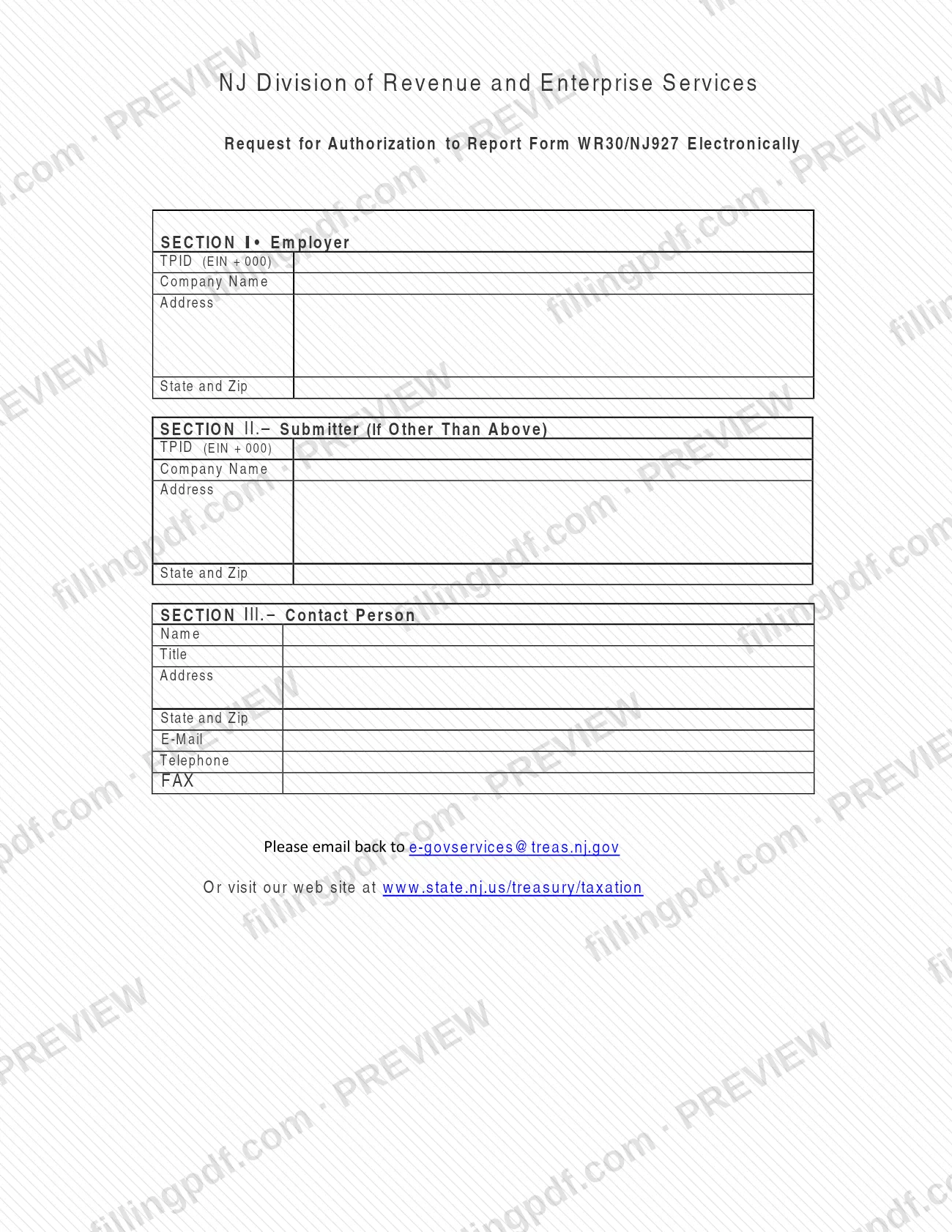
The Request for Authorization to Report Form WR30/NJ927 Electronically is a short New Jersey form that many people look for as the NJ registration form for electronic reporting. The NJ Division of Revenue and Enterprise Services publishes it so an employer, or a submitter acting for the employer, can ask for authorization to report Form WR30/NJ927 electronically. On this page you can fill out the form online on FillingPDF and download or print the completed PDF. The official PDF and the instructions to email it back are at the Division.
Last updated
What is Request for Authorization to Report Form WR30/NJ927 Electronically – New Jersey?
The Request for Authorization to Report Form WR30/NJ927 Electronically is the New Jersey form an employer uses to ask the NJ Division of Revenue and Enterprise Services for authorization to report Form WR30/NJ927 electronically instead of on paper.
The request is not the WR30/NJ927 report itself. It identifies who will report and who to contact about it. The one-page form has three sections:
- Section I, Employer: the employer's TPID (EIN + 000), company name, address, state and ZIP code.
- Section II, Submitter (If Other Than Above): the same four entries for a submitter who is not the employer.
- Section III, Contact Person: name, title, address, state and ZIP code, e-mail, telephone and fax.
The Division is part of New Jersey state government and issues the form. It is returned by email, and the form also points to the Division's tax website at www.state.nj.us/treasury/taxation. The PDF is often found under a generic name such as "registration form", but the title printed on it is the one above.
Who needs to file Request for Authorization to Report Form WR30/NJ927 Electronically – New Jersey?
An employer that wants to report Form WR30/NJ927 electronically completes Section I of this request with its own TPID, company name and address.
- Employer: Section I is the employer's. The TPID is the employer's EIN followed by 000.
- Another submitter: Section II is headed "Submitter (If Other Than Above)". Complete it only when the party that will submit the report is not the employer named in Section I.
- Contact person: Section III asks for a person the Division can reach, with title, address, e-mail, telephone and fax.
The form does not list eligibility conditions, exclusions or who may sign for the employer, and it has no signature line. For questions about whether your business may report electronically, use the contact route the form gives, the Division's tax website at www.state.nj.us/treasury/taxation.
When to file Request for Authorization to Report Form WR30/NJ927 Electronically – New Jersey
Submit the request when you want to start reporting Form WR30/NJ927 electronically, because the form asks for authorization to do so. No due date, filing window or renewal period is printed on it. It is a standalone request, so it is sent to the Division by email before you report electronically. For any deadline that applies to Form WR30/NJ927 itself, check the Division's tax website at www.state.nj.us/treasury/taxation.
How to fill out Request for Authorization to Report Form WR30/NJ927 Electronically – New Jersey
Confirm you have the right form
The title should read Request for Authorization to Report Form WR30/NJ927 Electronically, issued by the NJ Division of Revenue and Enterprise Services.
Enter the employer's TPID
In Section I, Employer, enter the TPID (EIN + 000): the employer's EIN followed by 000.
Enter the employer's name and address
In Section I, fill in Company Name, Address, and State and Zip.
Complete Section II if needed
If someone other than the employer will submit the report, enter that submitter's TPID (EIN + 000), company name, address, and state and ZIP code. Otherwise leave Section II as it is.
Identify the contact person
In Section III, enter the contact person's Name and Title, then the address and the state and ZIP code.
Add the contact details
In Section III, enter the contact person's E-Mail, Telephone and FAX.
Review and download the PDF
Check the TPID and every entry, then download or print the completed PDF from FillingPDF and email it as described under How to submit.
How to submit Request for Authorization to Report Form WR30/NJ927 Electronically – New Jersey
The form gives one submission channel: email. At the bottom it says "Please email back to [email protected]".
- Email: send the completed form to [email protected]. Make sure Sections I and III are filled in, and Section II as well when the submitter is not the employer.
- Website: the form also says "Or visit our web site at www.state.nj.us/treasury/taxation", which is where to look for further information from the NJ Division of Revenue and Enterprise Services.
The form prints no mailing address, fax number for returning it, fee or processing time. FillingPDF lets you fill out and download the PDF; submission follows the channels above.
Common mistakes to avoid
- Entering only the EIN in the TPID box; the form defines the TPID as the EIN plus 000.
- Leaving Section II blank when a submitter other than the employer will report; the section is for a submitter if other than the employer.
- Skipping Section III, which asks for the contact person's name, title, address, state and ZIP code, e-mail, telephone and fax.
- Sending the completed form somewhere other than the email address printed on it, [email protected].
- Treating this request as the report itself; it only asks for authorization to report Form WR30/NJ927 electronically.
- Entering the employer's own details in Section II when no other submitter is involved, which the heading "If Other Than Above" does not call for.
Frequently asked questions
What is the NJ registration form for reporting WR30/NJ927 electronically?
It is the Request for Authorization to Report Form WR30/NJ927 Electronically, published by the NJ Division of Revenue and Enterprise Services. You use it to ask for authorization to report that form electronically, naming the employer, any other submitter and a contact person.
How do I write the TPID on this form?
Enter the employer's EIN followed by 000. The form labels the box TPID (EIN + 000), and the same entry is requested in Section I for the employer and in Section II for a submitter other than the employer.
Where do I send the completed request?
Email it to [email protected]. The form says "Please email back to [email protected]" and refers to www.state.nj.us/treasury/taxation for more information. It prints no mailing address.
When do I fill in Section II of this form?
Only when the submitter is someone other than the employer in Section I. Section II is headed "Submitter (If Other Than Above)" and asks for that submitter's TPID (EIN + 000), company name, address, and state and ZIP code.
What contact details does Section III ask for?
Section III asks for the contact person's name, title, address, state and ZIP code, e-mail, telephone and fax. Use a person the NJ Division of Revenue and Enterprise Services can reach about the request.
Is this request the same as Form WR30/NJ927?
No. The request only asks for authorization to report Form WR30/NJ927 electronically. It collects employer, submitter and contact information and is not the report itself.
Can I fill out this registration form online on FillingPDF?
Yes. You can fill out the PDF online on FillingPDF and download or print it. FillingPDF is an independent service, not affiliated with the State of New Jersey, and does not send the request; you email it to the Division yourself.
Ready to fill out Request for Authorization to Report Form WR30/NJ927 Electronically – New Jersey?
Fill out Request for Authorization to Report Form WR30/NJ927 Electronically – New Jersey now