
Form IT-201 is the Resident Income Tax Return issued by the New York State Department of Taxation and Finance for people who lived in New York State for the whole year. One return covers New York State tax, New York City tax, the Yonkers surcharge and earnings tax, and the Metropolitan Commuter Transportation Mobility Tax (MCTMT). It starts from the income and adjustments on your federal return. On this page you can fill out the form online on FillingPDF and download or print the completed PDF; the official form and the Form IT-201-I instructions are published by the Tax Department.
Last updated
What is IT-201?
Form IT-201, Resident Income Tax Return, is the New York State Department of Taxation and Finance return on which full-year New York State residents report income, make New York modifications, figure their taxes and credits, and settle a refund or balance due for tax year 2025.
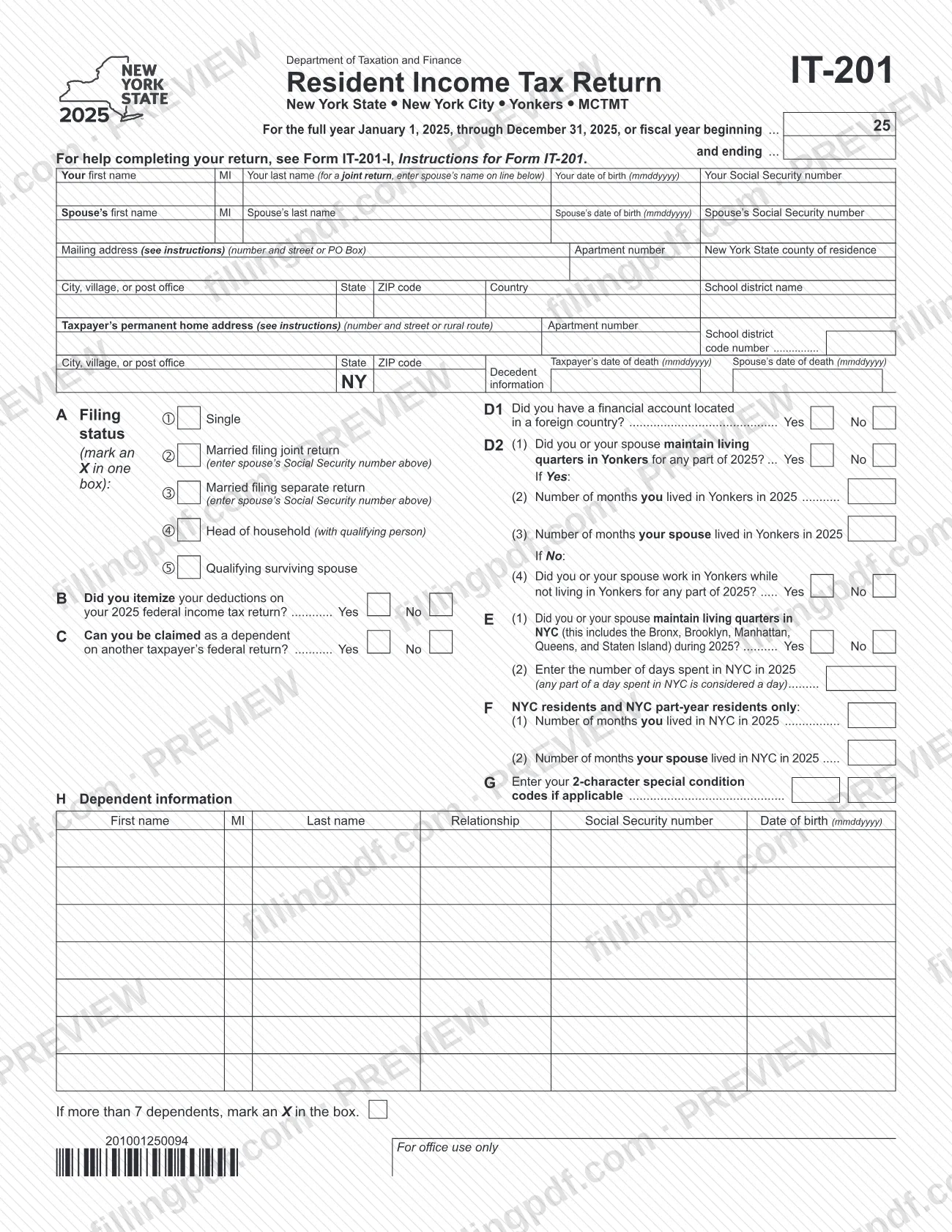
The printed form covers the full year January 1, 2025, through December 31, 2025, or a fiscal year, and is headed "New York State • New York City • Yonkers • MCTMT". Its four pages run in this order:
- Page 1: taxpayer information, filing status, items B through H and dependents.
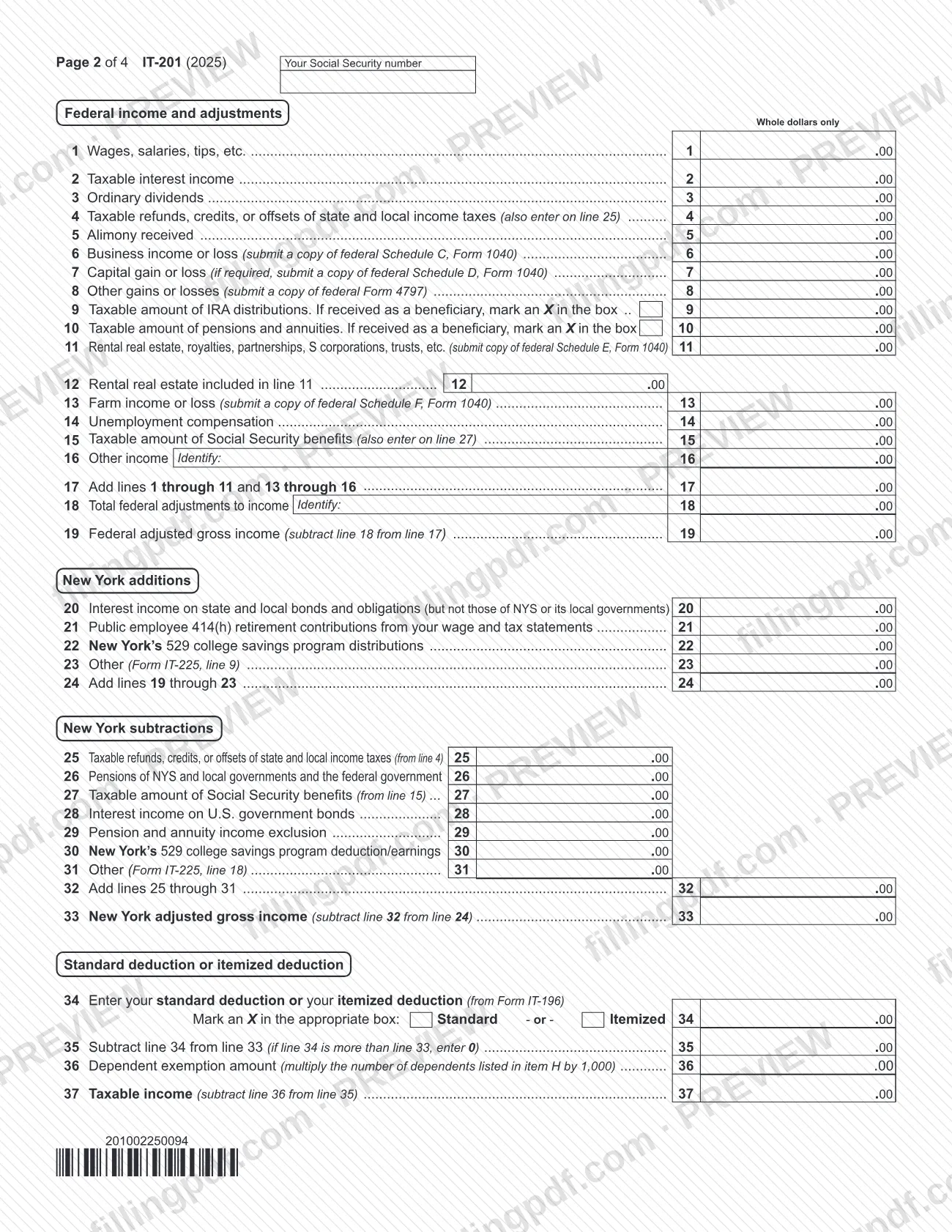
- Page 2: federal income and adjustments (lines 1 to 19), New York additions and subtractions (lines 20 to 33), and the deduction and dependent exemption (lines 34 to 37).
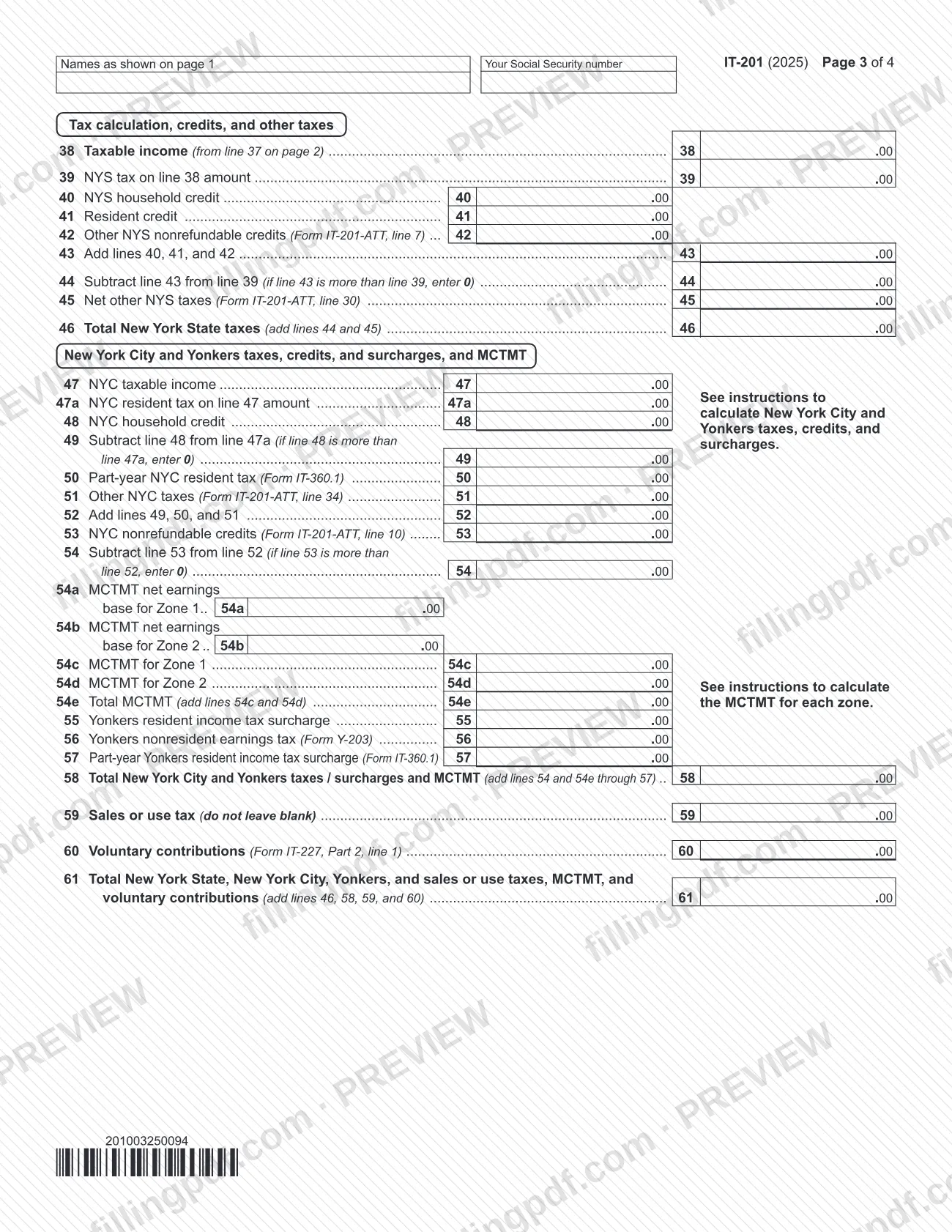
- Page 3: New York State tax and credits (lines 38 to 46), New York City and Yonkers taxes and MCTMT (lines 47 to 58), and sales or use tax and voluntary contributions (lines 59 to 61).
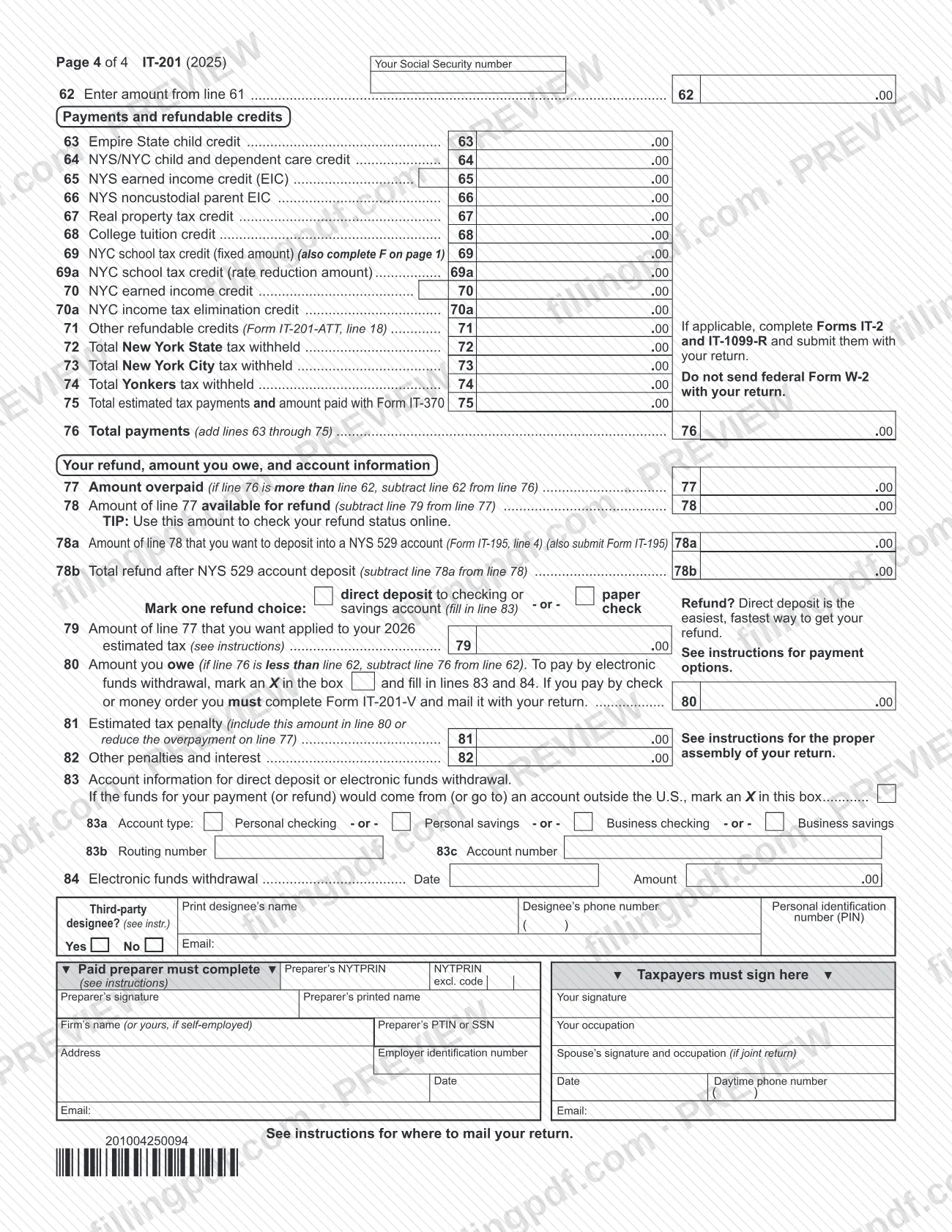
- Page 4: payments and refundable credits (lines 62 to 76), refund or amount owed (lines 77 to 84), third-party designee, preparer and signature blocks.
The instructions are in Form IT-201-I, Instructions for Form IT-201, which also include instructions for Forms IT-195 and IT-201-ATT. IT-201 is only for full-year residents: part-year residents and nonresidents with New York source income file Form IT-203, Nonresident and Part-Year Resident Income Tax Return.
Who needs to file IT-201?
You file Form IT-201 if you were a New York State resident for the entire year and meet any one of these conditions in the Form IT-201-I instructions:
- You must file a federal return.
- You did not have to file a federal return, but your federal adjusted gross income for 2025 plus New York additions was more than $4,000 ($3,100 if you are single and can be claimed as a dependent on another taxpayer's federal return).
- You want a refund of New York State, New York City or Yonkers income tax withheld from your pay or from unemployment insurance benefits.
- You want to claim any refundable or carryover credits.
Do not use Form IT-201 if you were a New York resident for only part of the year, including if you moved in or out on any day other than January 1 or December 31. Nonresidents and part-year residents with New York income file Form IT-203.
Married couples who file a joint federal return may need separate New York returns when one spouse is a resident and the other a nonresident or part-year resident. The resident uses IT-201; the other uses IT-203 if required to file. If both choose a joint New York return, use IT-201 and both spouses are taxed as full-year residents.
If a filer died before filing, enter the date of death in the decedent boxes on page 1. If you filed federal Form 1040-SR, read every reference to Form 1040 as Form 1040-SR.
When to file IT-201
File Form IT-201 for the 2025 tax year once you meet one of the filing conditions for a full-year resident. The return covers January 1 through December 31, 2025, or a fiscal year entered at the top of page 1. The instructions refer to April 15, 2026 as the date unpaid tax is due, and they have a "When to file/Important dates" section with the full calendar.
Several situations extend or change timing, and each is reported with a two-character code in item G:
- D9: automatic 90-day extension if your spouse died within 30 days before the due date.
- E3: automatic two-month extension to file your federal return because you are out of the country.
- E4: U.S. nonresident noncitizens filing the federal return by June 15, 2026; the New York deadline is also June 15, 2026.
- E5: extension beyond six months for people outside the United States and Puerto Rico, with a copy of the letter sent to the IRS.
- C7: combat zone or contingency operation relief.
If you cannot pay in full by April 15, 2026, enter code C2 to request an installment payment agreement; you cannot apply until you receive a bill, and penalties and interest keep accruing on the unpaid balance.
Documents you need
- Federal Schedule C (Form 1040): submit a copy when you report business income or loss on line 6.
- Federal Schedule D (Form 1040): submit a copy if required, when you report capital gain or loss on line 7.
- Federal Form 4797: submit a copy when you report other gains or losses on line 8.
- Federal Schedule E (Form 1040): submit a copy when you report rental real estate, royalties, partnerships, S corporations or trusts on line 11.
- Federal Schedule F (Form 1040): submit a copy when you report farm income or loss on line 13.
- Form IT-225, New York State Modifications: submit it when you enter amounts on line 23 (line 9 of IT-225) or line 31 (line 18 of IT-225).
- Form IT-196: submit it if you choose the itemized deduction on line 34.
- Form IT-201-ATT, Other Tax Credits and Taxes, and the matching credit forms: submit them for amounts on lines 42, 45, 51, 53 and 71.
- Credit forms for amounts on lines 41, 63 to 68, 70 and 70a: for example IT-112-R, IT-213, IT-216, IT-215 or IT-209, IT-214, IT-272 and IT-270, as the instructions direct.
- Form IT-360.1: submit it if you were a part-year New York City or Yonkers resident (lines 50 and 57).
- Form Y-203: submit it if you were not a Yonkers resident but earned wages there (line 56).
- Form IT-135: submit it if the amount on line 59 is $1,700 or more.
- Form IT-227 (line 60) and Form IT-195 (line 78a): submit them if you make voluntary contributions or deposit part of your refund into a NYS 529 account.
- Form IT-201-V: complete and mail it with the return if you pay by check or money order.
- Forms IT-2 and IT-1099-R, if applicable, and a copy of your letter to the IRS or federal Form 2350 if you enter special condition code E5.
How to fill out IT-201
Enter taxpayer information
At the top of page 1, enter the tax year or fiscal-year dates, names, dates of birth and Social Security numbers, mailing address, county of residence, school district name and code number, and your permanent home address as of December 31, 2025. For a deceased taxpayer, enter the date of death.
Mark your filing status
At item A, mark one box: Single, Married filing joint return, Married filing separate return, Head of household (with qualifying person) or Qualifying surviving spouse. In most cases use the same status as on your federal return; enter your spouse's Social Security number where the form asks.
Answer items B through F
Mark Yes or No for B (itemized on your federal return), C (can be claimed as a dependent) and D1 (foreign financial account). Complete D2 for Yonkers and E for New York City living quarters and days; leave E blank if you were a full-year NYC resident. Complete F only if you are a NYC resident or part-year resident.
Enter special condition codes and dependents
At item G, enter any 2-character special condition code that applies. At item H, list each dependent's name, relationship, Social Security number and date of birth, and mark the box if you have more than 7.
Report federal income and adjustments
Enter wages on line 1 through other income on line 16, using whole dollars. Add them on line 17, enter total federal adjustments on line 18, and subtract to get federal adjusted gross income on line 19. Identify other income and adjustments on lines 16 and 18.
Add New York additions
Enter on lines 20 through 23 interest on other states' bonds, public employee 414(h) contributions, New York 529 distributions and other additions from Form IT-225. Add lines 19 through 23 on line 24.
Enter New York subtractions
Complete lines 25 through 31 for items such as refunds already reported on line 4, government pensions, Social Security, U.S. government bond interest, the pension and annuity exclusion and 529 deductions. Add them on line 32 and subtract from line 24 to get New York adjusted gross income on line 33.
Take your deduction and exemptions
On line 34, enter your standard or itemized deduction (Form IT-196) and mark the matching box. Subtract it on line 35, enter the dependent exemption on line 36, and figure taxable income on line 37.
Calculate New York State tax
Copy taxable income to line 38, find the tax on line 39, and enter the household credit, resident credit and other nonrefundable credits on lines 40 through 42. Complete lines 43 through 46 to reach total New York State taxes.
Complete New York City, Yonkers and MCTMT lines
Fill in lines 47 through 58 as the instructions direct for your residency: NYC taxable income and tax, household credit, part-year tax from Form IT-360.1, MCTMT on lines 54a through 54e, and the Yonkers surcharge or earnings tax on lines 55 through 57.
Report sales or use tax and contributions
Enter sales or use tax on line 59 (enter 0 if none; do not leave it blank) and voluntary contributions from Form IT-227 on line 60. Add lines 46, 58, 59 and 60 on line 61.
Enter payments and refundable credits
Copy line 61 to line 62. Enter refundable credits on lines 63 through 71 and tax withheld and estimated payments on lines 72 through 75. Add lines 63 through 75 on line 76.
Figure your refund or amount owed
If line 76 is more than line 62, complete lines 77 through 79 and mark a refund choice. If it is less, enter the amount you owe on line 80, with any penalties on lines 81 and 82. Complete lines 83 and 84 for direct deposit or electronic withdrawal.
Review, sign and download the PDF
Complete the third-party designee section if wanted, then sign and date; a spouse signs on a joint return and a paid preparer completes the preparer block. Check that no required line is blank, then download or print the completed PDF from FillingPDF.
How to submit IT-201
You can e-file Form IT-201 or mail a paper return to the Tax Department.
- E-file: The instructions say you must e-file if your software allows it, or if you are a tax preparer subject to the e-file mandate. Combining e-file with direct deposit gives the fastest refund; the instructions say up to two weeks sooner than a paper return with a paper check.
- Paper return: Mail it to the address listed in the "Where to file" section of Form IT-201-I (page 41 of the instructions); the form itself says to see the instructions for where to mail. Include all pages of the form and only the schedules and forms that apply. Do not send federal Form W-2 with your return.
- Paying by check or money order: Complete Form IT-201-V and mail it with your return. Write only the last four digits of your Social Security number on the check or money order.
- Electronic payment: Mark the box on line 80 and complete lines 83 and 84 to pay by electronic funds withdrawal, or pay online through Online Services or by credit card.
The instructions state that a return with missing pages or missing entries cannot be processed and may lead to penalty and interest. FillingPDF lets you fill out and download the PDF; submission follows the channels above.
Common mistakes to avoid
- Using Form IT-201 for a year you lived in New York only part of the time; part-year residents and nonresidents with New York income file Form IT-203.
- Entering cents or dollar signs and commas; the form takes whole dollars only, and the zeros are preprinted.
- Showing a loss in parentheses or brackets instead of placing a minus sign immediately to the left of the amount.
- Marking boxes with a check mark, or writing in red or pencil; the instructions require an X and black ink.
- Leaving line 19, line 33 or line 59 blank; enter 0 on line 59 if you owe no sales or use tax.
- Leaving the school district name and code number off page 1 because you have no children in school; the instructions require them anyway.
- Abbreviating the country name on a foreign address, or putting other information in the city space.
- Choosing the itemized deduction on line 34 without submitting Form IT-196 with the return.
- Sending federal Form W-2 with the return, or mailing an incomplete set of pages; missing pages or entries can prevent processing.
- Writing your full Social Security number on a check or money order; write only the last four digits.
Frequently asked questions
What is Form IT-201?
Form IT-201 is the Resident Income Tax Return of the New York State Department of Taxation and Finance. Full-year New York residents use it to report income, figure New York State, New York City and Yonkers taxes and MCTMT, and claim credits, a refund or a balance due for 2025.
Who must file Form IT-201?
Full-year New York residents who must file a federal return, or whose federal adjusted gross income plus New York additions was more than $4,000 ($3,100 if single and claimable as a dependent). You also file to claim a refund of withheld tax or any refundable or carryover credits.
Can part-year residents use Form IT-201?
No. If you lived in New York for only part of 2025, including moving in or out on any day other than January 1 or December 31, file Form IT-203, Nonresident and Part-Year Resident Income Tax Return, if you had New York source income.
Can I fill out Form IT-201 online?
Yes. You can fill out the fillable PDF online on FillingPDF and download or print it. FillingPDF does not file the return for you; you e-file through approved software or mail the paper return to the Tax Department.
Do I send my W-2 with Form IT-201?
No. The form states not to send federal Form W-2 with your return. You do submit the schedules and credit forms your entries require, such as Form IT-225, Form IT-196 if you itemize, and copies of the federal schedules named on lines 6, 7, 8, 11 and 13.
Where do I mail Form IT-201?
The form says to see the instructions for where to mail your return. Form IT-201-I has a "Where to file" section on page 41 with the addresses. If your software lets you e-file, the instructions say you must e-file instead.
How do I pay a balance due on Form IT-201?
Enter the amount on line 80. You can authorize an electronic funds withdrawal by marking the box and completing lines 83 and 84, pay through Online Services or by credit card, or pay by check or money order with Form IT-201-V mailed with the return.
What do I enter on line 59 if I owe no sales or use tax?
Enter 0. The instructions say not to leave line 59 blank. If you owe sales or use tax and the amount is $1,700 or more, you must also complete Form IT-135 and submit it with your return.
What if my spouse died shortly before the due date?
Enter special condition code D9 in item G to claim the automatic 90-day extension if your spouse died within 30 days before the due date. Also enter the date of death in the Taxpayer's or Spouse's date of death box on page 1.
Ready to fill out IT-201?
Fill out IT-201 now