
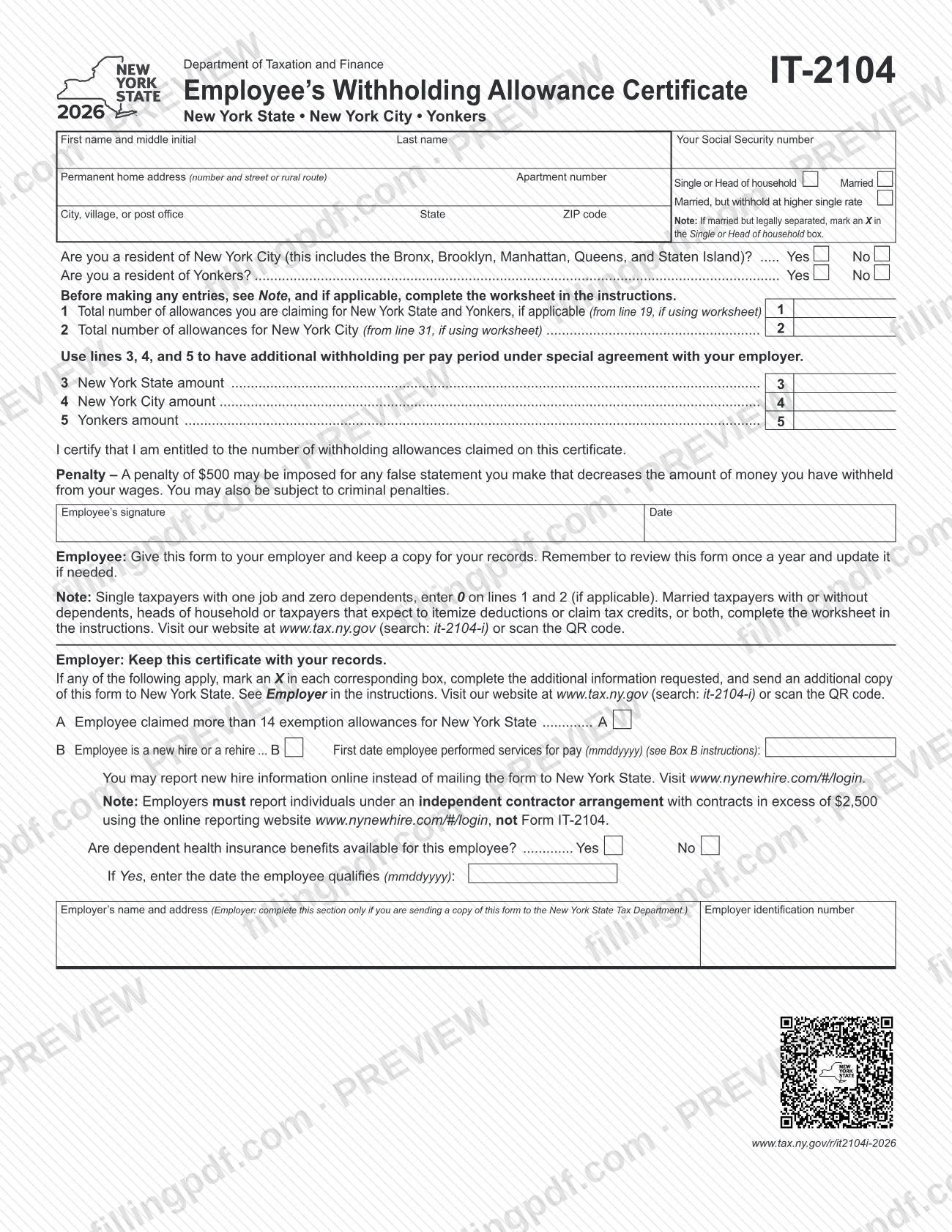
IT-2104 is the Employee's Withholding Allowance Certificate that the New York State Department of Taxation and Finance publishes for employees in New York State, New York City and Yonkers. You complete it and give it to your employer, who uses your residency, marital status and allowances to decide how much tax to withhold from each paycheck. On FillingPDF you can fill out the form online and download or print the completed PDF; the form, the IT-2104-I instructions and the worksheet are published by the Tax Department at tax.ny.gov.
Last updated
What is IT-2104?
Form IT-2104, Employee's Withholding Allowance Certificate, is the form an employee completes and gives to an employer to instruct how much New York State, New York City and Yonkers income tax to withhold from pay and send to the New York State Tax Department.
The employer relies on three things you enter: your residency, your marital status and the number of withholding allowances you claim. A withholding allowance is an exemption that lowers the income tax your employer deducts. More allowances mean less tax withheld from each paycheck; fewer allowances mean more.
The form has a short employee section (name, address, filing status, residency questions, lines 1 to 5, certification and signature) and a section at the bottom for the employer. The IT-2104-I instructions add a worksheet (Parts 1 to 4) for calculating allowances and charts (Parts 5 and 6) for additional withholding when a household has more than one job.
The instructions were revised for tax years beginning on or after January 1, 2026. Form IT-2104 cannot be used to claim exemption from withholding; that requires Form IT-2104-E, Form IT-2104-IND or Form IT-2104-MS. Federal Form W-4 no longer reports withholding allowances for tax years 2020 or later, so this form is where New York allowances are stated.
Who needs to file IT-2104?
Employees who want New York State, New York City or Yonkers tax withheld from their pay use Form IT-2104. You complete it when you start a new job and review it every year for each job you hold. The Tax Department says to file a new one with your employer if any of these apply:
- Life changes: you are no longer a dependent, you married, divorced or became legally separated, you had a child, or you moved into or out of New York City or Yonkers.
- Income changes: you expect to earn $107,650 or more during the year, your combined income with your spouse rose to that level, or your other income or second-job income changed significantly.
- Job changes: you started or ended a job, or you are a covered employee of an employer in the Employer Compensation Expense Program.
- Tax situation changes: you itemize deductions, qualify for New York credits, owed tax or got a large refund last year, or no longer qualify for exemption from withholding.
If you have more than one job, file a separate certificate with each employer. If you and your spouse both work, each files a separate IT-2104 with your own employers. You may not claim an allowance for yourself or your spouse.
Do not use this form to claim exemption from withholding. Employers also use the bottom section of the form, but only when they must send a copy to the Tax Department.
When to file IT-2104
Complete Form IT-2104 when you start a new job, and give it to the employer for that job. Review the form you submitted for each job every year, and submit a new one whenever your tax situation changes and the number of allowances you may claim changes. If you filed before January 1, 2026 using the worksheet or charts, complete a new 2026 form.
If you do not file Form IT-2104, the instructions say your employer may use zero allowances (if your most recent federal Form W-4 is for tax year 2020 or later) or the allowances on a W-4 for tax year 2019 or earlier, which may withhold the wrong amount.
Employer deadlines: for a new hire or rehire, the completed form is due to the Tax Department within 20 days of hiring. Copies for employees who claim more than 14 allowances are due by April 30, July 31, October 31 and January 31 for the quarters ending March 31, June 30, September 30 and December 31.
How to fill out IT-2104
Enter your name and Social Security number
Write your first name and middle initial, last name and Social Security number in the first row of the form.
Enter your permanent home address
Give the number and street or rural route, apartment number, then city, village or post office, state and ZIP code.
Mark your filing status
Check one box: Single or Head of household, Married, or Married, but withhold at higher single rate. If you are married but legally separated, mark Single or Head of household; if you and a working spouse have combined wages under $107,650, each marks the higher single rate box.
Answer the residency questions
Check Yes or No for whether you are a New York City resident (Bronx, Brooklyn, Manhattan, Queens or Staten Island) and whether you are a Yonkers resident.
Use the worksheet if it applies
Single taxpayers with one job and no dependents enter 0 on lines 1 and 2. Married taxpayers, heads of household and those who expect to itemize or claim credits complete the worksheet in the IT-2104-I instructions first.
Enter allowances on line 1
Line 1 is your total allowances for New York State and Yonkers, taken from line 19 of the worksheet if you used it. Enter 0 if your worksheet result is negative and your employer cannot accommodate negative allowances.
Enter New York City allowances on line 2
Line 2 is your total allowances for New York City, from line 31 of the worksheet if you used it. Complete it only if it applies to you.
Request additional withholding on lines 3 to 5
Use line 3 (New York State amount), line 4 (New York City amount) and line 5 (Yonkers amount) only for additional withholding per pay period under a special agreement with your employer. Adjust chart amounts if you are not paid weekly.
Sign and date the certification
Sign and date under the statement that you are entitled to the allowances claimed. A penalty may be imposed for any false statement that decreases the amount withheld.
Leave the employer section blank
The boxes at the bottom (A, B, dependent health insurance, employer name and address, employer identification number) are for your employer, and only when a copy goes to the Tax Department.
Review and download the completed PDF
Check that allowances match your worksheet and filing status, then download or print the completed PDF from FillingPDF. Give it to your employer and keep a copy.
How to submit IT-2104
You give Form IT-2104 to your employer and keep a copy for your records; you do not send it to the Tax Department yourself. The employer keeps the certificate and sends a copy to the state only in two cases.
- Employee to employer: hand or send the signed form to your employer for each job.
- Employer copy for more than 14 allowances: mark box A and mail a copy to NYS TAX DEPARTMENT, INCOME TAX AUDIT ADMINISTRATOR, WITHHOLDING CERTIFICATE COORDINATOR, W A HARRIMAN CAMPUS, ALBANY NY 12227-0865. For private delivery services, see Publication 55, Designated Private Delivery Services.
- Employer copy for a new hire or rehire (box B): within 20 days of hiring, mail it to NYS TAX DEPARTMENT, NEW HIRE NOTIFICATION, PO BOX 15119, ALBANY NY 12212-5119, or report online at www.nynewhire.com/#/login instead of mailing the form.
Employers must report independent contractors with contracts over $2,500 through the New York New Hire Online Reporting Center, not on Form IT-2104. For questions, call the Personal Income Tax Information Center at 518-457-5181. FillingPDF lets you fill out and download the PDF; submission follows the channels above.
Common mistakes to avoid
- Claiming a withholding allowance for yourself or, if married, for your spouse; the instructions do not allow either.
- Using Form IT-2104 to claim exemption from withholding; that requires Form IT-2104-E, IT-2104-IND or IT-2104-MS.
- Entering a negative number of allowances on line 1 or 2 when your employer cannot accommodate it; enter 0 and use additional withholding on lines 3 to 5.
- Both working spouses claiming the full allowances; claim no more in total than you are entitled to, ideally all at the higher earner's job.
- Filing one certificate for several jobs instead of a separate IT-2104 with each employer.
- Not filing a new form after a life or income change, or keeping a pre-2026 form that used the old worksheet or charts.
- Using the chart amounts unchanged when you are not paid weekly; they are accurate for a weekly payroll and must be adjusted, for example doubled for biweekly pay.
- Marking Married when legally separated; the form says to mark Single or Head of household.
- Making a false statement that lowers your withholding; a penalty and possible criminal penalties apply under the certification.
Frequently asked questions
What is Form IT-2104 used for?
Form IT-2104 tells your employer how much New York State, New York City and Yonkers income tax to withhold from your pay. Your employer uses your residency, marital status and the allowances you claim; more allowances mean less tax withheld from each paycheck.
Who has to fill out an IT-2104?
Employees complete it when they start a new job and review it each year. File a new one after life, income, job or tax-situation changes, such as marriage, a child, a move into or out of New York City or Yonkers, or itemizing deductions.
What do I enter on lines 1 and 2 if I am single with one job?
Enter 0 on line 1 and, if it applies, line 2. The form says single taxpayers with one job and zero dependents enter 0. Married taxpayers, heads of household and people who itemize or claim credits complete the worksheet in the instructions.
What happens if I do not give my employer an IT-2104?
Your employer may use zero allowances if your latest federal Form W-4 is for tax year 2020 or later, or the W-4 allowances if it is for 2019 or earlier. The instructions warn this may withhold the wrong New York amount.
Can I use Form IT-2104 to claim exemption from withholding?
No. To claim exemption you must file Form IT-2104-E, Form IT-2104-IND or Form IT-2104-MS with your employer, depending on eligibility. Check their instructions on tax.ny.gov to see which applies.
Where do I send Form IT-2104?
Give it to your employer and keep a copy; you do not mail it to the Tax Department. Employers send a copy to the state only if you claim more than 14 allowances (box A) or the form serves as a new hire report (box B).
What if I have two jobs or my spouse works too?
File a separate IT-2104 with each employer, claiming no more than the total allowances you are entitled to. Claiming them all at the higher-paying job better matches your tax. At combined wages of $107,650 or more, the instructions send you to charts for additional withholding on line 3.
Can I fill out Form IT-2104 online on FillingPDF?
Yes. You can fill out the PDF online on FillingPDF and download or print it. FillingPDF does not submit it to your employer or the Tax Department; you give the completed form to your employer yourself.
Ready to fill out IT-2104?
Fill out IT-2104 now