
ST-101, the New York State and Local Annual Sales and Use Tax Return, is the return the NY Department of Taxation and Finance uses to collect a business's sales and use tax for a full tax period. The edition on this page, ST-101 (2/26), covers March 1, 2025 – February 28, 2026 and is due Friday, March 20, 2026. Most filers must file through Sales Tax Web File; the paper return is mailed. On FillingPDF you can fill out the form online and download or print the completed PDF; the original PDF and the Form ST-101-I instructions are published by the agency.
Last updated
What is ST-101?
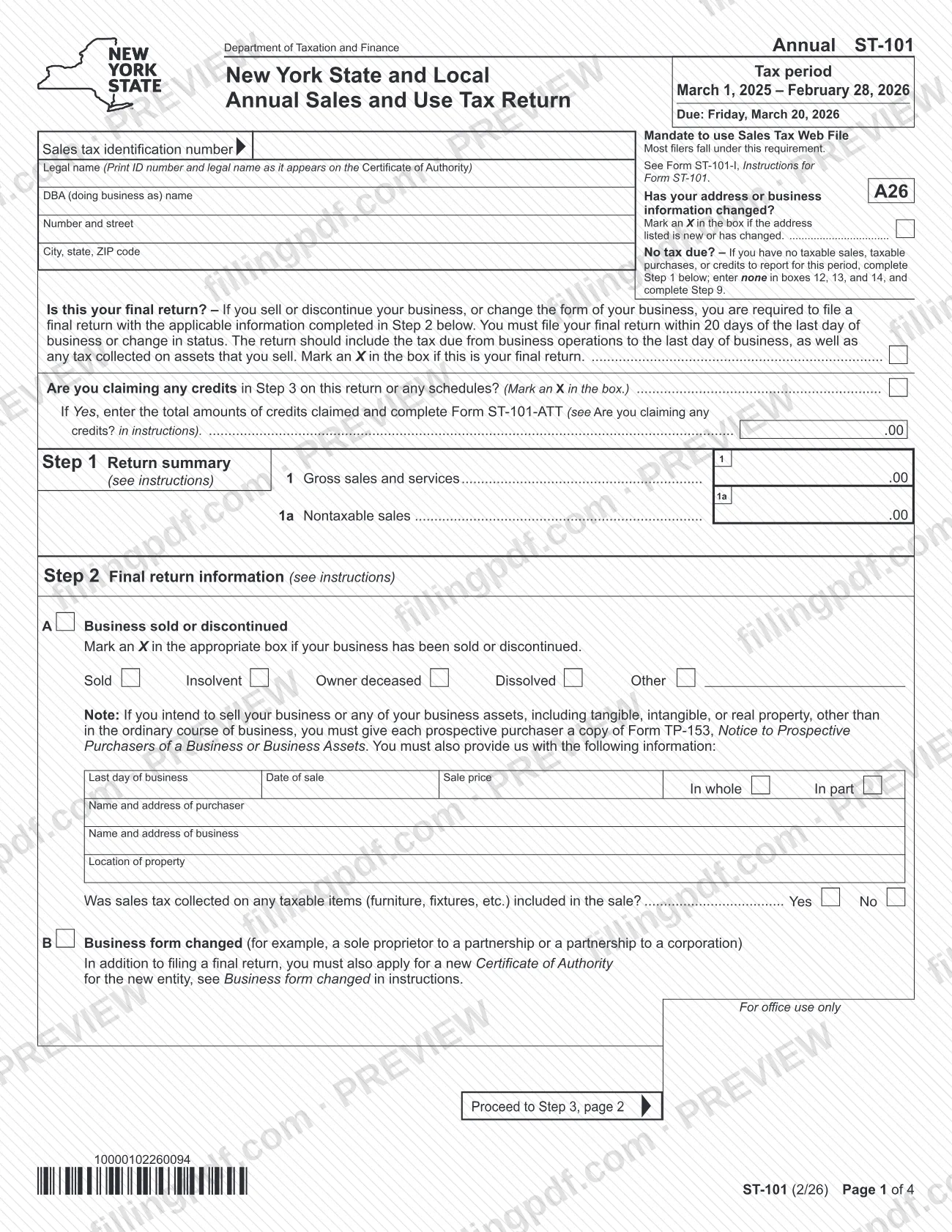
Form ST-101, New York State and Local Annual Sales and Use Tax Return, is the Department of Taxation and Finance return on which a business reports its gross sales, taxable sales and purchases subject to tax, and pays the sales and use tax due for one annual tax period.
This edition covers March 1, 2025 – February 28, 2026. The return is identified by your sales tax identification number and the legal name shown on your Certificate of Authority. It is built in steps:
- Step 1: return summary (gross sales and services, nontaxable sales).
- Step 2: final return information, for businesses that are sold, discontinued or change form.
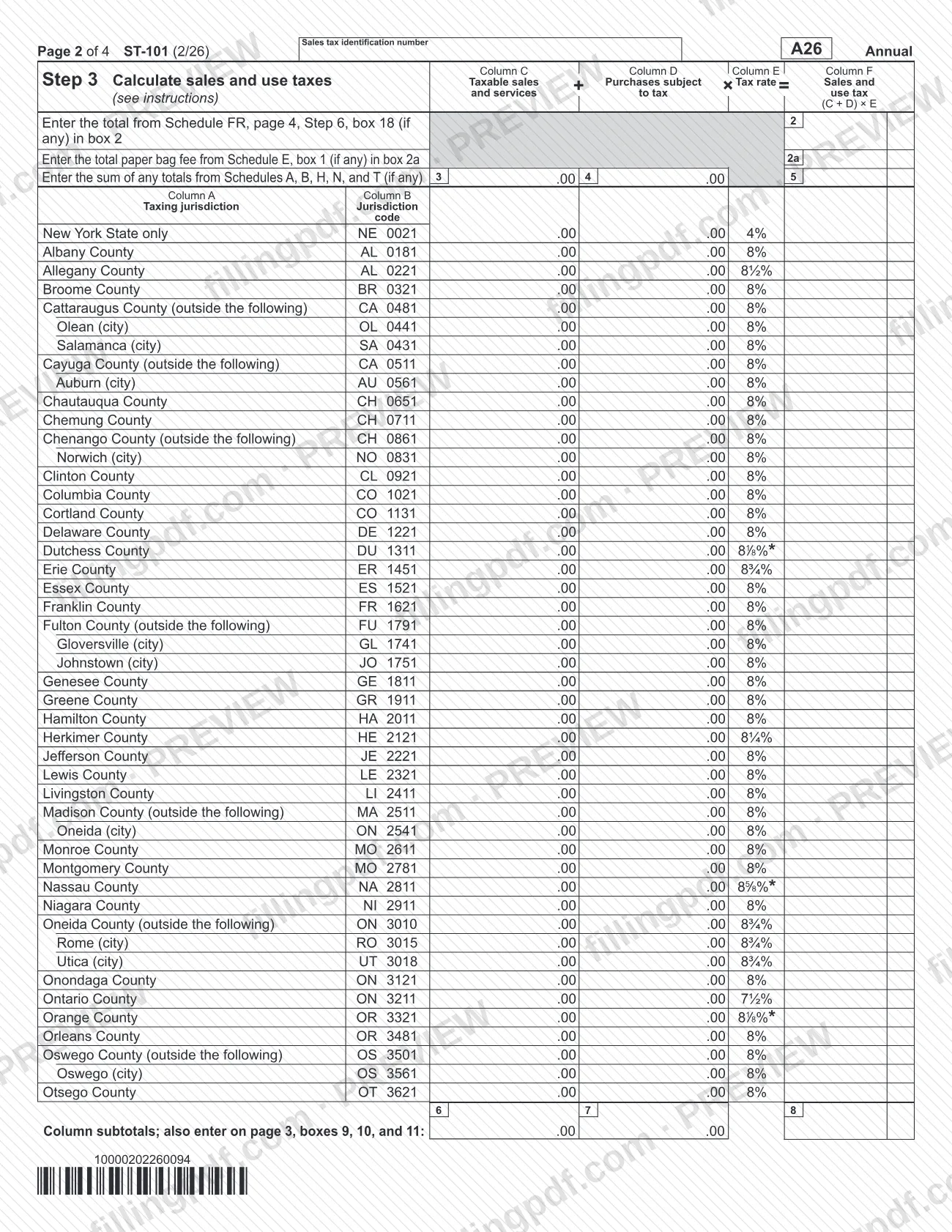
- Step 3: sales and use tax by taxing jurisdiction, with totals in boxes 12, 13 and 14.
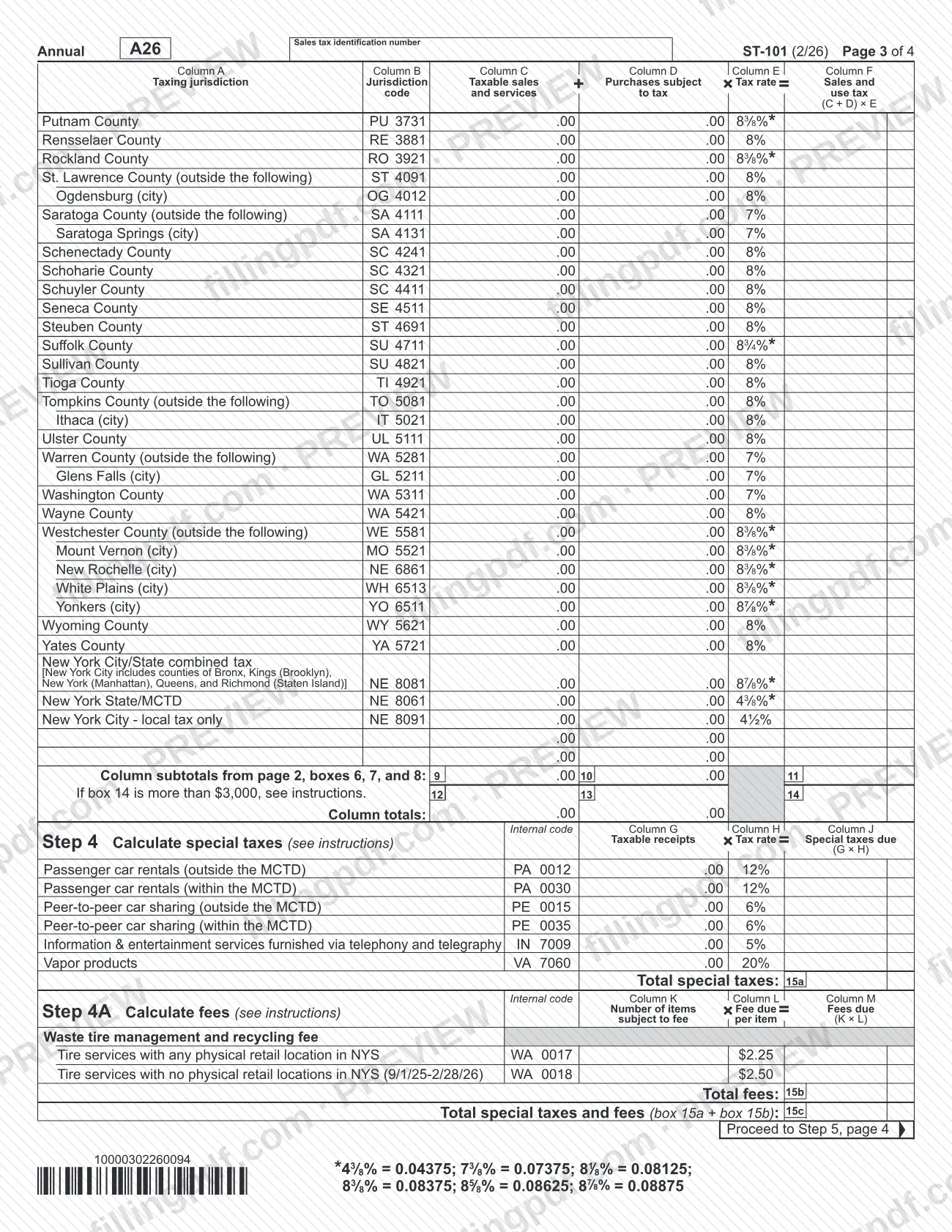
- Step 4 and Step 4A: special taxes and fees.
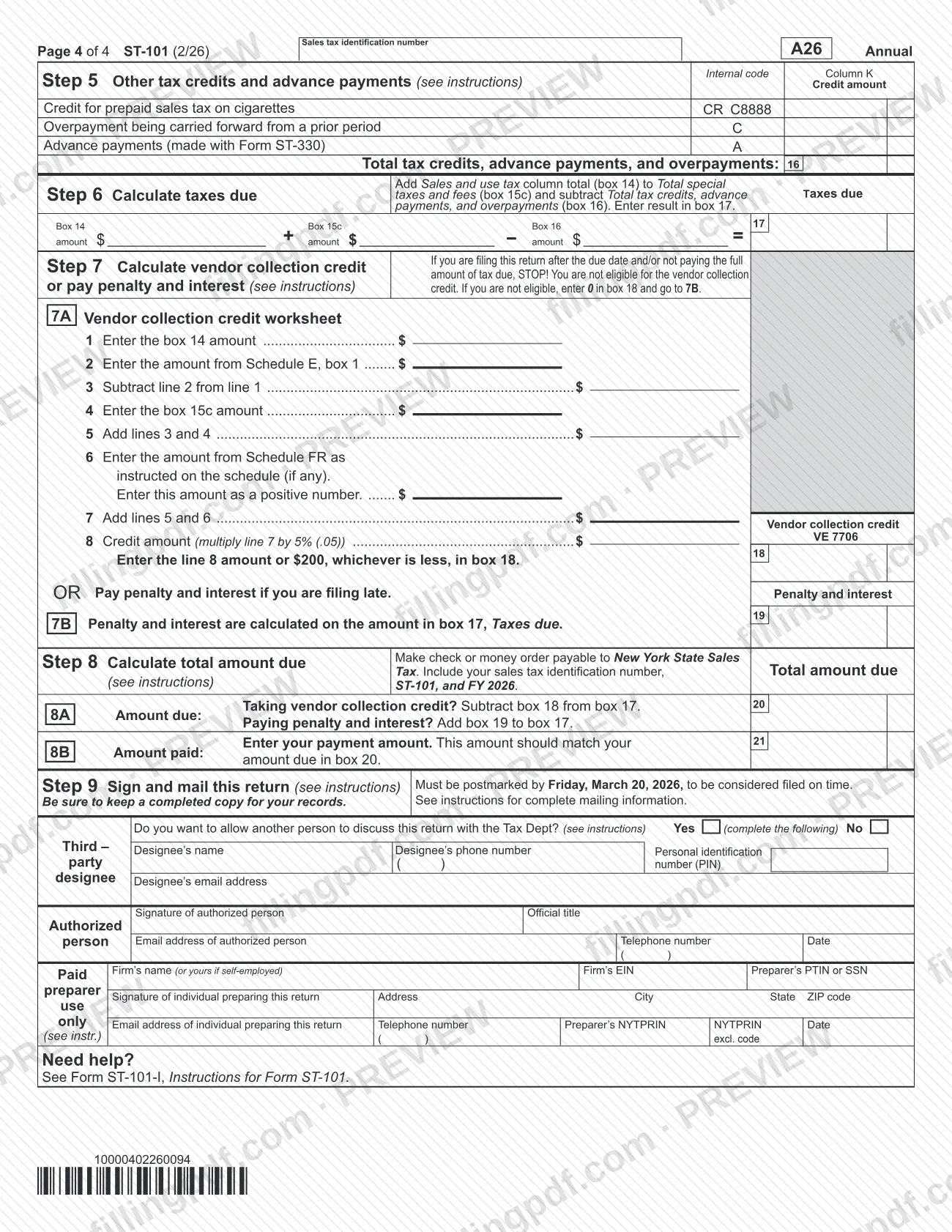
- Step 5: other tax credits and advance payments.
- Step 6: taxes due.
- Step 7: vendor collection credit, or penalty and interest for late filers.
- Step 8: total amount due.
- Step 9: signature, third-party designee and paid preparer sections.
Schedules FR, E, A, B, H, N and T feed amounts into Step 3, and Form ST-101-ATT is completed when you claim credits. The line-by-line instructions are in Form ST-101-I, Instructions for Form ST-101. This is the annual return for this period; the form does not cover other filing periods.
Who needs to file ST-101?
Businesses registered for New York sales tax that file the annual return for the tax period March 1, 2025 – February 28, 2026 use Form ST-101, identified by their sales tax identification number and the legal name on their Certificate of Authority.
- Filers with no tax due. If you have no taxable sales, taxable purchases or credits to report, you still complete Step 1, enter none in boxes 12, 13 and 14, and complete Step 9.
- Businesses that sell, close or change form. If you sell or discontinue your business, or change its form (for example, a sole proprietor becoming a partnership), you must file a final return with Step 2 completed. A changed business form also requires a new Certificate of Authority for the new entity.
- Web File filers. The agency says you must use Sales Tax Web File if you do not use a tax preparer, use a computer to prepare or calculate your tax forms, and have broadband Internet access.
- Paper filers. If you do not meet all of those conditions, you continue to file paper Form ST-101.
A paid preparer or a designated third party may be named in Step 9, but the return is signed by an authorized person.
When to file ST-101
The return is due Friday, March 20, 2026, and a mailed return must be postmarked by that date to be considered filed on time. With Web File, scheduled payments can be set up to the due date.
A final return has its own deadline: if you sell or discontinue your business, or change its form, file within 20 days of the last day of business or of the change in status. It should include the tax due from business operations to the last day of business and any tax collected on assets you sell.
Late filing has consequences printed on the form. You are not eligible for the vendor collection credit if you file after the due date or do not pay the full tax due, and penalty and interest are calculated on the amount in box 17, Taxes due.
Documents you need
- Form ST-101-ATT, completed when you mark that you are claiming credits in Step 3 and enter the total credits claimed at the top of the return.
- Schedules FR, E, A, B, H, N and T, only those that apply to you; their totals are carried into boxes 2, 2a, 3, 4 and 5.
- A check or money order payable to New York State Sales Tax when you file the paper return and owe tax, marked with your sales tax identification number, ST-101 and FY 2026.
- Form TP-153, Notice to Prospective Purchasers of a Business or Business Assets: not attached, but a copy must be given to each prospective purchaser if you intend to sell your business or business assets other than in the ordinary course of business.
How to fill out ST-101
Check the header information
Confirm your sales tax identification number, legal name as it appears on the Certificate of Authority, DBA name and address. Mark an X in the box if the address is new or has changed.
Answer the status questions
Mark an X if this is your final return and if you are claiming credits in Step 3. If you claim credits, enter the total credits claimed and complete Form ST-101-ATT.
Complete Step 1 return summary
Enter gross sales and services on line 1 and nontaxable sales on line 1a. If you have no tax due, stop after Step 1, enter none in boxes 12, 13 and 14, and go to Step 9.
Complete Step 2 for a final return
Mark Sold, Insolvent, Owner deceased, Dissolved or Other, and give the last day of business, date of sale, sale price and purchaser details. If the business form changed, use part B.
Enter schedule totals in Step 3
Enter the Schedule FR total in box 2, the paper bag fee from Schedule E in box 2a, and the sums of the totals from Schedules A, B, H, N and T in boxes 3, 4 and 5.
Report taxable sales by jurisdiction
For each taxing jurisdiction, enter taxable sales and services in Column C and purchases subject to tax in Column D. Column F is (C + D) × E at the printed rate. Carry subtotals from boxes 6, 7 and 8 to boxes 9, 10 and 11.
Total the sales and use tax
Enter the column totals in boxes 12, 13 and 14. If the note beside box 14 applies to your total, see the instructions.
Calculate special taxes and fees
In Step 4, enter taxable receipts in Column G for each special tax that applies and the tax in Column J, then total in box 15a. In Step 4A, enter items subject to the waste tire fee, total fees in box 15b, and add both in box 15c.
Enter credits and advance payments
In Step 5, enter any credit for prepaid sales tax on cigarettes, overpayment carried forward and advance payments made with Form ST-330. Enter the total in box 16.
Calculate taxes due
In Step 6, add box 14 to box 15c and subtract box 16. Enter the result in box 17.
Figure vendor credit or penalty
If you file on time and pay in full, complete worksheet 7A and enter the credit in box 18; otherwise enter 0 in box 18. Late filers enter penalty and interest in box 19.
Calculate the total amount due
In Step 8, box 20 is box 17 minus box 18 if you take the credit, or box 17 plus box 19 if you pay penalty and interest. Enter the payment amount in box 21.
Review, sign and download the PDF
In Step 9, complete the third-party designee and paid preparer sections if they apply, and have the authorized person sign and date. Download or print the completed PDF from FillingPDF and keep a copy.
How to submit ST-101
You can file ST-101 online through Sales Tax Web File or on paper by mail.
- Sales Tax Web File. The agency says most filers fall under the e-file mandate. Web File is free, needs no extra software and calculates amounts due. It gives instant filing confirmation. Log in or create an Online Services account from https://www.tax.ny.gov/bus/ads/webst101.htm.
- By mail (paper return). Sign the return in Step 9 and mail it so that it is postmarked by Friday, March 20, 2026. Keep a completed copy for your records. The form refers to the instructions, Form ST-101-I, for complete mailing information; the return itself prints no address.
- Payment with a paper return. Make the check or money order payable to New York State Sales Tax, and include your sales tax identification number, ST-101 and FY 2026. The amount in box 21 should match box 20.
FillingPDF lets you fill out and download the PDF; submission follows the channels above.
Common mistakes to avoid
- Mailing the paper return so that it is postmarked after Friday, March 20, 2026; it is not considered filed on time.
- Paper filing when you are required to use Sales Tax Web File: no tax preparer, a computer used to prepare your forms and broadband access.
- Taking the vendor collection credit in box 18 when filing late or not paying the full tax due; enter 0 in box 18 instead.
- Skipping Step 2 on a final return, or filing it later than 20 days after the last day of business or the change in status.
- Leaving out a new Certificate of Authority application when the business form changed, for example a sole proprietor becoming a partnership.
- Entering your legal name differently from the Certificate of Authority, or omitting the sales tax identification number.
- Filing a no-tax-due return without entering none in boxes 12, 13 and 14 and completing Step 9.
- Writing a payment that does not match: box 21 should equal the amount due in box 20.
- Selling a business or its assets without giving each prospective purchaser a copy of Form TP-153.
Frequently asked questions
What is the ST-101 form?
ST-101 is the New York State and Local Annual Sales and Use Tax Return issued by the NY Department of Taxation and Finance. This edition covers March 1, 2025 – February 28, 2026 and reports gross sales, taxable sales, purchases subject to tax, special taxes, fees and credits.
When is the ST-101 due?
The 2/26 edition is due Friday, March 20, 2026. A mailed return must be postmarked by that date to be considered filed on time. A final return is due within 20 days of the last day of business or of the change in status.
Do I have to file ST-101 online with Web File?
Most filers do. The agency says you must use Sales Tax Web File if you do not use a tax preparer, use a computer to prepare or calculate your tax forms and have broadband Internet access. If you do not meet all three conditions, you file paper Form ST-101.
What do I file if I had no sales or tax due?
Still file the return. Complete Step 1, enter none in boxes 12, 13 and 14, and complete Step 9 (signature). The form says this applies when you have no taxable sales, taxable purchases or credits to report for the period.
How do I file a final ST-101 when I close or sell my business?
Mark the final return box and complete Step 2: choose Sold, Insolvent, Owner deceased, Dissolved or Other, and give the sale details. File within 20 days of the last day of business. If you sell assets, give each prospective purchaser Form TP-153.
Who is eligible for the vendor collection credit on ST-101?
Only filers who file on time and pay the full tax due. If you file after the due date or do not pay in full, you are not eligible and enter 0 in box 18. The credit is figured on worksheet 7A in Step 7.
Where do I mail a paper ST-101 and how do I pay?
The return refers to Form ST-101-I, Instructions for Form ST-101, for complete mailing information. Pay by check or money order payable to New York State Sales Tax, with your sales tax identification number, ST-101 and FY 2026 written on it.
Can I fill out ST-101 online on FillingPDF?
Yes. You can fill out the fillable PDF online on FillingPDF and download or print it. FillingPDF is an independent service and does not file the return; you file through Sales Tax Web File or mail the paper return.
Ready to fill out ST-101?
Fill out ST-101 now