
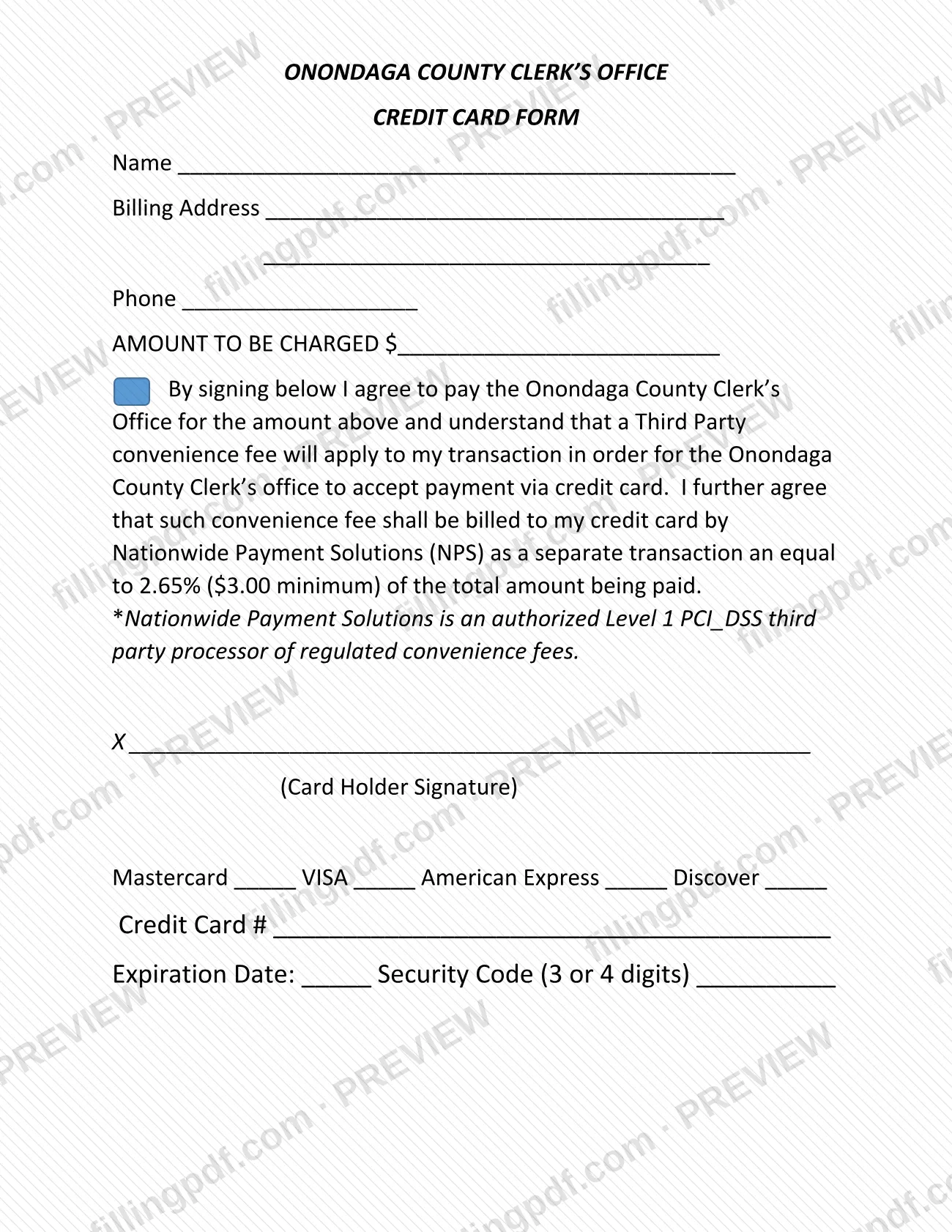
The Credit Card Form is the payment authorization of the Onondaga County Clerk's Office. On it, a cardholder states the amount to be charged, agrees to pay the Clerk's Office and accepts a third-party convenience fee for paying by credit card. It is one of the forms the Clerk lists on its Forms & Links page. On FillingPDF you can fill out the form online and download or print the completed PDF; the agency publishes the original at onondaga.gov.
Last updated
What is Credit Card Form – Onondaga County, NY?
The Credit Card Form of the Onondaga County Clerk's Office is a one-page payment authorization. By signing it, the cardholder agrees to pay the Clerk's Office the amount written on the form and accepts that a third-party convenience fee applies to the card transaction.
The form asks for the cardholder's name, billing address and phone number, and the AMOUNT TO BE CHARGED. It then states the fee terms: the convenience fee is billed to the card by Nationwide Payment Solutions (NPS) as a separate transaction, and it is calculated on the total amount being paid with a minimum charge. The form describes NPS as an authorized Level 1 PCI_DSS third party processor of regulated convenience fees. The Clerk's Office needs this fee arrangement in order to accept payment by credit card.
Below the signature line, the form lists four card brands to mark: Mastercard, VISA, American Express and Discover. It also has spaces for the credit card number, the expiration date and the security code, which is 3 or 4 digits.
The Credit Card Form does not apply for any service by itself. It only authorizes the charge. The Clerk's Forms & Links page lists it with the office's other forms, and notes that the County Clerk and her staff cannot give legal advice or help in completing forms.
Who needs to file Credit Card Form – Onondaga County, NY?
Anyone who pays the Onondaga County Clerk's Office by credit card uses this form. The person whose card will be charged is the one who signs it, on the line marked Card Holder Signature.
- You fill in your own name, billing address and phone number as the cardholder.
- You enter the amount to be charged, and you mark the brand of the card you are using: Mastercard, VISA, American Express or Discover.
- You accept the third-party convenience fee that Nationwide Payment Solutions (NPS) bills to your card as a separate transaction. The form makes this a condition of paying by card.
The form prints no exclusions and says nothing about someone else signing for the cardholder. The Clerk's Forms & Links page states that the County Clerk and her staff cannot give legal advice or assist in completing forms, so check the entries yourself before you sign.
When to file Credit Card Form – Onondaga County, NY
Complete the form when you are paying the Onondaga County Clerk's Office by credit card, because your signature authorizes the charge in the amount you write on it. No separate due date is printed on the form. The convenience fee is not part of that amount: it is billed to your card by Nationwide Payment Solutions (NPS) as a separate transaction.
How to fill out Credit Card Form – Onondaga County, NY
Enter your name and billing address
Write the cardholder's name on the Name line and the card's billing address on the two Billing Address lines.
Add your phone number
Enter a phone number on the Phone line.
Enter the amount to be charged
Write the dollar amount you are paying the Onondaga County Clerk's Office on the AMOUNT TO BE CHARGED line. Do not add the convenience fee, which NPS bills separately.
Read the fee agreement
The paragraph above the signature line says you agree to pay the Clerk's Office and accept a third-party convenience fee billed by Nationwide Payment Solutions (NPS). Read it before signing.
Sign as the cardholder
Sign on the line marked X above Card Holder Signature.
Mark the card brand
Mark one of Mastercard, VISA, American Express or Discover, whichever matches your card.
Enter the card number
Write the full number of your credit card on the Credit Card # line.
Enter expiration date and security code
Write the Expiration Date and the Security Code, which is 3 or 4 digits.
Review and download the completed PDF
Check the name, amount, card brand and card details, and confirm the form is signed. Download or print the completed PDF from FillingPDF and give it to the Clerk's Office as the office directs.
How to submit Credit Card Form – Onondaga County, NY
The form prints no mailing address, portal, fax number or office hours, so it names no channel of its own. It is addressed to the Onondaga County Clerk's Office, to which the cardholder agrees to pay the amount shown. Ask the Clerk's Office how it accepts the completed form before you send card details. The Clerk's Forms & Links page is at https://onondaga.gov/clerk/forms/. If a fee applies, the form says it is billed to the card by NPS as a separate transaction; the amount is not repeated here, so rely on the form and the Clerk's Office for it. FillingPDF lets you fill out and download the PDF; submission follows the agency's own channels.
Common mistakes to avoid
- Leaving the Card Holder Signature line unsigned; the form is an agreement to pay and accept the convenience fee, and it is signed by the cardholder.
- Treating the convenience fee as part of the amount to be charged; the form says Nationwide Payment Solutions (NPS) bills it to the card as a separate transaction.
- Assuming no fee applies to a card payment; the form states a third-party convenience fee applies so the Clerk's Office can accept credit cards.
- Leaving the AMOUNT TO BE CHARGED blank, so the authorization does not say what the card will be charged.
- Not marking the card brand when the form lists Mastercard, VISA, American Express and Discover.
- Leaving out the expiration date or the security code, which the form asks for as 3 or 4 digits.
- Expecting Clerk's Office staff to help complete the form; the Clerk's page says staff cannot give legal advice or assist in completing forms.
Frequently asked questions
What is the Onondaga County Clerk's Credit Card Form?
It is a one-page authorization for paying the Onondaga County Clerk's Office by credit card. You enter the amount to be charged, sign as cardholder and accept a third-party convenience fee billed separately by Nationwide Payment Solutions (NPS).
Can I use this form for Onondaga County property tax?
The form does not mention property tax. It authorizes a credit card payment to the Onondaga County Clerk's Office only, so confirm with the relevant office where a tax bill is paid before using it.
Is there a fee for paying the Clerk's Office by credit card?
Yes. The form says a third-party convenience fee applies, billed to your card by Nationwide Payment Solutions (NPS) as a separate transaction. It is calculated on the total paid with a minimum; the rate is printed on the form.
Which credit cards does the form accept?
The form lists four brands to mark: Mastercard, VISA, American Express and Discover. It also asks for the card number, the expiration date and the security code, which is 3 or 4 digits.
Who signs the Credit Card Form?
The cardholder signs, on the line marked Card Holder Signature. The signature means you agree to pay the Clerk's Office the amount on the form and accept the convenience fee. The form says nothing about another person signing for you.
Can I fill out the Credit Card Form online?
You can fill out the PDF online on FillingPDF and download or print it. FillingPDF is independent of the Onondaga County Clerk's Office and does not submit the form or process the payment; you give it to the office as the Clerk directs.
Does the form say where to send it?
No. The form prints no address, portal or fax number. It is addressed to the Onondaga County Clerk's Office, so ask the office how it accepts the completed form; the Clerk's forms page is at onondaga.gov/clerk/forms/.
Ready to fill out Credit Card Form – Onondaga County, NY?
Fill out Credit Card Form – Onondaga County, NY now