
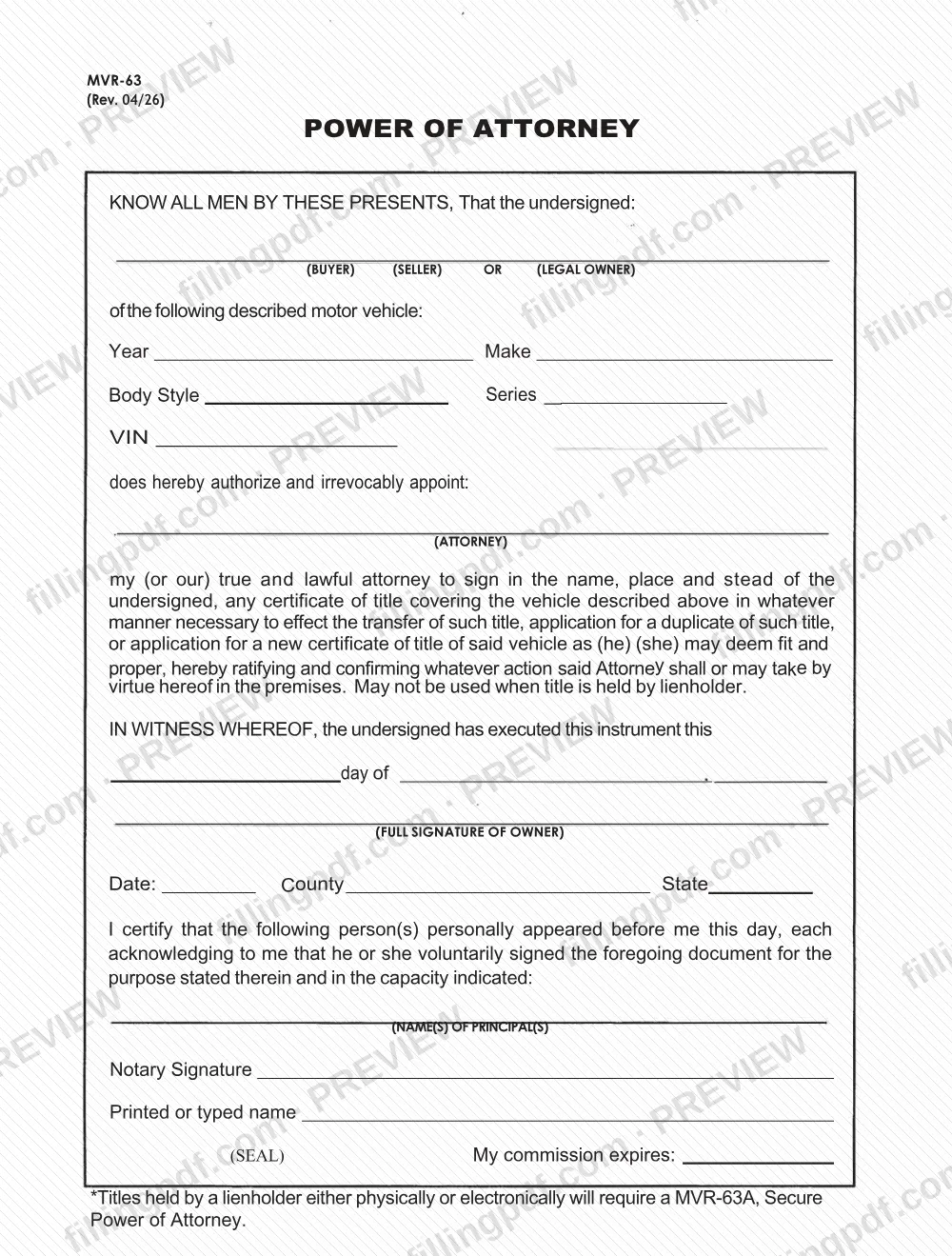
MVR-63 is the Power of Attorney form published by the NCDMV. It lets a vehicle's buyer, seller or legal owner appoint an attorney to sign a certificate of title for that vehicle, including to transfer the title, apply for a duplicate or apply for a new certificate of title. The form may not be used when a lienholder holds the title. On this page you can fill out the form online on FillingPDF and download or print the completed PDF; the original is published by the NCDMV.
Last updated
What is MVR-63?
Form MVR-63, Power of Attorney, is the NCDMV form on which a buyer, seller or legal owner of a motor vehicle irrevocably appoints an attorney to sign the vehicle's certificate of title in the owner's name, place and stead.
The printed text describes the vehicle by Year, Make, Body Style, Series and VIN, and names the attorney. It authorizes that person to sign any certificate of title for the vehicle in whatever manner is necessary to transfer the title, to apply for a duplicate of the title, or to apply for a new certificate of title, as the attorney deems fit and proper. The owner ratifies and confirms whatever the attorney does under it.
The form is an executed instrument: the owner signs and dates it ("In witness whereof, the undersigned has executed this instrument this ___ day of ___"), and a notary certifies on the same page that the principal personally appeared and voluntarily signed. The notary block has lines for the principal's name, the notary's signature, printed or typed name, seal and commission expiration.
Form MVR-63 may not be used when the title is held by a lienholder. A footnote on the form says titles held by a lienholder, physically or electronically, require MVR-63A, Secure Power of Attorney, a different form.
Who needs to file MVR-63?
The main users are the people the form names as principal: the buyer, the seller or the legal owner of a motor vehicle who wants another person to sign title documents on their behalf. The person appointed is the attorney named on the form. The form does not require that person to be a particular kind of representative.
Use Form MVR-63 only for the three purposes it prints: signing a certificate of title to transfer it, applying for a duplicate title, or applying for a new certificate of title for the vehicle described.
Do not use Form MVR-63 when the title is held by a lienholder. The form says so directly, and the footnote adds that titles held by a lienholder either physically or electronically require MVR-63A, Secure Power of Attorney.
The form is written for one or more principals ("my (or our) true and lawful attorney"), and the notary section has room for the name(s) of the principal(s) who appeared before the notary.
When to file MVR-63
Complete and sign Form MVR-63 before the attorney signs any title document for the vehicle, because the form is what gives the attorney that authority. The form prints no deadline and no validity period of its own.
Use it when the purpose is one of the three the form lists: transferring the certificate of title, applying for a duplicate title, or applying for a new certificate of title. If a lienholder holds the title, physically or electronically, MVR-63 cannot be used; the form points to MVR-63A, Secure Power of Attorney, instead.
How to fill out MVR-63
Identify the principal's role
At the top, show whether the undersigned is the BUYER, SELLER or LEGAL OWNER of the motor vehicle, as the form's first line asks. Enter the name of each principal.
Describe the motor vehicle
Enter the Year, Make, Body Style, Series and VIN of the vehicle. Copy the VIN exactly as shown on the vehicle's title.
Name the attorney
On the line marked ATTORNEY, enter the full name of the person you appoint to sign title documents in your name.
Check the title is not held by a lienholder
The form may not be used when the title is held by a lienholder, physically or electronically. If it is, use MVR-63A, Secure Power of Attorney, instead.
Enter the execution date
Complete the "this ___ day of ___" line in the In Witness Whereof paragraph with the day and month on which the owner signs.
Sign as owner
The owner signs on the line marked FULL SIGNATURE OF OWNER. Complete Date, County and State on the lines next to it.
Complete the notary acknowledgment
The notary enters the name(s) of the principal(s) who appeared, then signs, prints or types the notary's name, applies the seal and enters the commission expiration date.
Review and download the completed PDF
Check the vehicle details, the roles and the signature block, then download or print the completed PDF from FillingPDF and sign it before the notary as required.
How to submit MVR-63
Form MVR-63 prints no mailing address, portal or office, so it does not name a submission channel of its own. It is an authorization: the attorney it names signs the vehicle's certificate of title or title application in the owner's name, as the form describes.
Before it is used, the principal signs it and the notary completes the acknowledgment block (signature, printed or typed name, seal and commission expiration date). The NCDMV publishes this form with its other vehicle registration and title forms at https://www.ncdot.gov/dmv/downloads/Pages/registration.aspx; contact the NCDMV for where and how the title paperwork it supports is handled.
If the title is held by a lienholder, do not use this form; use MVR-63A, Secure Power of Attorney.
FillingPDF lets you fill out and download the PDF; submission follows the NCDMV's channels.
Common mistakes to avoid
- Using MVR-63 when the title is held by a lienholder, physically or electronically; the form says such titles require MVR-63A, Secure Power of Attorney.
- Leaving out the vehicle description (Year, Make, Body Style, Series or VIN), so the form does not identify the vehicle it covers.
- Not stating whether the signer is the buyer, seller or legal owner in the line at the top of the form.
- Leaving the attorney line blank or unclear, so no person is named as the attorney.
- Signing before appearing in front of the notary; the certificate states that the principal personally appeared and acknowledged signing.
- Omitting the notary's signature, printed or typed name, seal or commission expiration date.
- Using the form for something other than transferring a title, applying for a duplicate title or applying for a new certificate of title.
- Leaving the execution date, County or State lines blank on the signature block.
Frequently asked questions
What is the MVR-63 form?
MVR-63 is the NCDMV Power of Attorney form. A buyer, seller or legal owner uses it to appoint an attorney to sign a vehicle's certificate of title to transfer it, to apply for a duplicate title, or to apply for a new certificate of title.
Can I use MVR-63 if a lienholder holds my title?
No. The form states it may not be used when the title is held by a lienholder. Titles held by a lienholder, either physically or electronically, require MVR-63A, Secure Power of Attorney.
Does MVR-63 have to be notarized?
The form includes a notary certificate stating that the principal personally appeared and voluntarily signed, with lines for the notary's signature, printed name, seal and commission expiration. Complete that block with a notary when you sign the form.
What can the attorney do under MVR-63?
The attorney can sign, in the owner's name, any certificate of title for the described vehicle as needed to transfer the title, apply for a duplicate of the title, or apply for a new certificate of title, as the form states.
Can I fill out the MVR-63 form online?
Yes. You can fill out the PDF online on FillingPDF and download or print it. FillingPDF is an independent service and does not file the form or notarize it; signing and notarization are done as the form requires.
What vehicle details does MVR-63 ask for?
It asks for the vehicle's Year, Make, Body Style, Series and VIN. It also asks you to show whether the signer is the buyer, seller or legal owner and to name the attorney.
What is the current revision of MVR-63?
The version provided by the NCDMV is marked Rev. 04/26. The revision is printed at the top of the form, below the form number MVR-63.
Ready to fill out MVR-63?
Fill out MVR-63 now