
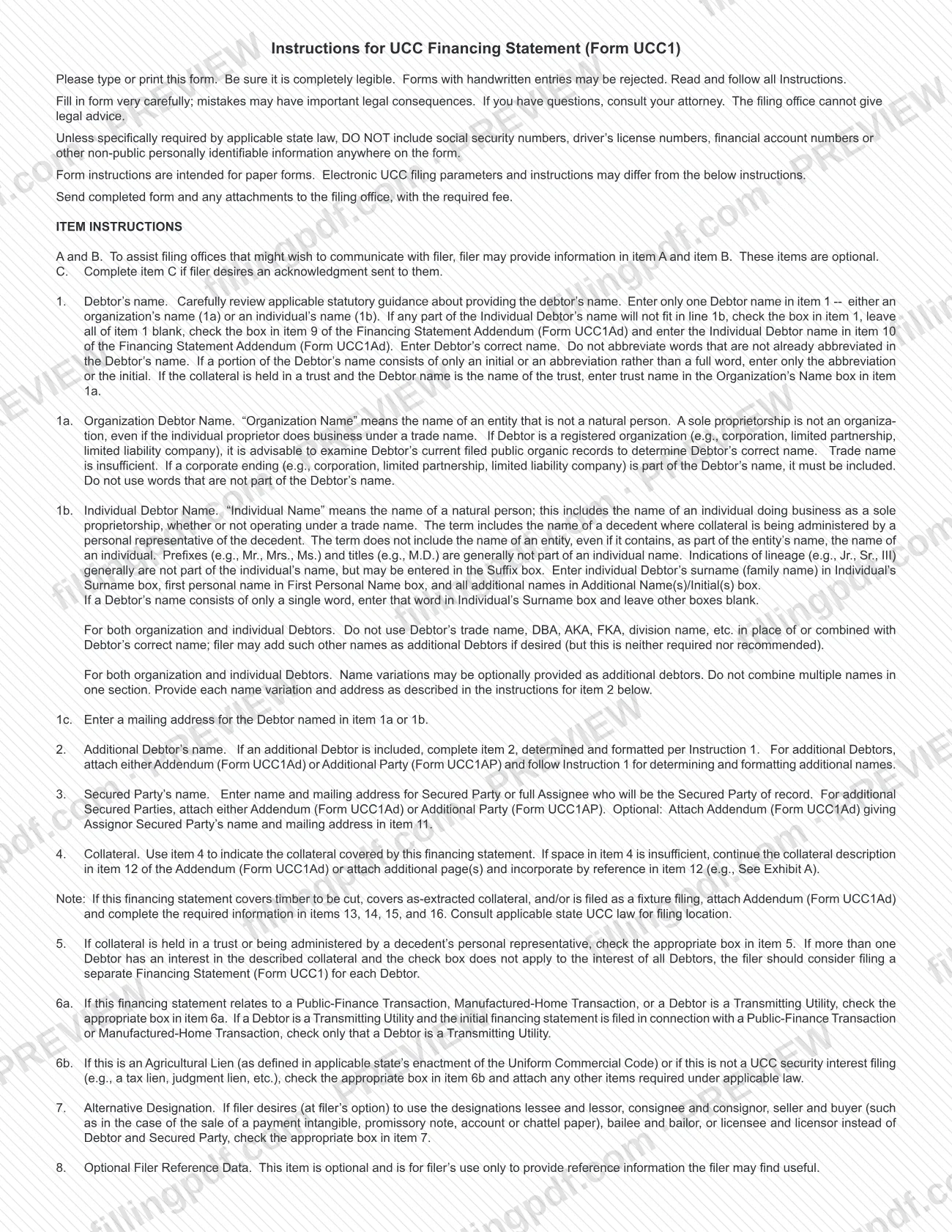
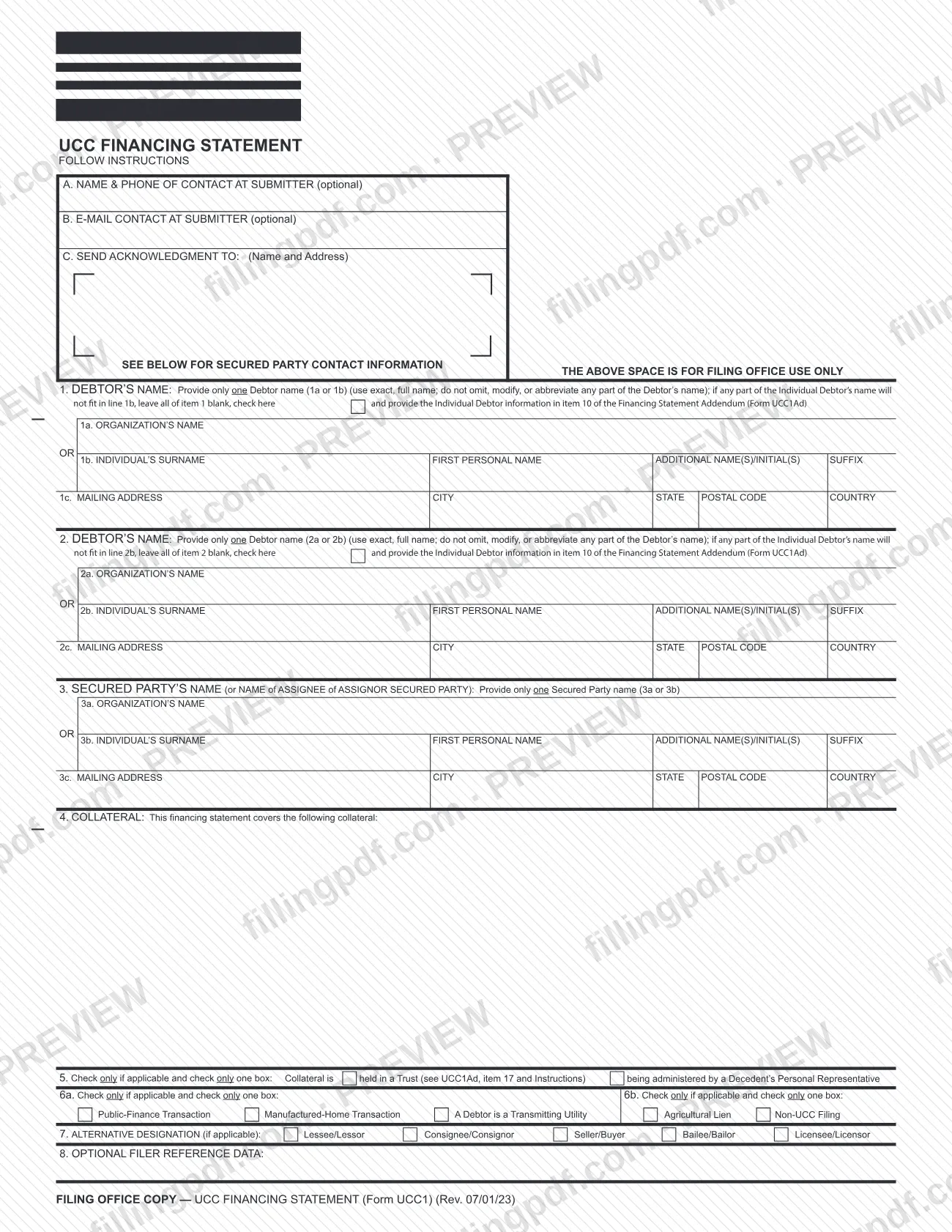
The financing statement (Form UCC1) is the Uniform Commercial Code form that names a debtor, a secured party and the collateral the filing covers; this edition, Rev. 07/01/23, is published by the North Carolina Department of the Secretary of State. A filer uses it to describe the collateral and, where applicable, to mark special transactions such as public-finance, manufactured-home or agricultural lien filings. On this page you can fill out the form online on FillingPDF and download or print the completed PDF. The official PDF and the agency's UCC forms page remain with the Secretary of State.
Last updated
What is UCC1?
Form UCC1, Financing Statement (printed on the form as UCC FINANCING STATEMENT) is the Uniform Commercial Code form on which a filer identifies a debtor, a secured party and the collateral the filing covers. This copy is the Rev. 07/01/23 edition published by the North Carolina Department of the Secretary of State.
The form is built from numbered items:
- Items A, B and C: optional contact details for the submitter and, in item C, the name and address to which an acknowledgment should be sent.
- Item 1: the debtor's name (organization or individual) and mailing address.
- Item 2: an additional debtor, if any.
- Item 3: the secured party, or the assignee of an assignor secured party.
- Item 4: the collateral covered.
- Items 5, 6a, 6b and 7: check boxes for trusts and decedents' personal representatives, special transaction types, agricultural liens and non-UCC filings, and alternative designations such as lessee/lessor.
- Item 8: optional filer reference data.
Two companion forms extend it: the Financing Statement Addendum (Form UCC1Ad) and the Additional Party (Form UCC1AP). They carry extra parties, overflow collateral text and the extra information needed for timber to be cut, as-extracted collateral and fixture filings.
The instructions on the form are written for paper filings; electronic UCC filing parameters and instructions may differ. Most documents in the Secretary of State's files are public records under the Public Records Act, Chapter 132 of the North Carolina General Statutes, and many UCC filings can be viewed on the agency's website.
Who needs to file UCC1?
The form is completed by a filer who wants to record a financing statement that names a debtor, a secured party (or the assignee of an assignor secured party) and the collateral covered. The instructions describe several situations the boxes are built for:
- Public-Finance Transaction, Manufactured-Home Transaction or a Debtor that is a Transmitting Utility: check the matching box in item 6a.
- Agricultural Lien, or a filing that is not a UCC security interest (for example a tax lien or judgment lien): check the matching box in item 6b and attach any other items required under applicable law.
- Collateral held in a trust or administered by a decedent's personal representative: check the box in item 5.
- Lessor/lessee, consignor/consignee, seller/buyer, bailor/bailee or licensor/licensee arrangements: the filer may, at its option, use these designations in item 7 instead of Debtor and Secured Party.
- Timber to be cut, as-extracted collateral or a fixture filing: attach the Addendum (Form UCC1Ad) and complete its items 13, 14, 15 and 16.
Item 1 takes only one debtor name. Further debtors or secured parties go on the Addendum (Form UCC1Ad) or the Additional Party (Form UCC1AP). If more than one debtor has an interest in the collateral and the item 5 box does not apply to every debtor, the instructions say the filer should consider a separate Form UCC1 for each debtor. The filing office cannot give legal advice, so questions about whether and how to file go to your attorney.
Documents you need
- Financing Statement Addendum (Form UCC1Ad): attach it when an individual debtor's name will not fit in item 1b, when there are additional debtors or secured parties, when collateral text overflows item 4, or to name an assignor secured party.
- Financing Statement Addendum (Form UCC1Ad), items 13, 14, 15 and 16: required when the financing statement covers timber to be cut, covers as-extracted collateral, or is filed as a fixture filing.
- Additional Party (Form UCC1AP): an alternative to the Addendum for adding additional debtors or additional secured parties.
- Additional page(s) continuing the collateral description, if item 4 is too short and you do not use the Addendum; incorporate them by reference (for example, "See Exhibit A").
- Any other items required under applicable law, when you check Agricultural Lien or Non-UCC Filing in item 6b.
How to fill out UCC1
Read the instructions and type entries
Follow the instructions printed on the form and complete it in typed or printed, fully legible text. Do not add Social Security, driver's license or financial account numbers unless state law specifically requires them.
Complete the contact items A, B and C
Items A (name and phone of contact) and B (e-mail contact) are optional. Fill in item C, the name and address for the acknowledgment, only if you want an acknowledgment sent to you.
Enter one debtor name in item 1
Use 1a for an organization or 1b for an individual, never both. For a registered organization, use its correct name including any corporate ending; do not use a trade name, DBA, AKA or FKA.
Format an individual debtor's name
In 1b enter the surname, first personal name and any additional names or initials, with lineage such as Jr. or III in the Suffix box. If the name will not fit, check the item 1 box, leave item 1 blank and enter the name in item 10 of Form UCC1Ad.
Add the debtor's mailing address
In item 1c enter the mailing address for the debtor named in 1a or 1b, including city, state, postal code and country.
Complete item 2 for an additional debtor
Fill in item 2 only if an additional debtor is included, using the same name rules as item 1. Attach the Addendum (Form UCC1Ad) or the Additional Party (Form UCC1AP) for additional debtors.
Identify the secured party in item 3
Enter one secured party name (3a or 3b) and mailing address (3c), or the full assignee who will be the secured party of record. Add further secured parties on Form UCC1Ad or Form UCC1AP.
Describe the collateral in item 4
State the collateral covered by this financing statement. If space runs out, continue in item 12 of Form UCC1Ad or attach pages and incorporate them by reference, such as "See Exhibit A".
Check item 5 if it applies
Check the box if the collateral is held in a trust or administered by a decedent's personal representative. If it does not apply to every debtor, consider a separate Form UCC1 for each debtor.
Mark item 6a or 6b if applicable
In 6a check one box for a Public-Finance Transaction, Manufactured-Home Transaction or a Debtor that is a Transmitting Utility; if a transmitting utility filing is also public-finance or manufactured-home, check only the transmitting utility box. In 6b check Agricultural Lien or Non-UCC Filing and attach any items the law requires.
Set item 7 and item 8 if wanted
Item 7, at your option, replaces Debtor and Secured Party with lessee/lessor, consignee/consignor, seller/buyer, bailee/bailor or licensee/licensor. Item 8 is optional filer reference data for your own use.
Review and download the completed PDF
Check the debtor names against the debtor's correct name and confirm that any addendum is attached. Download or print the completed PDF from FillingPDF and submit it with the required fee as described under How to submit.
How to submit UCC1
The instructions on Form UCC1 name one channel: send the completed form and any attachments to the filing office, with the required fee. The form itself prints no mailing address, portal or fee amount, so confirm the current details with the Uniform Commercial Code Section of the North Carolina Department of the Secretary of State through its UCC forms page.
- Paper filing: type or print the form so it is completely legible; forms with handwritten entries may be rejected. Include every attachment, such as the Addendum (Form UCC1Ad) or the Additional Party (Form UCC1AP), and the required fee.
- Acknowledgment: complete item C only if you want an acknowledgment sent to you.
- Electronic filing: the form's instructions are intended for paper forms, and electronic UCC filing parameters and instructions may differ.
Do not put Social Security numbers on the filing unless the Department requires one to process your transaction; the Department says it cannot guarantee that a number placed on a document by mistake will not be disclosed. FillingPDF lets you fill out and download the PDF; submission follows the channels above.
Common mistakes to avoid
- Handwriting entries on the paper form instead of typing or printing legibly; the instructions warn that forms with handwritten entries may be rejected.
- Using a trade name, DBA, AKA, FKA or division name in place of, or combined with, the debtor's correct name in item 1.
- Omitting a corporate ending such as corporation, limited partnership or limited liability company from a registered organization's name when it is part of the name.
- Abbreviating words in the debtor's name that are not already abbreviated, or adding words that are not part of the name.
- Entering more than one debtor name in item 1, or combining several names in one section, instead of using item 2 or an addendum.
- Squeezing an individual debtor's name into line 1b when it will not fit, instead of checking the item 1 box, leaving item 1 blank and using item 10 of the Addendum (Form UCC1Ad).
- Putting a Social Security number, driver's license number or financial account number on the form when state law does not specifically require it.
- Filing for timber to be cut, as-extracted collateral or a fixture filing without attaching the Addendum (Form UCC1Ad) with items 13 to 16 completed.
- Checking more than one box in item 6a or 6b, which each say to check only one box if applicable.
Frequently asked questions
What is a financing statement on Form UCC1?
A financing statement (Form UCC1) is the Uniform Commercial Code form that names the debtor, the secured party and the collateral covered. The North Carolina Department of the Secretary of State publishes this Rev. 07/01/23 edition; its Uniform Commercial Code Section receives filings, and many can be viewed on the agency's website.
How do I enter the debtor's name on Form UCC1?
Enter only one debtor name in item 1: the organization's name in 1a or the individual's name in 1b. Use the debtor's correct name, do not abbreviate words that are not already abbreviated, and include a corporate ending if it is part of the name.
Can I use a trade name or DBA as the debtor name?
No. The instructions say not to use a trade name, DBA, AKA, FKA or division name in place of, or combined with, the debtor's correct name. A filer may add those names as additional debtors, but the instructions call this neither required nor recommended.
What if an individual debtor's name does not fit on line 1b?
Check the box in item 1, leave all of item 1 blank, check the box in item 9 of the Financing Statement Addendum (Form UCC1Ad) and enter the individual debtor's name in item 10 of that addendum.
How do I add more debtors or secured parties?
Attach either the Financing Statement Addendum (Form UCC1Ad) or the Additional Party (Form UCC1AP). Follow the item 1 name rules for additional debtors. For an assignor secured party, the instructions allow an optional Form UCC1Ad with its name and address in item 11.
Should I include my Social Security number on the form?
No, unless specifically required by applicable state law or by the Department to process your transaction. The instructions also bar driver's license and financial account numbers. The Department notes that filings are public and it cannot guarantee a mistakenly placed number will not be disclosed.
Where do I send Form UCC1 and is there a fee?
Send the completed form and any attachments to the filing office with the required fee. The form prints no address or fee amount, so ask the North Carolina Secretary of State's UCC Section for them. Electronic filing parameters may differ from the paper instructions.
Can I fill out Form UCC1 online on FillingPDF?
Yes. You can fill out the fillable PDF online on FillingPDF and download or print it. FillingPDF is an independent service and does not file the financing statement; you submit it to the filing office with the required fee.
Ready to fill out UCC1?
Fill out UCC1 now