
Form G-28, Notice of Entry of Appearance as Attorney or Accredited Representative, is the form that U.S. Citizenship and Immigration Services (USCIS) and the Department of Homeland Security (DHS) use to confirm that an attorney or accredited representative may act for a client in an immigration matter. It is filed in each case, and both the representative and the client must sign it. On FillingPDF you can fill out Form G-28 online and download or print the completed PDF; the form and its instructions are published by USCIS, and filing follows the USCIS channels described below.
Last updated
What is G-28?
Form G-28, Notice of Entry of Appearance as Attorney or Accredited Representative, is the DHS form that establishes an attorney's or accredited representative's eligibility to represent a client in an immigration matter before USCIS, U.S. Immigration and Customs Enforcement (ICE) or U.S. Customs and Border Protection (CBP).
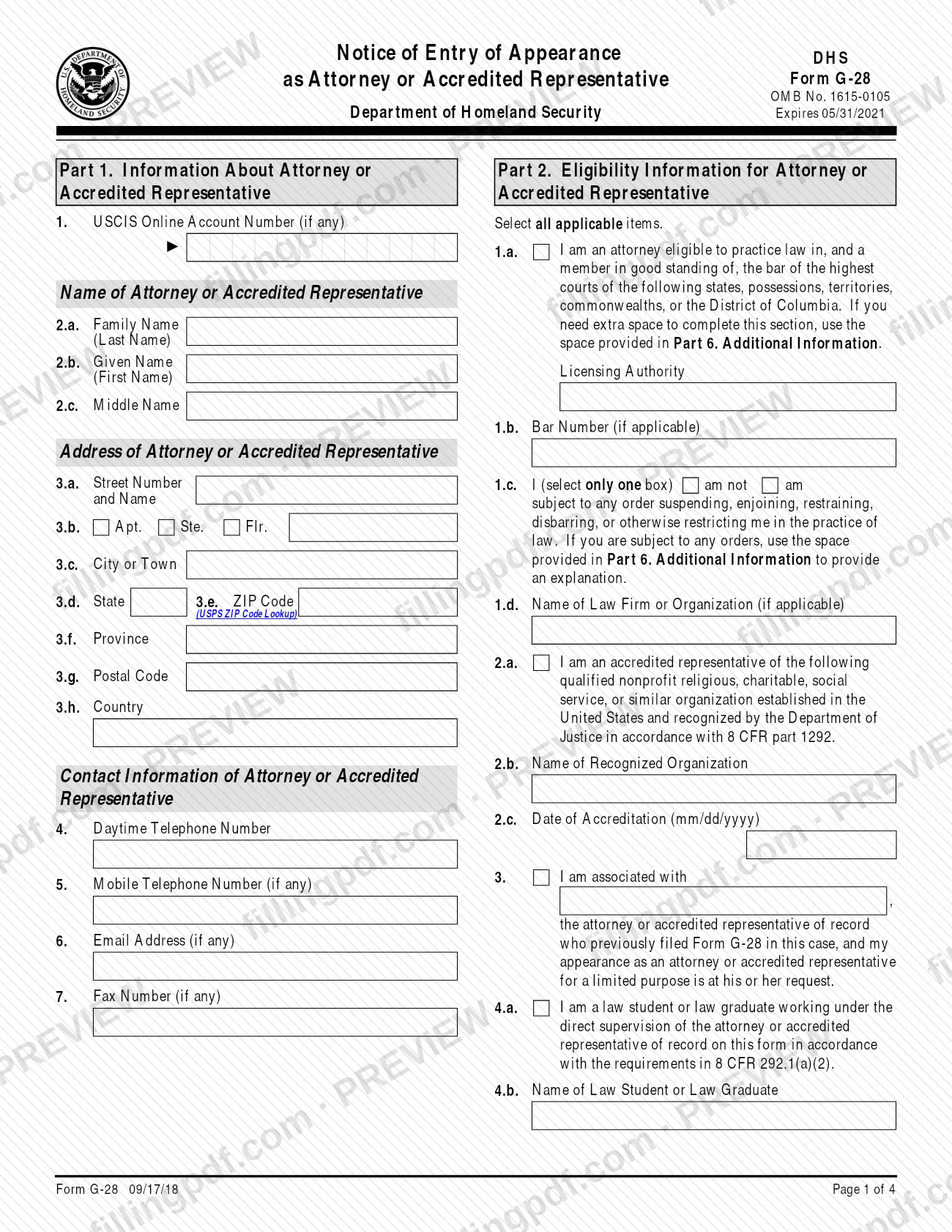
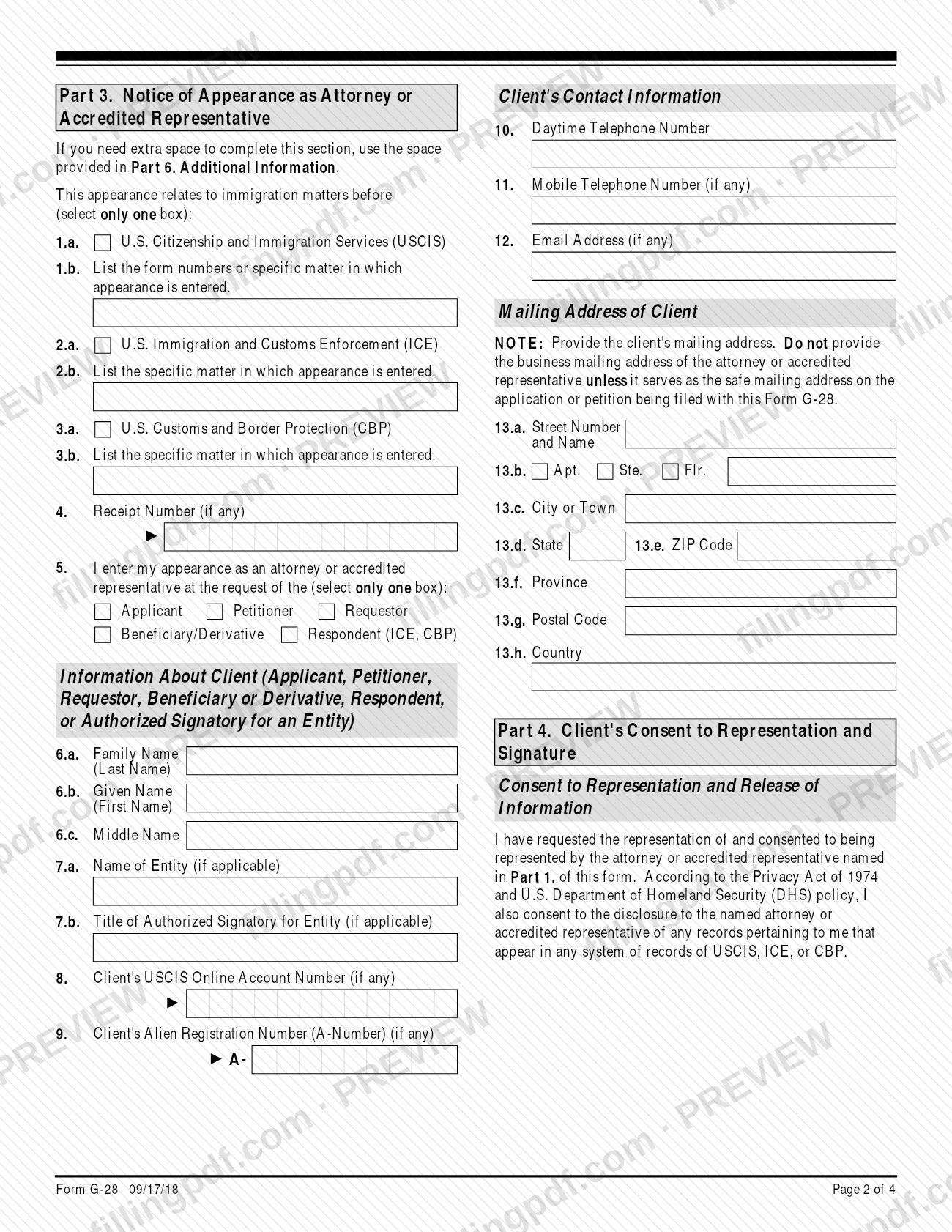
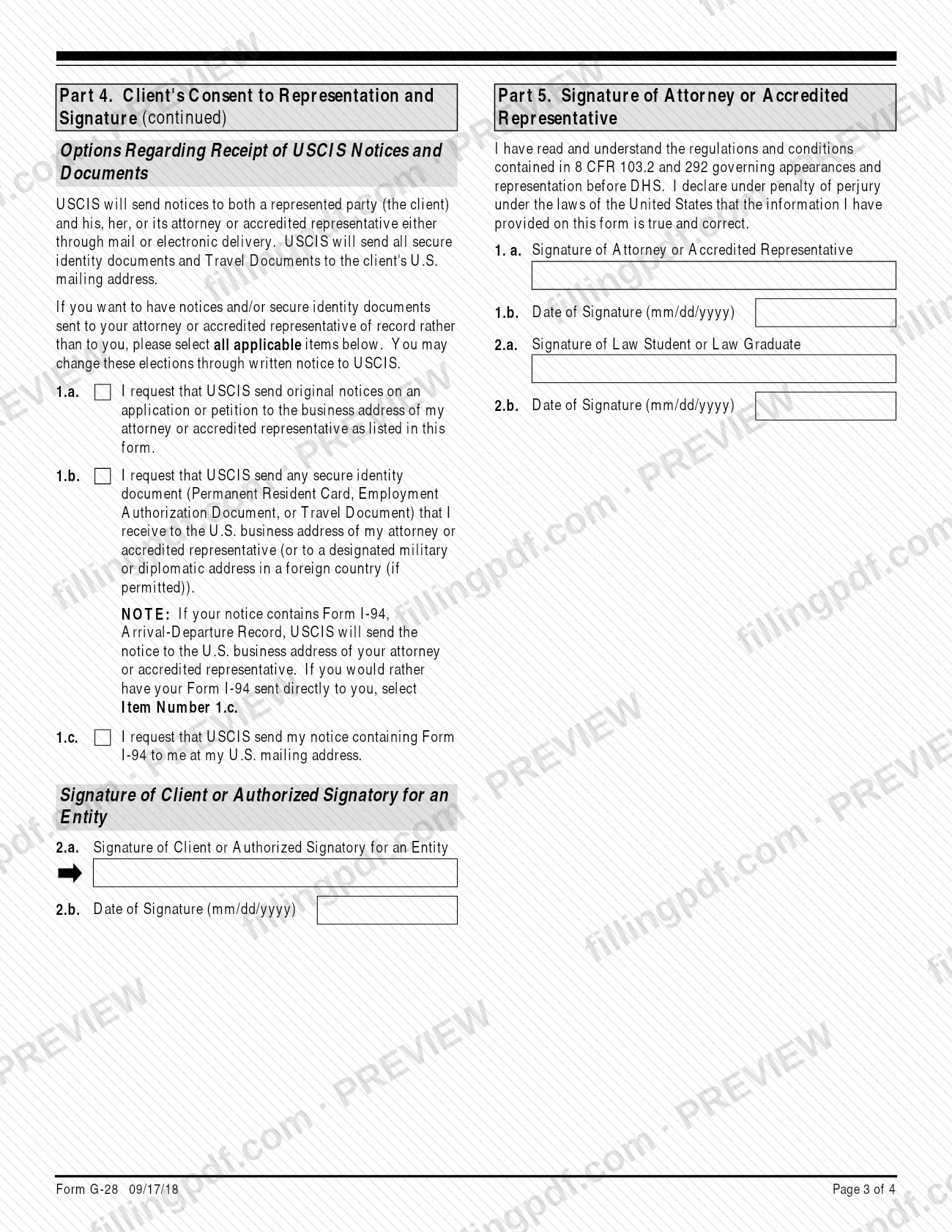
The form is built in six parts. Part 1 identifies the attorney or accredited representative. Part 2 states eligibility: bar admission and any disciplinary orders for attorneys, or the recognized organization and accreditation date for accredited representatives. Part 3 names the agency and the matter, the receipt number and the client. Part 4 holds the client's consent to representation and release of records, plus the client's choices about where USCIS sends notices and secure identity documents. Part 5 carries the signatures of the representative and, if one appears, a law student or law graduate. Part 6 is for additional information.
The instructions say USCIS, CBP and ICE recognize only a properly completed Form G-28 signed by both the representative and the client, and recognize it until the matter concludes unless they are told otherwise.
It is not the right form in some cases. For matters before the Board of Immigration Appeals, use Form EOIR-27. Attorneys not licensed to practice law in the United States use Form G-28I, Notice of Entry of Appearance as Attorney In Matters Outside the Geographical Confines of the United States. Form G-28 also cannot be used to request records under the Freedom of Information Act or the Privacy Act.
Who needs to file G-28?
An attorney or accredited representative, as defined in 8 CFR parts 1.2 and 1292, files Form G-28 in each immigration case in which he or she appears before DHS. The client signs it too, to consent to the representation.
- Accredited representatives of a nonprofit organization recognized by the Department of Justice under 8 CFR part 1292 complete Part 2, Items 2.a. to 2.c.
- Stand-in attorneys or representatives who appear for a limited purpose, such as an interview, at the request of the representative of record complete Part 2, Item 3 and submit the form in person at a DHS office. Each representative who appears in the matter files a separate Form G-28.
- Law students and law graduates working under direct supervision complete Part 2, Items 4.a. and 4.b., and sign Part 5, Items 2.a. and 2.b., on the supervising representative's Form G-28. The DHS official must permit the appearance.
- Clients sign Part 4. A parent or legal guardian may sign for a client under 14, and a legal guardian may sign for a mentally incompetent person.
Do not use Form G-28 if you are a reputable individual: that person must get DHS permission to appear. Foreign attorneys use Form G-28I, and BIA matters use Form EOIR-27.
When to file G-28
File Form G-28 with the application, petition, motion or appeal it relates to, because the form must be filed in each case in which a representative appears. It has no due date of its own.
USCIS recognizes the form until the matter concludes, unless it is told otherwise. If you file Form I-290B, Notice of Appeal or Motion, you must file a new Form G-28 with the Administrative Appeals Office.
A representative who later joins a pending matter files a subsequent Form G-28. A representative who appears in person for a limited purpose, such as an interview, at the request of the representative who first filed Form G-28 in the same case must submit the form in person at a DHS office; the original representative stays the representative of record.
How to fill out G-28
Enter your account number and name
In Part 1, Item 1, enter your USCIS Online Account Number if you have one; it is not an A-Number. In Items 2.a. to 2.c., enter your family, given and middle names.
Add your address and contact details
Complete Items 3.a. to 3.h. with your mailing address and Items 4 to 7 with your daytime and mobile telephone numbers, email address and fax number where they apply.
State your eligibility as an attorney
In Part 2, if you are an attorney, select Item 1.a. and list each licensing authority and bar number (Item 1.b.). Select am or am not in Item 1.c., add any order details in Part 6, and enter your law firm or organization in Item 1.d.
Complete the other eligibility items
Accredited representatives select Item 2.a. and give the recognized organization and accreditation date in Items 2.b. and 2.c. Select Item 3 only if you stand in for the representative of record, and Items 4.a. and 4.b. only for a law student or law graduate.
Select the agency and the matter
In Part 3, select only one box: USCIS (Item 1.a.), ICE (2.a.) or CBP (3.a.). List the form numbers or specific matter in Item 1.b., 2.b. or 3.b., and enter the Receipt Number in Item 4 if there is one.
Identify the client
Select the client type in Item 5. In Items 6.a. to 6.c., enter the client's name exactly as on the related form. For an entity, add its name and the signatory's title in Items 7.a. and 7.b.
Enter client numbers and contact details
Enter the client's USCIS Online Account Number (Item 8) and A-Number (Item 9) if any, then telephone and email in Items 10 to 12. In Items 13.a. to 13.h., enter the client's mailing address, not your business address.
Record the client's notice preferences
In Part 4, the client selects Items 1.a., 1.b. or 1.c. to choose whether original notices and secure identity documents go to the representative, or the I-94 notice goes to the client. The client then signs and dates Items 2.a. and 2.b.
Sign Part 5
The attorney or accredited representative signs and dates Items 1.a. and 1.b. A law student or law graduate signs and dates Items 2.a. and 2.b. Use black ink.
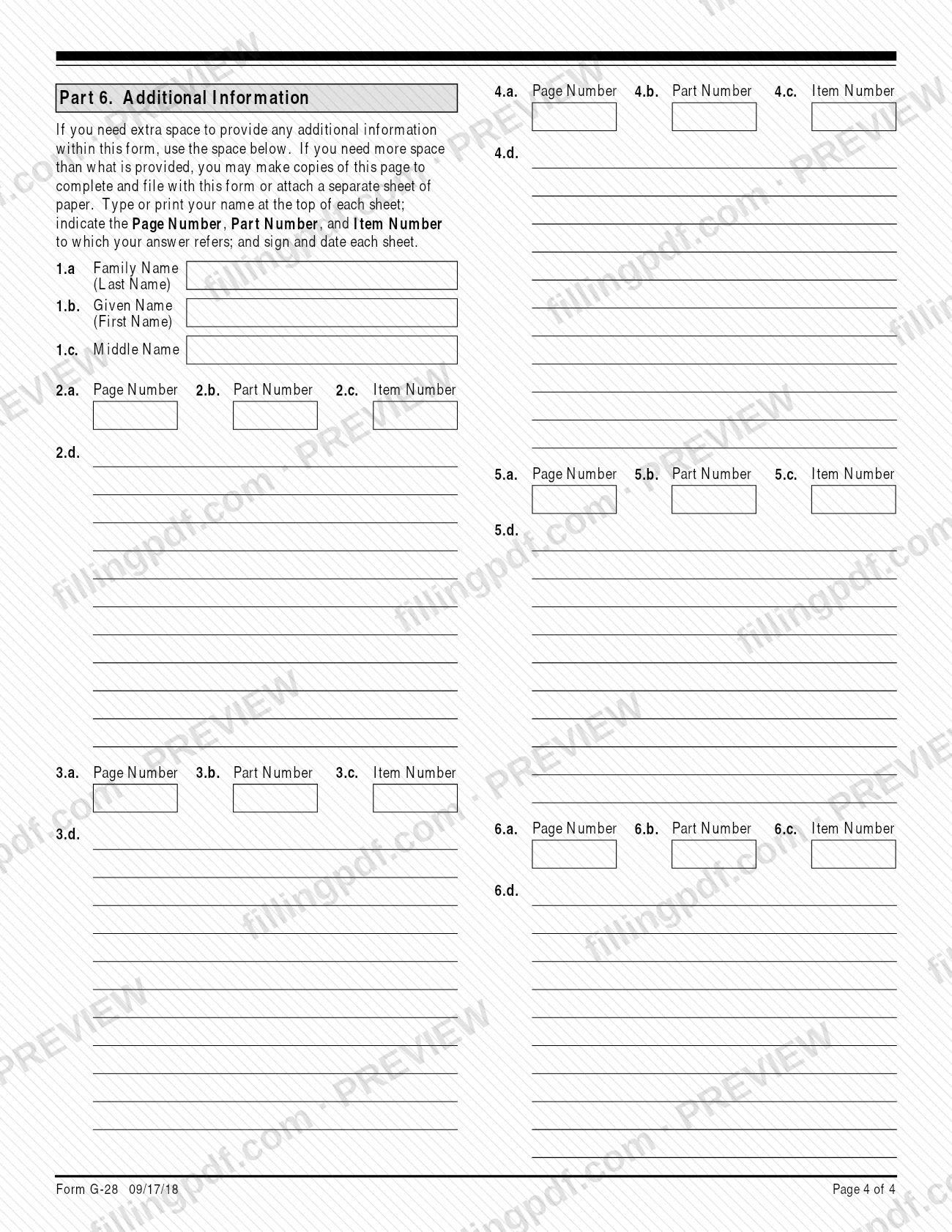
Use Part 6 for extra space
Put your name at the top, then give the page, part and item number each answer refers to. Use it for bar details or a disciplinary order.
Review and download the completed PDF
Check that names match the related immigration form and both signatures will be handwritten in ink. Download or print the completed PDF from FillingPDF, then file it through the channels under How to submit.
How to submit G-28
Form G-28 is filed online through a USCIS online account or by mail, together with the related application, petition, motion or appeal; limited-purpose appearances are submitted in person at a DHS office.
- Initial Form G-28, online: create a USCIS online account, then file the form with your client's online filing. USCIS has an Online Filing for Attorneys and Accredited Representatives page.
- Initial Form G-28, by mail: send it with the related application, petition, motion or appeal. USCIS refers you to its Tips for Filing Forms by Mail page.
- Subsequent Form G-28, online: in your USCIS representative online account, go to File a Form and choose Form G-28 from the dropdown. This works for certain pending forms.
- Subsequent Form G-28, by mail: send it to the office where the case is pending, or to the return address of the last notice you received.
- In person: a limited-purpose appearance at the request of the representative of record.
A photocopied, faxed or scanned copy is valid only if it copies the original with the handwritten ink signatures. If you print the form, make sure the edition date and page numbers show on every page and all pages come from the same edition, or USCIS may reject it. USCIS lists the filing fee for Form G-28 on its Fee Schedule page; check it there. FillingPDF lets you fill out and download the PDF; submission follows the channels above.
Common mistakes to avoid
- Submitting the form without all required signatures. USCIS says the most common mistake is a form that is not signed or lacks a required signature: the client and the representative must both sign.
- Typing or stamping a name instead of signing. USCIS does not accept a stamped or typewritten name in place of a handwritten signature.
- Leaving Part 2 incomplete. USCIS rejects any Form G-28 without the required information in Items 1.a. to 1.d. or 2.a. to 2.c.
- Entering a client name that differs from the related immigration form. The client's first and last name must match it exactly.
- Giving the attorney's business address as the client's mailing address in Items 13.a. to 13.h., unless it is the safe mailing address on the application or petition.
- Using highlighters or correction fluid, or graying out any part of the form.
- Printing pages from different form editions or missing pages, or hiding the edition date and page numbers. USCIS may reject the form.
- Not disclosing a suspension, disbarment or other restriction. If you are subject to such an order, select the box in Item 1.c. and explain it in Part 6.
- Filing Form G-28 for a Board of Immigration Appeals matter. Use Form EOIR-27 instead.
Frequently asked questions
What is Form G-28 used for?
Form G-28 establishes that an attorney or accredited representative is eligible to represent a client in an immigration matter before DHS, meaning USCIS, ICE or CBP. It must be filed in each case, and only a properly completed form signed by both representative and client is recognized.
Who signs Form G-28?
The client signs Part 4 and the attorney or accredited representative signs Part 5. A law student or law graduate who appears under supervision also signs Part 5. A parent or legal guardian may sign for a client under 14, and a legal guardian for a mentally incompetent person.
Can I fill out Form G-28 online?
You can fill out the PDF online on FillingPDF and download or print it. FillingPDF does not file it with USCIS. You file it yourself, online through a USCIS online account with the related filing or by mail, as USCIS describes.
Where do I file Form G-28?
File an initial G-28 with the related application, petition, motion or appeal, online in your USCIS account or by mail. A subsequent G-28 can go online through File a Form, or by mail to the office where the case is pending or the return address of the last notice.
Is there a fee to file Form G-28?
USCIS directs filers to its Fee Schedule page for the filing fee for Form G-28. This page does not state an amount, so check that page before you file.
Do I need a new Form G-28 for an appeal?
Yes, in one case. If you file Form I-290B, Notice of Appeal or Motion, you must file a new Form G-28 with the Administrative Appeals Office. Otherwise USCIS recognizes the form until the matter concludes, unless it is told otherwise.
Can a signed G-28 be faxed or scanned?
Yes. USCIS treats a photocopied, faxed or scanned copy as valid for filing, but only if it copies the original document bearing the handwritten ink signatures. A stamped or typewritten name is never accepted in place of a signature.
What is the difference between Form G-28 and Form G-28I?
Form G-28 is for attorneys admitted in the United States and accredited representatives. Form G-28I is for attorneys not licensed to practice law in the United States, who may represent individuals only in matters filed and decided in DHS offices outside the United States.
What happens if my Form G-28 is not completed properly?
USCIS will not accept it and will process the benefit request as if you had not submitted Form G-28. USCIS also rejects forms missing the required Part 2 eligibility information.
Ready to fill out G-28?
Fill out G-28 now