
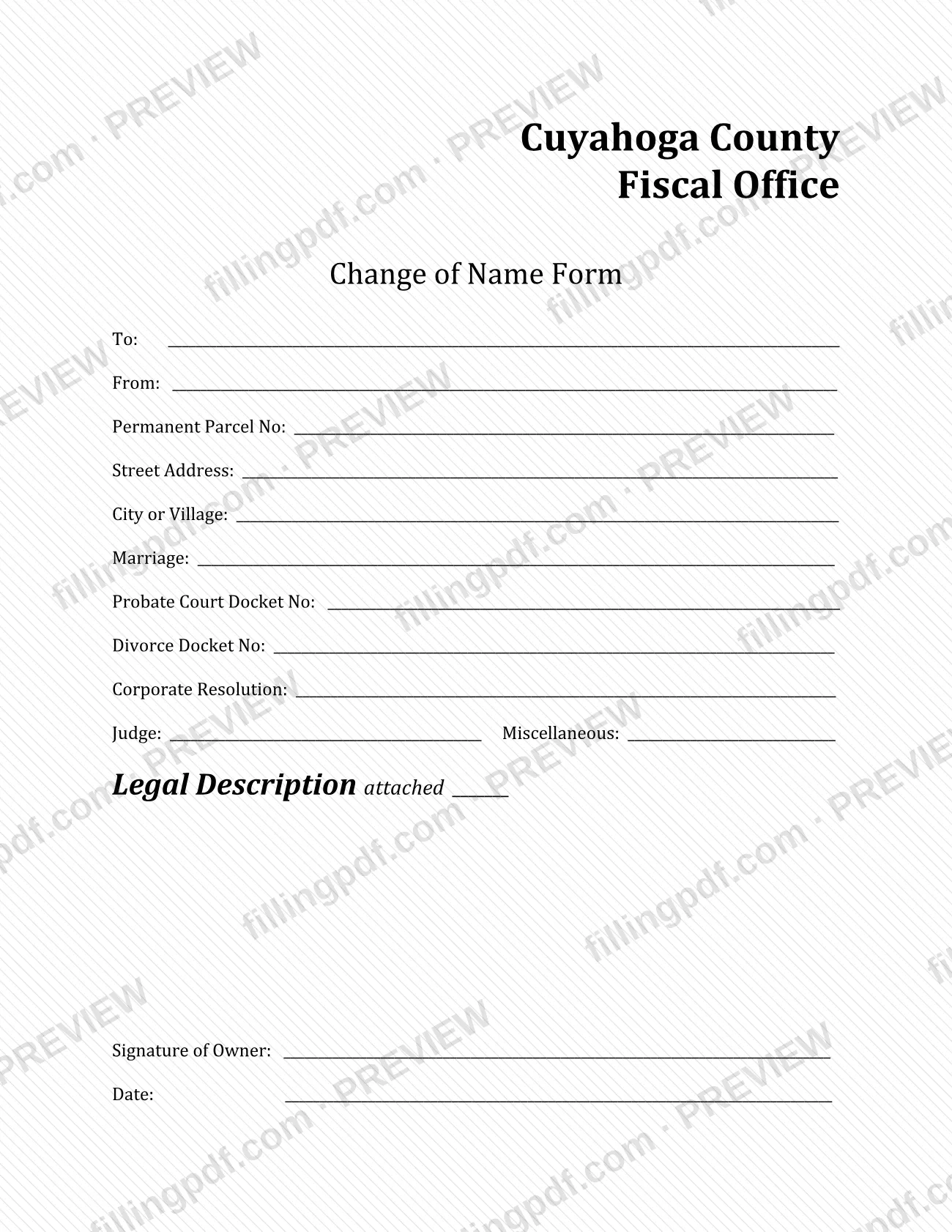
The Change of Name Form is issued by the Cuyahoga County Fiscal Office and appears among its Real Estate Services Forms, the page many people reach when they search for Cuyahoga County property tax paperwork. The form names a permanent parcel and the record behind the name change: a marriage, a probate or divorce docket, a corporate resolution or another document. The owner signs and dates it. On FillingPDF you can fill out the form online and download or print the completed PDF; the original is published by the Fiscal Office.
Last updated
What is Change of Name Form – Cuyahoga County, OH?
The Change of Name Form is the Cuyahoga County Fiscal Office form on which an owner identifies a permanent parcel and the record that supports a name change, such as a marriage, a probate or divorce docket number, or a corporate resolution.
The form is headed "Cuyahoga County Fiscal Office" and carries no form number or revision date. It asks for a To and a From line, the Permanent Parcel No, the street address, and the city or village. It then gives one line for each kind of supporting record: Marriage, Probate Court Docket No, Divorce Docket No, Corporate Resolution, the Judge, and a Miscellaneous line for anything else. A Legal Description attached line and a Signature of Owner with a date close the form.
The Fiscal Officer lists the form on its Real Estate Services Forms page, under Transfer and Recording. That page notes that these documents must be prepared in accordance with ORC 317.114, Standard format of instruments to be recorded. Other documents on the same page are separate: the Affidavit for Insertion of Initials on Property Duplicate and Tax List, the Transfer on Death Designation Affidavit and the Residential Rental Property Disclosure Form.
Who needs to file Change of Name Form – Cuyahoga County, OH?
The form is meant for owners of property in Cuyahoga County whose name has changed for a reason the form lists: a marriage, a probate matter, a divorce, a corporate resolution, or another reason entered on the Miscellaneous line. The form carries a Signature of Owner line, so the owner is the person who signs it.
It is identified by a Permanent Parcel Number, so you need to know the parcel the name change applies to, along with its street address and city or village.
The form does not describe who may sign for an owner, such as a representative of a business or an estate. If you are not the individual owner, ask the Cuyahoga County Fiscal Office who may sign before you submit.
Do not use this form for the Affidavit for Insertion of Initials on Property Duplicate and Tax List. The Fiscal Officer lists that affidavit as a separate document, for peace officers, prosecuting attorneys, assistant prosecuting attorneys, correctional employees, firefighters, parole officers, youth service employees and EMTs.
When to file Change of Name Form – Cuyahoga County, OH
Complete the form when an owner's name on a parcel has changed because of a marriage, a probate matter, a divorce, a corporate resolution or another event you can describe on the Miscellaneous line. No due date is printed on it. The owner dates it when signing, so have the supporting docket numbers or resolution details ready before you start. The Fiscal Officer's page adds that documents of this kind must be prepared in accordance with ORC 317.114, Standard format of instruments to be recorded.
Documents you need
- Legal description of the property: the form has a Legal Description attached line, so mark it and attach the legal description when you submit the form.
How to fill out Change of Name Form – Cuyahoga County, OH
Complete the To and From lines
At the top, fill in the To and From lines. The form prints no further label for them, so use the names exactly as your supporting record shows them.
Enter the permanent parcel number
Write the Permanent Parcel No of the property whose owner name is changing.
Enter the property location
Fill in the Street Address and the City or Village of the property.
Identify the marriage or court record
Use Marriage for a marriage, Probate Court Docket No for a probate case and Divorce Docket No for a divorce. Enter the Judge where it applies.
Add a resolution or other basis
For a business change, enter the details on the Corporate Resolution line. Use Miscellaneous only for a basis that does not fit another line.
Mark the legal description line
On the Legal Description attached line, mark that the legal description of the property is attached.
Sign and date as owner
The owner signs the Signature of Owner line and enters the Date.
Review and download the PDF
Check the parcel number, address and docket numbers against your records. Download or print the completed PDF from FillingPDF and submit it following the Fiscal Office's channels described under How to submit.
How to submit Change of Name Form – Cuyahoga County, OH
The form prints no mailing address, portal or delivery instruction, so the channel is not stated on the document itself. The Cuyahoga County Fiscal Officer publishes it on its Real Estate Services Forms page, under the Transfer and Recording department: https://cuyahogacounty.gov/fiscal-officer/departments/transfer-and-recording/real-estate-services-forms. The same page links Transfer and Recording Procedures and Transfer and Conveyance Standards, which are the places to check for how and where to deliver documents. Prepare the document in accordance with ORC 317.114, as that page requires. FillingPDF lets you fill out and download the PDF; submission follows the Fiscal Office's channels.
Common mistakes to avoid
- Leaving the Signature of Owner line or the Date line blank; the form closes with both.
- Leaving Permanent Parcel No blank or entering the wrong parcel, since the parcel number is what identifies the property.
- Skipping the Legal Description attached line instead of marking it and attaching the legal description.
- Putting a divorce case number on the Probate Court Docket No line, or the reverse; each kind of record has its own line.
- Using the Miscellaneous line for a marriage, divorce, probate or corporate change that already has its own line.
- Preparing the document without following ORC 317.114, Standard format of instruments to be recorded, which the Fiscal Officer's page requires.
- Using this form when you need the Affidavit for Insertion of Initials on Property Duplicate and Tax List, which is a separate Fiscal Officer document.
Frequently asked questions
What is the Cuyahoga County Change of Name Form?
It is a Cuyahoga County Fiscal Office form that identifies a permanent parcel and the record behind an owner's name change: a marriage, a probate or divorce docket, a corporate resolution or another document. The owner signs and dates it.
What information do I need to fill out the Change of Name Form?
Have the Permanent Parcel No, the street address, the city or village, and the reference for your supporting record: marriage details, a probate or divorce docket number, a corporate resolution, or a Miscellaneous entry. You also need the legal description and the owner's signature.
Who signs the Change of Name Form?
The form has a Signature of Owner line with a date, so the owner signs it. It does not say who may sign for an owner, so ask the Cuyahoga County Fiscal Office before someone else signs on an owner's behalf.
Do I have to attach a legal description?
The form has a Legal Description attached line, which tells you to attach the legal description of the property and mark that line. Check the Fiscal Officer's Transfer and Recording pages for what else a recorded document needs.
What is ORC 317.114 and does it apply to this form?
ORC 317.114 is Standard format of instruments to be recorded. The Fiscal Officer's Real Estate Services Forms page says its documents, including the Change of Name Form, must be prepared in accordance with it.
Is this the same as the Affidavit for Insertion of Initials?
No. The Affidavit for Insertion of Initials on Property Duplicate and Tax List is a separate document on the same Fiscal Officer page, for peace officers, firefighters, EMTs and other listed groups. The Change of Name Form records a name change.
Can I fill out the Change of Name Form online on FillingPDF?
Yes. You can fill out the PDF online on FillingPDF and download or print it. FillingPDF is independent of Cuyahoga County and does not submit the form; you deliver it through the Fiscal Office's channels.
Ready to fill out Change of Name Form – Cuyahoga County, OH?
Fill out Change of Name Form – Cuyahoga County, OH now