
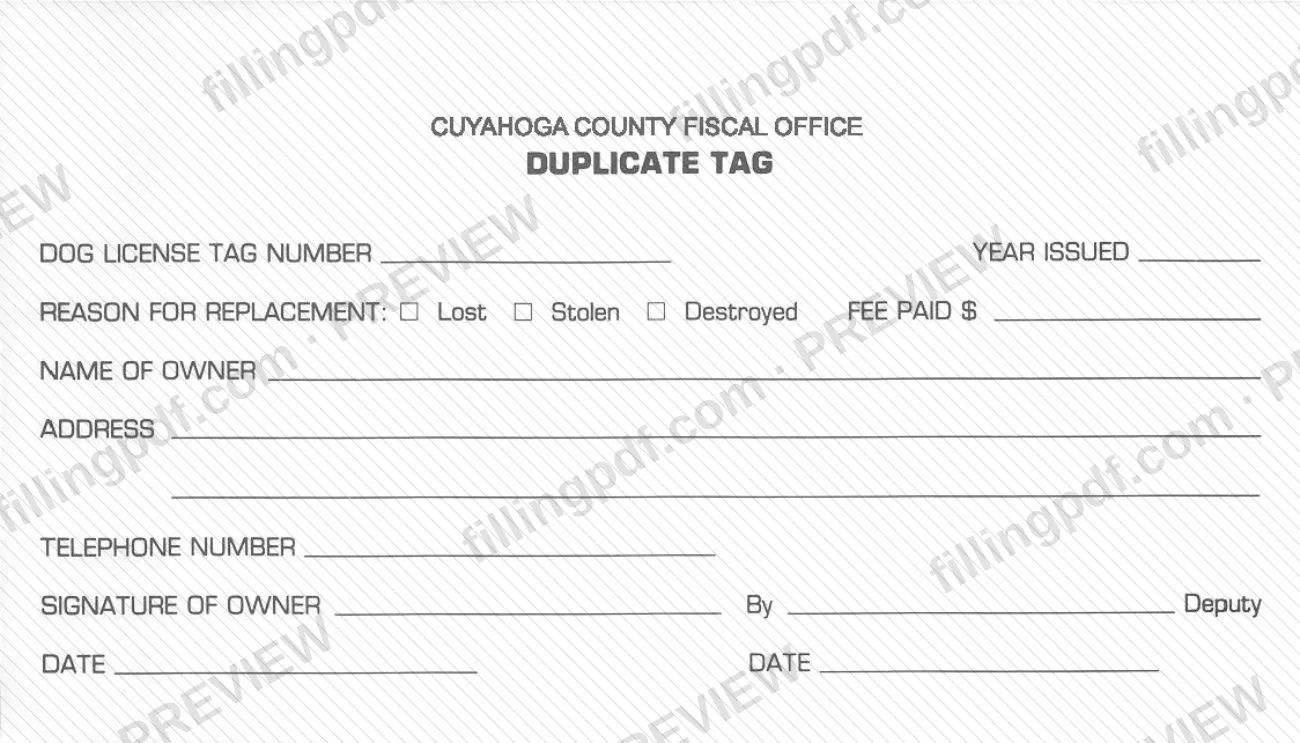
The Dog License Duplicate Tag is the form the Cuyahoga County Fiscal Office uses to replace a dog license tag that was lost, stolen or destroyed. It is one of the Cuyahoga County dog license forms, and it asks for the number and year of the original tag, the reason for replacement, the fee paid and the owner's contact details. You can fill out the form online on FillingPDF and download or print the completed PDF; the official PDF is published by the Cuyahoga County Fiscal Officer at the address linked on this page.
Last updated
What is Dog License Duplicate Tag – Cuyahoga County, OH?
The Dog License Duplicate Tag is a one-page Cuyahoga County Fiscal Office form that a dog owner completes to request a replacement for a dog license tag that was lost, stolen or destroyed.
The form identifies the tag being replaced by its Dog License Tag Number and Year Issued. It then records the reason for replacement (Lost, Stolen or Destroyed), a Fee Paid line, and the owner's name, address, telephone number, signature and date. A separate line reading By ... Deputy, with its own date, appears beside the owner's signature.
The tag number matters because of how the county uses it. The Fiscal Officer's dog license page explains that when a license is attached to a dog's collar, the assigned license number is all the office needs to identify the owner, which is why the page calls a license a lost dog's ticket home.
This form is not an application for a new dog license or a renewal. The Fiscal Officer's page lists the ways to obtain a license: online, at one of its neighborhood locations, or by downloading the application and mailing it to the Cuyahoga County Animal Shelter. The duplicate tag form is the document for replacing a tag on a license that was already issued.
Who needs to file Dog License Duplicate Tag – Cuyahoga County, OH?
Owners of a dog that already has a Cuyahoga County dog license, and whose license tag has been lost, stolen or destroyed, use this form to ask for a replacement tag. The owner signs the form, and the form asks for the owner's name, address and telephone number.
You will need the Dog License Tag Number and the Year Issued of the tag you are replacing, so look for them on your license records before you start.
Do not use this form to buy a first license or to renew one. The Fiscal Officer's dog license page describes separate options for that: purchasing online, visiting a neighborhood location, or mailing the downloadable application. The form does not describe any representative or alternate signer, so if someone other than the owner will handle the request, ask the Fiscal Officer's office first.
When to file Dog License Duplicate Tag – Cuyahoga County, OH
Use the form when the tag on your dog's license has been lost, stolen or destroyed. The form prints no due date of its own, and it offers only those three reasons for replacement.
For context, the Fiscal Officer's dog license page explains that the license number on the collar tag is what lets the office identify a dog's owner, so a missing tag is worth replacing promptly. The same page says dog licenses can be purchased year round and that Ohio law requires owners to renew each year between December 1st and January 31st; those rules concern the license itself, not this form.
How to fill out Dog License Duplicate Tag – Cuyahoga County, OH
Enter the dog license tag number
At the top, write the number from the original tag in Dog License Tag Number. This number is what the county uses to identify the dog's owner.
Enter the year issued
In Year Issued, write the year printed or recorded for the tag you are replacing.
Check the reason for replacement
Under Reason for Replacement, mark the box that applies: Lost, Stolen or Destroyed.
Record the fee paid
Enter the amount in Fee Paid only after you have confirmed it with the Cuyahoga County Fiscal Officer; the form does not print an amount.
Enter the owner's name
In Name of Owner, write the full name of the person who holds the dog license.
Enter address and telephone number
Write the owner's mailing address in Address and a contact number in Telephone Number.
Sign and date as owner
The owner signs Signature of Owner and enters the Date beside it.
Leave the deputy line for the office
The form has a By ... Deputy line with its own date. It does not say who completes it, so ask the Fiscal Officer's office if you are unsure.
Review and download the completed PDF
Check that the tag number, year and reason are correct, then download or print the completed PDF from FillingPDF and deliver it as the Fiscal Officer's office directs.
How to submit Dog License Duplicate Tag – Cuyahoga County, OH
The duplicate tag form itself prints no mailing address, portal or office hours, so confirm the delivery method with the Cuyahoga County Fiscal Officer before sending it. Dog owners with questions can call the office at 216-443-3192.
For reference, the Fiscal Officer's dog license page gives this address for mailed license applications: Cuyahoga County Animal Shelter, 9500 Sweet Valley Drive, Valley View, Ohio 44125. That page says to send a check or money order and "NO cash please!" for those applications. It does not say that the duplicate tag form follows the same route, so ask the office whether it does.
The form has a Fee Paid line, so a fee is recorded with the request. The amount is not printed on the form; ask the Fiscal Officer's office for the current figure and the accepted payment method.
FillingPDF lets you fill out and download the PDF; submission follows the channels the agency confirms.
Common mistakes to avoid
- Leaving the Dog License Tag Number or Year Issued blank; the form identifies the tag being replaced by these two entries.
- Marking more than one reason, or none, in the Reason for Replacement line; the form offers Lost, Stolen or Destroyed.
- Leaving the Fee Paid line empty or guessing the amount; the amount is not printed on the form, so confirm it with the Fiscal Officer's office.
- Submitting the form without the owner's signature and date.
- Filling in the By ... Deputy line yourself without checking who completes it; the form does not say, so ask the office.
- Using this form to buy or renew a dog license; the Fiscal Officer lists online, neighborhood-location and mail options for licenses.
- Mailing cash; the Fiscal Officer's dog license page says no cash for mailed license applications.
Frequently asked questions
What is the Cuyahoga County dog license duplicate tag form?
It is a one-page Cuyahoga County Fiscal Office form used to replace a dog license tag that was lost, stolen or destroyed. It asks for the original tag number and year issued, the reason, the fee paid, and the owner's name, address, telephone number and signature.
What information do I need to request a duplicate dog tag?
You need the Dog License Tag Number and Year Issued of the tag being replaced, plus your name, address and telephone number. The form also asks you to mark Lost, Stolen or Destroyed and to sign and date it as the owner.
Can I fill out the dog license duplicate tag online?
Yes, you can fill out the PDF online on FillingPDF and download or print it. FillingPDF is independent of Cuyahoga County and does not send the form to the Fiscal Officer; you deliver it through the channel the office confirms.
Is there a fee for a duplicate dog license tag in Cuyahoga County?
The form has a Fee Paid line, so a fee is recorded with the request. The amount is not printed on the form. Ask the Cuyahoga County Fiscal Officer's office at 216-443-3192 for the current amount and how it is paid.
Where do I send the duplicate tag form?
The form prints no address. The Fiscal Officer's dog license page gives the Cuyahoga County Animal Shelter, 9500 Sweet Valley Drive, Valley View, Ohio 44125, for mailed license applications. Call 216-443-3192 to confirm that duplicate tag requests go there too.
Do I use this form to renew my dog license?
No. This form only replaces a tag. The Fiscal Officer's page says licenses can be bought online, at neighborhood locations or by mailing the downloadable application, and that Ohio law requires yearly renewal between December 1st and January 31st.
Who signs the duplicate dog tag form?
The owner signs in the Signature of Owner line and adds the date. The form also has a separate By ... Deputy line with its own date; it does not say who fills that in, so ask the Fiscal Officer's office if you are unsure.
Ready to fill out Dog License Duplicate Tag – Cuyahoga County, OH?
Fill out Dog License Duplicate Tag – Cuyahoga County, OH now