
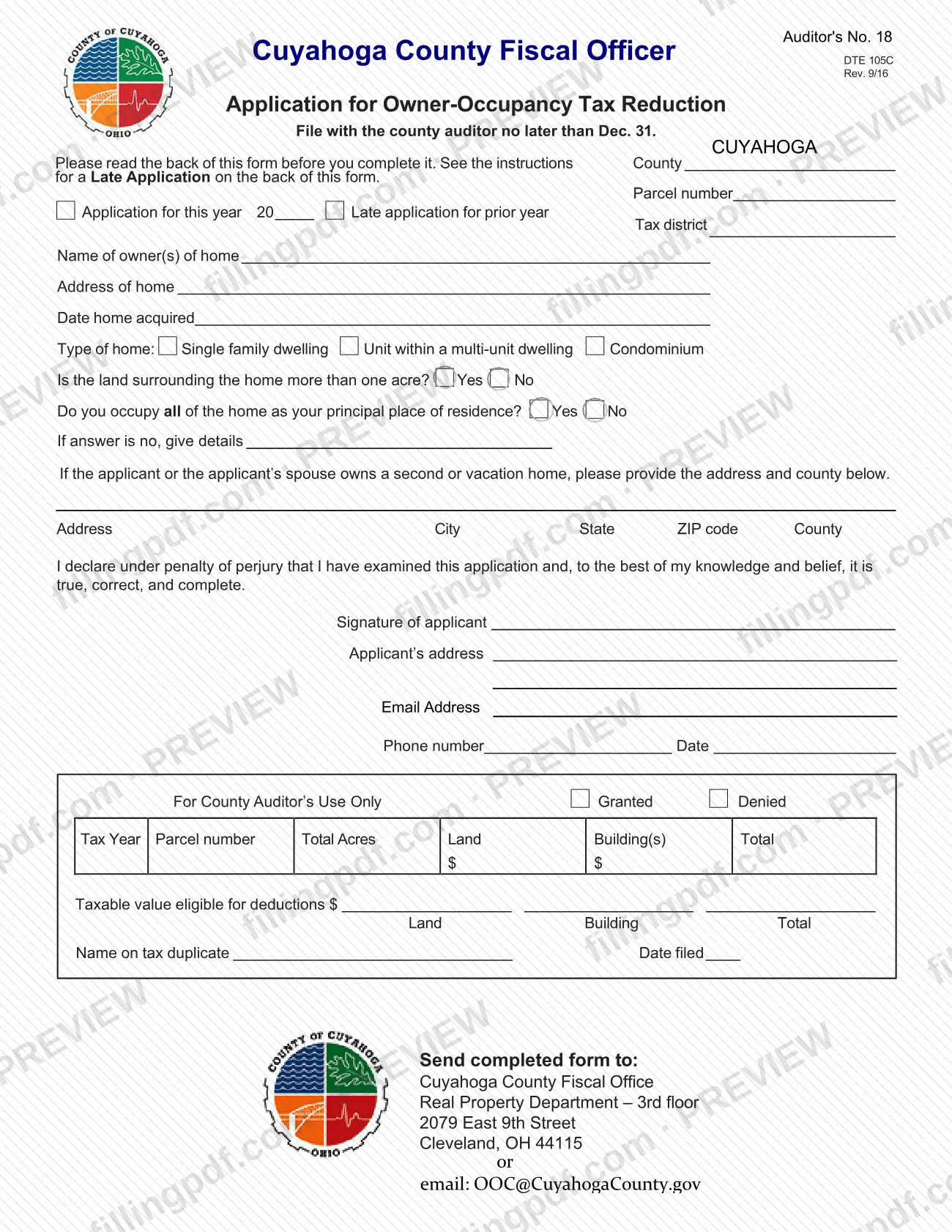
Form DTE 105C, the Owner Occupancy Credit Application, is the form the Cuyahoga County Fiscal Officer uses to apply for the owner-occupancy tax reduction on a home that you own and occupy as your principal place of residence. It is one of the Cuyahoga County property tax forms, and it is also used to file a late application for the prior year. On this page you can fill out the form online on FillingPDF and download or print the completed PDF; the Fiscal Office publishes the official form and receives the application at the address or email listed under How to submit.
Last updated
What is DTE 105C?
Form DTE 105C, Owner Occupancy Credit Application, printed on the form as "Application for Owner-Occupancy Tax Reduction," is the Cuyahoga County Fiscal Officer form a homeowner files with the county auditor to claim the owner-occupancy credit on the home that is their principal place of residence.
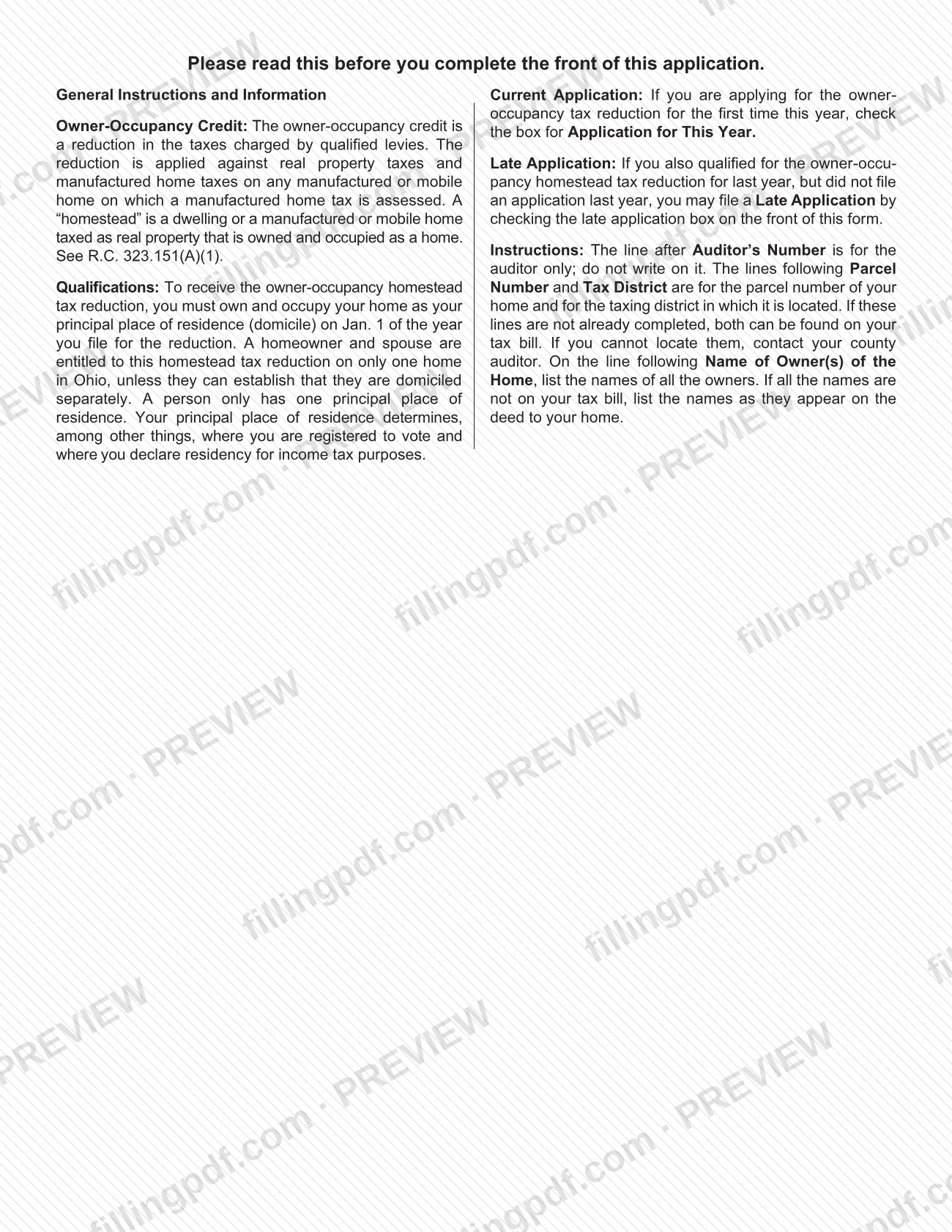
The form's instructions describe the credit as a reduction in the taxes charged by qualified levies. It is applied against real property taxes and against manufactured home taxes on a manufactured or mobile home on which a manufactured home tax is assessed. The instructions define a "homestead" as a dwelling, or a manufactured or mobile home taxed as real property, that is owned and occupied as a home, and cite R.C. 323.151(A)(1).
The application identifies the parcel and tax district, the owners, the address and acquisition date of the home, the type of home (single family dwelling, unit within a multi-unit dwelling, or condominium), whether the surrounding land is more than one acre, and whether you occupy all of the home. It also asks for the address of any second or vacation home, and it closes with a declaration under penalty of perjury and a block for the county auditor's use only.
The same form serves two cases: an application for the current year, and a late application for the prior year. It is not the request to remove the credit: the Fiscal Office's page says that owners who need to remove the credit to apply for a new home use a separate Removal Request Form.
Who needs to file DTE 105C?
Homeowners in Cuyahoga County who own and occupy their home as their principal place of residence (domicile) on Jan. 1 of the year they file for the reduction use this form. A person has only one principal place of residence, which determines, among other things, where you are registered to vote and where you declare residency for income tax purposes.
Conditions the form and the Fiscal Office page attach:
- A homeowner and spouse are entitled to the reduction on only one home in Ohio, unless they can establish that they are domiciled separately. A married couple is presumed to share one residence.
- If you also qualified for the reduction last year but did not file an application, you may file a late application by checking the late application box.
- The form asks you to list all owners of the home and to give the address and county of any second or vacation home owned by you or your spouse.
- If you do not occupy all of the home, you answer No to the occupancy question and give details.
Buyers of a home that they purchased as their principal residence should note that, according to the Fiscal Office, the credit should already be in place for the next tax year from the time of conveyance.
When to file DTE 105C
File the application with the county auditor no later than Dec. 31, as printed at the top of the form. Eligibility is measured on Jan. 1: you must own and occupy the home as your principal place of residence on Jan. 1 of the year for which you apply.
If you qualified for the reduction last year but did not file, you may submit a late application for the prior year by checking the late application box instead of the box for the current year. The instructions give no separate deadline for it.
The Fiscal Office page gives an example of timing: if you took ownership of your home during 2022, your first eligibility for the credit is the 2023 tax year. For a home bought as your principal residence, the page says the credit should already be in place for the next tax year from the time of conveyance. Neither the form nor the page states a processing time.
How to fill out DTE 105C
Enter parcel number and tax district
Write the parcel number of your home and the taxing district in which it is located, if the lines are not already completed. Both appear on your tax bill; if you cannot find them, contact the county auditor.
Choose current or late application
Check the box for Application for this year and enter the year after 20 if you are applying for the first time this year. Check Late application for prior year if you qualified last year but did not file.
List the owners and home address
On the Name of owner(s) of home line, list the names of all owners. If all names are not on your tax bill, use the names as they appear on the deed. Then enter the Address of home.
Enter acquisition date and home type
Enter the Date home acquired. Check one type of home: Single family dwelling, Unit within a multi-unit dwelling, or Condominium.
Answer the acreage question
Check Yes or No to whether the land surrounding the home is more than one acre.
Answer the occupancy question
Check Yes or No to whether you occupy all of the home as your principal place of residence. If you answer No, give the details on the line provided.
Report any second or vacation home
If you or your spouse owns a second or vacation home, enter its address, city, state, ZIP code and county in the spaces provided.
Sign, date and add contact details
Sign the declaration under penalty of perjury, then enter your address, email address, phone number and the date.
Leave the auditor's block blank
Do not write in the For County Auditor's Use Only section or on the line after Auditor's Number; the county completes them.
Review and download the completed PDF
Check the parcel number, owner names, the Jan. 1 residency and your answers, then download or print the completed PDF from FillingPDF and send it as described under How to submit.
How to submit DTE 105C
Send the completed form to the Cuyahoga County Fiscal Office by mail to the address printed on the form, or by email.
- Address: Cuyahoga County Fiscal Office, Real Property Department – 3rd floor, 2079 East 9th Street, Cleveland, OH 44115.
- Email: [email protected]
The application is to be filed with the county auditor no later than Dec. 31. For questions, the Fiscal Office lists 216-443-7420, Option 5, and the same email address. The form and the Fiscal Office page name no other channel and no filing fee. FillingPDF lets you fill out and download the PDF; submission follows the channels above.
Common mistakes to avoid
- Writing on the line after Auditor's Number; the instructions say it is for the auditor only.
- Filing after Dec. 31, the date printed at the top of the form, instead of checking the late application box for a prior year you qualified for.
- Applying for a home you did not own and occupy as your principal place of residence on Jan. 1 of the year you file.
- Claiming the reduction on a second home in Ohio; a homeowner and spouse are entitled to it on only one home unless they are domiciled separately.
- Leaving out the address and county of a second or vacation home owned by you or your spouse.
- Listing only the names printed on the tax bill when they differ from the deed; the instructions say to use the names as they appear on the deed if all are not on the bill.
- Answering No to the occupancy question without giving details on the line provided.
- Submitting the form without reading the instructions on the back, which explain the late application and the parcel number and tax district lines.
Frequently asked questions
What is the Owner Occupancy Credit Application?
It is Form DTE 105C, the Cuyahoga County Fiscal Officer application for the owner-occupancy tax reduction. The credit reduces the taxes charged by qualified levies on the home you own and occupy as your principal place of residence.
What is the deadline for the Cuyahoga County owner occupancy credit?
The form says to file with the county auditor no later than Dec. 31. You must have owned and occupied the home as your principal place of residence on Jan. 1 of the year for which you file.
Can I get the owner occupancy credit on two homes?
Not generally. A homeowner and spouse are entitled to the reduction on only one home in Ohio, unless they can establish that they are domiciled separately. The form asks for the address and county of any second or vacation home.
What if I missed filing last year?
If you also qualified last year but did not file, you may file a late application by checking the late application box for the prior year on the front of the form. The instructions set no separate deadline for it.
Where do I send the owner occupancy credit application?
Send it to Cuyahoga County Fiscal Office, Real Property Department – 3rd floor, 2079 East 9th Street, Cleveland, OH 44115, or email it to [email protected]. For questions, call 216-443-7420, Option 5.
Do I need to apply if I just bought my home?
Possibly not. The Fiscal Office says that if you purchased the home as your principal residence, the credit should already be in place for the next tax year from the time of conveyance. Contact the Fiscal Office if you have questions.
How do I remove the credit when I move?
Use the Removal Request Form, not this application. Include your parcel number or address and a short notice asking for removal; the Fiscal Office says you will receive the form letter needed to apply for your new homestead.
Can I fill out Form DTE 105C online on FillingPDF?
Yes. You can fill out the PDF online on FillingPDF and download or print it. FillingPDF is an independent service and does not file the application; you send it to the Fiscal Office by the channels described under How to submit.
Ready to fill out DTE 105C?
Fill out DTE 105C now