
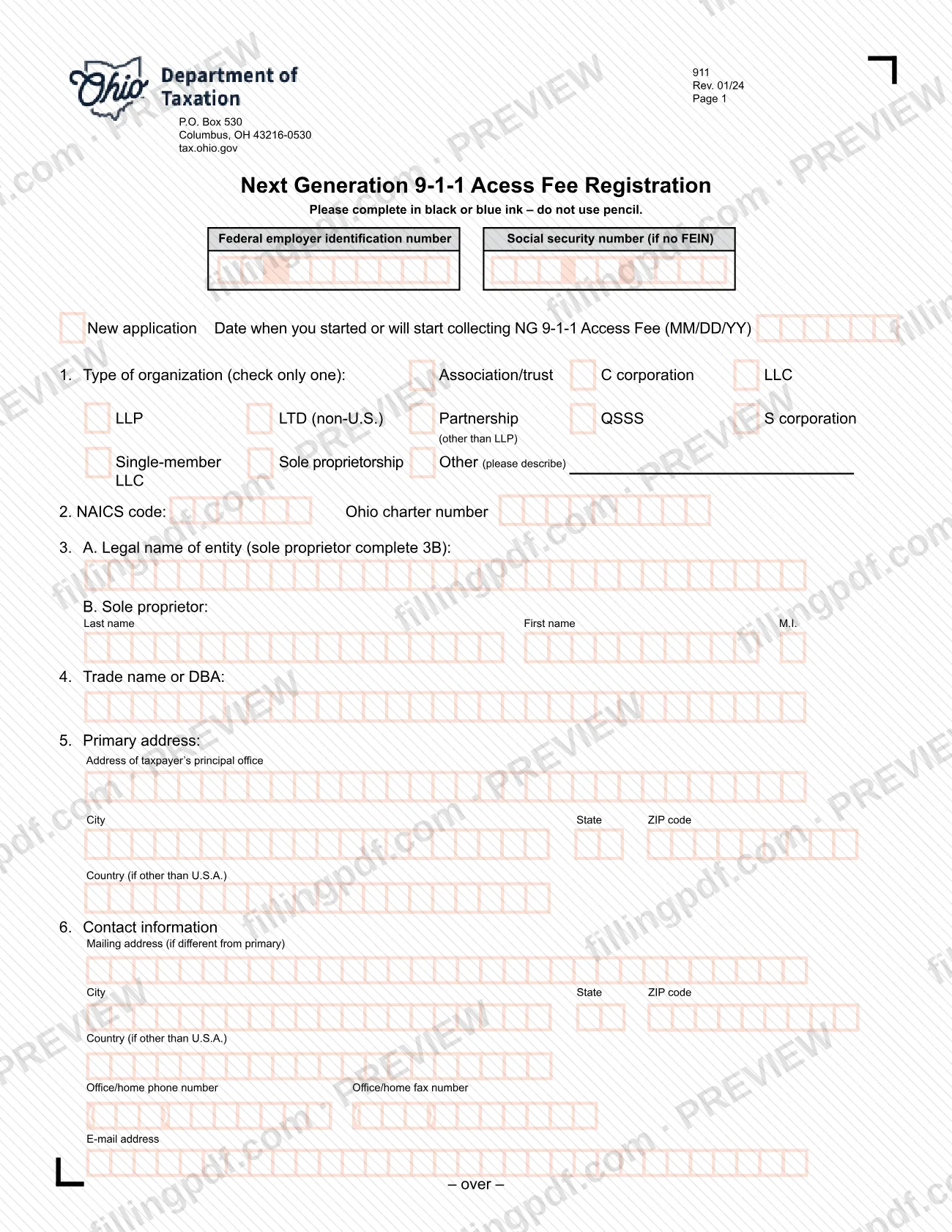
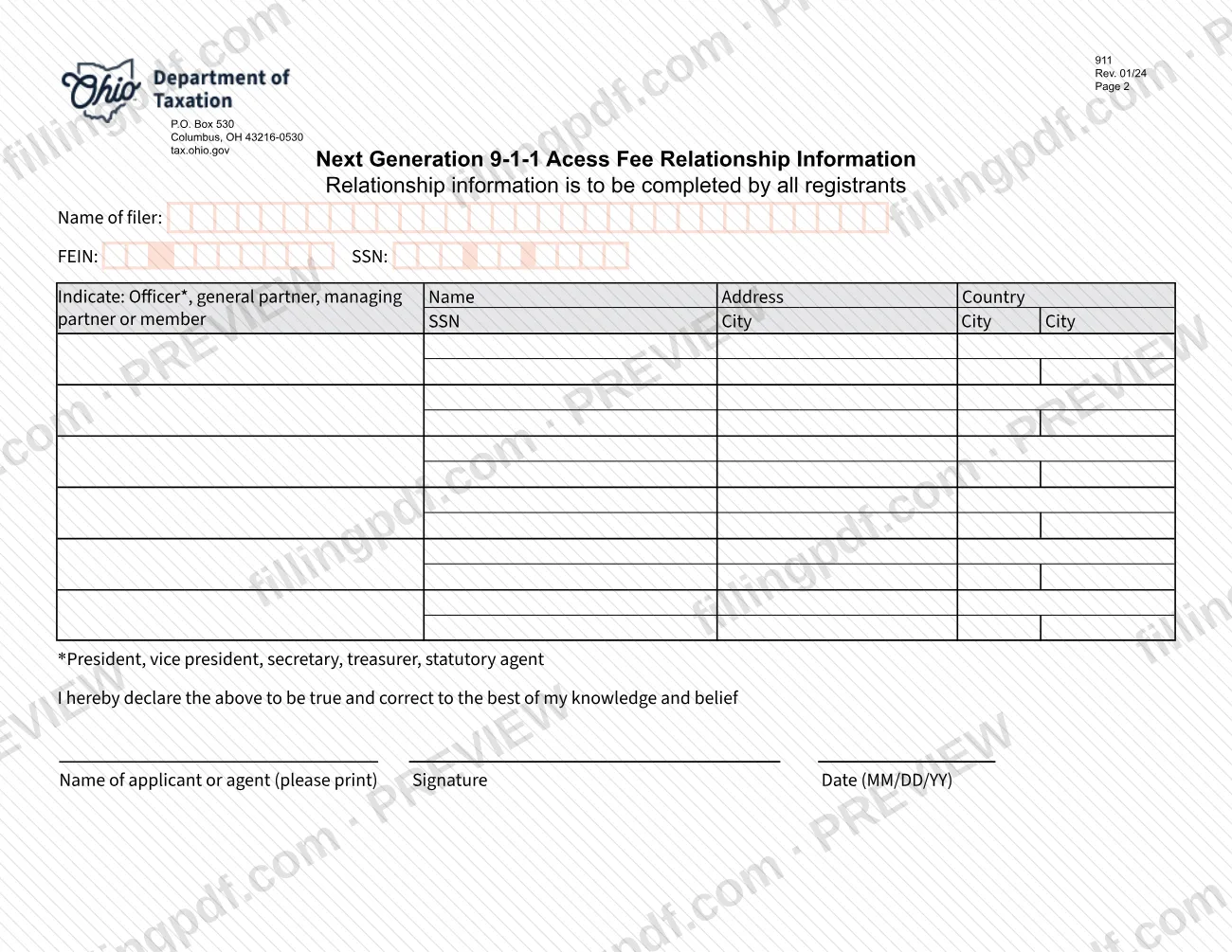
The 911 App, formally the Next Generation 911 Access Fee Registration, is the Ohio Department of Taxation form (Rev. 01/24) that a taxpayer completes when it has started or will start collecting the NG 9-1-1 Access Fee. It asks for the type of organization, NAICS code, legal name, addresses and contact details, and page 2 collects relationship information about officers, partners or members. On this page you can fill out the form online on FillingPDF and download or print the completed PDF; the official PDF is published by the Ohio Department of Taxation at tax.ohio.gov.
Last updated
What is 911?
The Next Generation 911 Access Fee Registration is the Ohio Department of Taxation form on which a taxpayer registers, with the date it started or will start collecting the NG 9-1-1 Access Fee and relationship information about its officers, partners or members.
The form is numbered 911 and carries the revision date Rev. 01/24. It prints its title with hyphens, as Next Generation 9-1-1 Access Fee Registration, and NG in the text stands for Next Generation. The Ohio Department of Taxation is the issuing agency; its P.O. Box and website, tax.ohio.gov, appear in the header of both pages.
It has two pages:
- Page 1, registration: a New application box with the date collection starts (MM/DD/YY), the federal employer identification number (FEIN) or, if there is no FEIN, a Social Security number, the type of organization, NAICS code and Ohio charter number, the legal name, any trade name or DBA, the primary address and contact information.
- Page 2, Relationship Information: completed by all registrants. It names the filer and lists each officer, general partner, managing partner or member with name, Social Security number and address, followed by a signed declaration that the information is true and correct to the best of the signer's knowledge and belief.
The form is a registration only. It does not report or pay the fee, and it prints no fee amount.
Who needs to file 911?
The form is for taxpayers that have started, or will start, collecting the NG 9-1-1 Access Fee in Ohio: the form asks for the date you started or will start collecting. The form does not itself say which businesses must collect the fee, so confirm that with the Ohio Department of Taxation.
Groups the form addresses:
- Entities. Page 1 lists these types of organization, of which you check only one: Association/trust, C corporation, LLC, LLP, LTD (non-U.S.), Partnership (other than LLP), QSSS, S corporation, Single-member LLC, Sole proprietorship, or Other (with a description).
- Sole proprietors. Give your name on line 3B (last name, first name, M.I.) and use your Social Security number if you have no FEIN.
- All registrants. Page 2, Relationship Information, is completed by every registrant, listing each officer, general partner, managing partner or member. The form's footnote defines officers as the president, vice president, secretary, treasurer or statutory agent.
- Agents. The signature block asks for the name of the applicant or agent, so an agent may sign for the applicant.
Entities with a principal office outside the United States give the country in the space provided.
When to file 911
The triggering event is the start of collecting the NG 9-1-1 Access Fee. The form asks for the date when you started or will start collecting, entered as MM/DD/YY, and it has a New application box for a first registration. This means you can complete it before collection begins as well as after.
No due date is printed on the form, and it names no renewal cycle or validity period. For any deadline that applies to your situation, ask the Ohio Department of Taxation; the form's header gives its P.O. Box 530, Columbus, OH 43216-0530 address and the website tax.ohio.gov, and the department publishes its forms at tax.ohio.gov/forms.
How to fill out 911
Enter your FEIN or Social Security number
At the top of page 1, enter the federal employer identification number. Enter a Social security number only if you have no FEIN.
Mark New application and the start date
Check New application and enter in MM/DD/YY format the date when you started or will start collecting the NG 9-1-1 Access Fee.
Select the type of organization
On line 1, check only one box: Association/trust, C corporation, LLC, LLP, LTD (non-U.S.), Partnership (other than LLP), QSSS, S corporation, Single-member LLC, or Sole proprietorship. If none fits, check Other and describe it.
Add the NAICS code and charter number
On line 2, enter the NAICS code and the Ohio charter number. The department's forms page points to the U.S. Census Bureau website for NAICS codes.
Enter the legal name
On line 3A, enter the legal name of the entity. A sole proprietor completes line 3B instead, with last name, first name and M.I.
Enter any trade name or DBA
On line 4, enter the trade name or DBA the business uses.
Enter the primary address
On line 5, enter the address of the taxpayer's principal office with city, state and ZIP code. Add the country only if it is other than U.S.A.
Complete the contact information
On line 6, give a mailing address only if it differs from the primary address, then the office or home phone number, fax number and e-mail address.
Fill in the relationship information
On page 2, enter the name of the filer with its FEIN or SSN. List each officer, general partner, managing partner or member with name, SSN, address, city and country; officers are the president, vice president, secretary, treasurer or statutory agent.
Print, sign and date the declaration
At the bottom of page 2, print the name of the applicant or agent, sign and enter the date in MM/DD/YY format. The signature declares the information true and correct to the best of the signer's knowledge and belief.
Review and download the completed PDF
Check that both pages are complete and that only one organization type is marked. Download or print the completed PDF from FillingPDF and sign it in black or blue ink if you print it.
How to submit 911
The form prints no submission instructions of its own, so confirm the current filing channel with the Ohio Department of Taxation before you send it. What the form does show, in the header of both pages, is the department's address, P.O. Box 530, Columbus, OH 43216-0530, and its website, tax.ohio.gov. The department's forms page is https://tax.ohio.gov/forms.
Before you send the package:
- Complete both pages. Page 2, Relationship Information, is completed by all registrants.
- If you complete a printed copy, use black or blue ink and no pencil.
- Have the applicant or agent print a name, sign and date the declaration on page 2 (MM/DD/YY).
The form lists no attachments, no fee amount and no payment method. FillingPDF lets you fill out and download the PDF; submission follows the Ohio Department of Taxation's channels.
Common mistakes to avoid
- Completing the form in pencil; the form says to use black or blue ink and not to use pencil.
- Checking more than one type of organization on line 1; the form says to check only one.
- Leaving line 3B blank when the registrant is a sole proprietor; the form tells sole proprietors to complete 3B with last name, first name and M.I.
- Entering a Social Security number in place of a FEIN when the registrant has a FEIN; the form asks for the SSN only if there is no FEIN.
- Skipping page 2; Relationship Information is to be completed by all registrants.
- Writing the start date in another format; the form asks for MM/DD/YY for the date collecting began or will begin and for the signature date.
- Submitting the declaration unsigned, or without the printed name of the applicant or agent.
- Filling in the mailing address when it is the same as the primary address; the form asks for it only if it is different.
Frequently asked questions
What is the 911 App registration form in Ohio?
The 911 App is the Ohio Department of Taxation's Next Generation 911 Access Fee Registration, form 911 (Rev. 01/24). A taxpayer completes it to register, stating the date it started or will start collecting the NG 9-1-1 Access Fee and listing its officers, partners or members.
Can I fill out the Next Generation 911 Access Fee Registration online?
Yes. You can fill out the PDF online on FillingPDF and download or print it. FillingPDF is an independent service and does not file the form with the Ohio Department of Taxation; you submit it through the department's channels.
Do I enter a FEIN or a Social Security number?
Enter your federal employer identification number at the top of page 1. The form asks for a Social security number only if you have no FEIN, which is the usual case for a sole proprietor without one.
Who has to complete page 2, Relationship Information?
All registrants. Page 2 names the filer and lists each officer, general partner, managing partner or member with name, Social Security number and address. Officers are the president, vice president, secretary, treasurer or statutory agent.
What do I enter if I am a sole proprietor?
Check Sole proprietorship on line 1 and complete line 3B with your last name, first name and middle initial, as the form directs for line 3A. Use your Social Security number at the top of page 1 if you have no FEIN.
When do I have to submit the 911 registration form?
The form prints no due date. It asks for the date when you started or will start collecting the NG 9-1-1 Access Fee, so it is tied to beginning collection. Ask the Ohio Department of Taxation about any deadline that applies to you.
Where do I send the Next Generation 911 Access Fee Registration?
The form names no submission channel. Its header shows the Ohio Department of Taxation, P.O. Box 530, Columbus, OH 43216-0530, and tax.ohio.gov. Confirm the current filing method with the department before sending it.
Can I use pencil or a different date format?
No. The form says to complete it in black or blue ink and not to use pencil. Dates, including the collection start date and the signature date, are entered as MM/DD/YY.
Ready to fill out 911?
Fill out 911 now