
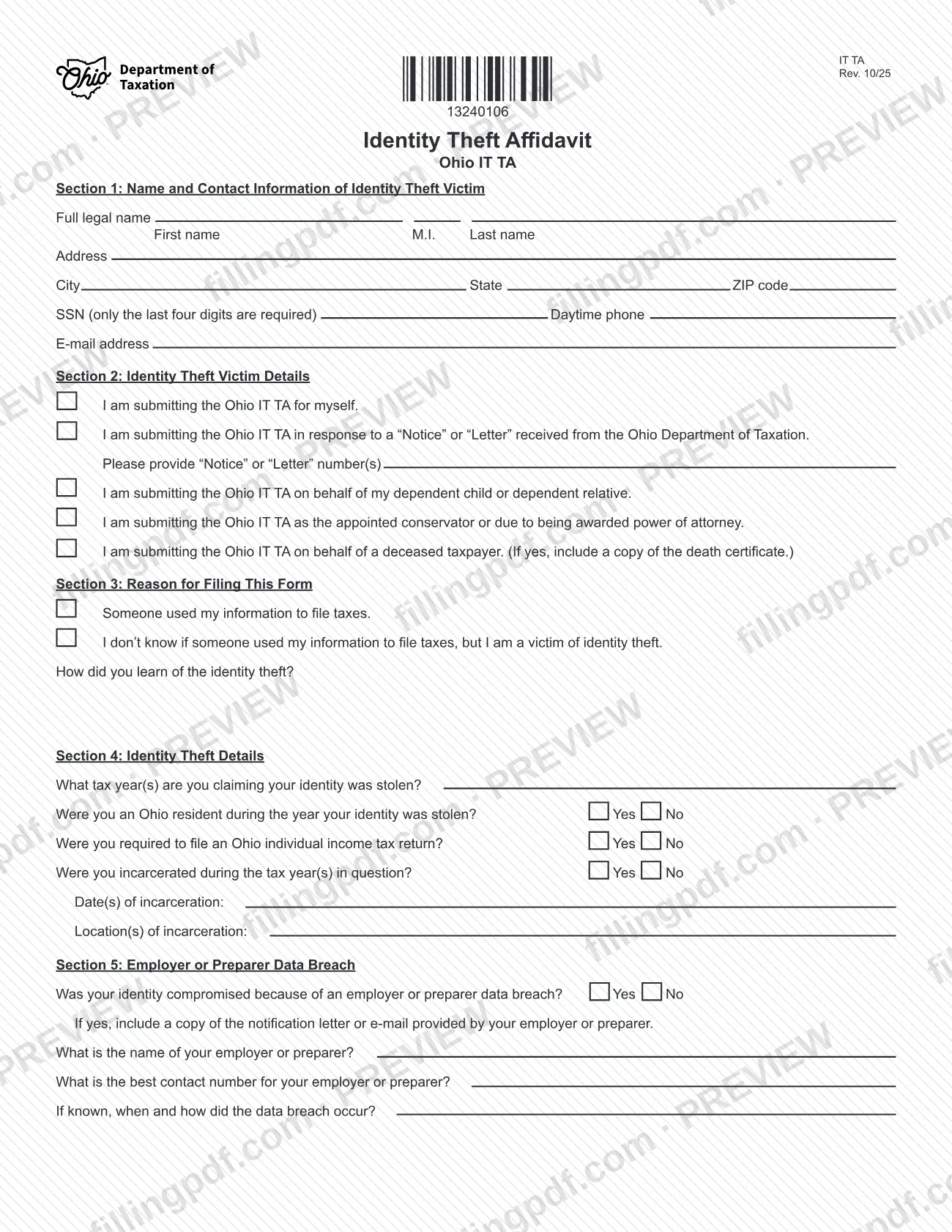
Ohio IT TA, Identity Theft Affidavit, is the form the Ohio Department of Taxation uses to collect a sworn report from a victim of tax-related identity theft. You can submit it for yourself, in response to a Department "Notice" or "Letter," or for a dependent, a person under your conservatorship or power of attorney, or a deceased taxpayer. On this page you can fill out the form online on FillingPDF and download or print the completed PDF; the Department publishes the original PDF at tax.ohio.gov, and it receives the affidavit only through the channels described below.
Last updated
What is IT TA?
Ohio IT TA, Identity Theft Affidavit is the Ohio Department of Taxation form that a victim of identity theft, or a person acting for the victim, uses to report the theft and give the Department the details it needs to review the claim.
The affidavit has seven sections:
- Section 1: name and contact information of the victim.
- Section 2: who is submitting it and why, including any Department "Notice" or "Letter" number.
- Section 3: whether someone used your information to file taxes, or you are a victim but do not know whether anyone filed, and how you learned of the theft.
- Section 4: the tax years involved, Ohio residency, whether you were required to file an Ohio individual income tax return, and any incarceration during those years.
- Section 5: whether an employer or preparer data breach exposed your information.
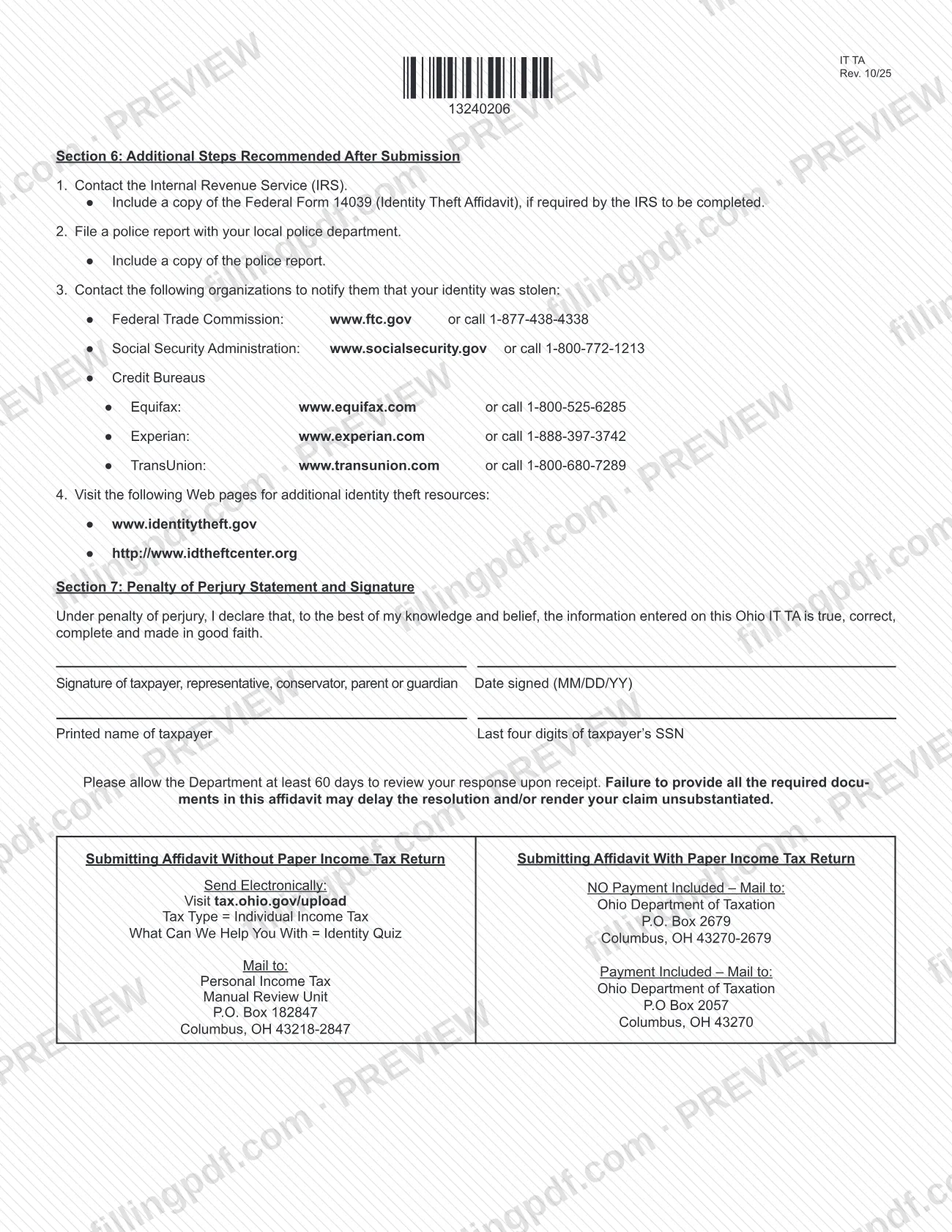
- Section 6: steps the Department recommends after you submit.
- Section 7: a penalty of perjury statement and signature.
The form is a statement made under penalty of perjury that the information is true, correct, complete and made in good faith. The Department asks you to allow at least 60 days to review your response after it receives it. The form refers to a separate federal document, Federal Form 14039 (Identity Theft Affidavit), which you include only if the IRS requires you to complete it. This page covers the Ohio form IT TA, Rev. 10/25.
Who needs to file IT TA?
The form is for a victim of identity theft who needs to report it to the Ohio Department of Taxation. Section 2 lists who may submit it:
- You, for yourself.
- You, in response to a "Notice" or "Letter" received from the Department; enter the notice or letter number(s).
- A person submitting on behalf of a dependent child or dependent relative.
- An appointed conservator, or a person awarded power of attorney.
- A person submitting on behalf of a deceased taxpayer, who must include a copy of the death certificate.
Section 3 covers two situations: someone used your information to file taxes, or you do not know whether anyone did but you are a victim of identity theft.
The signature line accepts the taxpayer, representative, conservator, parent or guardian. The form also asks for the printed name of the taxpayer and the last four digits of the taxpayer's SSN. The form lists no other eligibility rules or exclusions.
When to file IT TA
Submit the affidavit once you learn that you are a victim of identity theft affecting your Ohio taxes, or when you receive a "Notice" or "Letter" from the Ohio Department of Taxation that you are answering. The form prints no separate due date. It does ask for the tax year(s) in which your identity was stolen and how you learned of the theft, so have those details ready.
After the Department receives your response, allow at least 60 days for its review. The form warns that failing to provide all the required documents may delay resolution or leave your claim unsubstantiated. If you are also filing a paper Ohio income tax return, the affidavit goes with that return, and the mailing address depends on whether a payment is included.
Documents you need
- A copy of the death certificate, if you submit the affidavit on behalf of a deceased taxpayer (Section 2).
- A copy of the notification letter or e-mail from your employer or preparer, if you answer Yes to the data breach question in Section 5.
- A copy of Federal Form 14039 (Identity Theft Affidavit), if the IRS requires it to be completed; Section 6 recommends including it.
- A copy of the police report, if you file a report with your local police department; Section 6 recommends including it.
How to fill out IT TA
Enter victim name and contact details
Section 1: enter the victim's full legal name (first name, M.I., last name), address, city, state, ZIP code, daytime phone and e-mail address. For the SSN, only the last four digits are required.
Check who is submitting the form
Section 2: check the box that applies: for yourself, in response to a "Notice" or "Letter" (enter the number(s)), for a dependent child or relative, as conservator or power of attorney holder, or for a deceased taxpayer.
Select your reason for filing
Section 3: check whether someone used your information to file taxes or whether you do not know but are a victim of identity theft. Then describe how you learned of the identity theft.
Describe the identity theft details
Section 4: list the tax year(s) in which your identity was stolen and answer Yes or No on Ohio residency, the requirement to file an Ohio individual income tax return, and incarceration. If you were incarcerated, enter the date(s) and location(s).
Report any employer or preparer breach
Section 5: answer Yes or No. If Yes, include the notification letter or e-mail, and enter the employer or preparer name, a contact number and, if known, when and how the breach occurred.
Review the recommended next steps
Section 6: the form recommends contacting the IRS, filing a police report and notifying the FTC, the Social Security Administration and the credit bureaus. Include copies of Federal Form 14039 or the police report where the form says to.
Sign the penalty of perjury statement
Section 7: sign as the taxpayer, representative, conservator, parent or guardian, enter the date signed as MM/DD/YY, and add the taxpayer's printed name and the last four digits of the taxpayer's SSN.
Review, download and assemble the package
Check every section, then download or print the completed PDF from FillingPDF. Attach the supporting documents and send it through one of the channels described under How to submit.
How to submit IT TA
You can send the Ohio IT TA electronically or by mail, depending on whether you are also submitting a paper income tax return.
- Without a paper income tax return, electronically: go to tax.ohio.gov/upload, set Tax Type to Individual Income Tax and What Can We Help You With to Identity Quiz.
- Without a paper income tax return, by mail: Personal Income Tax, Manual Review Unit, P.O. Box 182847, Columbus, OH 43218-2847.
- With a paper income tax return, no payment included: Ohio Department of Taxation, P.O. Box 2679, Columbus, OH 43270-2679.
- With a paper income tax return, payment included: Ohio Department of Taxation, P.O Box 2057, Columbus, OH 43270.
Include every supporting document the form calls for, such as the death certificate for a deceased taxpayer or the employer or preparer notification letter when a data breach is involved. The form states that a payment applies only when you are submitting a return with a payment; it names no fee for the affidavit. FillingPDF lets you fill out and download the PDF; submission follows the Department's channels above.
Common mistakes to avoid
- Submitting the affidavit for a deceased taxpayer without a copy of the death certificate.
- Answering Yes to the employer or preparer data breach question without including the notification letter or e-mail.
- Leaving out the "Notice" or "Letter" number(s) when you are responding to a Department notice.
- Answering Yes to the incarceration question without entering the date(s) and location(s) of incarceration.
- Omitting the signature, or entering the date in a format other than MM/DD/YY.
- Mailing the affidavit to an address that does not match your situation: without a paper return, with a return and no payment, and with a return and payment each have a different address.
- Leaving out Federal Form 14039 when the IRS requires it, or the police report, which can delay resolution.
- Expecting a decision before the 60 days the Department asks you to allow for review.
Frequently asked questions
What is the Ohio IT TA identity theft affidavit?
It is the Ohio Department of Taxation form on which a victim of identity theft, or a person acting for the victim, reports the theft under penalty of perjury. It covers who is filing, why, the tax years involved and any employer or preparer data breach.
Who can submit the Ohio Identity Theft Affidavit?
You can submit it for yourself, in response to a Department "Notice" or "Letter," for a dependent child or dependent relative, as an appointed conservator or power of attorney holder, or for a deceased taxpayer, in which case a copy of the death certificate is required.
Where do I send Ohio form IT TA?
Without a paper income tax return, upload it at tax.ohio.gov/upload or mail it to P.O. Box 182847, Columbus, OH 43218-2847. With a paper return, mail it to P.O. Box 2679 (no payment) or P.O Box 2057 (payment included); full addresses are under How to submit.
How long does the Ohio Department of Taxation take to review the affidavit?
The form asks you to allow the Department at least 60 days to review your response after it receives it. Missing required documents may delay resolution or leave your claim unsubstantiated.
Do I need to attach the federal Identity Theft Affidavit to the Ohio IT TA?
Only if the IRS requires you to complete it. Section 6 says to include a copy of Federal Form 14039 (Identity Theft Affidavit) in that case. The Ohio IT TA is a separate Ohio Department of Taxation form.
Do I need to give my full Social Security number?
No. Section 1 says only the last four digits of your SSN are required, and Section 7 asks for the last four digits of the taxpayer's SSN again next to the printed name.
Can I fill out the Ohio IT TA online?
You can fill out the PDF online on FillingPDF and download or print it. FillingPDF is an independent service and does not submit the affidavit to the Ohio Department of Taxation; you send it by upload or mail as the form directs.
Ready to fill out IT TA?
Fill out IT TA now