
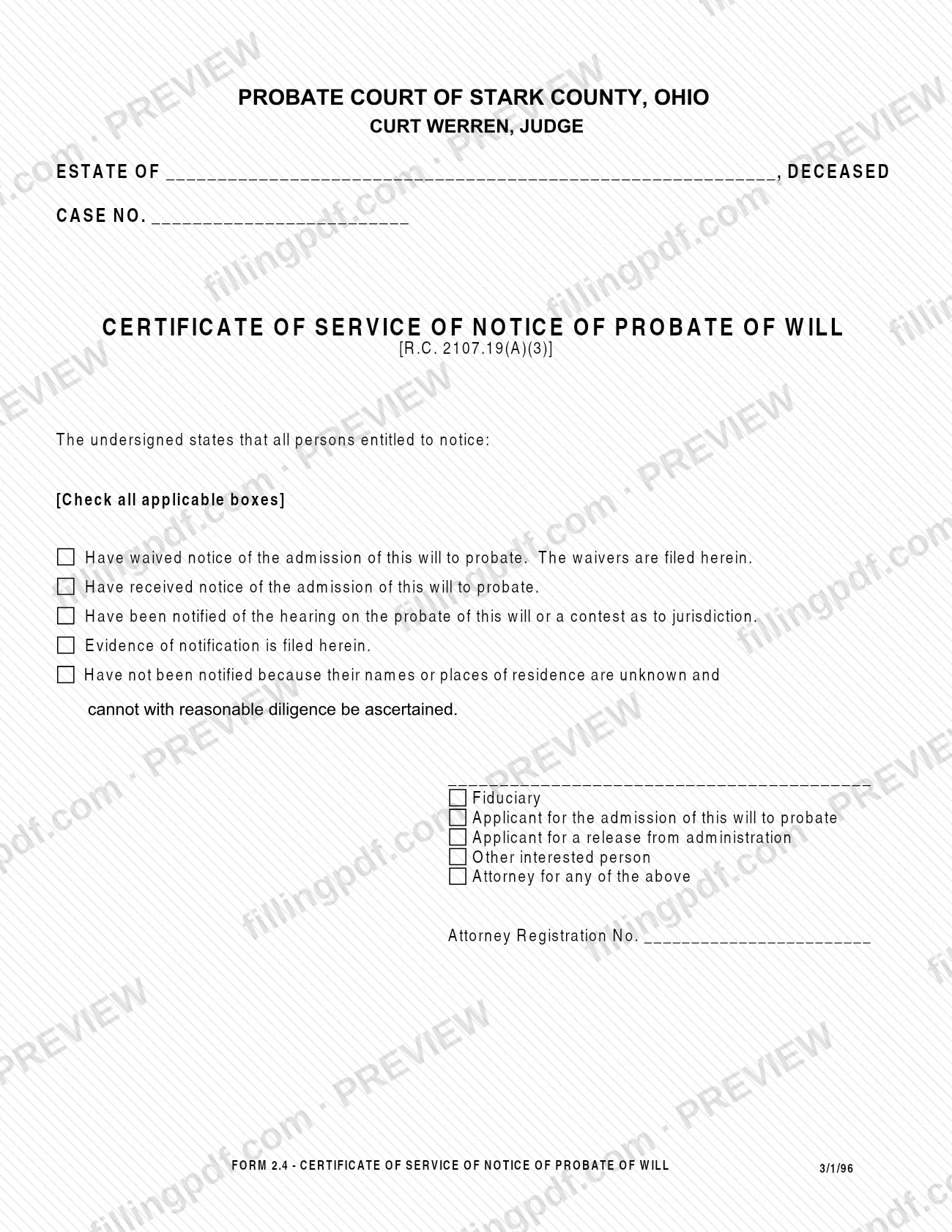
Form 2.4, Certificate of Service of Notice of Probate Will, is a form of the Probate Court of Stark County, Ohio, on which a signer certifies what happened with notice to everyone entitled to notice of a will's admission to probate. The form cites R.C. 2107.19(A)(3). It is one of the Stark County probate forms in the court's Decedent's Estate group, listed beside Form 2.2, Notice of Probate of Will. On this page you can fill out the form online on FillingPDF and download or print the completed PDF; the court publishes the original at the link below.
Last updated
What is 2.4?
Form 2.4, Certificate of Service of Notice of Probate Will, is a Stark County, Ohio Probate Court form in which a signer states what happened with notice to all persons entitled to notice of a will's admission to probate.
The form is captioned in the Probate Court of Stark County, Ohio, with the name of the estate, the word "Deceased" and the case number. Its heading cites [R.C. 2107.19(A)(3)]. A printed statement begins "The undersigned states that all persons entitled to notice," followed by boxes marked "Check all applicable boxes." The boxes say that those persons:
- have waived notice of the admission of the will to probate, with the waivers filed in the case;
- have received notice of the admission of the will to probate;
- have been notified of the hearing on the probate of the will or a contest as to jurisdiction, with evidence of notification filed in the case;
- have not been notified because their names or places of residence are unknown and cannot with reasonable diligence be ascertained.
The signer then marks a capacity and, for an attorney, adds an Attorney Registration No. The form is printed as FORM 2.4 with the date 3/1/96. On the court's forms page it sits among the Decedent's Estate forms next to Form 2.0, Application to Probate Will, Form 2.1, Waiver of Notice of Probate of Will, and Form 2.2, Notice of Probate of Will. Form 2.4 certifies the notice; it is not the notice itself and not the waiver.
Who needs to file 2.4?
The form is signed by one of the people the printed capacity list names. Whoever signs certifies the notice status of all persons entitled to notice of the will's admission to probate. The capacities are:
- Fiduciary;
- Applicant for the admission of this will to probate;
- Applicant for a release from administration;
- Other interested person;
- Attorney for any of the above.
An attorney who signs also enters an Attorney Registration No.
The form fits an estate in the Probate Court of Stark County where a will has been or is being admitted to probate and the notice status of the persons entitled to notice needs to be stated for the court. It carries the estate's name and case number, so it belongs to an existing case. The form prints no exclusions and no rule about signing for someone else beyond the attorney capacity. For questions about whether your estate needs it, contact the Probate Court of Stark County.
When to file 2.4
The form prints no due date. It is used in connection with the notice of the admission of a will to probate, which R.C. 2107.19(A)(3), cited in its heading, addresses. Because its boxes use the past tense (persons "have waived," "have received," "have been notified," "have not been notified"), you complete it once the notice step it describes has taken place for every person entitled to notice. If you need to know when it must be on file in your estate, ask the Probate Court of Stark County, since the form itself gives no deadline.
Documents you need
- Waivers of notice, filed in the case, when you check the box saying persons entitled to notice have waived notice of the admission of the will to probate. The court lists Form 2.1, Waiver of Notice of Probate of Will, among its estate forms.
- Evidence of notification, filed in the case, when you check the box saying persons were notified of the hearing on the probate of the will or a contest as to jurisdiction.
How to fill out 2.4
Enter the name of the estate
On the line after ESTATE OF, type the name of the decedent as it appears in the estate case. The word DECEASED is already printed after the line.
Enter the case number
On the CASE NO. line, enter the number the Probate Court of Stark County assigned to the estate.
Check the waiver box if it applies
Check "Have waived notice of the admission of this will to probate" only if all persons entitled to notice waived and the waivers are filed in the case.
Check the received-notice box if it applies
Check "Have received notice of the admission of this will to probate" for persons who actually received that notice. The form allows you to check all applicable boxes.
Check the hearing-notification boxes
Check "Have been notified of the hearing on the probate of this will or a contest as to jurisdiction" if it applies, and check "Evidence of notification is filed herein" only if that evidence is in the case file.
Check the unknown-persons box if it applies
Check "Have not been notified because their names or places of residence are unknown and cannot with reasonable diligence be ascertained" only for persons who meet that description.
Sign on the signature line
Sign above the line that carries the capacity options. The statement begins "The undersigned states," so the person who signs makes the certification.
Mark your capacity
Choose one of: Fiduciary; Applicant for the admission of this will to probate; Applicant for a release from administration; Other interested person; Attorney for any of the above.
Add the attorney registration number
If you are an attorney, enter your number on the Attorney Registration No. line. Others leave it blank.
Review and download the completed PDF
Check that the case number, the boxes and the capacity match your estate file. Download or print the completed PDF from FillingPDF and file it with the court.
How to submit 2.4
The form names no filing channel, address or portal of its own. It is captioned in the Probate Court of Stark County, Ohio, carries the estate's case number, and refers to waivers and evidence of notification as "filed herein," that is, filed in the same case. File it with the court as the court directs for filings in your estate case. The court lists the form with its other Decedent's Estate forms at https://www.starkcountyohio.gov/government/legal_judicial/probate_court/forms.php. The PDF has a Print Form button. FillingPDF lets you fill out and download the PDF; submission follows the court's own channels.
Common mistakes to avoid
- Leaving the estate name or the CASE NO. line blank, so the certificate is not tied to the estate's case.
- Checking only one box when more than one applies; the form says to check all applicable boxes.
- Checking the waiver box when the waivers are not filed in the case; the box states that the waivers are filed herein.
- Checking the notified-of-hearing box without filing evidence of notification; the form states that the evidence is filed herein.
- Checking the box for unknown names or residences when they could be found with reasonable diligence; it applies only where they cannot be ascertained.
- Signing without marking the capacity (Fiduciary, applicant for admission of the will, applicant for release from administration, other interested person or attorney).
- Omitting the Attorney Registration No. when an attorney signs.
- Using this certificate in place of the notice or waiver itself; it only certifies their status.
Frequently asked questions
What is Form 2.4, Certificate of Service of Notice of Probate Will?
It is a Probate Court of Stark County, Ohio form in which a signer states that all persons entitled to notice of a will's admission to probate waived notice, received it, were notified of the hearing, or could not be notified. Its heading cites R.C. 2107.19(A)(3).
Who can sign Form 2.4?
The form lists five capacities: Fiduciary, Applicant for the admission of the will to probate, Applicant for a release from administration, Other interested person, or Attorney for any of the above. An attorney also enters an Attorney Registration No.
Can I check more than one box on Form 2.4?
Yes. The form says "Check all applicable boxes." You might check the waiver box for some persons and the received-notice box for others, as long as each statement is true and the waivers or evidence are filed in the case.
What if I do not know where a person entitled to notice lives?
Check the box for persons not notified because their names or places of residence are unknown and cannot with reasonable diligence be ascertained. The form gives that box only for persons who meet that description.
Is there a deadline to file the certificate of service of notice of probate of will?
The form prints no deadline. It cites R.C. 2107.19(A)(3) and certifies notice that has already been waived, received or attempted. For the timing in your estate, ask the Probate Court of Stark County.
Where do I file Form 2.4 in Stark County?
The form names no address or portal. It is captioned in the Probate Court of Stark County, Ohio, with your estate's case number, so file it in that case as the court directs. The court's forms page lists it among Decedent's Estate forms.
What is the difference between Form 2.4 and Forms 2.1 and 2.2?
Form 2.2 is the Notice of Probate of Will and Form 2.1 is the Waiver of Notice of Probate of Will. Form 2.4 is the certificate that states the status of notice and refers to waivers and evidence filed in the case.
Can I fill out Form 2.4 online on FillingPDF?
Yes. You can fill out the fillable PDF online on FillingPDF and download or print it. FillingPDF is an independent service and does not file the form with the Stark County Probate Court; you file it through the court's channels.
Ready to fill out 2.4?
Fill out 2.4 now