
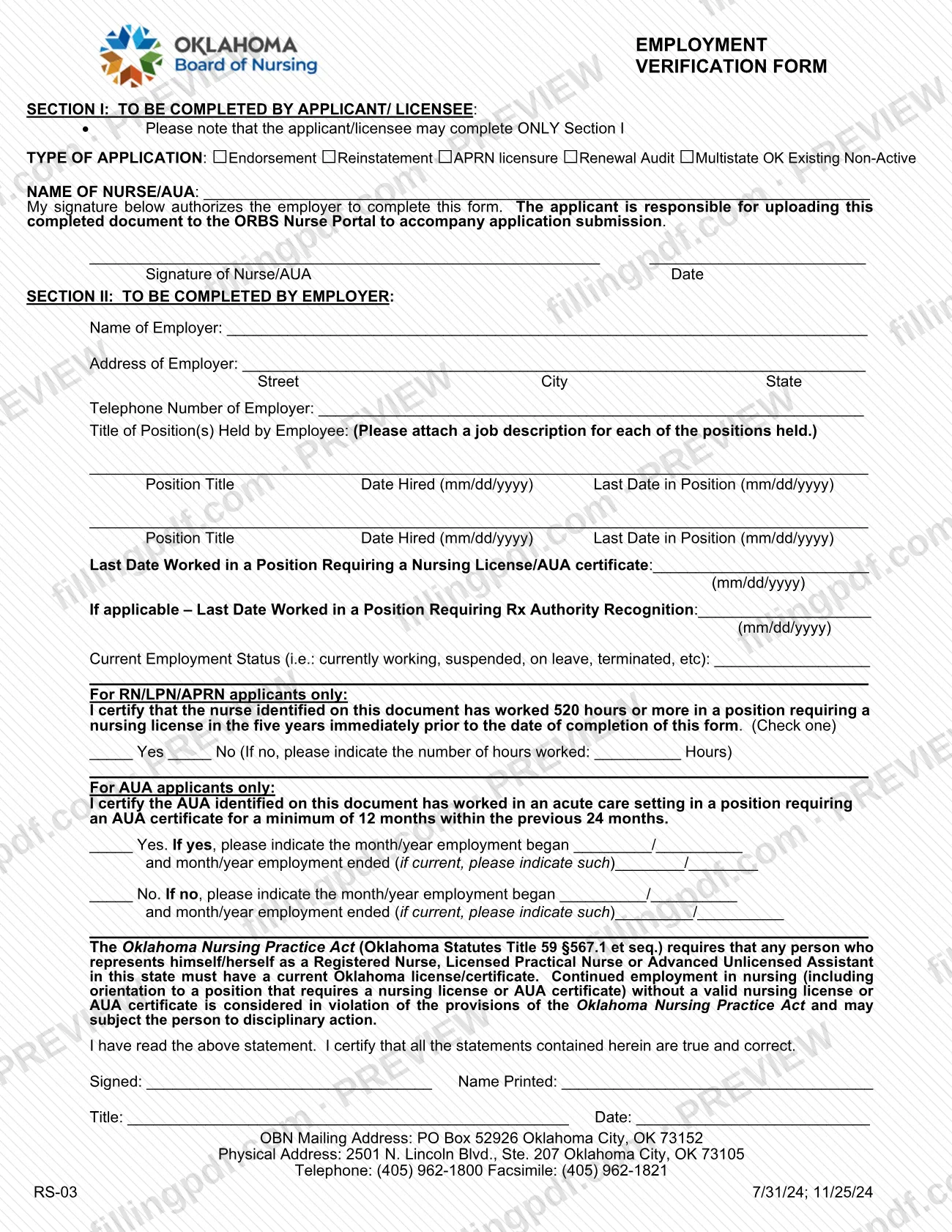
The employment verification form is a two-part document from the Oklahoma Board of Nursing (OBN) on which a nurse or Advanced Unlicensed Assistant (AUA) names the type of application, and the employer then confirms positions held, dates worked and employment status. The applicant completes only Section I; the employer completes Section II. On FillingPDF you can fill out the form online and download or print the completed PDF, while the official PDF itself is published by the OBN at oklahoma.gov.
Last updated
What is RS-03?
The Employment Verification Form is the Oklahoma Board of Nursing (OBN) form on which an employer certifies a nurse's or Advanced Unlicensed Assistant's (AUA) positions, dates of employment and current status, to accompany a licensure or certification application.
The form is split in two. Section I is completed by the applicant or licensee: the type of application (Endorsement, Reinstatement, APRN licensure, Renewal Audit, or Multistate OK Existing Non-Active), the name of the nurse or AUA, and a signature that authorizes the employer to complete the form. Section II is completed by the employer: employer name, address and telephone, each position held with hire and last dates, the last date worked in a position requiring a nursing license or AUA certificate, and current employment status.
Two certifications follow. For RN, LPN and APRN applicants, the employer states whether the nurse worked 520 hours or more in a position requiring a nursing license in the five years immediately before the form was completed. For AUA applicants, the employer states whether the AUA worked in an acute care setting in a position requiring an AUA certificate for at least 12 months within the previous 24 months.
The form also quotes the Oklahoma Nursing Practice Act (Oklahoma Statutes Title 59 §567.1 et seq.), which requires a current Oklahoma license or certificate for anyone representing themselves as a Registered Nurse, Licensed Practical Nurse or Advanced Unlicensed Assistant in the state. The form carries the code RS-03.
Who needs to file RS-03?
Nurses and AUAs who are applying to the Oklahoma Board of Nursing under one of the application types printed in Section I use this form: Endorsement, Reinstatement, APRN licensure, Renewal Audit, or Multistate OK Existing Non-Active. The form is meant to accompany that application.
Two roles complete it:
- The applicant or licensee completes Section I only, and signs to authorize the employer to complete the rest.
- The employer completes Section II, including the signature, printed name, title and date at the bottom.
The certifications in Section II depend on the applicant. The 520-hour statement is for RN, LPN and APRN applicants only. The 12-months-in-24 acute care statement is for AUA applicants only. Position titles are listed for each position the employee held, and a job description must be attached for each one.
The form does not describe any representative signing for the applicant; the applicant signs Section I.
When to file RS-03
The form is completed when you submit the licensure or certification application it supports, because the applicant is responsible for uploading the completed document to accompany application submission. The form prints no separate due date.
Timing rules built into the form: the 520-hour certification for RN, LPN and APRN applicants covers the five years immediately before the date the employer completes the form, so the employer's completion date matters. The AUA certification looks at the previous 24 months. Dates are entered in mm/dd/yyyy format. Check the OBN application instructions for the deadline that applies to your application type.
Documents you need
- A job description for each position listed in Section II: the form asks the employer to attach one for every position held by the employee.
How to fill out RS-03
Select the type of application
In Section I, check the box for your application: Endorsement, Reinstatement, APRN licensure, Renewal Audit, or Multistate OK Existing Non-Active.
Enter the nurse or AUA name
Write the full name in the NAME OF NURSE/AUA line. The applicant or licensee completes only Section I.
Sign and date Section I
Sign and date the Signature of Nurse/AUA line. Your signature authorizes the employer to complete the rest of the form.
Give the employer's details
In Section II, the employer enters its name, its address (street, city, state) and its telephone number.
List each position held
Enter each position title with the date hired and the last date in the position, in mm/dd/yyyy format. Attach a job description for every position listed.
Enter last dates worked
Enter the last date worked in a position requiring a nursing license or AUA certificate, and, if applicable, the last date worked in a position requiring Rx Authority Recognition, both in mm/dd/yyyy.
State the current employment status
Describe the status, such as currently working, suspended, on leave or terminated, on the Current Employment Status line.
Complete the RN/LPN/APRN certification
For RN, LPN or APRN applicants only, check Yes or No on the 520-hours statement for the five years before completion. If No, write the number of hours worked.
Complete the AUA certification
For AUA applicants only, check Yes or No on the 12-months-in-24 acute care statement, and enter the month/year employment began and ended, noting if it is current.
Sign the employer certification
After reading the Oklahoma Nursing Practice Act statement, the employer signs, prints the name, and enters title and date.
Review and download the completed PDF
Check that each section is complete and that only the applicable certification is filled in. Download or print the completed PDF from FillingPDF, then upload it to the ORBS Nurse Portal as described under How to submit.
How to submit RS-03
The applicant submits the completed form by uploading it to the ORBS Nurse Portal, together with the application it accompanies.
- Online upload: the form states that the applicant is responsible for uploading the completed document to the ORBS Nurse Portal to accompany application submission. The OBN applications page adds that applications and most documents are submitted to the OBN through your Nurse Portal account.
- Sequence: the applicant completes and signs Section I first, then the employer completes and signs Section II, then the applicant uploads the finished form.
The form prints these OBN contact details: mailing address PO Box 52926, Oklahoma City, OK 73152; physical address 2501 N. Lincoln Blvd., Ste. 207, Oklahoma City, OK 73105; telephone (405) 962-1800; facsimile (405) 962-1821. The form names the Nurse Portal upload as the way to submit it. FillingPDF lets you fill out and download the PDF; submission follows the channels above.
Common mistakes to avoid
- Having the applicant fill in Section II: the form states the applicant or licensee may complete only Section I, and the employer completes Section II.
- Leaving out the job description for a position listed in Section II; the form asks for one for each position held.
- Entering dates in a format other than mm/dd/yyyy for hire dates, last dates in a position and last date worked.
- Marking No on the 520-hour certification without writing the number of hours worked on the line provided.
- Completing the 520-hour statement for an AUA applicant, or the AUA acute care statement for an RN, LPN or APRN; each is for its own group only.
- Leaving the AUA month/year start date, or the end date or an indication that employment is current, blank under Yes or No.
- Submitting the form without the nurse's or AUA's signature and date in Section I, or without the employer's signature, printed name, title and date.
- Forgetting to upload the completed form to the ORBS Nurse Portal with the application; the applicant is responsible for the upload.
Frequently asked questions
What is the Oklahoma employment verification form for nurses?
It is Form RS-03 from the Oklahoma Board of Nursing (OBN). An employer uses it to certify a nurse's or AUA's positions, dates worked and employment status. It accompanies licensure applications such as endorsement, reinstatement, APRN licensure, renewal audit and multistate.
Who fills out which section of the employment verification form?
The applicant or licensee completes only Section I: application type, name, signature and date. The employer completes Section II, including employment details, the applicable certification, and its own signature, printed name, title and date.
Can I fill out the employment verification form online?
Yes. You can fill out the form online on FillingPDF and download or print the completed PDF. FillingPDF is an independent service and does not send the form to the OBN; you upload it to the ORBS Nurse Portal yourself.
Where do I submit the completed employment verification form?
The applicant uploads it to the ORBS Nurse Portal to accompany the application. The form says the applicant is responsible for the upload, and the OBN applications page says most documents go through your Nurse Portal account.
What does the 520 hours statement on the form mean?
For RN, LPN and APRN applicants, the employer certifies whether the nurse worked 520 hours or more in a position requiring a nursing license in the five years immediately before the form was completed. If the answer is No, the employer writes the hours worked.
Do AUA applicants use the same certification as RN and LPN applicants?
No. AUA applicants use a separate statement: the employer certifies whether the AUA worked in an acute care setting in a position requiring an AUA certificate for at least 12 months within the previous 24 months, with the month and year employment began and ended.
Do I need to attach a job description to the form?
Yes. Section II asks the employer to attach a job description for each position held by the employee, and each position is listed with its title, date hired and last date in the position.
Can the nurse complete the employer section?
No. The form states the applicant or licensee may complete only Section I. Section II must be completed and signed by the employer, who certifies that the statements are true and correct.
Ready to fill out RS-03?
Fill out RS-03 now