
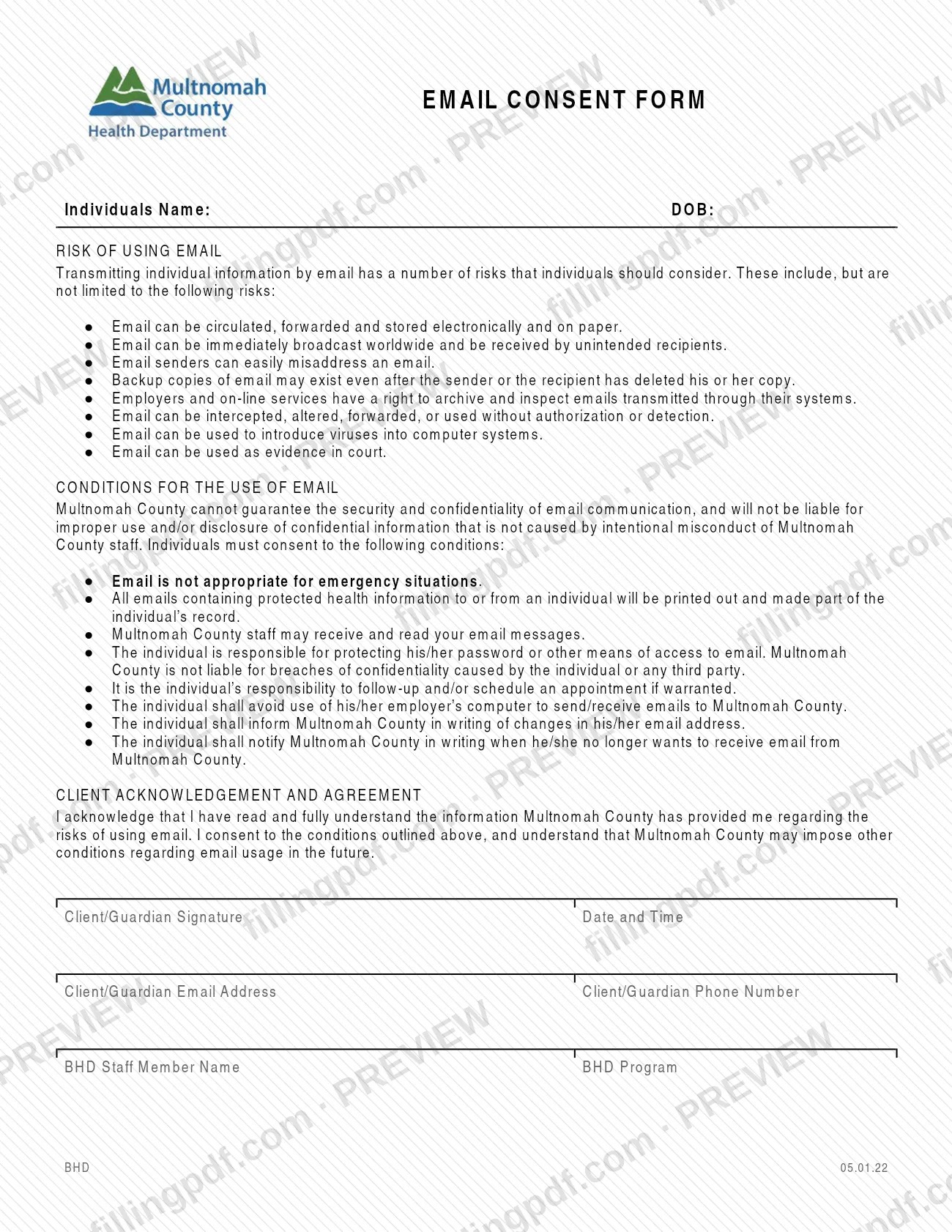
The Email Consent Form is a Multnomah County document in which a client, or the client's guardian, acknowledges the risks of exchanging information by email and agrees to the county's conditions for doing so. It is one of the forms the county lists under New Client Forms, to be completed and signed before a first visit. On this page you can fill out the form online on FillingPDF and download or print the completed PDF; the county publishes the original at multco.us.
Last updated
What is Email Consent Form – Multnomah County?
The Email Consent Form is the Multnomah County form on which an individual (the client) or the client's guardian records consent to receive and send information by email with the county, after reading the risks and conditions the county sets out.
The form has three parts. The first, Risk of Using Email, lists the risks the county wants the individual to weigh: email can be forwarded, stored on paper or electronically, misaddressed, intercepted or altered, can carry viruses, can be received by unintended recipients, may remain in backup copies after deletion, may be archived and inspected by employers and online services, and can be used as evidence in court.
The second part, Conditions for the Use of Email, states that Multnomah County cannot guarantee the security and confidentiality of email and will not be liable for improper use or disclosure that is not caused by intentional misconduct of county staff. The individual agrees, among other points, that email is not appropriate for emergencies, that emails containing protected health information will be printed and made part of the individual's record, and that county staff may receive and read the messages.
The third part, Client Acknowledgement and Agreement, holds the signature, date and time, email address and phone number, plus lines for a BHD staff member and BHD program. The revision printed on the form is BHD 05.01.22.
On the county's New Client Forms page it appears next to Consent for Treatment, Release of Information and the Text Message Consent form, which are separate documents. The same page lists Email Consent versions in Amharic, Simplified Chinese, Korean, Somali and Vietnamese.
Who needs to file Email Consent Form – Multnomah County?
Individuals who will be clients of Multnomah County and want to communicate with the county by email complete this form. The county's New Client Forms page tells new clients to complete and sign its forms before the first visit, and this is one of the forms listed there.
The signature line reads Client/Guardian Signature, so a guardian may sign for the client. The form does not say who qualifies as a guardian or what proof is needed; ask the county if you are unsure.
By signing, the individual accepts the county's conditions, including that:
- email is not appropriate for emergency situations;
- the individual protects his or her own password or other means of access to email;
- the individual should avoid using an employer's computer to send or receive emails to Multnomah County.
The form also says the county may impose other conditions on email use in the future. People who need a document in another language can use the translated versions listed on the county page or contact the county, as that page invites.
When to file Email Consent Form – Multnomah County
Complete and sign the Email Consent Form before your first visit, as the county's New Client Forms page directs for the forms listed there. The form itself prints no separate due date.
Two later events are covered by the conditions you agree to. If your email address changes, you must inform Multnomah County in writing. If you no longer want to receive email from the county, you must notify the county in writing. The form also says the county may add other conditions about email in the future.
How to fill out Email Consent Form – Multnomah County
Enter the individual's name and DOB
At the top of the form, write the individual's name next to Individuals Name and the date of birth next to DOB.
Read the risks of using email
Read the Risk of Using Email list, which covers forwarding, interception, misaddressing, backup copies, archiving by employers and online services, viruses and use as evidence in court.
Read the conditions for email use
Read Conditions for the Use of Email. By signing you consent to each one, including that email is not for emergencies and that you protect your own password.
Sign with the date and time
Under Client/Guardian Signature, sign and enter the date and time. A guardian may sign on the client's behalf.
Enter your email and phone
Write the Client/Guardian Email Address and the Client/Guardian Phone Number. Use an email address you do not access through an employer's computer.
Complete the BHD staff lines
The bottom of the form has BHD Staff Member Name and BHD Program lines. Enter them if the county staff member gives you that information.
Review and download the completed PDF
Check the name, date of birth, signature, date and time and contact details, then download or print the completed PDF from FillingPDF and give it to the county as described under How to submit.
How to submit Email Consent Form – Multnomah County
The county's New Client Forms page tells clients to complete and sign the forms before the first visit; the Email Consent Form itself names no mailing address, portal or other delivery channel. For how and where to hand it in, contact Multnomah County, which the page invites you to do for documents in another language.
What the completed form must contain:
- the individual's name and date of birth at the top;
- the Client/Guardian Signature with date and time;
- the client's or guardian's email address and phone number;
- the BHD staff member name and BHD program lines at the bottom.
Written notices about an email address change or about stopping email contact are separate from this form: the conditions require them to be in writing. Check the county page for the current English form and for the translated versions. FillingPDF lets you fill out and download the PDF; submission follows the county's channels.
Common mistakes to avoid
- Signing without reading the Risk of Using Email section; the signature states that you have read and fully understand the information provided.
- Leaving out the time next to the date on the Client/Guardian Signature line, which asks for both date and time.
- Leaving the Client/Guardian Email Address blank, so the county has no address to which the consent applies.
- Using an employer's computer to send or receive emails to Multnomah County, which the conditions ask the individual to avoid.
- Relying on email in an emergency; the form says email is not appropriate for emergency situations.
- Changing your email address without telling the county in writing, as the conditions require.
- Asking the county to stop emailing you by email or phone only; the conditions require written notice when you no longer want email.
Frequently asked questions
What is the Multnomah County Email Consent Form?
It is a county form on which a client or guardian acknowledges the risks of email and agrees to the county's conditions for email communication. It sits among the New Client Forms the county asks you to complete and sign before your first visit.
Is the Email Consent Form a Multnomah County property tax form?
No. It is a consent form from the county's New Client Forms, covering the risks and conditions of using email. Nothing printed on it relates to property tax, so look for tax matters elsewhere on the county's website.
Who has to sign the Email Consent Form?
The client or the client's guardian signs on the Client/Guardian Signature line, with date and time. The form does not say who counts as a guardian, so ask the county if you are unsure whether you can sign for someone.
When should I complete the Email Consent Form?
Before your first visit. The county's New Client Forms page asks new clients to complete and sign its forms ahead of that visit. The form prints no other deadline.
Can I use email for emergencies after signing?
No. One of the conditions you consent to states that email is not appropriate for emergency situations. The county also says it cannot guarantee the security and confidentiality of email.
How do I stop receiving email from Multnomah County?
Notify the county in writing. The conditions require the individual to tell Multnomah County in writing when he or she no longer wants email, and also to report any change of email address in writing.
Is the Email Consent Form available in other languages?
Yes. The county's New Client Forms page lists Email Consent versions in Amharic, Simplified Chinese, Korean, Somali and Vietnamese, and invites you to contact the county for documents in another language.
Can I fill out the Email Consent Form online on FillingPDF?
Yes. You can fill out the PDF online on FillingPDF and download or print it. FillingPDF is an independent service, is not affiliated with Multnomah County and does not send the form to the county; you deliver it through the county's channels.
Ready to fill out Email Consent Form – Multnomah County?
Fill out Email Consent Form – Multnomah County now