
The Employment Verification Form (form CY 925, edition 12/15) is the form the Pennsylvania Department of Human Services (DHS) uses to confirm an employee's job, income and work schedule when that employee asks for help paying child care costs. An authorized company representative completes most of it, and it goes directly to the Child Care Information Services (CCIS) agency, which uses it to decide eligibility for the subsidized child care program. On this page you can fill out the form online on FillingPDF and download or print the completed PDF; the original PDF is published by the agency at pa.gov.
Last updated
What is CY 925?
The Employment Verification Form (CY 925) is the Pennsylvania Department of Human Services form that a Child Care Information Services (CCIS) agency sends to an employer to verify an employee's employment, work schedule and employment income for the subsidized child care program.
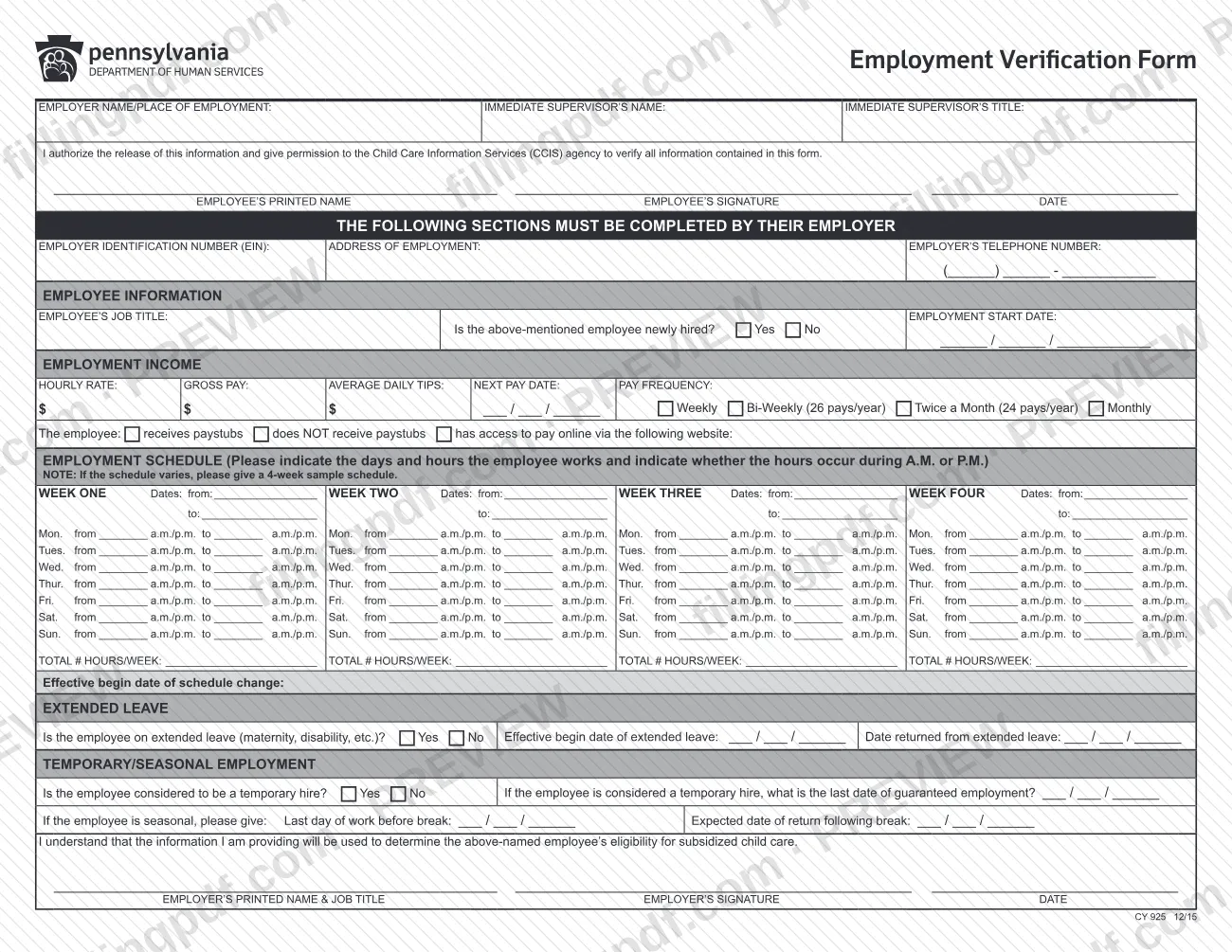
The form has two kinds of content. At the top, the employee names the employer or place of employment and the immediate supervisor, and signs an authorization that lets the CCIS agency verify the information on the form. Under the heading stating that the following sections must be completed by the employer, the employer gives:
- the employer identification number (EIN), address of employment and telephone number;
- the employee's job title, start date and whether the employee is newly hired;
- hourly rate, gross pay, average daily tips, next pay date and pay frequency;
- a weekly work schedule, plus any schedule change, extended leave, temporary hire or seasonal break.
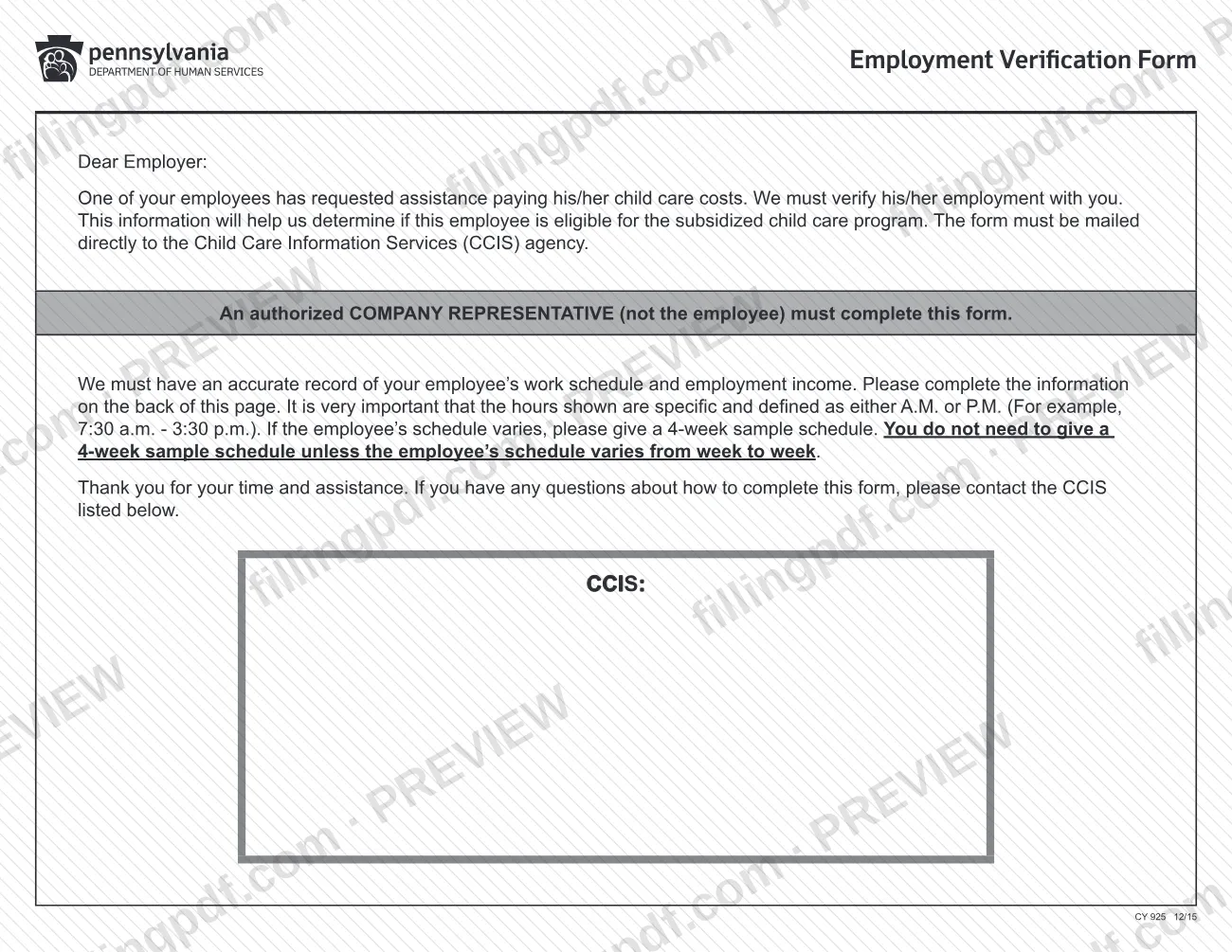
The cover letter addressed to the employer explains that the agency needs an accurate record of the employee's schedule and income, and the employer's signature block confirms that the information will be used to determine eligibility for subsidized child care. The form is not a pay statement and is not an application for child care assistance.
Who needs to file CY 925?
An authorized company representative completes the employer sections of this form for any employee who has asked for assistance paying child care costs and whose employment a CCIS agency must verify. The letter on the form is explicit: the representative must not be the employee.
- Employers: complete the employer identification number, address, telephone number, job title, start date, pay, schedule, leave and temporary or seasonal sections, then print your name and job title, sign and date.
- Employees: write the employer or place of employment and your immediate supervisor's name and title, then print your name, sign and date the authorization that lets the CCIS agency verify the information.
- Employers of employees with a varying schedule: give a 4-week sample schedule. Employers whose employee works the same schedule each week do not need to.
Employees should not fill in the sections reserved for their employer. Questions about how to complete the form go to the CCIS agency named on the letter.
When to file CY 925
The form is completed when an employee has requested help paying child care costs and the CCIS agency needs to verify employment with you. No due date is printed on the form itself, so ask the CCIS agency that sent it how quickly it needs the form returned.
Timing entries on the form itself include the employment start date, the next pay date and, where they apply, the effective begin date of a schedule change, the begin and return dates of extended leave such as maternity or disability leave, the last date of guaranteed employment for a temporary hire, and the last day of work before a seasonal break with the expected date of return.
How to fill out CY 925
Confirm who completes each section
The employee fills in the top part and signs the authorization. An authorized company representative, not the employee, completes everything under the heading that says the following sections must be completed by the employer.
Enter employer and supervisor details
Write the EMPLOYER NAME/PLACE OF EMPLOYMENT, the IMMEDIATE SUPERVISOR'S NAME and the IMMEDIATE SUPERVISOR'S TITLE.
Sign the employee authorization
The employee prints their name, signs and dates the statement authorizing the release of the information and permitting the CCIS agency to verify it.
Add employer identification and address
The employer enters the EMPLOYER IDENTIFICATION NUMBER (EIN), the ADDRESS OF EMPLOYMENT and the EMPLOYER'S TELEPHONE NUMBER.
Enter job title and start date
Give the EMPLOYEE'S JOB TITLE and the EMPLOYMENT START DATE in the month, day and year format shown, then answer Yes or No to whether the employee is newly hired.
Complete the employment income section
Enter the HOURLY RATE, GROSS PAY, AVERAGE DAILY TIPS, NEXT PAY DATE and check the PAY FREQUENCY: Weekly, Bi-Weekly (26 pays/year), Twice a Month (24 pays/year) or Monthly.
Say how the employee is paid
Check whether the employee receives paystubs, does NOT receive paystubs, or has access to pay online, and enter the website if the last option applies.
Fill in the employment schedule
For each day, enter the start and end times and mark a.m. or p.m., then give the TOTAL # HOURS/WEEK. If the schedule varies, complete Weeks One to Four with their dates; otherwise one week is enough. Enter the effective begin date of any schedule change.
Answer the extended leave questions
Check Yes or No for extended leave such as maternity or disability. If Yes, enter the effective begin date and the date the employee returned.
Complete temporary or seasonal details
Check Yes or No for temporary hire and, if Yes, enter the last date of guaranteed employment. For seasonal employees, enter the last day of work before the break and the expected return date.
Sign, review and download the PDF
The employer prints their name and job title, signs and dates the form. Check that every applicable field is filled, then download or print the completed PDF from FillingPDF and mail it to the CCIS agency.
How to submit CY 925
The form is returned by mail directly to the Child Care Information Services (CCIS) agency; the letter on the form states that it must be mailed directly to the CCIS agency.
- By mail to the CCIS agency: the employer's representative mails the completed and signed form to the CCIS agency named in the CCIS line of the letter. The form itself prints no street address, so use the one the CCIS agency gives you.
- Questions: if you are unsure how to complete the form, contact the CCIS agency listed on the letter.
The form names no other channel and mentions no fee. Check that both signatures are present before mailing: the employee's authorization near the top and the employer's signature at the end. FillingPDF lets you fill out and download the PDF; submission follows the CCIS channels above.
Common mistakes to avoid
- Having the employee complete the sections reserved for the employer; the letter says an authorized company representative, not the employee, must complete them.
- Writing work hours without A.M. or P.M.; the form asks for specific hours defined as A.M. or P.M., for example 7:30 a.m. - 3:30 p.m.
- Leaving out the 4-week sample schedule when the employee's schedule varies from week to week.
- Sending the completed form back through the employee instead of mailing it directly to the CCIS agency.
- Submitting without the employee's signature and date on the authorization to release information to the CCIS agency.
- Leaving the employer's printed name, job title, signature or date blank at the bottom of the form.
- Skipping the extended leave or temporary/seasonal questions when they apply, such as maternity or disability leave or a seasonal break.
- Not marking whether the employee receives paystubs, or the pay frequency (weekly, bi-weekly, twice a month or monthly).
Frequently asked questions
What is the employment verification form for child care in Pennsylvania?
It is Form CY 925, which a Child Care Information Services (CCIS) agency sends to an employer to verify an employee's employment, schedule and income. The agency uses it to help decide whether the employee is eligible for the subsidized child care program.
Who fills out the employment verification form, the employee or the employer?
Both, in different parts. The employee names the employer and supervisor and signs the authorization at the top. An authorized company representative, not the employee, completes every section under the employer heading and signs at the end.
Where do I send the completed employment verification form?
Mail it directly to the CCIS agency, as the letter on the form instructs. The form prints no address of its own, so use the CCIS agency named on the letter or contact it to ask where to send the form.
What do I write for a work schedule that changes every week?
Give a 4-week sample schedule, with dates for each week, the days and hours worked marked a.m. or p.m., and the total hours per week. If the schedule does not vary from week to week, the instructions say no 4-week sample is needed.
Do I need to put A.M. or P.M. on the hours?
Yes. The letter says the hours must be specific and defined as A.M. or P.M., for example 7:30 a.m. - 3:30 p.m. The schedule grid asks you to mark a.m. or p.m. for both the start and end of each shift.
What should the employer enter for temporary or seasonal employees?
For a temporary hire, check Yes and enter the last date of guaranteed employment. For a seasonal employee, enter the last day of work before the break and the expected date of return after it.
Can I fill out the employment verification form online?
You can fill out the PDF online on FillingPDF and download or print it. FillingPDF is independent of the Department of Human Services and does not send the form; the employer mails it to the CCIS agency.
What if the employee is on maternity or disability leave?
Check Yes under Extended Leave and enter the effective begin date of the leave and, if the employee has come back, the date returned from leave. The form names maternity and disability as examples of extended leave.
Ready to fill out CY 925?
Fill out CY 925 now