
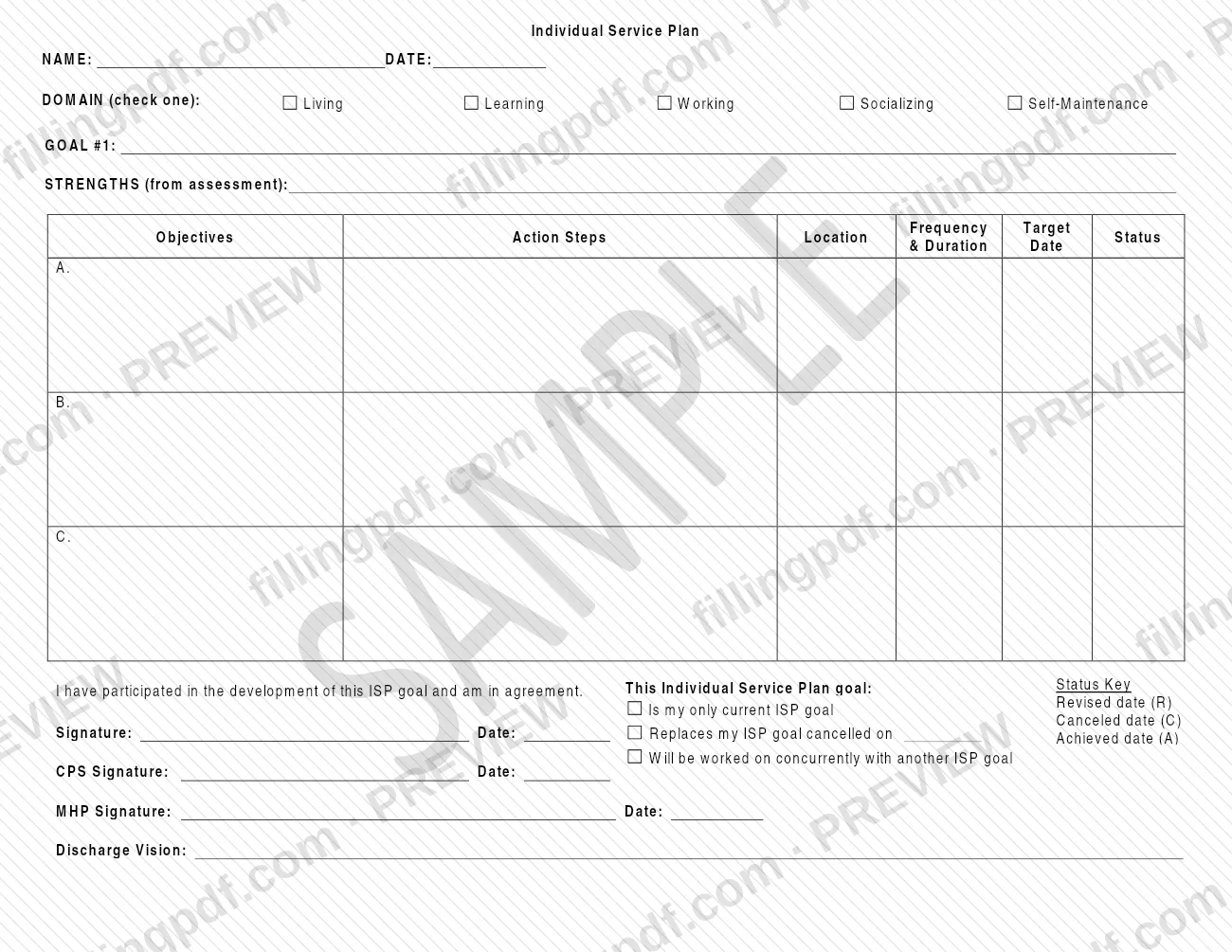
The Individual Service Plan (ISP) is a Pennsylvania Department of Human Services (DHS) form for writing down a person's ISP goal, the strengths behind it and the steps for reaching it. This individual service plan form sets out one goal under one life domain, lists up to three objectives with action steps, and closes with signatures and a discharge vision. On this page you can fill out the form online on FillingPDF and download or print the completed PDF; the original PDF is published by the agency at pa.gov.
Last updated
What is Individual Service Plan – Pennsylvania?
The Individual Service Plan is a Pennsylvania Department of Human Services (DHS) form on which one Individual Service Plan (ISP) goal is written out, with its domain, the strengths it builds on, the objectives and action steps, and the signatures of the people who agree to it.
The form is built around a single goal, printed as GOAL #1. At the top you enter the name and the date, then check one DOMAIN: Living, Learning, Working, Socializing or Self-Maintenance. Under the goal, the STRENGTHS (from assessment) space carries the strengths drawn from the person's assessment.
A table follows with rows A, B and C. For each objective it has columns for Objectives, Action Steps, Frequency & Duration, Location, Target Date and Status. A Status Key printed beside the signatures defines the status marks: Revised date (R), Canceled date (C) and Achieved date (A).
The lower part of the form records agreement. A statement reads that the person has participated in developing the ISP goal and is in agreement. Three boxes then say how the goal relates to others: it is the person's only current ISP goal, it replaces an ISP goal cancelled on a date you enter, or it will be worked on concurrently with another ISP goal. Signature lines are provided for the person, for the CPS and for the MHP, each with a date. The form ends with a Discharge Vision line.
Who needs to file Individual Service Plan – Pennsylvania?
The form is written for the person whose goal is being recorded: the participation statement is in the first person ("I have participated in the development of this ISP goal and am in agreement"), and that person signs and dates it.
Two further signers appear on the form: the CPS and the MHP, each with a signature line and a date line. The form does not spell out these titles, so follow your program's own instructions about who holds each role.
The form also fits several situations through its checkboxes:
- A person whose goal is the only current one checks Is my only current ISP goal.
- A person writing a goal to take the place of one that was cancelled checks Replaces my ISP goal cancelled on and enters that date.
- A person who is working on more than one goal checks Will be worked on concurrently with another ISP goal.
The form covers one goal under one domain. If a plan has goals in different domains, the domain box (check one) means each goal is written separately.
When to file Individual Service Plan – Pennsylvania
The form prints no deadline or filing window. It is completed when an ISP goal is written, and it carries its own dates: the DATE at the top, a Target Date for each objective, and the Status Key dates for a goal that is revised (R), canceled (C) or achieved (A). When a goal is cancelled and a new one is written to replace it, the Replaces my ISP goal cancelled on box asks for the date of the cancelled goal, so the form can be updated as a goal's status changes.
How to fill out Individual Service Plan – Pennsylvania
Enter the name and date
At the top, write the person's NAME and the DATE of the plan.
Check one domain
Under DOMAIN (check one), check Living, Learning, Working, Socializing or Self-Maintenance, whichever the goal belongs to.
Write the goal
Enter the goal next to GOAL #1.
List strengths from the assessment
In STRENGTHS (from assessment), enter the strengths that the person's assessment identified.
Complete the objectives table
In rows A, B and C, enter each objective with its action steps, the frequency and duration, the location and the target date. Use the Status column for the current status.
Apply the status key
Mark status with the Status Key printed on the form: Revised date (R), Canceled date (C) or Achieved date (A), with the date each applies.
Check how the goal relates
Check Is my only current ISP goal, Replaces my ISP goal cancelled on (and enter that date) or Will be worked on concurrently with another ISP goal.
Collect the signatures
The person signs and dates under the participation statement. The CPS Signature and MHP Signature lines each need a signature and date.
Enter the discharge vision
Complete the Discharge Vision line at the bottom of the form.
Review and download the PDF
Check that one domain is checked, every objective row is complete and all signature dates are filled. Download or print the completed PDF from FillingPDF.
Common mistakes to avoid
- Checking more than one box under DOMAIN; the form says to check one.
- Leaving the person's signature and date blank; the participation statement is only complete once it is signed.
- Missing the CPS Signature or the MHP Signature, each of which has its own line and date.
- Not checking any of the three boxes that say whether the goal is the only current one, replaces a cancelled one or runs concurrently with another.
- Checking Replaces my ISP goal cancelled on without entering the date of the cancelled goal.
- Filling the STRENGTHS (from assessment) space with strengths that do not come from the assessment.
- Leaving the Target Date or Status column empty for an objective that has an action step.
- Using Revised, Canceled or Achieved status without the date the Status Key asks for.
Frequently asked questions
What is an Individual Service Plan?
The Individual Service Plan is a Pennsylvania Department of Human Services form that records one ISP goal. It captures the domain, the strengths from the assessment, objectives with action steps, signatures and a discharge vision.
What domains are listed on the Individual Service Plan?
Five: Living, Learning, Working, Socializing and Self-Maintenance. The form says to check one under DOMAIN, so each goal is placed in a single domain.
Who signs the Individual Service Plan?
The person whose goal it is signs and dates the statement that they participated in developing it and agree. The form also has signature and date lines for the CPS and for the MHP.
What do the R, C and A marks mean on the ISP?
The Status Key on the form defines them: R is the revised date, C the canceled date and A the achieved date. The Status column in the objectives table is where status is tracked for each objective.
What if a goal replaces an earlier ISP goal?
Check Replaces my ISP goal cancelled on and enter the date of the cancelled goal. If the goal is the only current one, or is being worked on along with another goal, check the other matching box instead.
Can I fill out the Individual Service Plan online?
You can fill out the PDF online on FillingPDF and download or print it. FillingPDF is an independent service: it does not submit the plan to the Department of Human Services or anyone else.
Ready to fill out Individual Service Plan – Pennsylvania?
Fill out Individual Service Plan – Pennsylvania now