
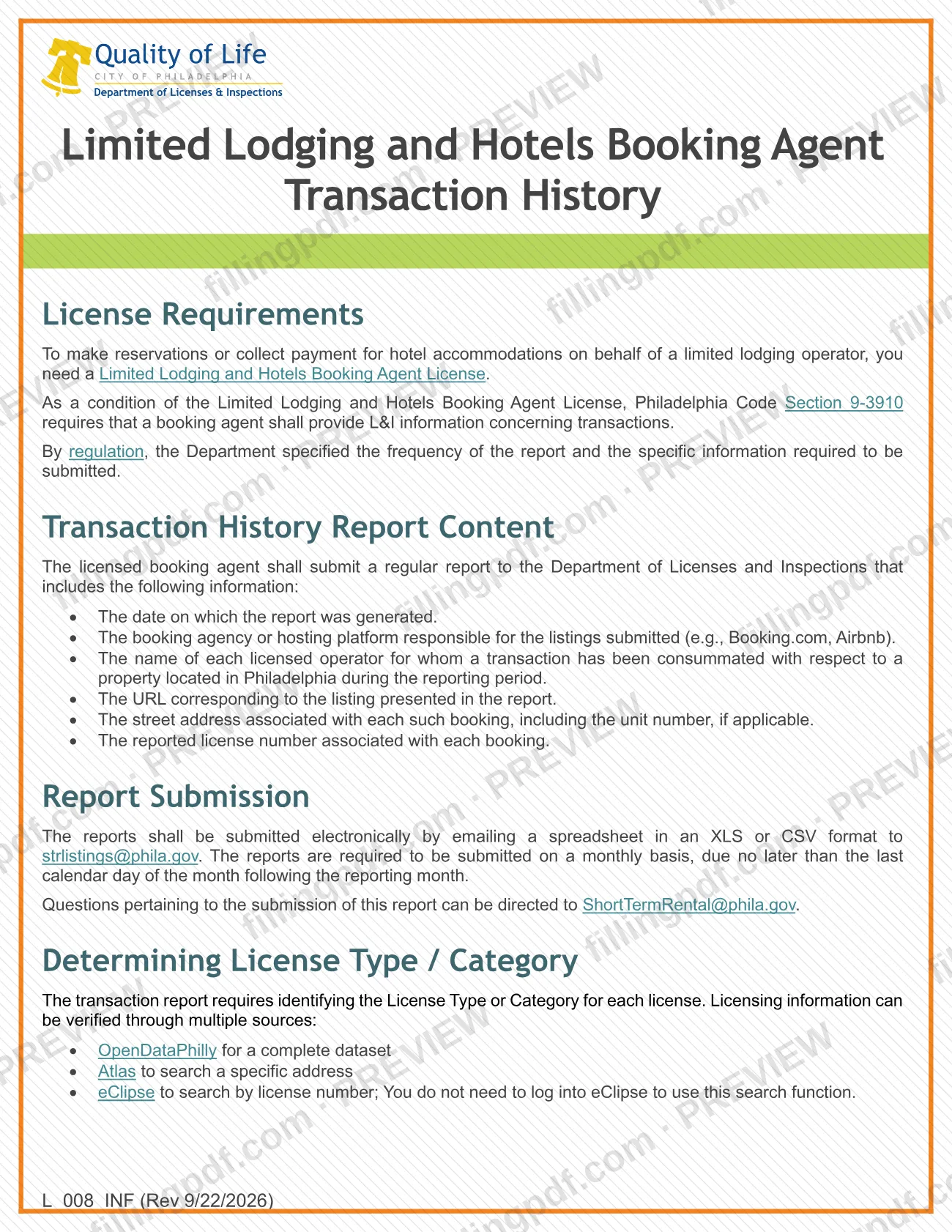
The Limited Lodging Hotels Booking Agent information sheet (L_008_INF) is the City of Philadelphia Department of Licenses and Inspections (L&I) document that explains the monthly transaction history report required of licensed booking agents. It is one of the Philadelphia business license materials for limited lodging, and it lists the six report columns, the file format and where to email the report. On this page you can fill out the form online on FillingPDF and download or print the completed PDF; the original sheet is published by L&I at phila.gov.
Last updated
What is L_008_INF?
The Limited Lodging Hotels Booking Agent information sheet is the City of Philadelphia Department of Licenses and Inspections (L&I) document that tells licensed booking agents what to put in their transaction history report, how to format it and where to send it.
The sheet is not an application. To make reservations or collect payment for hotel accommodations on behalf of a limited lodging operator, you need a Limited Lodging and Hotels Booking Agent License. As a condition of that license, Philadelphia Code Section 9-3910 requires the booking agent to give L&I information about transactions, and an L&I regulation sets how often and what must be reported.
The sheet covers:
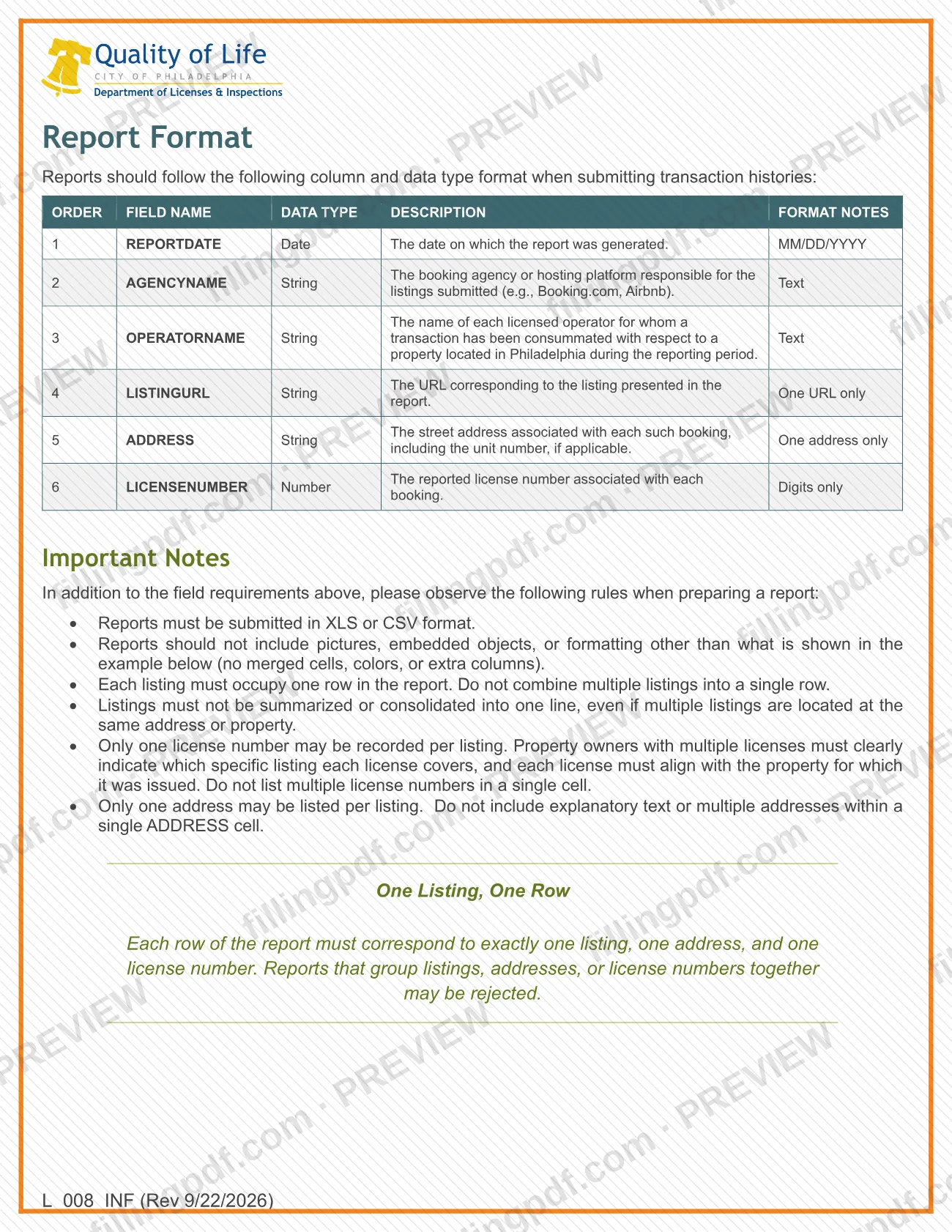
- the content of the report (report date, booking agency or hosting platform, licensed operator name, listing URL, street address and license number);
- the six-column layout with data types and formats;
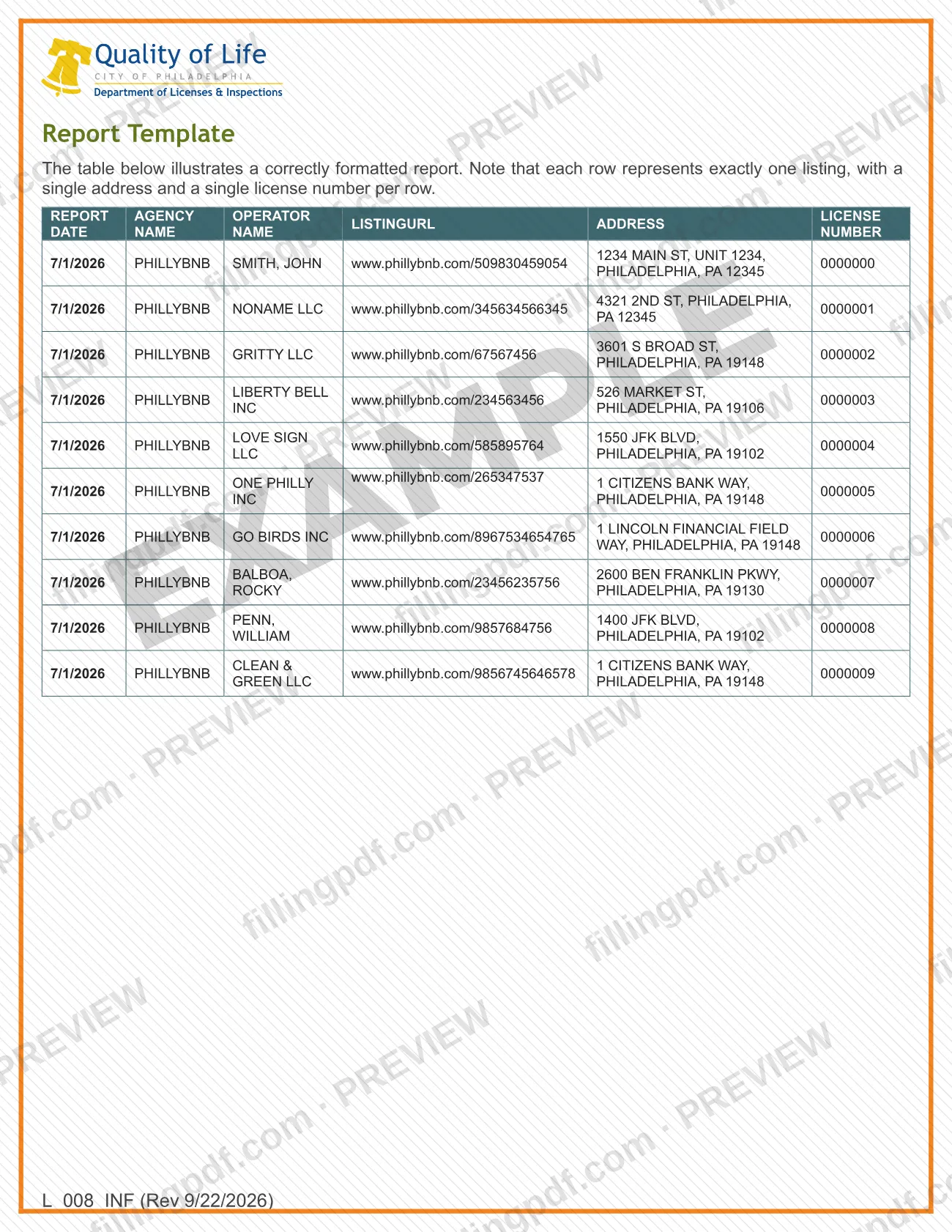
- the rules for preparing the file, summed up as one listing, one row;
- where to check the license type or category: OpenDataPhilly, Atlas and eClipse;
- the email address for submission.
The license itself is requested with a separate document, the limited lodging and hotel booking agent license application, which L&I lists next to this sheet.
Who needs to file L_008_INF?
The main group is licensed booking agents: anyone holding a Limited Lodging and Hotels Booking Agent License, which is required to make reservations or collect payment for hotel accommodations on behalf of a limited lodging operator. Section 9-3910 of the Philadelphia Code makes the report a condition of that license.
The report covers each licensed operator for whom a transaction was consummated for a property located in Philadelphia during the reporting period. The booking agency or hosting platform responsible for the listings, such as Booking.com or Airbnb in the sheet's examples, is named in each row.
The sheet is guidance for preparing the report. It does not say that operators or property owners file it, and it names no representative or signer. Questions about submitting the report go to [email protected].
When to file L_008_INF
The report is due every month, no later than the last calendar day of the month following the reporting month. For example, transactions from July fall in a report due by the end of August. The Department of Licenses and Inspections set this frequency by regulation, as a condition of the Limited Lodging and Hotels Booking Agent License. The sheet prints no other deadline, renewal cycle or processing time for the report.
Documents you need
- The monthly transaction history report as a spreadsheet in XLS or CSV format, attached to the email sent to [email protected].
How to fill out L_008_INF
Enter the report date
Column 1, REPORTDATE: enter the date on which the report was generated, in MM/DD/YYYY format.
Name the booking agency or platform
Column 2, AGENCYNAME: enter the booking agency or hosting platform responsible for the listings submitted, as text (the sheet gives Booking.com and Airbnb as examples).
Enter each licensed operator's name
Column 3, OPERATORNAME: enter the name of each licensed operator for whom a transaction was consummated for a property located in Philadelphia during the reporting period.
Paste one listing URL
Column 4, LISTINGURL: enter the URL of the listing presented in the report. One URL only per row.
Enter one street address
Column 5, ADDRESS: enter the street address of the booking, including the unit number if applicable. One address only, with no explanatory text.
Enter one license number
Column 6, LICENSENUMBER: enter the license number reported for the booking, digits only. Record only one license number per listing.
Keep one listing per row
Each row must match exactly one listing, one address and one license number. Do not summarize or consolidate listings, even at the same address.
Verify license type or category
The report requires the License Type or Category for each license. Check it in OpenDataPhilly, Atlas (by address) or eClipse (by license number).
Check the file format
Save the spreadsheet as XLS or CSV. Remove pictures, embedded objects, merged cells, colors and extra columns.
Review and download the PDF
Check each column against the sheet, then download or print the completed PDF from FillingPDF and send the spreadsheet as described under How to submit.
How to submit L_008_INF
The report is submitted electronically by email; the sheet names no other channel.
- Email: send a spreadsheet in XLS or CSV format to [email protected].
- Questions: direct questions about submitting the report to [email protected].
The file must follow the sheet's rules: no pictures, embedded objects, merged cells, colors or extra columns, and one listing per row with one address and one license number. L&I warns that reports grouping listings, addresses or license numbers together may be rejected. To confirm a license type or category before you report, use OpenDataPhilly (complete dataset), Atlas (search by address) or eClipse (search by license number, no login needed).
L&I's page on property business license materials says not to mail business license applications to L&I; that note concerns applications, not this report. FillingPDF lets you fill out and download the PDF; submission follows the channels above.
Common mistakes to avoid
- Submitting the report in a format other than XLS or CSV; the sheet requires one of those two.
- Missing the monthly due date, which is the last calendar day of the month following the reporting month.
- Combining several listings in one row, or summarizing listings at the same address into one line; each listing needs its own row.
- Entering more than one license number in a single cell; only one license number may be recorded per listing.
- Putting explanatory text or several addresses in the ADDRESS cell, or omitting the unit number when one applies.
- Adding pictures, embedded objects, merged cells, colors or extra columns, which the sheet prohibits.
- Entering letters or punctuation in LICENSENUMBER, which takes digits only.
- Writing the report date in a format other than MM/DD/YYYY.
Frequently asked questions
What is the Limited Lodging Hotels Booking Agent information sheet?
It is L&I sheet L_008_INF, which explains the transaction history report that a licensed limited lodging and hotels booking agent must give the Philadelphia Department of Licenses and Inspections: its content, column format, file rules and email address.
Who has to submit the transaction history report?
Booking agents holding a Limited Lodging and Hotels Booking Agent License. That license is needed to make reservations or collect payment for hotel accommodations on behalf of a limited lodging operator, and Philadelphia Code Section 9-3910 requires the report as a license condition.
When is the booking agent report due?
Monthly, no later than the last calendar day of the month following the reporting month. A report covering July transactions, for example, is due by the end of August.
Where do I send the transaction history report?
Email a spreadsheet in XLS or CSV format to [email protected]. Questions about submitting the report go to [email protected]. The sheet names no mailing address or portal.
What columns does the report need?
Six, in this order: REPORTDATE (MM/DD/YYYY), AGENCYNAME, OPERATORNAME, LISTINGURL, ADDRESS and LICENSENUMBER (digits only). Each row must hold exactly one listing, one address and one license number.
Can I put several listings in one row?
No. Each listing must occupy its own row, even when several listings share an address or property. L&I states that reports grouping listings, addresses or license numbers together may be rejected.
How do I check a license type or category?
Use OpenDataPhilly for the complete dataset, Atlas to search a specific address, or eClipse to search by license number. You do not need to log in to eClipse to use its search.
Can I fill out this sheet online on FillingPDF?
You can fill out the PDF online on FillingPDF and download or print it. FillingPDF is an independent service and does not submit the report to L&I; you email it yourself through the channel described above.
Ready to fill out L_008_INF?
Fill out L_008_INF now