
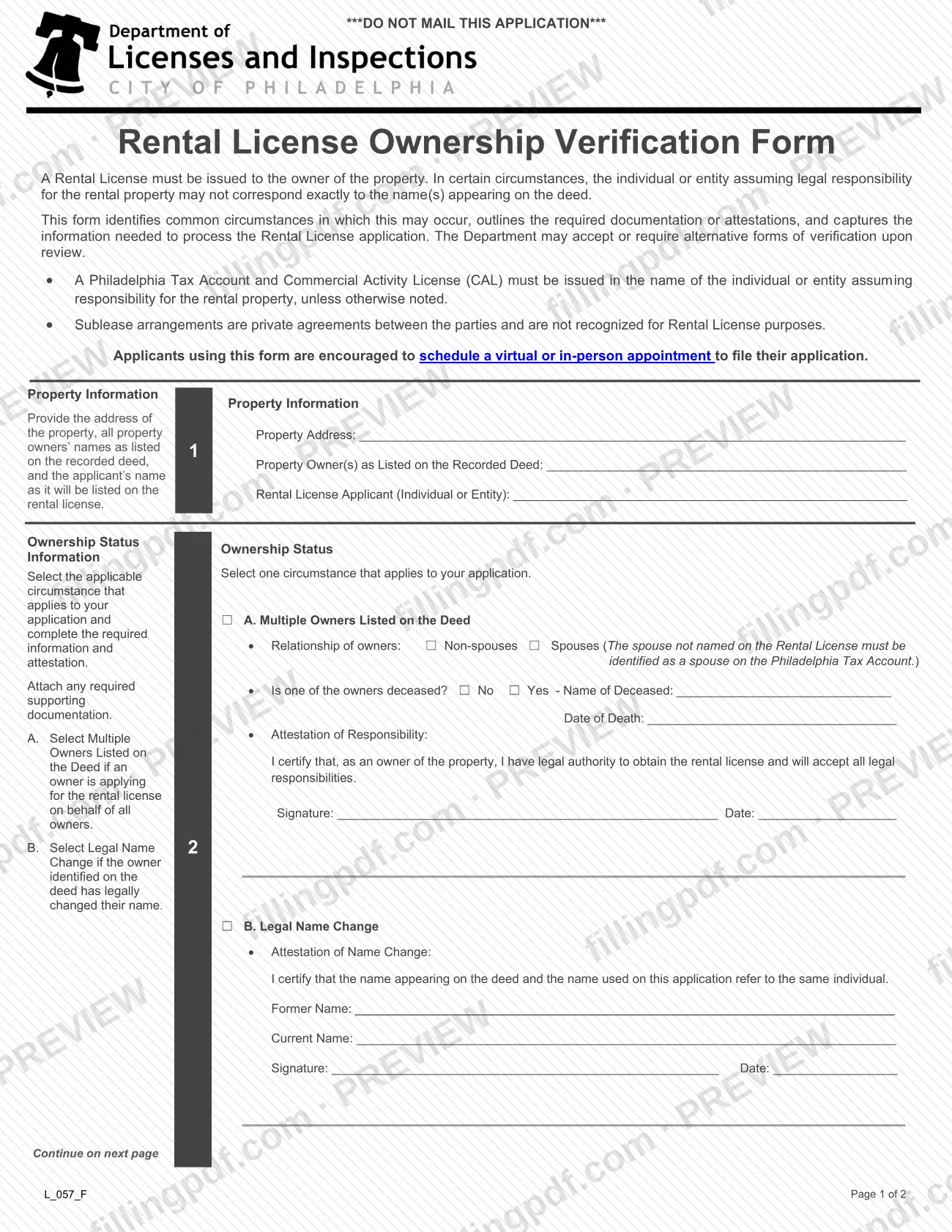
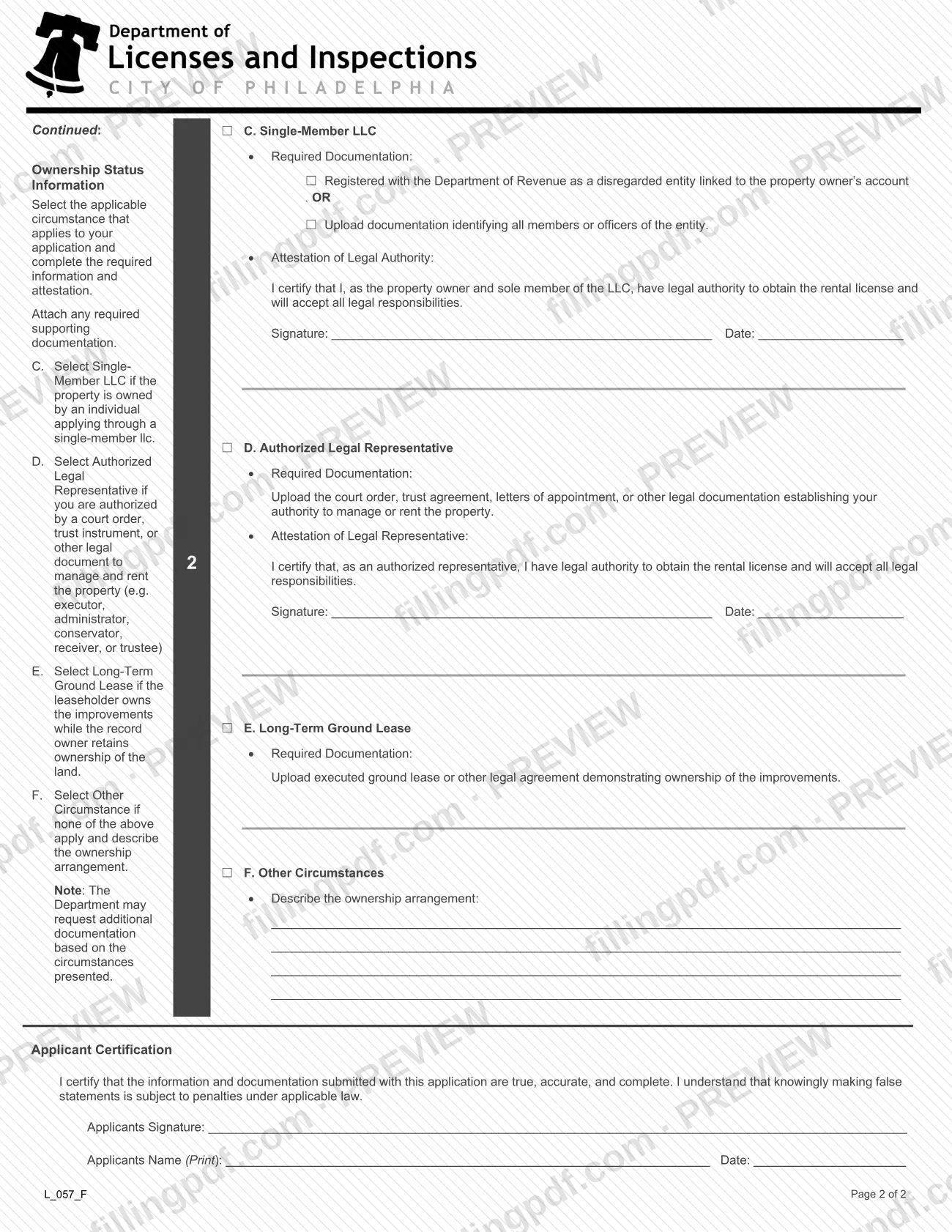
The Rental License Ownership Verification Form (L_057_F) is issued by the City of Philadelphia Department of Licenses and Inspections (L&I) for rental license applicants whose name does not exactly match the property deed. It is one of the Philadelphia business license materials for rental and property businesses. You choose the one circumstance that fits, such as multiple owners, a legal name change or a single-member LLC, and complete its attestation. On this page you can fill out the form online on FillingPDF and download or print the completed PDF; L&I publishes the original at phila.gov.
Last updated
What is L_057_F?
The Rental License Ownership Verification Form (L_057_F) is the City of Philadelphia Department of Licenses and Inspections (L&I) form that explains why the name on a Rental License application may differ from the name on the deed, and captures the attestation and documents that support it.
A Rental License must be issued to the owner of the property. The form recognizes that the individual or entity taking legal responsibility for a rental property does not always match the deed exactly. It lists six circumstances, and you select one:
- A. Multiple Owners Listed on the Deed
- B. Legal Name Change
- C. Single-Member LLC
- D. Authorized Legal Representative
- E. Long-Term Ground Lease
- F. Other Circumstances
The form also states two rules. A Philadelphia Tax Account and Commercial Activity License (CAL) must be issued in the name of the individual or entity assuming responsibility for the rental property, unless otherwise noted. Sublease arrangements are private agreements and are not recognized for Rental License purposes. L&I may accept or require alternative forms of verification after review.
This form is not the Rental License application. It accompanies that application, and the form is marked DO NOT MAIL THIS APPLICATION.
Who needs to file L_057_F?
Rental License applicants whose name does not exactly match the name(s) on the property deed submit this form with the license application, according to L&I's rental and property business license page. Use the circumstance that fits:
- A. Multiple Owners Listed on the Deed: one owner applies on behalf of all owners.
- B. Legal Name Change: the owner named on the deed has legally changed their name.
- C. Single-Member LLC: the property is owned by an individual applying through a single-member LLC.
- D. Authorized Legal Representative: you are authorized by a court order, trust instrument or other legal document to manage and rent the property, for example as an executor, administrator, conservator, receiver or trustee.
- E. Long-Term Ground Lease: the leaseholder owns the improvements while the record owner keeps the land.
- F. Other Circumstances: none of the above applies, and you describe the ownership arrangement.
Select only one circumstance. A sublease does not qualify: sublease arrangements are not recognized for Rental License purposes. If the applicant is signing for someone else, only the representative situation in D, supported by legal documentation, is described on the form.
When to file L_057_F
Submit this form together with the Rental License application whenever the applicant's name does not exactly match the name(s) on the property deed. The form sets no separate deadline of its own; it travels with the application. For new applications, L&I's page also lists a supplemental information form that must be submitted with a new rental license application. Applicants using this form are encouraged to schedule a virtual or in-person appointment to file, so arrange the appointment once your signed attestation and any required documents are ready.
Documents you need
- Circumstance C, Single-Member LLC: proof the LLC is registered with the Department of Revenue as a disregarded entity linked to the property owner's account, OR an upload of documentation identifying all members or officers of the entity.
- Circumstance D, Authorized Legal Representative: the court order, trust agreement, letters of appointment or other legal documentation establishing your authority to manage or rent the property.
- Circumstance E, Long-Term Ground Lease: the executed ground lease or other legal agreement demonstrating ownership of the improvements.
- Circumstance F, Other Circumstances: a written description of the ownership arrangement; L&I may request additional documentation based on the circumstances presented.
- Circumstance A with spouses: the spouse not named on the Rental License must be identified as a spouse on the Philadelphia Tax Account.
How to fill out L_057_F
Enter the property information
Under Property Information, write the Property Address, the Property Owner(s) as Listed on the Recorded Deed, and the Applicant (Individual or Entity) exactly as the name will appear on the Rental License.
Select one ownership circumstance
Under Ownership Status Information, check the single box A through F that applies to your application, then complete only that section and attach any required supporting documentation.
Complete A for multiple owners
Check whether the owners are Non-spouses or Spouses, and answer whether one of the owners is deceased, giving the name and date of death if Yes. Sign and date the Attestation of Responsibility.
Complete B for a name change
Enter the Former Name and Current Name, then sign and date the Attestation of Name Change certifying that both names refer to the same individual.
Complete C for a single-member LLC
Check the Department of Revenue disregarded-entity box OR the box for uploading documentation identifying all members or officers. Sign and date the Attestation of Legal Authority.
Complete D for a legal representative
Upload the court order, trust agreement, letters of appointment or other legal documentation establishing your authority. Sign and date the Attestation of Legal Representative.
Complete E for a ground lease
Check box E and upload the executed ground lease or other legal agreement demonstrating ownership of the improvements.
Describe other circumstances in F
If none of A through E applies, check F and describe the ownership arrangement on the lines provided. The Department may request additional documentation.
Sign the Applicant Certification
At the end of page 2, sign, print the Applicants Name and enter the Date to certify that the information and documentation are true, accurate and complete.
Review, download and prepare to file
Check that only one circumstance is completed and that signatures and dates are present. Download or print the completed PDF from FillingPDF and file it with your Rental License application as described under How to submit.
How to submit L_057_F
Do not mail this form: it is marked DO NOT MAIL THIS APPLICATION, and L&I's page says business license applications are not to be mailed to L&I. Submit it with your Rental License application through these routes:
- Appointment: L&I encourages applicants using this form to schedule a virtual or in-person appointment to file their application.
- Uploads: the documentation required for circumstances C, D and E is uploaded with the application.
The form prints no mailing address, portal address or fee. The L&I page with the rental and property business license materials is at https://www.phila.gov/documents/real-estate-and-property-business-license-materials/. FillingPDF lets you fill out and download the PDF; submission follows the L&I channels above.
Common mistakes to avoid
- Mailing the form to L&I; it is marked DO NOT MAIL THIS APPLICATION.
- Selecting more than one circumstance; the form asks you to select one circumstance that applies.
- Choosing circumstance A for spouses without identifying the spouse not named on the Rental License as a spouse on the Philadelphia Tax Account.
- Checking circumstance C, D or E without uploading the required documentation, such as the court order, trust agreement or executed ground lease.
- Leaving the attestation signature and date blank under the circumstance you selected.
- Skipping the Applicant Certification at the end: it needs the applicant's signature, printed name and date.
- Relying on a sublease to establish responsibility; sublease arrangements are not recognized for Rental License purposes.
- Listing only the applicant's name under Property Information instead of the owner name(s) exactly as recorded on the deed.
Frequently asked questions
What is the Rental License Ownership Verification Form?
It is City of Philadelphia L&I form L_057_F that identifies who is legally responsible for a rental property when the applicant's name does not exactly match the deed. You select one circumstance, A through F, and complete its attestation and documentation.
When do I need to submit the rental license ownership verification form?
Submit it with the Rental License application if the applicant's name does not exactly match the name(s) on the property deed, according to L&I's rental and property business license page. The form sets no separate deadline of its own.
Can I mail the Rental License Ownership Verification Form?
No. The form is marked DO NOT MAIL THIS APPLICATION, and L&I says business license applications should not be mailed to it. L&I encourages applicants using this form to schedule a virtual or in-person appointment to file.
What do I need if the rental is owned by a single-member LLC?
Under circumstance C, check either that the LLC is registered with the Department of Revenue as a disregarded entity linked to the owner's account, or upload documentation identifying all members or officers. You also sign the Attestation of Legal Authority.
Who can use circumstance D, Authorized Legal Representative?
People authorized by a court order, trust instrument or other legal document to manage and rent the property, for example an executor, administrator, conservator, receiver or trustee. You upload that legal documentation and sign the attestation.
Does a sublease count as ownership for a Philadelphia rental license?
No. The form states that sublease arrangements are private agreements between the parties and are not recognized for Rental License purposes. The license must go to the owner or the person or entity in one of the listed circumstances.
Can I fill out this form online on FillingPDF?
Yes. You can fill out the form online on FillingPDF and download or print the completed PDF. FillingPDF is an independent service and does not file the form with L&I; you submit it through L&I's channels.
Ready to fill out L_057_F?
Fill out L_057_F now