
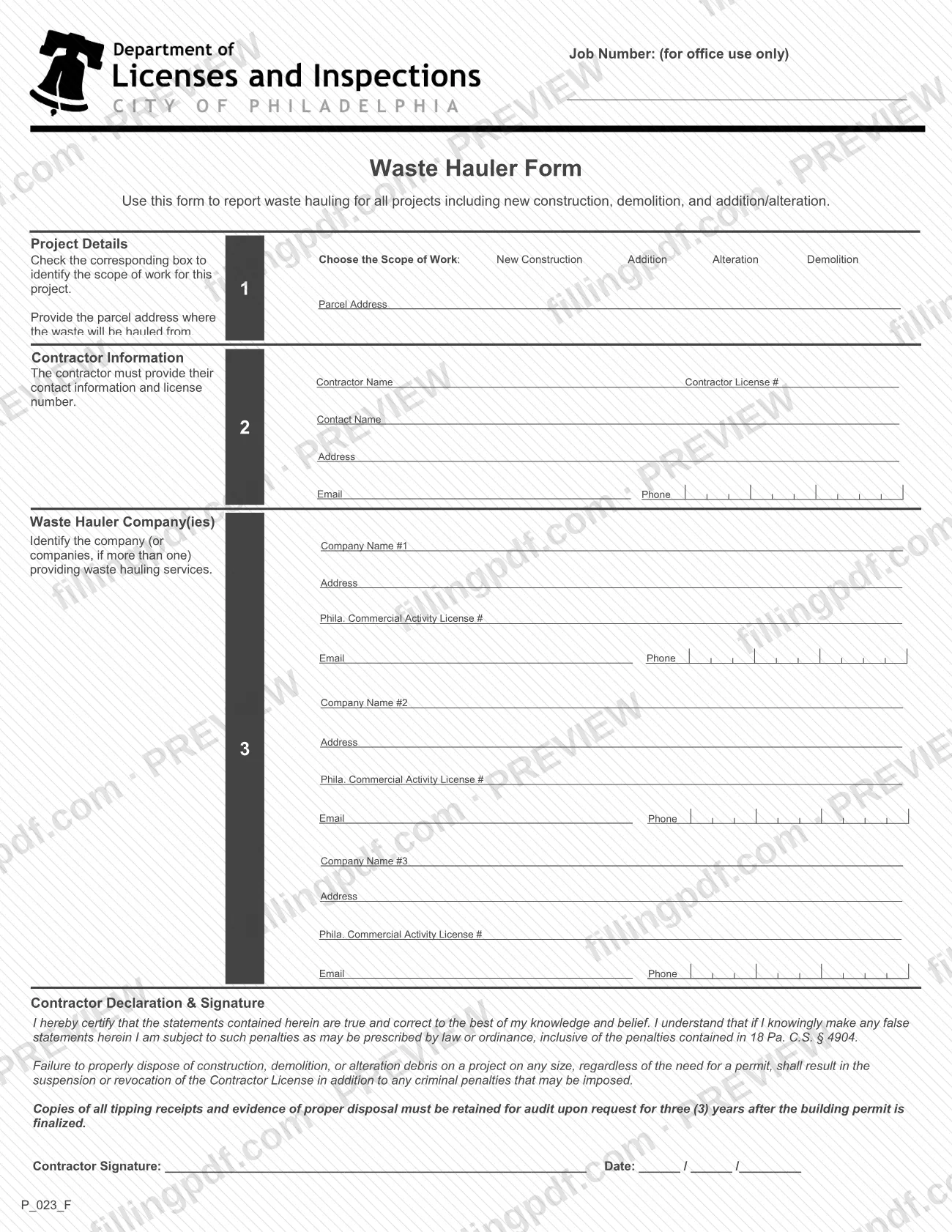
The Waste Hauler Form is the City of Philadelphia Department of Licenses and Inspections (L&I) form a contractor uses to report waste hauling for a project, including new construction, demolition, and addition/alteration work. It lists the parcel address, the contractor and its license number, and up to three waste hauler companies with their Phila. Commercial Activity License numbers. It reports hauling rather than applying for a license, so it is not a Philadelphia business license application. On this page you can fill out the form online on FillingPDF and download or print the completed PDF; L&I publishes the original at phila.gov.
Last updated
What is P_023_F?
The Waste Hauler Form is a City of Philadelphia Department of Licenses and Inspections (L&I) form on which a contractor reports who hauls the waste from a project, covering new construction, demolition, and addition/alteration work.
The form has three blocks. Project Details records the scope of work (New Construction, Addition, Alteration or Demolition) and the parcel address where the waste will be hauled from. Contractor Information records the contractor's name, license number and contact details. Waste Hauler Company(ies) identifies each company providing hauling services, with its address, Phila. Commercial Activity License # and contact details; the form has room for three companies.
The contractor then signs a declaration. By signing, the contractor certifies that the statements are true and correct and acknowledges the penalties for false statements, including those in 18 Pa. C.S. § 4904. The declaration also warns that failure to properly dispose of construction, demolition, or alteration debris on a project of any size, regardless of the need for a permit, results in suspension or revocation of the Contractor License in addition to any criminal penalties.
L&I lists the form, released December 23, 2019, among the documents that support the Demolition Permit process, next to the demolition permit application and the building demolition site safety plan forms. It is a separate document from those: it identifies the hauler and does not apply for a permit. The form also carries a "Job Number" box marked for office use only.
Who needs to file P_023_F?
The contractor responsible for a project in Philadelphia completes and signs this form. L&I's form says to use it to report waste hauling for all projects, including new construction, demolition, and addition/alteration.
- Contractors: you give your name, Contractor License #, a contact name, address, email and phone, and you sign the Contractor Declaration & Signature.
- Waste hauler companies: they do not complete the form, but the contractor must list each company that provides hauling services, with its Phila. Commercial Activity License #. List up to three on this form.
- Projects of any size: the declaration states that proper disposal of construction, demolition, or alteration debris applies to a project of any size, regardless of the need for a permit.
The form has no place for anyone other than the contractor to sign, and it does not describe representatives acting for the contractor. Leave the "Job Number" box blank: it is for office use only.
When to file P_023_F
Complete the form for each project on which waste will be hauled, whether it is new construction, demolition, or addition/alteration. The form prints no due date of its own.
L&I lists it among the documents that support a Demolition Permit application, so ask L&I when it expects the form for your project.
The form does set a record-keeping period. Copies of all tipping receipts and evidence of proper disposal must be retained for audit upon request for three (3) years after the building permit is finalized.
Documents you need
- Copies of all tipping receipts and evidence of proper disposal: keep them rather than attach them, and retain them for audit upon request for three (3) years after the building permit is finalized.
How to fill out P_023_F
Leave the Job Number box blank
At the top, the Job Number box is marked for office use only. Do not enter anything in it.
Check the scope of work
Under Project Details, check the box that matches the project: New Construction, Addition, Alteration or Demolition.
Enter the parcel address
Write the parcel address where the waste will be hauled from.
Enter the contractor's name and license
Under Contractor Information, enter the Contractor Name and Contractor License #.
Add the contractor's contact details
Enter the Contact Name, Address, Email and Phone for the contractor.
Identify the first waste hauler company
Under Waste Hauler Company(ies), enter Company Name #1, its Address, its Phila. Commercial Activity License #, and its Email and Phone.
Add more hauler companies if needed
If more than one company provides hauling services, complete Company Name #2 and Company Name #3 with the same details. Leave unused blocks empty.
Sign and date the declaration
The contractor signs at Contractor Signature and enters the date as month, day and year in the Date boxes. By signing, the contractor certifies the statements are true and correct.
Review and download the completed PDF
Check the scope of work, parcel address and license numbers, then download or print the completed PDF from FillingPDF. Keep tipping receipts and evidence of proper disposal for three years after the building permit is finalized.
How to submit P_023_F
The form itself names no mailing address, portal, office or appointment rule, so it gives no channel for delivery. L&I lists it among the documents that support the Demolition Permit process at https://www.phila.gov/documents/demolitions-permits-information/; contact L&I to confirm how it should be delivered for your project.
Before you send it, check that the contractor has signed and dated the declaration, that the license numbers are entered, and that the "Job Number" box, which is for office use only, is blank. Keep copies of tipping receipts and evidence of proper disposal; the form says to retain them, not to attach them. FillingPDF lets you fill out and download the PDF; submission follows the agency's channels.
Common mistakes to avoid
- Writing in the Job Number box; the form marks it for office use only.
- Leaving out the Contractor License # in the Contractor Information block, which the form says the contractor must provide.
- Omitting the Phila. Commercial Activity License # for a waste hauler company listed under Waste Hauler Company(ies).
- Listing only one hauler when more than one company provides hauling services; the form asks you to identify every company.
- Not checking a scope of work box (New Construction, Addition, Alteration or Demolition) in Project Details.
- Submitting the form without the contractor's signature and date in the Contractor Declaration & Signature block.
- Assuming the form is not needed because no permit is required; the declaration applies to a project of any size, regardless of the need for a permit.
- Discarding tipping receipts or evidence of proper disposal before three years after the building permit is finalized.
Frequently asked questions
What is the Philadelphia Waste Hauler Form used for?
It is the City of Philadelphia L&I form a contractor uses to report waste hauling for a project, including new construction, demolition, and addition/alteration. It records the scope of work, the parcel address, the contractor's license and up to three waste hauler companies.
Is the waste hauler form a Philadelphia business license?
No. The form reports who hauls waste from a project; it does not issue a license. It asks for the contractor's Contractor License # and each hauler's Phila. Commercial Activity License #, which must already exist.
Do I need this form if my project does not require a permit?
The form says to use it to report waste hauling for all projects. Its declaration also states that the duty to dispose of debris properly applies to a project of any size, regardless of the need for a permit.
Who signs the Waste Hauler Form?
The contractor signs and dates the Contractor Declaration & Signature, certifying that the statements are true and correct to the best of their knowledge and belief. The form has no signature block for the hauler company.
How many waste hauler companies can I list on the form?
Up to three. The form has blocks for Company Name #1, #2 and #3, each with address, Phila. Commercial Activity License #, email and phone. List every company that provides hauling services for the project.
How long do I have to keep tipping receipts?
Three (3) years after the building permit is finalized. The form says copies of all tipping receipts and evidence of proper disposal must be retained and produced for audit upon request.
What happens if debris is not disposed of properly?
The form states that failure to properly dispose of construction, demolition, or alteration debris results in suspension or revocation of the Contractor License, in addition to any criminal penalties that may be imposed. Knowingly false statements carry penalties under 18 Pa. C.S. § 4904.
Can I fill out the Waste Hauler Form online?
You can fill out the PDF online on FillingPDF and download or print it. FillingPDF is an independent service, not affiliated with L&I, and does not file the form; delivery follows L&I's channels.
Ready to fill out P_023_F?
Fill out P_023_F now