
OSHA 300 (SP) is the Spanish-language version of the injury and illness recordkeeping forms published by the Occupational Safety and Health Administration (OSHA): the Registro de Lesiones y Enfermedades Ocupacionales (Formulario OSHA-300), the Resumen (Formulario OSHA-300A) and the Informe de Incidente de Lesión y Enfermedad (Formulario OSHA-301). Employers with establishments covered by 29 CFR Part 1904 use them to record work-related cases, summarize the year and document each incident. On this page you can fill out the form online on FillingPDF and download or print the completed PDF; OSHA publishes the original at osha.gov and does not accept completed forms by mail or email.
Last updated
What is OSHA 300 (SP)?
The OSHA 300 (SP) package is the Spanish-language version of the Occupational Safety and Health Administration (OSHA) injury and illness recordkeeping forms: the Registro de Lesiones y Enfermedades Ocupacionales (Form 300), the Resumen (Form 300A) and the Informe de Incidente (Form 301).
The package has three parts, all marked Form approved OMB no. 1218-0176:
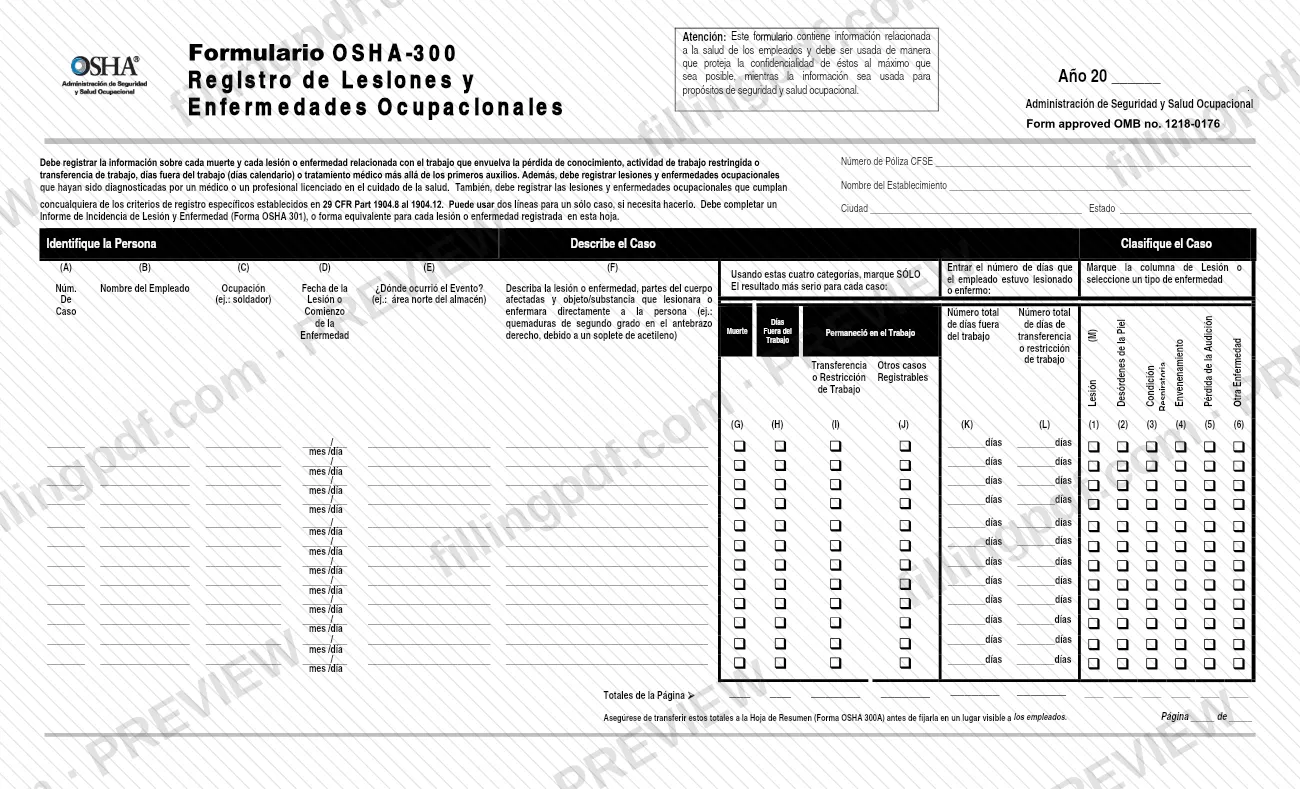
- Formulario OSHA-300, the Log. It lists each death and each work-related injury or illness that involves loss of consciousness, restricted work or job transfer, days away from work, or medical treatment beyond first aid. It also lists cases diagnosed by a physician or licensed health care professional and cases that meet the specific recording criteria in 29 CFR Part 1904.8 through 1904.12.
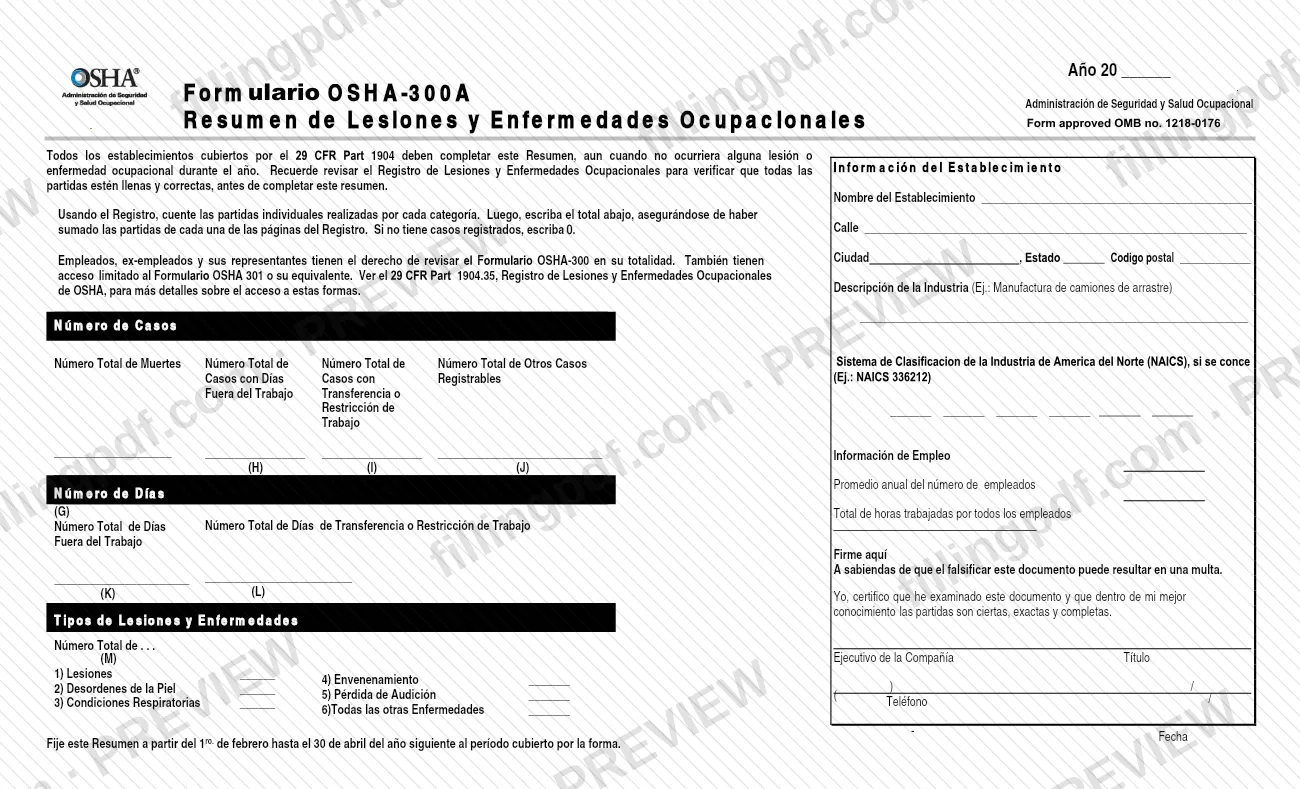
- Formulario OSHA-300A, the Summary. It totals the Log by category, adds the annual average number of employees and the total hours worked, and is certified by a company executive.
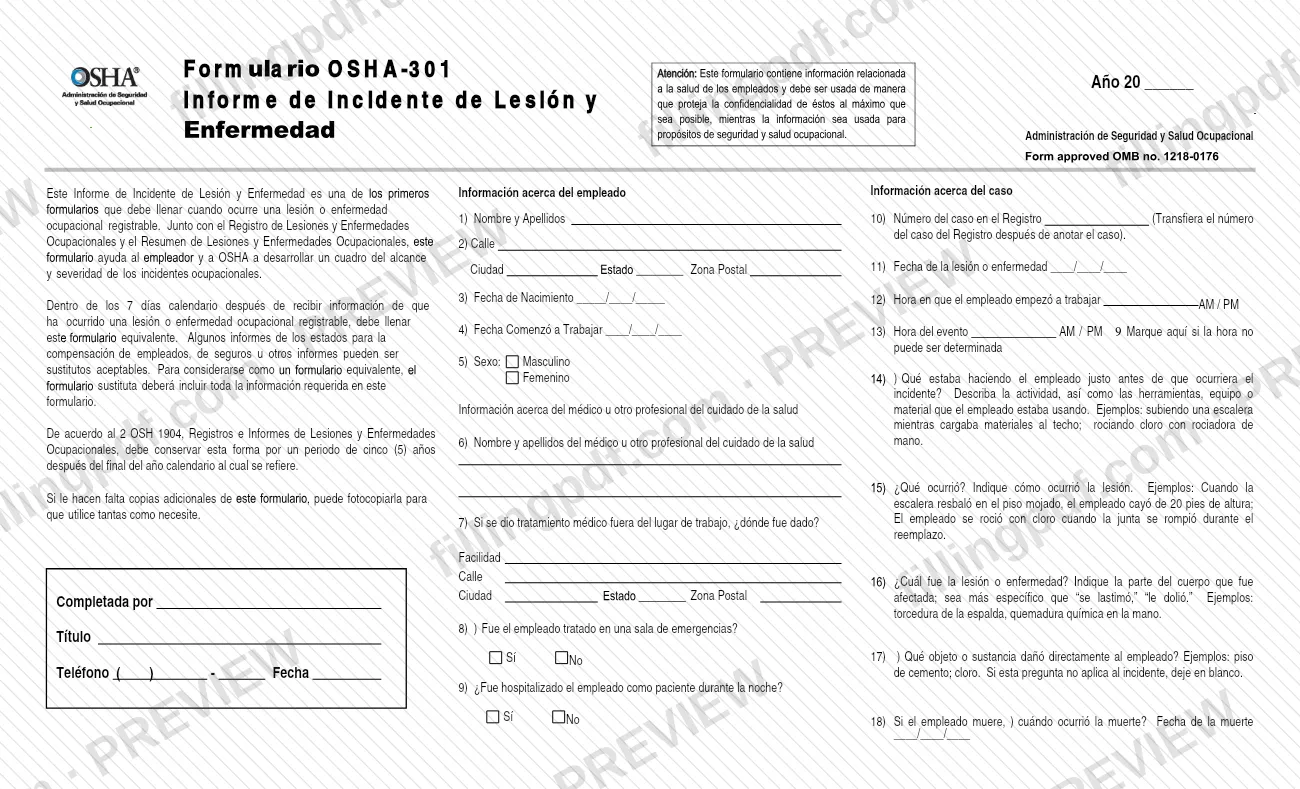
- Formulario OSHA-301, the incident report. It describes one recorded case: the employee, the health care provider and what happened.
Together they give the employer and OSHA a picture of the scope and severity of workplace incidents. The forms carry a notice that they hold employee health information and must be used in a way that protects confidentiality as much as possible. This page covers the Spanish version; the agency page for the forms is titled Injury & Illness Recordkeeping Forms - 300, 300A, 301.
Who needs to file OSHA 300 (SP)?
Employers whose establishments are covered by 29 CFR Part 1904 use these forms.
- Form 300A (Summary): every covered establishment must complete it, even when no work-related injury or illness occurred during the year. If there are no recorded cases, you enter 0.
- Form 300 (Log): you record each case that meets the criteria printed at the top of the form, and you may use two lines for a single case.
- Form 301 (Incident Report): you complete it, or an equivalent form, for each injury or illness recorded on the Log.
- Company executive: this person examines the Summary and certifies that the entries are true, accurate and complete, to the best of their knowledge.
Employees, former employees and their representatives have the right to review the Form 300 in full, and limited access to Form 301 or its equivalent. The form refers to 29 CFR Part 1904.35 for the details.
OSHA also allows equivalent forms in any file format, such as Excel or CSV, if the requirements of paragraphs 1904.29(b)(4) and 1904.32(b)(2)(iii) are met.
When to file OSHA 300 (SP)
Form 301 is due within 7 calendar days after you receive information that a recordable work-related injury or illness has occurred. The Log is kept as cases occur, and you transfer its page totals to the Summary (Form 300A) at year end.
Post the Summary from February 1 through April 30 of the year after the period it covers, in a place visible to employees. Complete the Summary even if no cases occurred. At year end it also needs the annual average number of employees and the total hours worked by all employees.
Keep Form 301 for five years after the end of the calendar year it covers, according to the form. OSHA does not set a mailing deadline on these forms because it does not accept paper or emailed copies; see the annual data submission described under How to submit.
Documents you need
- Form OSHA-301, Informe de Incidente de Lesión y Enfermedad, or an equivalent form, for each injury or illness recorded on the Form 300 Log.
- State workers' compensation or insurance reports, only when they contain all the information required on Form 301 and are used as an acceptable equivalent form.
How to fill out OSHA 300 (SP)
Enter the year and establishment
On the Log (Formulario OSHA-300), write the year after "Año 20", the Nombre del Establecimiento, the Ciudad and the Estado. The form also has a line for a CFSE policy number (Número de Póliza CFSE).
Identify the employee
For each case, enter the case number in column (A), the employee's name in (B) and the occupation in (C), for example welder.
Describe when and where
In (D) enter the date of the injury or onset of illness as month/day. In (E) say where the event occurred, for example the north storage area.
Describe the injury or illness
In column (F) describe the injury or illness, the parts of the body affected and the object or substance that directly injured or made the employee ill.
Mark the most serious outcome
In columns (G) to (J) check ONLY one box: Muerte, Días Fuera del Trabajo, Transferencia o Restricción de Trabajo, or Otros casos Registrables.
Enter days and illness type
Columns (K) and (L) take the number of days away from work and days of job transfer or restriction. In (M) check one type: injury, skin disorder, respiratory condition, poisoning, hearing loss or all other illnesses.
Total each page of the Log
Complete Totales de la Página and Página __ de __. Transfer these totals to the Summary before it is posted.
Complete the 300A establishment information
On Formulario OSHA-300A, enter the Año, establishment name, street, city, state and ZIP code. Add the industry description and the NAICS code if known.
Enter employment information
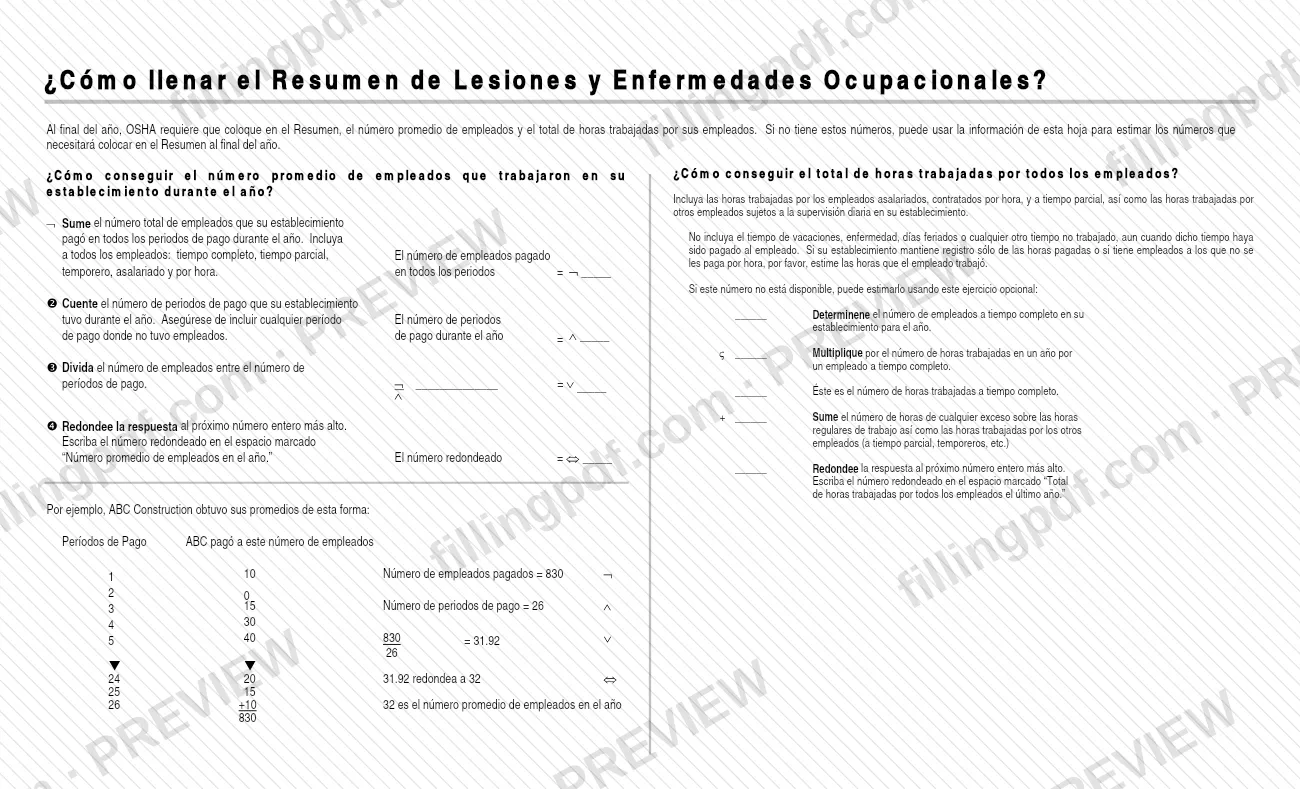
Enter the annual average number of employees and the total hours worked by all employees. Count paid and part-time staff and others under daily supervision, and leave out vacation, sick and holiday time.
Enter case counts and totals
Count the Log entries by category. Fill in (G) to (J), the days totals (K) and (L) and the injury and illness types (M) 1 to 6, entering 0 where there are none.
Certify and sign the Summary
Under Firme aquí, the company executive enters their name, title, phone and date after examining the document.
Complete Form 301 for each case
On Formulario OSHA-301, answer items 1 to 9 about the employee and the health care provider. Then answer items 10 to 18 about the case: case number from the Log, dates and times, what happened, the injury or illness and any date of death.
Review and download the PDF
Check that the Log totals match the Summary and that each case has a Form 301. Download or print the completed PDF from FillingPDF, and keep it as described under How to submit.
How to submit OSHA 300 (SP)
OSHA does not accept completed paper forms by mail or electronic forms by email. The channels are internal posting and the agency's online application.
- Injury Tracking Application (ITA): covered establishments must submit their annual 300A, 300 and 301 data through OSHA's Injury Tracking Application. The agency page at https://www.osha.gov/recordkeeping/forms links to the ITA page for details and frequently asked questions.
- Posting at the workplace: post the certified Form 300A where employees can see it from February 1 through April 30 of the following year.
- Employee access: employees, former employees and their representatives may review the Form 300 and, in a limited way, the Form 301. See 29 CFR Part 1904.35.
Before posting, check that the Log totals were transferred to the Summary. An equivalent form used in place of Form 300A must also be certified and posted each year under paragraph 1904.32. OSHA advises saving the fillable PDF to your computer first and not editing or printing it in a browser plug-in viewer. FillingPDF lets you fill out and download the PDF; submission follows the channels above.
Common mistakes to avoid
- Leaving a recordable case off the Log, such as a death or an injury with days away from work, restricted work or job transfer, or treatment beyond first aid.
- Skipping Form 300A in a year with no cases; every covered establishment must complete it, entering 0 when there are none.
- Posting the Summary before transferring the page totals from the Log, or not leaving it posted from February 1 through April 30.
- Counting vacation, sick leave, holidays or other paid time not worked in the total hours worked by all employees.
- Completing Form 301 after the 7 calendar days that follow notice of the case.
- Marking more than one outcome in columns G through J; the form says to mark ONLY the most serious outcome for each case.
- Opening, editing or printing the fillable PDF through a browser plug-in viewer instead of saving it and using Acrobat.
- Mailing or emailing completed forms to OSHA, which does not accept them that way.
Frequently asked questions
What is OSHA 300 (SP)?
OSHA 300 (SP) is the Spanish version of OSHA's injury and illness recordkeeping forms: the Log (Formulario OSHA-300), the annual Summary (300A) and the incident report (301). Employers use them to record work-related deaths, injuries and illnesses.
Do I have to complete Form 300A if nobody was injured?
Yes. All establishments covered by 29 CFR Part 1904 must complete the Summary even when no work-related injury or illness occurred during the year. If you have no recorded cases, enter 0.
When do I post the OSHA 300A summary?
Post it from February 1 through April 30 of the year after the period it covers. The form says to put it where employees can see it, and to transfer the Log totals to it first.
How long do I have to fill out Form 301?
Within 7 calendar days after you receive information that a recordable work-related injury or illness has occurred. Keep the form for five years after the end of the calendar year it covers.
Can I mail or email my OSHA 300 forms to OSHA?
No. OSHA does not accept completed paper forms by mail or electronic forms by email. Covered establishments submit their annual 300A, 300 and 301 data through the Injury Tracking Application (ITA).
Can I use my own form instead of the OSHA 300?
Yes, an equivalent form may be kept in any file format, such as Excel or CSV, if it meets paragraphs 1904.29(b)(4) and 1904.32(b)(2)(iii). An equivalent Form 300A must also be certified and posted each year.
Can I fill out the OSHA 300 form online on FillingPDF?
Yes. You can fill out the fillable PDF online on FillingPDF and download or print it. FillingPDF is an independent service and does not submit data to OSHA; you follow OSHA's channels to submit and post.
Who can see my injury and illness records?
Employees, former employees and their representatives may review the Form 300 in full and have limited access to Form 301 or its equivalent. The form cites 29 CFR Part 1904.35 for details.
Ready to fill out OSHA 300 (SP)?
Fill out OSHA 300 (SP) now