
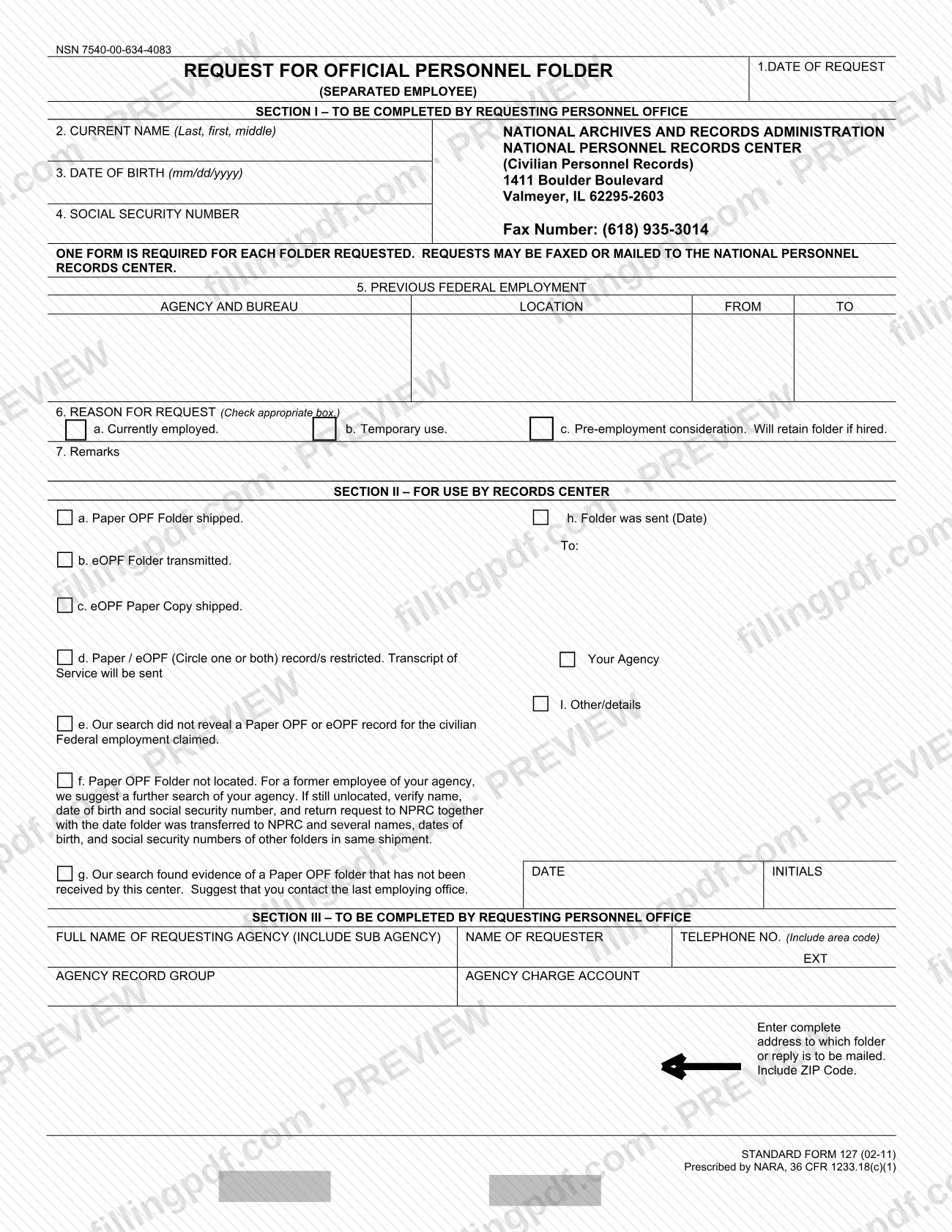
SF 127 is the Standard Form that a federal personnel office uses to request the Official Personnel Folder (OPF) of a separated employee from the National Personnel Records Center (NPRC), part of the National Archives and Records Administration (NARA). The GSA reference page states that use of the form is restricted to authorized representatives of Federal personnel offices. On this page you can fill out the SF 127 online on FillingPDF and download or print the completed PDF; the form and its agency page are published at gsa.gov.
Last updated
What is SF 127?
SF 127, Request for Official Personnel Folder (Separated Employee), is the Standard Form a federal personnel office sends to the National Archives and Records Administration (NARA) to request a separated employee's Official Personnel Folder (OPF) from the National Personnel Records Center (NPRC).
The form is prescribed by NARA under 36 CFR 1233.18(c)(1) and is addressed to the NPRC's Civilian Personnel Records unit. The edition printed on it is Standard Form 127 (02-11), and the GSA reference page lists the same revision date, 02/2011.
The form has three sections:
- Section I is completed by the requesting personnel office. It identifies the former employee (current name, date of birth, Social Security number), lists previous Federal employment, gives the reason for the request and leaves room for remarks.
- Section II is for use by the Records Center. It records the outcome, such as a paper OPF shipped, an eOPF transmitted, an eOPF paper copy shipped, a restricted record with a transcript of service sent, or a search that found no record or could not locate the folder.
- Section III is completed by the requesting personnel office. It names the requesting agency and requester, and gives the address to which the folder or reply is to be mailed.
One form is required for each folder requested.
Who needs to file SF 127?
The SF 127 is used by Federal personnel offices that need the Official Personnel Folder of a separated employee. The GSA reference page says use of the form is restricted to authorized representatives of Federal personnel offices.
Section I, item 6 gives the reasons a personnel office may check:
- a. the person is currently employed;
- b. temporary use of the folder;
- c. pre-employment consideration, where the office will retain the folder if the person is hired.
A separate form is required for each folder, so an office requesting several folders completes one SF 127 per person. The form is not designed for the former employee to request their own folder: Sections I and III are completed by the requesting personnel office. Neither the form nor the GSA page describes a procedure for individuals.
Government departments, agencies and offices can order the printed form with a government purchase card or Activity Address Code (AAC). Government contractors need their sponsoring Government Department, Agency, or Office to sponsor the order.
When to file SF 127
Submit an SF 127 when your personnel office needs the Official Personnel Folder of a separated employee for one of the reasons listed in item 6: current employment, temporary use, or pre-employment consideration. The form prints no deadline, filing window or validity period, so it is completed whenever the request arises.
Because one form is required for each folder, prepare a separate SF 127 for every person whose folder you request. The form states that requests may be faxed or mailed to the NPRC, and Section II is where the Records Center records its response. The form does not state a response time.
How to fill out SF 127
Enter the date of request
In Section I, item 1, enter the date you are making the request.
Enter the employee's current name
Item 2: write the current name of the separated employee in the order Last, first, middle.
Enter the date of birth
Item 3: enter the employee's date of birth in mm/dd/yyyy format.
Enter the Social Security number
Item 4: enter the employee's Social Security number. The Records Center uses the name, date of birth and Social Security number to search for the folder.
List previous Federal employment
Item 5: enter the agency and bureau, the location, and the FROM and TO dates of the previous Federal employment.
Check the reason for the request
Item 6: check the appropriate box: Currently employed, Temporary use, or Pre-employment consideration. Will retain folder if hired.
Add remarks
Item 7, Remarks: add any information that helps the Records Center identify or handle the request.
Leave Section II blank
Section II is for use by the Records Center, which records how the request was answered. Do not complete it.
Identify the requesting agency
In Section III, enter the full name of the requesting agency, including the sub agency, the name of the requester, and a telephone number with area code (and extension if any).
Enter record group and charge account
Enter the Agency Record Group and the Agency Charge Account in the boxes the form provides.
Enter the return mailing address
In the address box, write the complete address, including ZIP Code, to which the folder or reply is to be mailed.
Review and download the PDF
Check each item against the employee's records, then download or print the completed PDF from FillingPDF and send it as described under How to submit.
How to submit SF 127
Requests may be faxed or mailed to the National Personnel Records Center, as printed on the form.
- By mail: National Archives and Records Administration, National Personnel Records Center (Civilian Personnel Records), 1411 Boulder Boulevard, Valmeyer, IL 62295-2603.
- By fax: (618) 935-3014.
Send one form for each folder requested. In Section III, enter the complete address, including ZIP Code, to which the folder or reply is to be mailed. Leave Section II blank; the Records Center completes it.
The form prints no other channel and no fee. If your office needs printed copies of the blank form, Government departments, agencies and offices can order stock number 7540-00-634-4083 at www.gsaglobalsupply.gsa.gov or www.gsaadvantage.gov. FillingPDF lets you fill out and download the PDF; submission follows the channels above.
Common mistakes to avoid
- Using one SF 127 to request several folders; the form states that one form is required for each folder requested.
- Completing the form as an individual or contractor without authority; the GSA page restricts use to authorized representatives of Federal personnel offices.
- Writing in Section II, which is reserved for use by the Records Center.
- Leaving out the ZIP Code in the address to which the folder or reply is to be mailed.
- Entering the date of birth in a format other than mm/dd/yyyy.
- Skipping item 6 so the reason for the request is not marked: currently employed, temporary use, or pre-employment consideration.
- Omitting the requester's telephone number with area code, or the agency name with sub agency, in Section III.
- Sending the request to an address other than the NPRC address or fax number printed on the form.
Frequently asked questions
What is the SF 127 used for?
The SF 127 is the Standard Form a Federal personnel office uses to request the Official Personnel Folder of a separated employee from the National Personnel Records Center (NPRC), which is part of NARA. One form is required for each folder requested.
Who can use the SF 127 form?
The GSA reference page says use of the SF 127 is restricted to authorized representatives of Federal personnel offices. Sections I and III are completed by the requesting personnel office, so the form is not set up for an individual to request their own folder.
Where do I send the SF 127?
Fax it to (618) 935-3014 or mail it to the National Personnel Records Center (Civilian Personnel Records), 1411 Boulder Boulevard, Valmeyer, IL 62295-2603. The form states that requests may be faxed or mailed to the NPRC.
Can I request more than one folder on a single SF 127?
No. The form states that one form is required for each folder requested. If your office needs the folders of several former employees, complete a separate SF 127 for each person.
What are the reasons I can check on the SF 127?
Item 6 offers three boxes: currently employed, temporary use, and pre-employment consideration. For the last one, the form notes that the requesting office will retain the folder if the person is hired.
What do I put in Section II of the SF 127?
Nothing. Section II is for use by the Records Center, which uses it to show the result, such as a paper OPF shipped, an eOPF transmitted, a restricted record, or a folder it could not locate.
Can I fill out the SF 127 online?
Yes, you can fill out the PDF online on FillingPDF and download or print it. FillingPDF is an independent service and does not send the request to NPRC; your office faxes or mails it using the details on the form.
How can my agency order printed SF 127 forms?
Government departments, agencies and offices can order stock number 7540-00-634-4083 at www.gsaglobalsupply.gsa.gov or www.gsaadvantage.gov with a government purchase card or an Activity Address Code (AAC). Contractors need their sponsoring agency to sponsor the order.
Ready to fill out SF 127?
Fill out SF 127 now