
Form 113, Certificate Of Correction, is the form a domestic or foreign business corporation uses to correct a document it has already filed with the Rhode Island Department of State, Business Services Division. A certificate of correction names the document, the date it was filed, what was wrong and the corrected text, and it travels with the corrected document itself. On this page you can fill out the form online on FillingPDF and download or print the completed PDF; the Department of State publishes the original at docs.sos.ri.gov and receives filings only through its own channels.
Last updated
What is 113?
Form 113, Certificate Of Correction, is the Rhode Island Department of State form a domestic or foreign business corporation files under Section 7-1.2-105 of the General Laws of Rhode Island (RIGL 7-1.2-105) to correct an inaccurate document it previously filed with the Business Services Division.
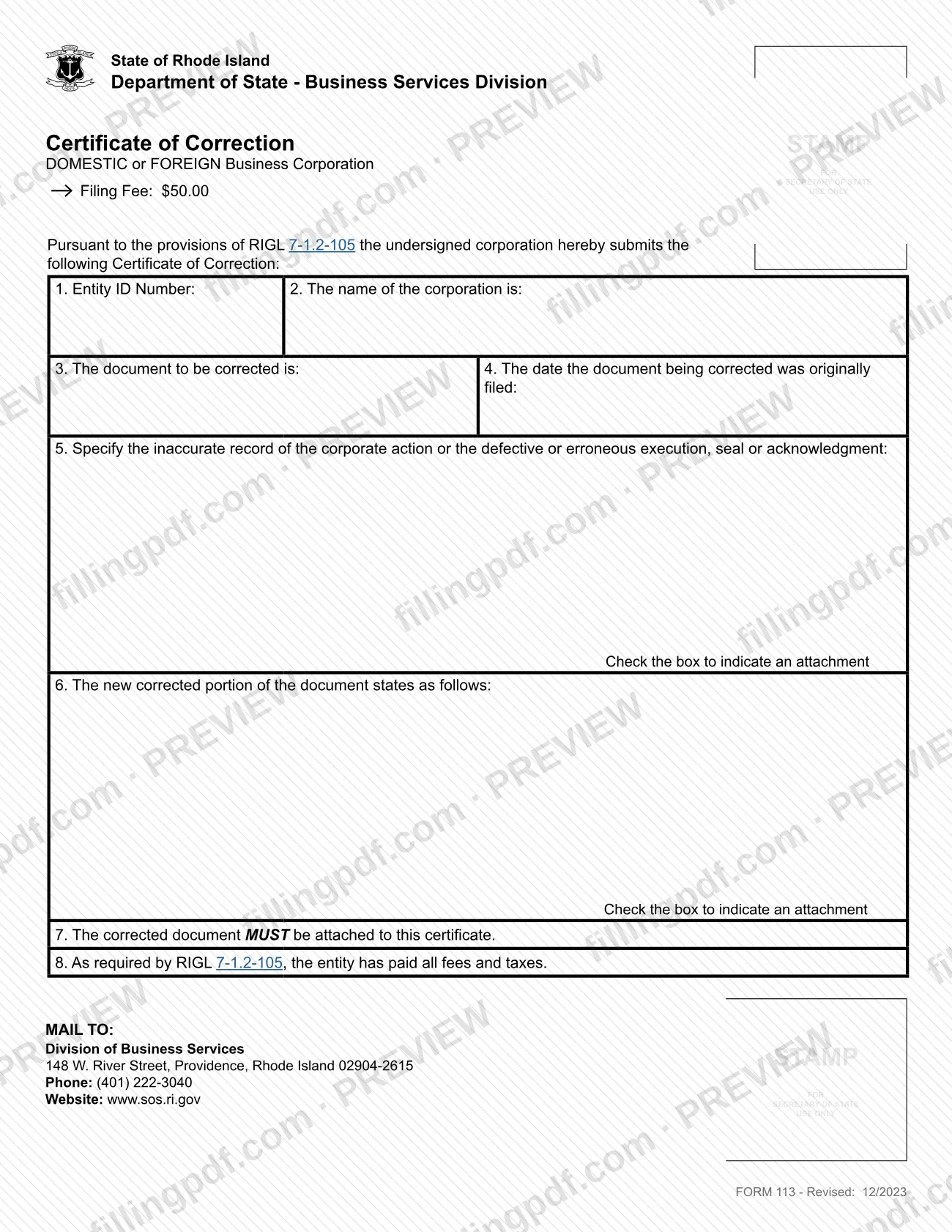
The form is built around the correction itself. You give the entity ID number and corporation name, identify the document to be corrected and the date it was originally filed, specify the inaccurate record of the corporate action or the defective or erroneous execution, seal or acknowledgment, and then state the new corrected portion. The corrected and completed document must be attached to the certificate. The entity also acknowledges that it has paid all fees and taxes, as RIGL 7-1.2-105 requires, and an authorized officer signs under penalty of perjury.
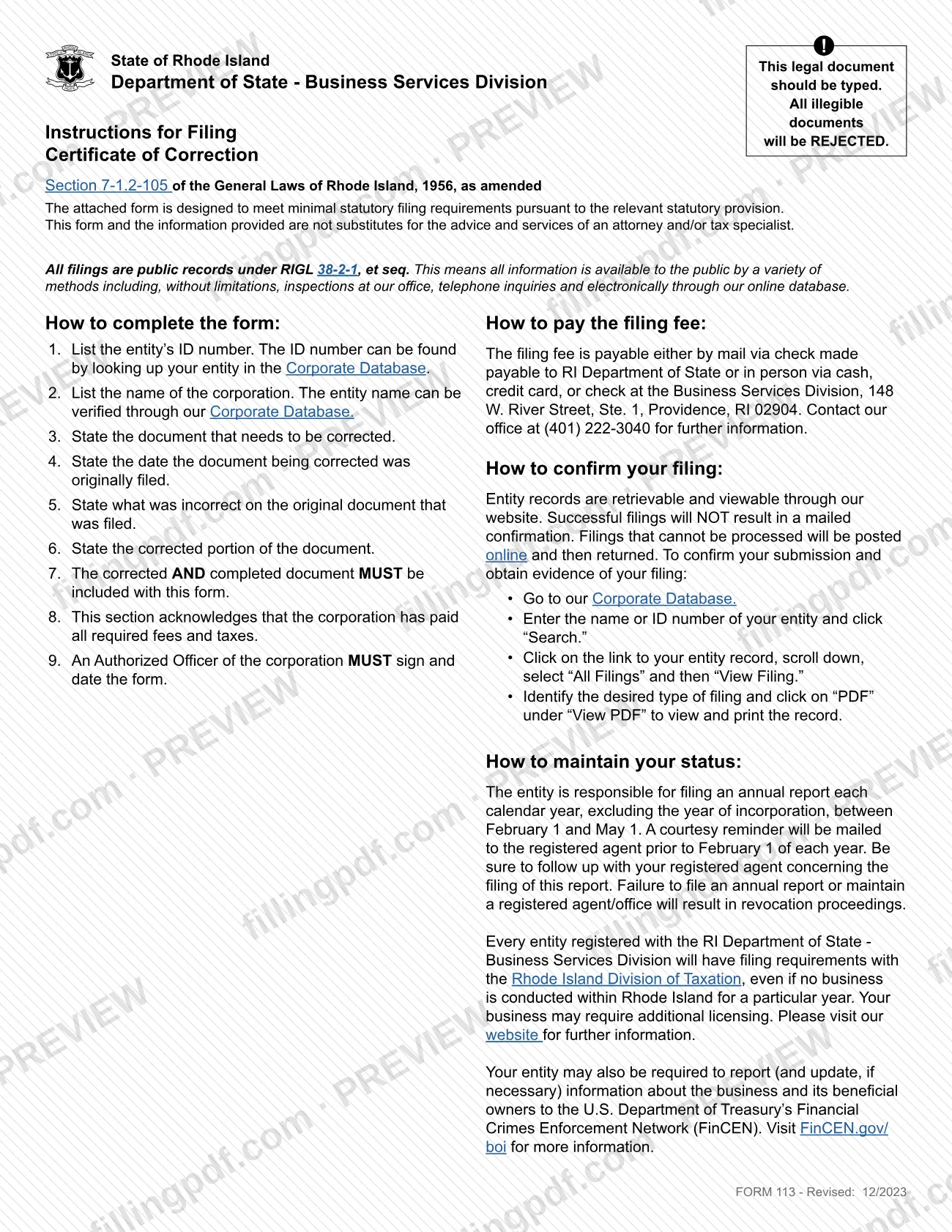
The Department of State states that the form is designed to meet minimal statutory filing requirements and is not a substitute for the advice of an attorney or tax specialist. All filings are public records under RIGL 38-2-1, et seq.
Form 113 is the business corporation version. The Department's page on updating business information lists separate certificates of correction for other entity types: Form 403 for an LLC and Form 351 for a limited partnership.
Who needs to file 113?
A domestic or foreign business corporation registered with the Rhode Island Department of State that needs to correct an inaccurate document it has already filed uses Form 113. The form is signed by an authorized officer of the corporation, who also types or prints their name and the date.
Who should not use it:
- LLCs. The Department's page lists Certificate of Correction Form 403 for an LLC.
- Limited partnerships. The same page lists Certificate of Correction Form 351.
- Entities that want to change information rather than fix an error. The Department's page lists other forms for those updates, such as Articles of Amendment Form 151 for a business corporation to change its name or purpose, and Annual Report Form 630 to change the principal office address or principals. If you are within your first year of operation, the Department notes you may need a different form and suggests contacting the office at 401-222-3040.
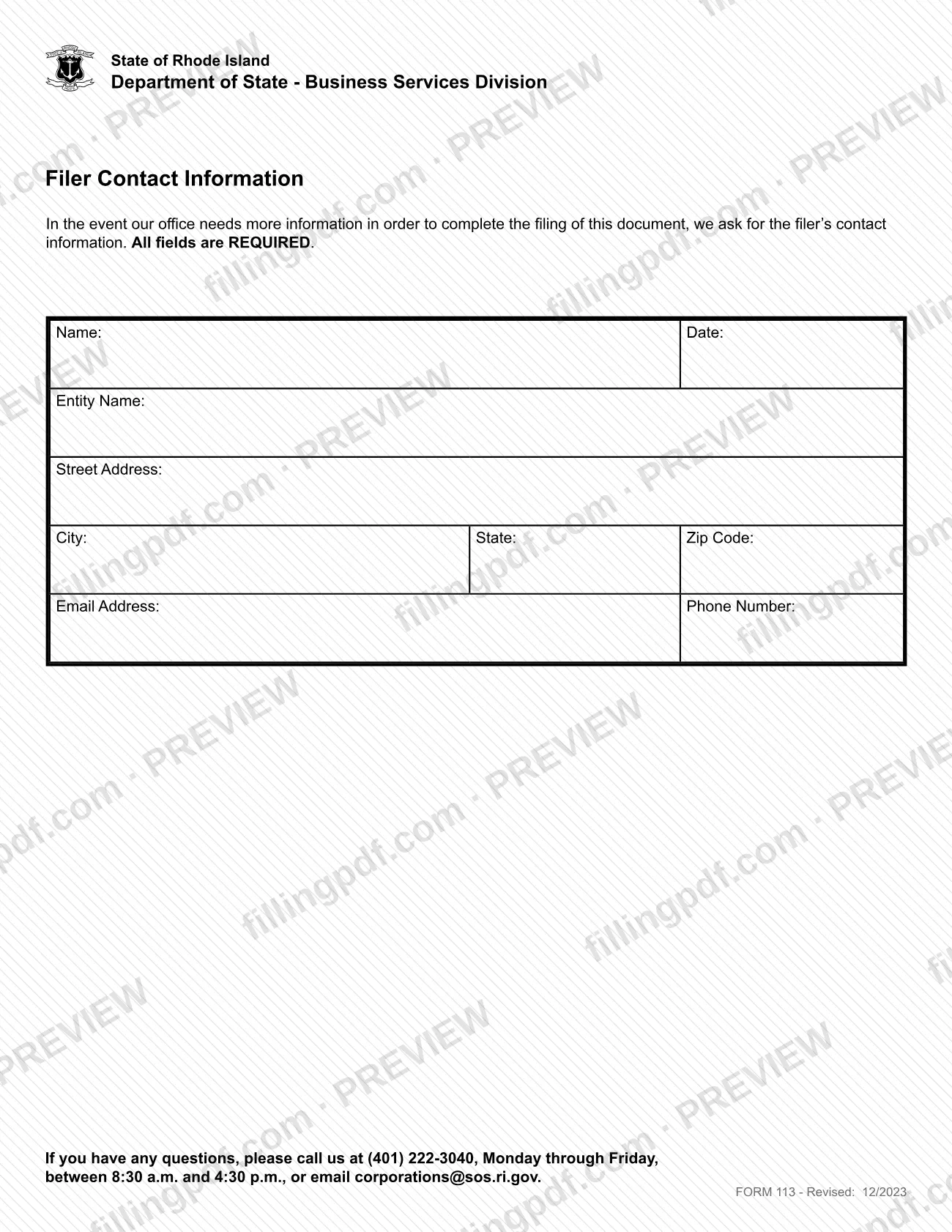
The form is a filing about the corporation's own record, so the filer contact page asks for the name, entity name, address, email and phone of the person to reach if the office needs more information.
When to file 113
File Form 113 when a document the corporation has already filed with the Rhode Island Department of State contains an inaccurate record of a corporate action, or a defective or erroneous execution, seal or acknowledgment. The form prints no separate deadline, so it is filed whenever the error is found and corrected.
Because the corrected and completed document must be included with the certificate, prepare that document before you submit. Item 8 also states that the entity has paid all fees and taxes, so settle any outstanding amounts first.
The form does not state a processing time. Successful filings do not produce a mailed confirmation; you check the entity record in the Corporate Database, as described under How to submit.
Documents you need
- The corrected and completed document, attached to the certificate; item 7 says it must be attached.
- Filing fee payment: a check payable to RI Department of State if mailing, or cash, credit card or check if paying in person at 148 W. River Street, Ste. 1, Providence.
- The Filer Contact Information page with all fields completed: name, date, entity name, street address, city, state, ZIP code, email address and phone number.
- A separate attachment for item 5 or item 6, only if the description or corrected text does not fit on the form; check the box on that item to indicate an attachment.
How to fill out 113
Prepare a typed form
Complete the form by typing, because the Department of State rejects illegible documents. Have the entity record handy; the ID number and name can be verified in the Corporate Database.
Enter the entity ID and name
Item 1: the Entity ID Number, found by looking up your entity in the Corporate Database. Item 2: the name of the corporation as it appears on the entity record.
Identify the document to correct
Item 3: the document that needs to be corrected. Item 4: the date that document was originally filed.
Describe what was incorrect
Item 5: specify the inaccurate record of the corporate action, or the defective or erroneous execution, seal or acknowledgment. Check the box if you add an attachment.
State the corrected text
Item 6: write the new corrected portion of the document as it should read. Check the box to indicate an attachment if you attach the text.
Attach the corrected document
Item 7: the corrected and completed document must be attached to the certificate. Include it with the form when you assemble the package.
Confirm fees and taxes are paid
Item 8 is the entity's acknowledgment under RIGL 7-1.2-105 that it has paid all fees and taxes. Make sure that is true before the officer signs.
Sign as an authorized officer
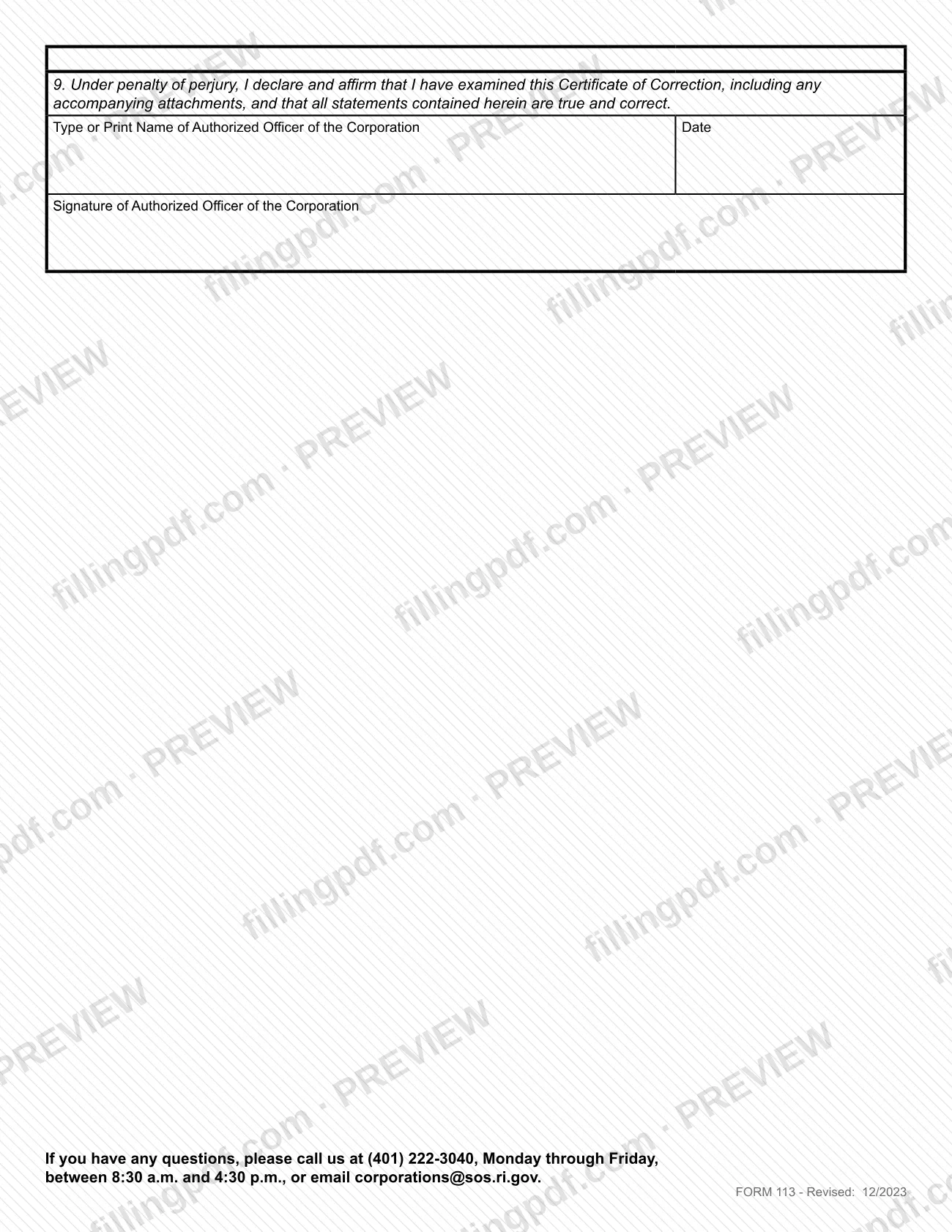
Item 9: type or print the name of the authorized officer of the corporation, add the date and have the officer sign. The declaration is made under penalty of perjury.
Complete the filer contact page
Fill in name, date, entity name, street address, city, state, ZIP code, email address and phone number. The form states that all fields are required.
Review and download the PDF
Check the entity ID, name, dates and corrected text, then download or print the completed PDF from FillingPDF and submit it as described under How to submit.
How to submit 113
Form 113 is mailed to the Division of Business Services, and the filing fee can be paid by mail or in person.
- By mail: Division of Business Services, 148 W. River Street, Providence, Rhode Island 02904-2615. Include the completed certificate, the corrected and completed document, the filer contact page and the fee payment.
- Fee by mail: a filing fee applies; pay by check made payable to RI Department of State.
- Fee in person: pay by cash, credit card or check at the Business Services Division, 148 W. River Street, Ste. 1, Providence, RI 02904.
The form must be typed, and all illegible documents will be rejected. For the current fee amount or other questions, call (401) 222-3040, Monday through Friday, between 8:30 a.m. and 4:30 p.m., or email [email protected].
To confirm your filing, go to the Corporate Database, enter the entity name or ID number and click Search, open the entity record, scroll down, select All Filings and then View Filing, and click PDF under View PDF. Filings that cannot be processed are posted online and then returned. FillingPDF lets you fill out and download the PDF; submission follows the channels above.
Common mistakes to avoid
- Handwriting or submitting an illegible form; the form says it should be typed and that all illegible documents will be rejected.
- Sending the certificate without the corrected and completed document; item 7 says it must be attached.
- Leaving the Filer Contact Information page incomplete when the form says all fields are required.
- Omitting the signature of an authorized officer of the corporation, or leaving the printed name and date blank in item 9.
- Using Form 113 for an LLC or a limited partnership, which use Form 403 and Form 351.
- Writing an attachment into item 5 or item 6 without checking the box that indicates an attachment.
- Expecting a mailed confirmation; successful filings produce none, and you check the Corporate Database instead.
- Sending the fee in a check not payable to RI Department of State when mailing the filing.
Frequently asked questions
What is a certificate of correction in Rhode Island?
A certificate of correction is the filing a Rhode Island business corporation uses to correct an inaccurate document it already filed with the Department of State. Form 113 is issued under RIGL 7-1.2-105 and must include the corrected and completed document.
Who signs Form 113, Certificate Of Correction?
An authorized officer of the corporation signs and dates the form, and types or prints their name, in item 9. The signature is a declaration under penalty of perjury that the statements in the certificate and any attachments are true and correct.
Can I use Form 113 for an LLC?
No. Form 113 is for domestic or foreign business corporations. The Department of State lists Certificate of Correction Form 403 for an LLC and Form 351 for a limited partnership.
What do I attach to a certificate of correction?
Attach the corrected and completed document, as item 7 requires. Also include the filer contact page with every field filled in, and the filing fee payment. Add an attachment for item 5 or 6 only if needed, and check the box on that item.
Where do I mail Form 113?
Mail it to the Division of Business Services, 148 W. River Street, Providence, Rhode Island 02904-2615. If you mail the fee, make the check payable to RI Department of State. You can also pay in person at 148 W. River Street, Ste. 1, Providence, RI 02904.
Is there a fee for a certificate of correction?
Yes, a filing fee applies. Pay by check payable to RI Department of State when mailing, or by cash, credit card or check in person at the Business Services Division. For the current amount, call (401) 222-3040.
How do I know my certificate of correction was filed?
No confirmation is mailed for successful filings. Search your entity in the Corporate Database, open the record, select All Filings, then View Filing and click PDF. Filings that cannot be processed are posted online and then returned.
Can I fill out Form 113 online?
You can fill out the PDF online on FillingPDF and download or print it. FillingPDF is an independent service and does not file anything with the Department of State; you submit the completed form through the Department's channels.
Ready to fill out 113?
Fill out 113 now