
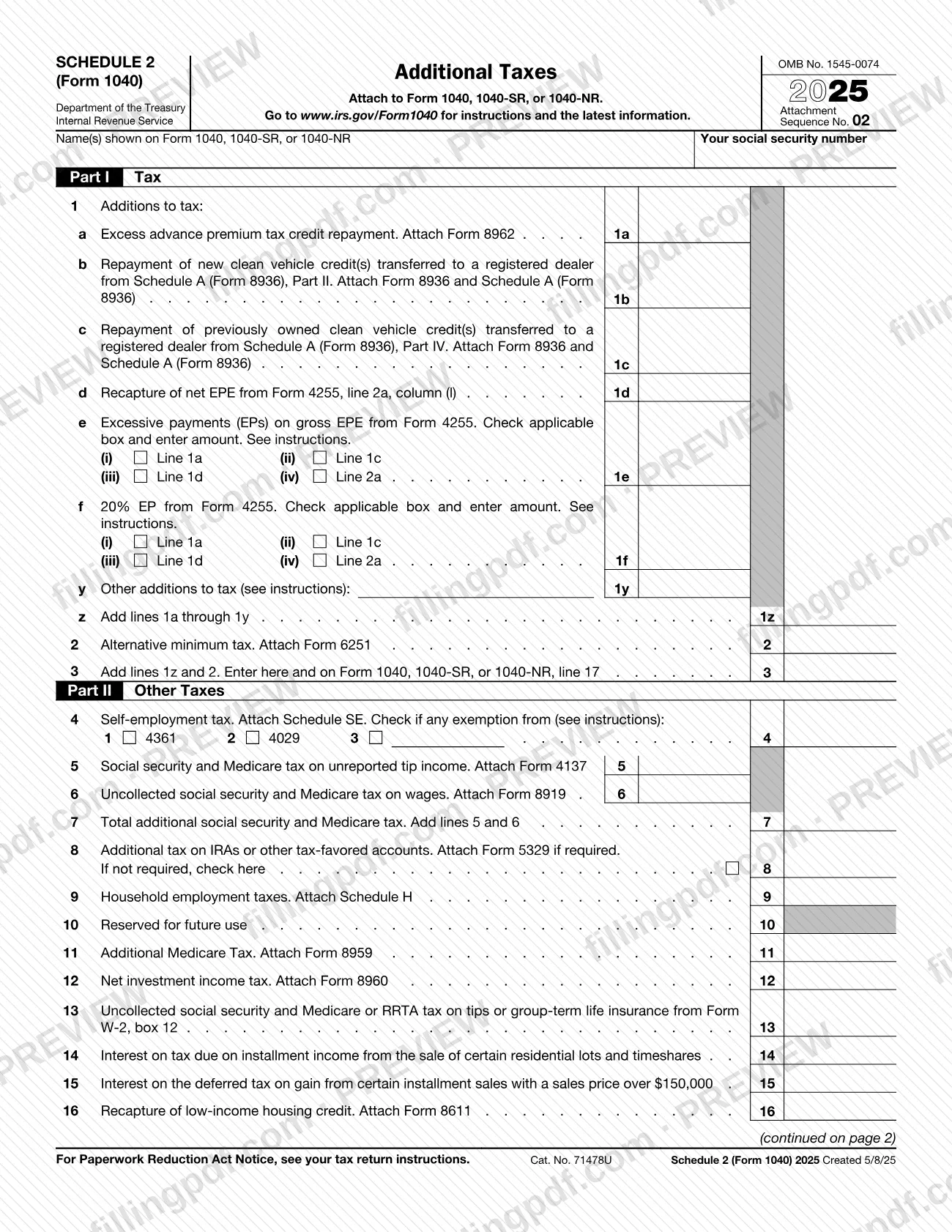
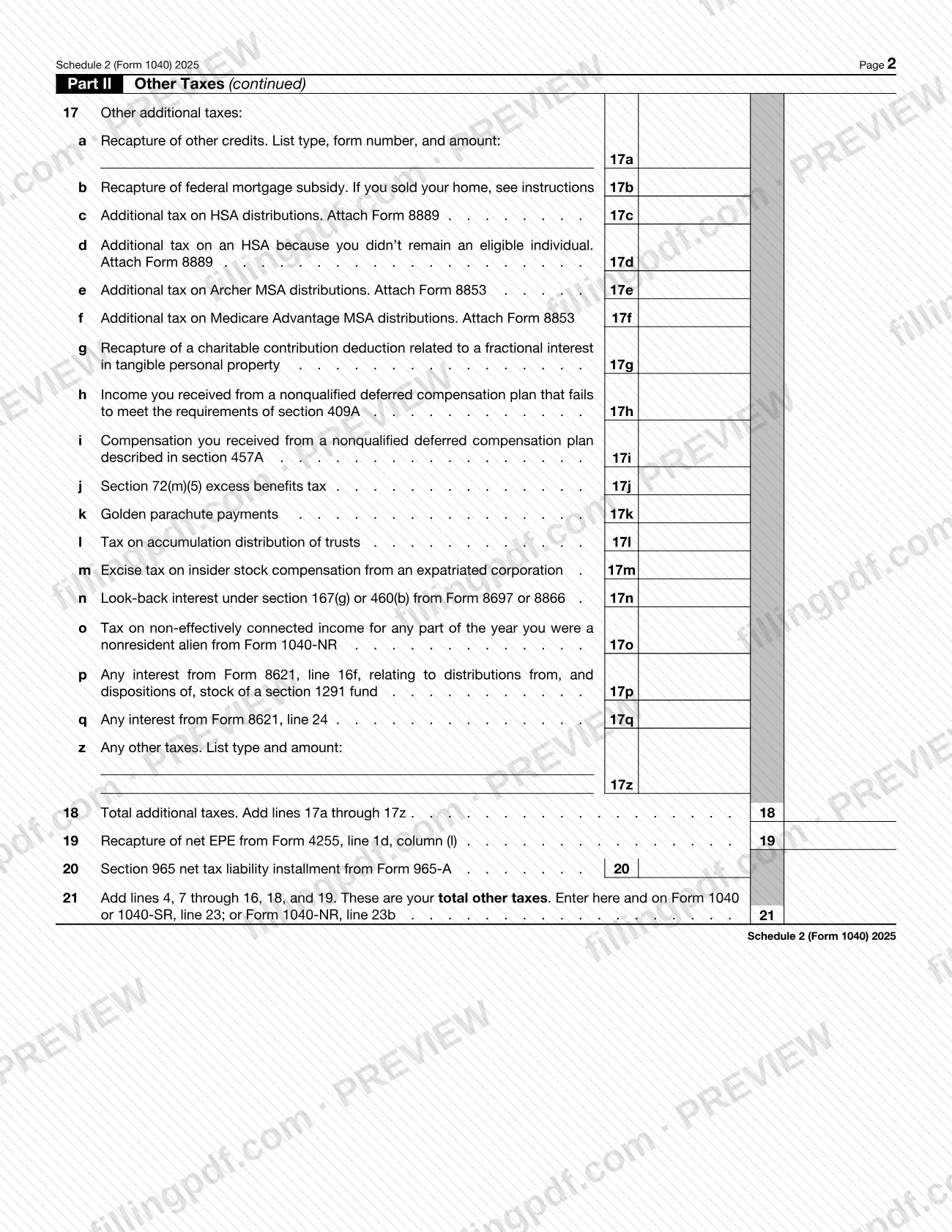
Schedule 2 (Form 1040), Additional Taxes, is the Internal Revenue Service (IRS) schedule that you attach to Form 1040, 1040-SR, or 1040-NR to report taxes that are added to your regular tax. Part I covers additions to tax and the alternative minimum tax, and Part II covers other taxes such as self-employment tax, household employment taxes and the net investment income tax. On this page you can fill out the form online on FillingPDF and download or print the completed PDF; the IRS publishes the form and its instructions at www.irs.gov/Form1040.
Last updated
What is Schedule 2 (Form 1040)?
Schedule 2 (Form 1040), Additional Taxes, is the Internal Revenue Service (IRS) schedule, attached to Form 1040, 1040-SR, or 1040-NR, on which you report additional taxes in Part I and other taxes in Part II; its totals carry to the return.
The schedule is printed on two pages and is identified as OMB No. 1545-0074, Attachment Sequence No. 02, for tax year 2025.
- Part I, Tax (lines 1 to 3): line 1 lists additions to tax, such as the excess advance premium tax credit repayment (line 1a) and repayments of clean vehicle credits transferred to a registered dealer (lines 1b and 1c). Line 2 is the alternative minimum tax. Line 3 adds lines 1z and 2 and is entered on line 17 of the return.
- Part II, Other Taxes (lines 4 to 21): self-employment tax, tax on unreported tip income, uncollected social security and Medicare tax on wages, additional tax on IRAs and other tax-favored accounts, household employment taxes, Additional Medicare Tax, net investment income tax, recapture items and a long list of other additional taxes on line 17. Line 21 gives the total of your other taxes.
Many lines tell you to attach another form, such as Form 6251, Schedule SE, Schedule H or Form 8960. Schedule 2 is not a return by itself: it is a schedule of Form 1040 and has no filing channel of its own. The form is the same for Form 1040-NR filers, with line 17o reserved for tax on non-effectively connected income from Form 1040-NR.
Who needs to file Schedule 2 (Form 1040)?
Taxpayers who file Form 1040, Form 1040-SR, or Form 1040-NR and owe one of the taxes listed on the schedule attach Schedule 2 to that return. The form says to attach it to those three returns and nothing else.
The lines show which situations call for it:
- Part I: you must repay the excess advance premium tax credit, repay a clean vehicle credit that was transferred to a registered dealer, or owe alternative minimum tax.
- Part II, self-employment and wages: you owe self-employment tax, social security and Medicare tax on unreported tip income, or uncollected social security and Medicare tax on wages.
- Part II, accounts and household employment: you owe additional tax on an IRA, other tax-favored account, HSA or Archer MSA, or you owe household employment taxes.
- Part II, high income and investments: you owe Additional Medicare Tax or net investment income tax.
- Part II, recapture and other taxes: you must recapture the low-income housing credit or a federal mortgage subsidy, or you owe any of the other taxes named on lines 17a to 17z.
- Nonresident aliens: Form 1040-NR filers use line 17o for tax on non-effectively connected income received while a nonresident alien.
The form itself does not describe who may sign for someone else; signing is done on the return it accompanies. See the IRS instructions at www.irs.gov/Form1040 for the conditions behind each line.
When to file Schedule 2 (Form 1040)
You attach Schedule 2 (Form 1040) when you file the Form 1040, 1040-SR, or 1040-NR that reports the additional taxes. The schedule prints no due date of its own, so it follows the due date of the return it is attached to.
This edition is the 2025 schedule, printed for the tax year shown at the top of the form. If you need any of the attached forms the lines call for, such as Form 8962, Form 6251 or Form 8889, have them completed before you fill in the matching line, because the amount on the schedule comes from them. For filing deadlines and extensions that apply to the return, see the IRS instructions at www.irs.gov/Form1040.
Documents you need
- Form 8962: attach for line 1a, excess advance premium tax credit repayment.
- Form 8936 and Schedule A (Form 8936): attach for line 1b or line 1c, repayment of clean vehicle credits transferred to a registered dealer.
- Form 6251: attach for line 2, alternative minimum tax.
- Schedule SE: attach for line 4, self-employment tax.
- Form 4137: attach for line 5, social security and Medicare tax on unreported tip income.
- Form 8919: attach for line 6, uncollected social security and Medicare tax on wages.
- Form 5329: attach for line 8 if it is required; if it is not required, check the box on line 8 instead.
- Schedule H: attach for line 9, household employment taxes.
- Form 8959: attach for line 11, Additional Medicare Tax.
- Form 8960: attach for line 12, net investment income tax.
- Form 8611: attach for line 16, recapture of low-income housing credit.
- Form 8889: attach for line 17c or 17d, additional tax on HSA distributions or on an HSA when you did not remain an eligible individual.
- Form 8853: attach for line 17e or 17f, additional tax on Archer MSA or Medicare Advantage MSA distributions.
How to fill out Schedule 2 (Form 1040)
Enter your name and Social Security number
At the top, write the name(s) shown on Form 1040, 1040-SR, or 1040-NR and your social security number exactly as they appear on the return.
Report additions to tax on line 1
Enter the amounts for lines 1a to 1f that apply, attaching Form 8962 for line 1a and Form 8936 with Schedule A (Form 8936) for lines 1b and 1c. For lines 1e and 1f, check the applicable box (i) to (iv) and enter the amount; use line 1y for other additions to tax.
Total Part I on lines 1z to 3
Add lines 1a through 1y on line 1z. Enter alternative minimum tax from Form 6251 on line 2, add lines 1z and 2 on line 3, and enter the result on line 17 of your return.
Enter self-employment tax on line 4
Attach Schedule SE and enter the tax on line 4. Check the box beside line 4 if you have an exemption from self-employment tax; the instructions explain which applies.
Report tip and wage taxes, lines 5 to 7
Enter tax on unreported tip income from Form 4137 on line 5 and uncollected tax on wages from Form 8919 on line 6. Add lines 5 and 6 on line 7.
Complete lines 8 and 9
Line 8: enter additional tax on IRAs or other tax-favored accounts and attach Form 5329 if required; if it is not required, check the box. Line 9: enter household employment taxes from Schedule H. Leave line 10 blank.
Enter Additional Medicare Tax and NIIT
Line 11: Additional Medicare Tax from Form 8959. Line 12: net investment income tax from Form 8960.
Complete lines 13 to 16
Enter uncollected social security and Medicare or RRTA tax from Form W-2, box 12 on line 13, the interest items on lines 14 and 15, and low-income housing credit recapture from Form 8611 on line 16.
List other additional taxes on line 17
Use lines 17a to 17q for the specific taxes printed there, attaching Form 8889 or Form 8853 where indicated. On lines 17a and 17z, list the type, form number if asked, and amount.
Total Part II on lines 18 to 21
Add lines 17a through 17z on line 18. Enter the recapture from Form 4255 on line 19 and the Form 965-A installment on line 20.
Figure total other taxes on line 21
Add lines 4, 7 through 16, 18, and 19. Enter the result on line 23 of Form 1040 or 1040-SR, or line 23b of Form 1040-NR.
Review and download the completed PDF
Check that every amount matches the attached forms and that the totals on lines 3 and 21 are carried to your return. Download or print the completed PDF from FillingPDF and attach it to your return as described under How to submit.
How to submit Schedule 2 (Form 1040)
Schedule 2 (Form 1040) is not sent on its own. It is submitted as an attachment to Form 1040, 1040-SR, or 1040-NR, through whatever channel you use for that return.
- With your return: attach the completed schedule, together with each form the lines you used tell you to attach (for example Form 8962 for line 1a, Form 6251 for line 2 or Schedule SE for line 4), to the return.
- Where the totals go: line 3 is entered on line 17 of Form 1040, 1040-SR, or 1040-NR. Line 21 is entered on line 23 of Form 1040 or 1040-SR, or on line 23b of Form 1040-NR.
- Addresses and instructions: the schedule prints no mailing address or portal. It directs you to www.irs.gov/Form1040 for instructions and the latest information, and to your tax return instructions for the Paperwork Reduction Act Notice.
FillingPDF lets you fill out and download the PDF; submission follows the IRS channels that apply to your return.
Common mistakes to avoid
- Entering an amount on line 10, which is printed as reserved for future use.
- Leaving off the form a line tells you to attach, such as Form 6251 with line 2 or Form 8960 with line 12.
- Skipping the box on line 8 when Form 5329 is not required; the line says to check it in that case.
- Adding lines 5 and 6 again on line 21 after they are already combined on line 7; line 21 adds lines 4, 7 through 16, 18, and 19.
- Carrying line 21 to the wrong line of the return: it goes on line 23 of Form 1040 or 1040-SR, or line 23b of Form 1040-NR, while line 3 goes on line 17.
- Entering an amount on line 17a or 17z without listing the type of credit, form number or tax as those lines ask.
- Entering an amount on line 1e or 1f without checking the applicable box (i) to (iv).
- Attaching the schedule to a return other than Form 1040, 1040-SR, or 1040-NR.
Frequently asked questions
What is Schedule 2 (Form 1040)?
Schedule 2 (Form 1040), Additional Taxes, is an IRS schedule attached to Form 1040, 1040-SR, or 1040-NR. Part I reports additions to tax and alternative minimum tax; Part II reports other taxes such as self-employment tax, household employment taxes and net investment income tax.
Do I file Schedule 2 by itself?
No. The form says to attach it to Form 1040, 1040-SR, or 1040-NR, so it is submitted with the return. It prints no separate address or due date. Instructions and the latest information are at www.irs.gov/Form1040.
Where does the total on Schedule 2, line 3 go?
Line 3, which adds lines 1z and 2, is entered on line 17 of Form 1040, 1040-SR, or 1040-NR. It covers Part I only: additions to tax and alternative minimum tax.
Where do I enter line 21 of Schedule 2 on my return?
Line 21, your total other taxes, goes on line 23 of Form 1040 or 1040-SR, or on line 23b of Form 1040-NR. It adds lines 4, 7 through 16, 18, and 19.
What forms do I attach to Schedule 2?
It depends on the lines you complete. Examples printed on the form: Form 8962 (line 1a), Form 6251 (line 2), Schedule SE (line 4), Form 4137 (line 5), Form 8919 (line 6), Schedule H (line 9), Form 8959 (line 11) and Form 8960 (line 12).
What is line 10 on Schedule 2?
Line 10 is printed as Reserved for future use, so there is nothing to enter on it. Line 21 still adds lines 7 through 16, which includes that blank line.
Does Form 1040-NR use the same Schedule 2?
Yes. The schedule is attached to Form 1040, 1040-SR, or 1040-NR. Form 1040-NR filers enter line 21 on line 23b of their return, and line 17o covers tax on non-effectively connected income received while a nonresident alien.
Can I fill out Schedule 2 (Form 1040) online?
Yes. You can fill out the PDF online on FillingPDF and download or print it. FillingPDF is an independent service, not connected to the IRS, and does not file your return; you submit the schedule with your Form 1040, 1040-SR, or 1040-NR.
Ready to fill out Schedule 2 (Form 1040)?
Fill out Schedule 2 (Form 1040) now