
Schedule 2 (Form 1040) (sp), Additional Taxes (Spanish Version), is the Spanish-language edition, printed as Anexo 2 Impuestos Adicionales, of the schedule the Internal Revenue Service (IRS) provides for taxes that are added to Form 1040, 1040-SR or 1040-NR. Filers use it when their return includes items such as the alternative minimum tax, self-employment tax, or additional tax on an HSA or IRA. On this page you can fill out the form online on FillingPDF and download or print the completed PDF; the IRS publishes the original PDF and the instructions at www.irs.gov/Form1040SP.
Last updated
What is Schedule 2 (Form 1040) (sp)?
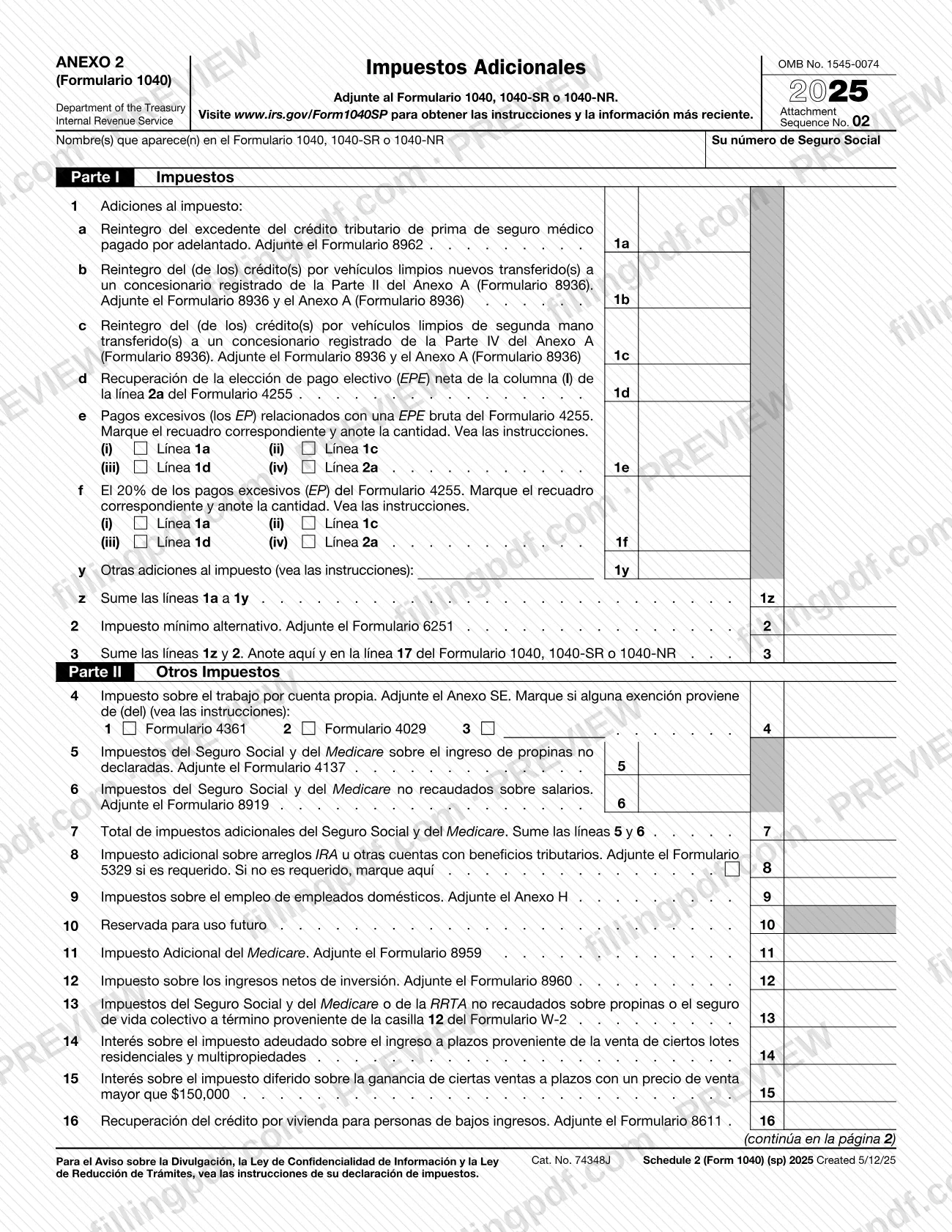
Schedule 2 (Form 1040) (sp), Additional Taxes (Spanish Version), is the IRS Spanish-language schedule, printed as Anexo 2 Impuestos Adicionales, on which a filer reports additional taxes that carry over to Form 1040, 1040-SR or 1040-NR for tax year 2025.
The schedule has two parts:
- Part I, Impuestos (Taxes): line 1 collects additions to tax, such as the repayment of excess advance payments of the premium tax credit (line 1a) and the repayment of clean vehicle credits (lines 1b and 1c), with line 1z as the total of lines 1a to 1y. Line 2 is the alternative minimum tax, and line 3 adds lines 1z and 2 and is entered on line 17 of Form 1040, 1040-SR or 1040-NR.
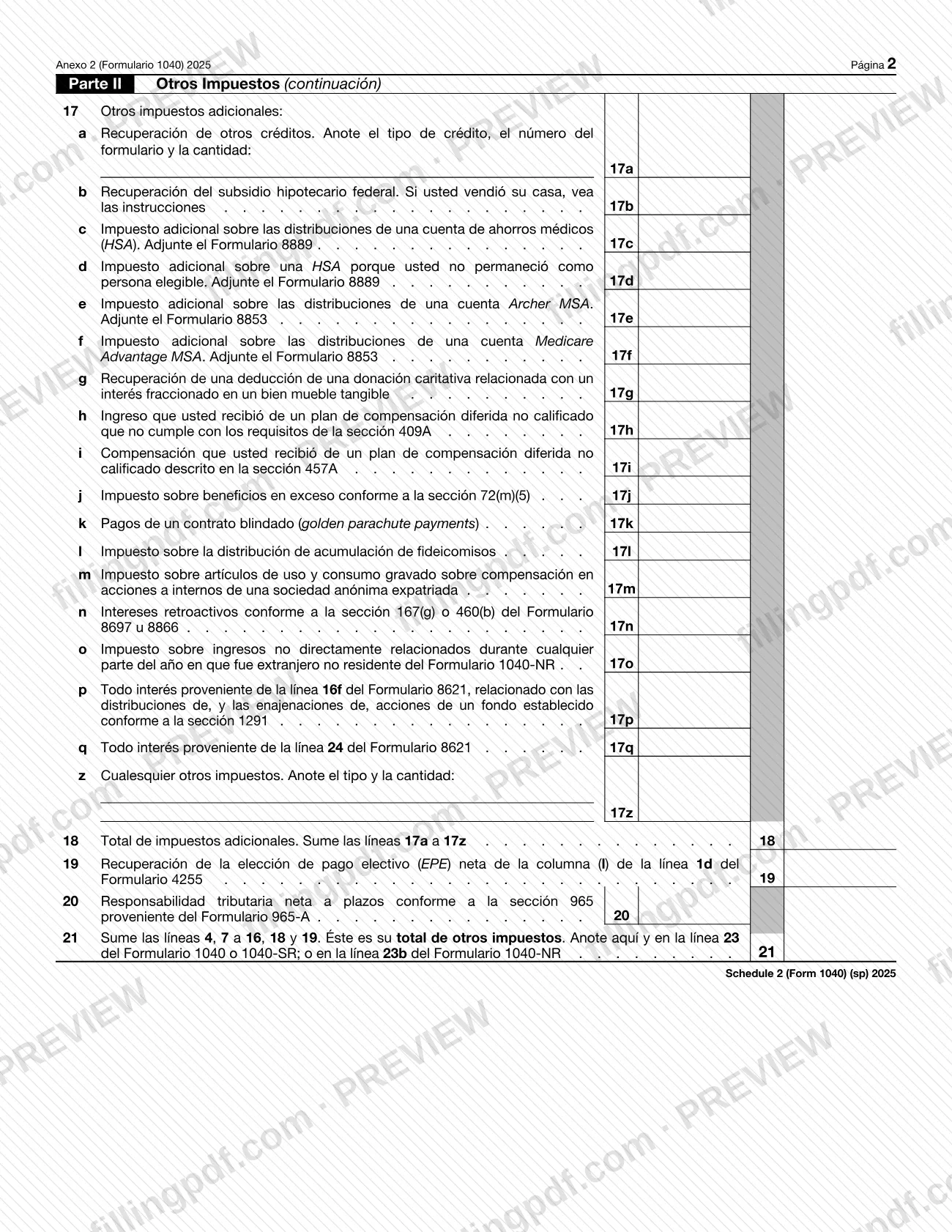
- Part II, Otros Impuestos (Other Taxes): lines 4 to 16 cover self-employment tax, Social Security and Medicare taxes on unreported tips or uncollected wages, additional tax on IRAs and other tax-favored accounts, household employment taxes, Additional Medicare Tax, net investment income tax and other items. Line 17 lists further additional taxes, line 18 totals them, and line 21 gives the total of other taxes.
Most lines tell you which form or schedule to attach. The form is issued under OMB No. 1545-0074, Attachment Sequence No. 02, and its footer reads Schedule 2 (Form 1040) (sp) 2025. Its printed text is in Spanish; the (sp) in the name marks this edition. The IRS instructions are at www.irs.gov/Form1040SP.
Who needs to file Schedule 2 (Form 1040) (sp)?
Filers of Form 1040, Form 1040-SR or Form 1040-NR attach Schedule 2 (Form 1040) (sp) when they have one of the additional taxes the schedule lists. The form states that it is attached to one of those three returns and asks for the name(s) shown on the return and your Social Security number.
Typical situations are the ones the lines name:
- You must repay excess advance payments of the premium tax credit or a clean vehicle credit (lines 1a to 1c).
- You owe alternative minimum tax (line 2).
- You owe self-employment tax, household employment taxes, Additional Medicare Tax or net investment income tax (lines 4, 9, 11 and 12).
- You owe additional tax on an IRA, HSA, Archer MSA or Medicare Advantage MSA (lines 8, 17c to 17f).
- You have another tax listed on lines 17a to 17z, such as a tax on a trust accumulation distribution (line 17l) or income from a nonqualified deferred compensation plan (lines 17h and 17i).
Line 21 says its total goes on line 23 of Form 1040 or 1040-SR, or line 23b of Form 1040-NR. The form does not say who may sign for another person; it has no signature block of its own. For eligibility questions, use the IRS instructions at www.irs.gov/Form1040SP.
When to file Schedule 2 (Form 1040) (sp)
You complete Schedule 2 (Form 1040) (sp) when you prepare Form 1040, 1040-SR or 1040-NR and have an additional tax to report, because the form says to attach it to one of those returns. It has no separate due date of its own: it travels with the return and is submitted when that return is. The schedule is printed for tax year 2025.
Gather the supporting forms first. Many lines ask you to attach another form or schedule, such as Form 8962, Form 6251, Schedule SE, Form 8959 or Form 8960, and the amount on the line comes from that attachment. For any deadline that applies to your return, see the IRS instructions at www.irs.gov/Form1040SP.
Documents you need
- Form 8962: attach for line 1a, repayment of excess advance payments of the premium tax credit.
- Form 8936 and Schedule A (Form 8936): attach for line 1b or 1c, repayment of clean vehicle credits transferred to a registered dealer.
- Form 6251: attach for line 2, alternative minimum tax.
- Schedule SE: attach for line 4, self-employment tax.
- Form 4137 (line 5, unreported tip income) and Form 8919 (line 6, uncollected Social Security and Medicare tax on wages).
- Form 5329 for line 8, if it is required; if it is not required, check the box on line 8 instead.
- Schedule H for line 9, household employment taxes.
- Form 8959 for line 11 (Additional Medicare Tax) and Form 8960 for line 12 (net investment income tax).
- Form 8611 for line 16, recapture of the low-income housing credit.
- Form 8889 for line 17c or 17d, additional tax on an HSA.
- Form 8853 for line 17e or 17f, additional tax on an Archer MSA or Medicare Advantage MSA.
How to fill out Schedule 2 (Form 1040) (sp)
Enter your name and Social Security number
At the top of page 1, write the name(s) as shown on Form 1040, 1040-SR or 1040-NR and your Social Security number.
Report repayments on lines 1a to 1d
Line 1a: repayment of excess advance premium tax credit (attach Form 8962). Lines 1b and 1c: repayment of clean vehicle credits (attach Form 8936 and Schedule A). Line 1d: recapture of net elective payment election from Form 4255, line 2a, column (l).
Complete lines 1e and 1f
For each line, check the box that matches the Form 4255 line (1a, 1c, 1d or 2a) and enter the amount. See the instructions for what to report.
Add other additions and total Part I line 1
Enter other additions to tax on line 1y, following the instructions, then add lines 1a to 1y on line 1z.
Enter alternative minimum tax and total Part I
Line 2: alternative minimum tax (attach Form 6251). Line 3: add lines 1z and 2, and enter the result here and on line 17 of your return.
Enter self-employment and Social Security taxes
Line 4: self-employment tax (attach Schedule SE), checking the exemption box for Form 4361 or Form 4029 if one applies. Lines 5 and 6 cover tax on unreported tips and uncollected wages; add them on line 7.
Report account, household and Medicare taxes
Line 8: additional tax on IRAs or other tax-favored accounts (attach Form 5329 if required, otherwise check the box). Line 9: household employment taxes (Schedule H). Line 10 stays blank. Line 11: Additional Medicare Tax (Form 8959). Line 12: net investment income tax (Form 8960).
Complete lines 13 to 16
Line 13: uncollected Social Security, Medicare or RRTA tax on tips or group-term life insurance from Form W-2, box 12. Lines 14 and 15: interest on installment-sale tax. Line 16: recapture of the low-income housing credit (Form 8611).
Complete the additional taxes on line 17
On page 2, enter the amounts on lines 17a to 17q that apply, attaching Form 8889 for 17c and 17d and Form 8853 for 17e and 17f. For 17a, give the type of credit, form number and amount.
Enter other taxes and total line 18
Line 17z: any other taxes, with the type and amount. Line 18: add lines 17a to 17z.
Complete lines 19 to 21
Line 19: recapture of net elective payment election from Form 4255, line 1d. Line 20: net installment tax liability under section 965 from Form 965-A. Line 21: add lines 4, 7 to 16, 18 and 19.
Review and download the completed PDF
Check that line 3 and line 21 match what you enter on your return and that each required attachment is ready. Download or print the completed PDF from FillingPDF and attach it to your return.
How to submit Schedule 2 (Form 1040) (sp)
Schedule 2 (Form 1040) (sp) is not sent on its own: it is attached to Form 1040, Form 1040-SR or Form 1040-NR and goes wherever that return goes. The schedule prints no mailing address, portal or appointment rule.
- With the return: attach the completed schedule, with the forms and schedules its lines call for (see the list of attachments), to the return you file.
- Carry the totals: enter line 3 on line 17 of the return, and line 21 on line 23 of Form 1040 or 1040-SR or on line 23b of Form 1040-NR.
- Instructions: the form directs you to www.irs.gov/Form1040SP for the instructions and the latest information, including how and where to file the return.
FillingPDF lets you fill out and download the PDF; submission follows the IRS channels for the return it is attached to.
Common mistakes to avoid
- Filing the schedule without the form its line calls for, such as Form 6251 for line 2, Schedule SE for line 4 or Form 8960 for line 12.
- Entering an amount on line 10, which is printed as reserved for future use.
- Leaving line 8 empty when Form 5329 is not required; the form says to check the box on that line instead.
- Forgetting to check the box for the line it relates to on lines 1e and 1f, where you must mark the matching Form 4255 line and enter the amount.
- Entering line 3 anywhere other than line 17 of Form 1040, 1040-SR or 1040-NR.
- Entering line 21 on line 23 of Form 1040-NR; for Form 1040-NR it goes on line 23b.
- Omitting the type of credit, form number and amount on line 17a, or the type and amount on line 17z.
- Leaving off the name(s) shown on the return or the Social Security number at the top of page 1.
Frequently asked questions
What is Schedule 2 (Form 1040) (sp)?
Schedule 2 (Form 1040) (sp) is the IRS Spanish-language schedule, titled Anexo 2 Impuestos Adicionales, for reporting additional taxes. Its totals go to Form 1040, 1040-SR or 1040-NR: line 3 to line 17, and line 21 to line 23 (line 23b on Form 1040-NR).
Which return do I attach Schedule 2 (Form 1040) (sp) to?
Attach it to Form 1040, Form 1040-SR or Form 1040-NR, as printed at the top of the form. It is not filed alone and has no separate address; it is submitted with the return.
Where do the totals on lines 3 and 21 go?
Enter line 3 on line 17 of Form 1040, 1040-SR or 1040-NR. Enter line 21 on line 23 of Form 1040 or 1040-SR, or on line 23b of Form 1040-NR.
Do I need Form 5329 for line 8?
Attach Form 5329 to line 8 only if it is required. If it is not required, the form tells you to check the box on line 8 instead of attaching it.
Can I fill out Schedule 2 (Form 1040) (sp) online?
You can fill out the PDF online on FillingPDF and download or print it. FillingPDF is an independent service and does not file anything with the IRS; you submit the schedule with your return through the IRS channels.
What goes on line 17z?
Line 17z is for any other taxes: enter the type of tax and the amount. Line 18 then adds lines 17a to 17z, so include any amount you enter on line 17z in that total.
What do I enter on line 10?
Nothing. Line 10 is printed as reserved for future use. Line 21 adds lines 4, 7 to 16, 18 and 19, so the blank line does not change the total.
Where can I find the instructions for this schedule?
The form points to www.irs.gov/Form1040SP for the instructions and the latest information. Lines 1e, 1f, 1y, 4 and 17b all refer to those instructions.
Ready to fill out Schedule 2 (Form 1040) (sp)?
Fill out Schedule 2 (Form 1040) (sp) now