
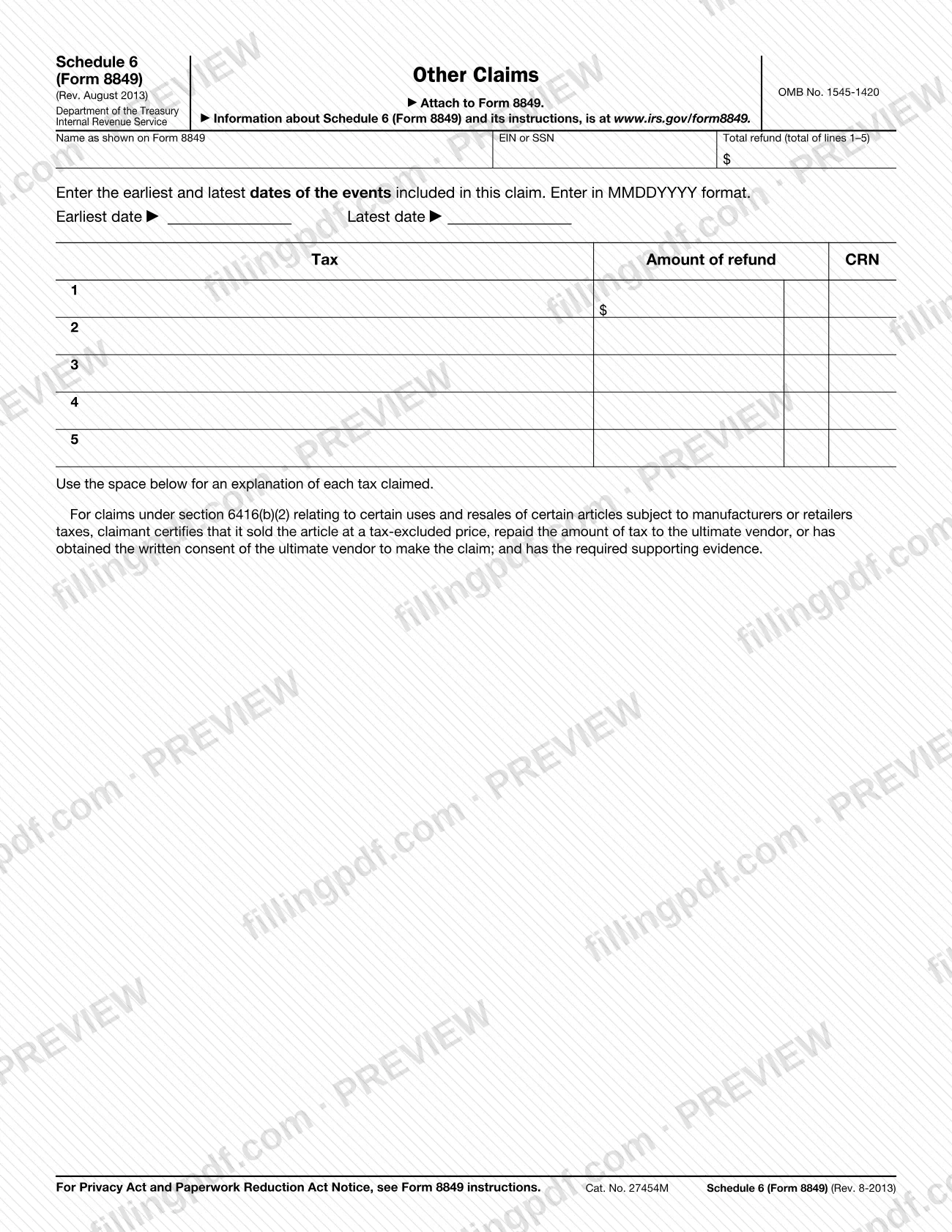
Schedule 6 (Form 8849), Other Claims, is the Internal Revenue Service (IRS) schedule for excise tax refund claims that do not belong on Schedules 1, 2, 3, 5 or 8 of Form 8849. It covers refunds of taxes reported on Form 720, Form 2290, Form 730 and Form 11-C, and it is always attached to Form 8849, Claim for Refund of Excise Taxes. On FillingPDF you can fill out Schedule 6 (Form 8849) online and download or print the completed PDF; the IRS publishes the form and its instructions at www.irs.gov/form8849.
Last updated
What is Form 8849 (Schedule 6)?
Schedule 6 (Form 8849), Other Claims, is the IRS schedule used to claim refunds of excise taxes that are not reportable on Schedules 1, 2, 3, 5 and 8, including refunds of taxes reported on Form 720, Form 2290, Form 730 and Form 11-C. It is attached to Form 8849 and is not filed alone.
The form lists up to five claims. Each line has three entries: the tax, the amount of refund and the CRN, the claim reference number. The IRS instructions give a Tax and CRN chart for Form 720 claims, with entries such as ozone-depleting chemicals (398), taxable tires (396, 304 and 305), vaccines (397), sport fishing equipment (341), transportation of persons by air (326), repurchase of corporate stock (441) and remittance transfer tax (475). Other CRNs cover Form 2290 (365), Form 730 (368) and Form 11-C (367).
The form also has a space to explain each tax claimed, and a printed certification for claims under section 6416(b)(2), which concern certain uses and resales of articles subject to manufacturers or retailers taxes.
Schedule 6 has limits. Do not use it to adjust liability reported on Forms 720 filed for earlier quarters; the instructions send you to Form 720-X, Amended Quarterly Federal Excise Tax Return, for that. Do not use it to claim amounts taken or to be taken as a credit on Form 2290 or Form 730.
Who needs to file Form 8849 (Schedule 6)?
Claimants with an excise tax refund that is not reportable on Schedules 1, 2, 3, 5 or 8 of Form 8849 use Schedule 6 (Form 8849). Who may claim depends on the tax:
- Form 2290, CRN 365: the person who paid the tax to the government claims an overpayment caused by a mistake in liability. For a pro rata refund on a vehicle sold, destroyed or stolen before June 1 of a period (July 1 – June 30), the claimant is the person in whose name the vehicle was registered at that time.
- Form 730, CRN 368: the person who paid the tax to the government claims an overpayment of tax.
- Form 11-C, CRN 367: the person who paid the tax to the government claims an overpayment caused by a mistake in liability.
- Remittance transfer tax, CRN 475: the sender who paid the tax to the remittance transfer provider, and only if the provider did not refund it.
- Diesel-water fuel emulsion, CRN 310: a claimant registered with the IRS, who must enter the registration number on the statement.
Do not use Schedule 6 to correct tax reported on earlier Forms 720 (use Form 720-X), or for amounts taken or to be taken as a credit on Form 2290 or Form 730.
When to file Form 8849 (Schedule 6)
Generally, a claim must be filed within 3 years of the filing of the return to which it relates, or within 2 years from when the tax reported on that return was paid, whichever is later. Schedule 6 travels with Form 8849, so it is filed whenever that claim is filed.
Some claims have their own timing. A diesel-water fuel emulsion claim must be filed during the first quarter following the last quarter included in the claim, and only one such claim may be filed per quarter. A claim for a Form 2290 mileage refund, for a vehicle used 5,000 miles or less on public highways (7,500 or less for agricultural vehicles) during the July 1 – June 30 period, cannot be filed until after June 30 of that period. The form also asks for the earliest and latest dates of the events in the claim.
Documents you need
- For Form 720 claims: a detailed description of the claim, any additional information the regulations require, the claim amount (by quarter if more than one quarter) and how you figured it.
- For Form 720 claims: any other information you believe supports the claim.
- For CRNs 396, 304 and 305: the number of taxable tires for each CRN included in the claim.
- Diesel-water fuel emulsion claim (CRN 310): a statement certifying the emulsion contains at least 14% water, the additive is EPA-registered, undyed diesel was used, and the emulsion was sold or used in trade or business.
- Remittance transfer tax claim (CRN 475): a statement that the provider did not refund the tax, plus provider attachments such as receipts showing the tax paid and the transfer canceled or expired.
- Form 2290 claim for a vehicle sold, destroyed or stolen: the VIN, taxable gross weight category, the event, its date and the refund computation.
- Form 2290 claim for a vehicle sold on or after July 1, 2015: the name and address of the purchaser.
- Form 730 claim: a statement of facts with the reason, date and amount of tax paid, any previous claim, and the wager-related statement the instructions list.
- Credit for wagers laid off by you: the certificate described in Regulations section 44.6419-2(d) and a statement with the reason, month and date of payment and any previous claim.
- Claims under section 6416(b)(2): the supporting evidence required by the printed certification on the form.
How to fill out Form 8849 (Schedule 6)
Enter the name from Form 8849
In the Name as shown on Form 8849 box, write the name exactly as it appears on the Form 8849 you are attaching this schedule to.
Enter your EIN or SSN
In the EIN or SSN box, enter your employer identification number or Social Security number.
Enter the claim dates
Enter the Earliest date and Latest date of the events included in this claim, in MMDDYYYY format.
Identify the tax on each line
On lines 1 through 5, use the Tax column to name each tax claimed, one tax per line, using the Tax and CRN chart in the instructions.
Enter the claim reference number
In the CRN column, enter the claim reference number for that tax, such as 365 for a Form 2290 claim or 475 for remittance transfer tax.
Enter each amount of refund
In the Amount of refund column, enter the amount claimed for each line. Claims for more than one quarter need amounts listed by quarter in the attached statement.
Total the refund
Add lines 1 through 5 and enter the result in the Total refund (total of lines 1–5) box at the top of the form.
Explain each tax claimed
Use the space provided to explain each tax claimed. Attach the detailed statement and evidence the instructions require for your CRN, with your name and taxpayer identification number on each extra sheet.
Read the section 6416(b)(2) certification
If you claim under section 6416(b)(2), the printed certification applies: you sold the article at a tax-excluded price, repaid the tax to the ultimate vendor or have the vendor's written consent, and hold the required evidence.
Review and download the completed PDF
Check the dates, CRNs and totals, then download or print the completed PDF from FillingPDF and attach it to Form 8849 as described under How to submit.
How to submit Form 8849 (Schedule 6)
Schedule 6 (Form 8849) has one channel: you attach it to Form 8849, Claim for Refund of Excise Taxes, and the claim is filed as Form 8849 is filed. The schedule prints no mailing address, portal or appointment rule of its own.
- Attach to Form 8849: the form says "Attach to Form 8849." Include any statements and evidence the instructions require for your CRN.
- Additional sheets: if you attach extra sheets, write your name and taxpayer identification number on each one.
- Where to look: the IRS publishes the form, its instructions and the latest information at www.irs.gov/form8849. The Privacy Act and Paperwork Reduction Act Notice is in the Form 8849 instructions.
FillingPDF lets you fill out and download the PDF; submission follows the Form 8849 channels above.
Common mistakes to avoid
- Using Schedule 6 to adjust liability on Forms 720 filed for prior quarters; the instructions say to use Form 720-X instead.
- Claiming on Schedule 6 an amount that was or will be taken as a credit on Form 2290 or Form 730.
- Filing Schedule 6 on its own instead of attaching it to Form 8849.
- Leaving out the description, amount, computation and other items 1–5 that must accompany a Form 720 claim.
- Omitting the number of taxable tires for each CRN 396, 304 or 305 included in the claim.
- Entering dates in a format other than MMDDYYYY in the earliest and latest date boxes.
- Attaching extra sheets without your name and taxpayer identification number on each sheet.
- Filing a Form 2290 mileage refund claim before July 1 after the period ends, when the claim cannot be filed until after June 30.
- Filing a remittance transfer tax claim when the provider already refunded the tax; the sender may claim only if it was not refunded.
Frequently asked questions
What is Schedule 6 (Form 8849)?
Schedule 6 (Form 8849), Other Claims, is the IRS schedule for excise tax refund claims not reportable on Schedules 1, 2, 3, 5 and 8. It covers refunds of taxes reported on Forms 720, 2290, 730 and 11-C, and you attach it to Form 8849.
Is Schedule 6 filed by itself?
No. The form says to attach it to Form 8849, Claim for Refund of Excise Taxes. It prints no separate address or due date, so it is filed with Form 8849 whenever that claim is filed.
What is the deadline for a Schedule 6 claim?
Generally, within 3 years of filing the return to which the claim relates, or 2 years from when the tax was paid, whichever is later. Diesel-water fuel emulsion claims and Form 2290 mileage refunds have additional timing rules in the instructions.
Can I use Schedule 6 to correct a Form 720 filed for a prior quarter?
No. The instructions say not to use Schedule 6 to adjust liability reported on Forms 720 for prior quarters. Use Form 720-X, Amended Quarterly Federal Excise Tax Return, instead.
How do I claim a refund of remittance transfer tax?
Use CRN 475. The sender who paid the tax to the provider may claim it for canceled or expired transfers, only if the provider did not refund it. Attach a statement and the provider's receipts showing the tax paid and the cancellation or expiration.
What do I attach for a Form 2290 refund on a sold vehicle?
Attach the VIN, taxable gross weight category, whether the vehicle was sold, destroyed or stolen, the date, and the refund computation. For sales on or after July 1, 2015, also give the purchaser's name and address.
Can I fill out Schedule 6 (Form 8849) online?
Yes. You can fill out the PDF online on FillingPDF and download or print it. FillingPDF is an independent service and does not file the claim with the IRS; you attach the schedule to Form 8849 and submit it through the IRS channels.
What date format does Schedule 6 use?
The earliest and latest dates of the events in the claim are entered in MMDDYYYY format, without slashes or dashes, in the boxes near the top of the form.
Ready to fill out Form 8849 (Schedule 6)?
Fill out Form 8849 (Schedule 6) now