
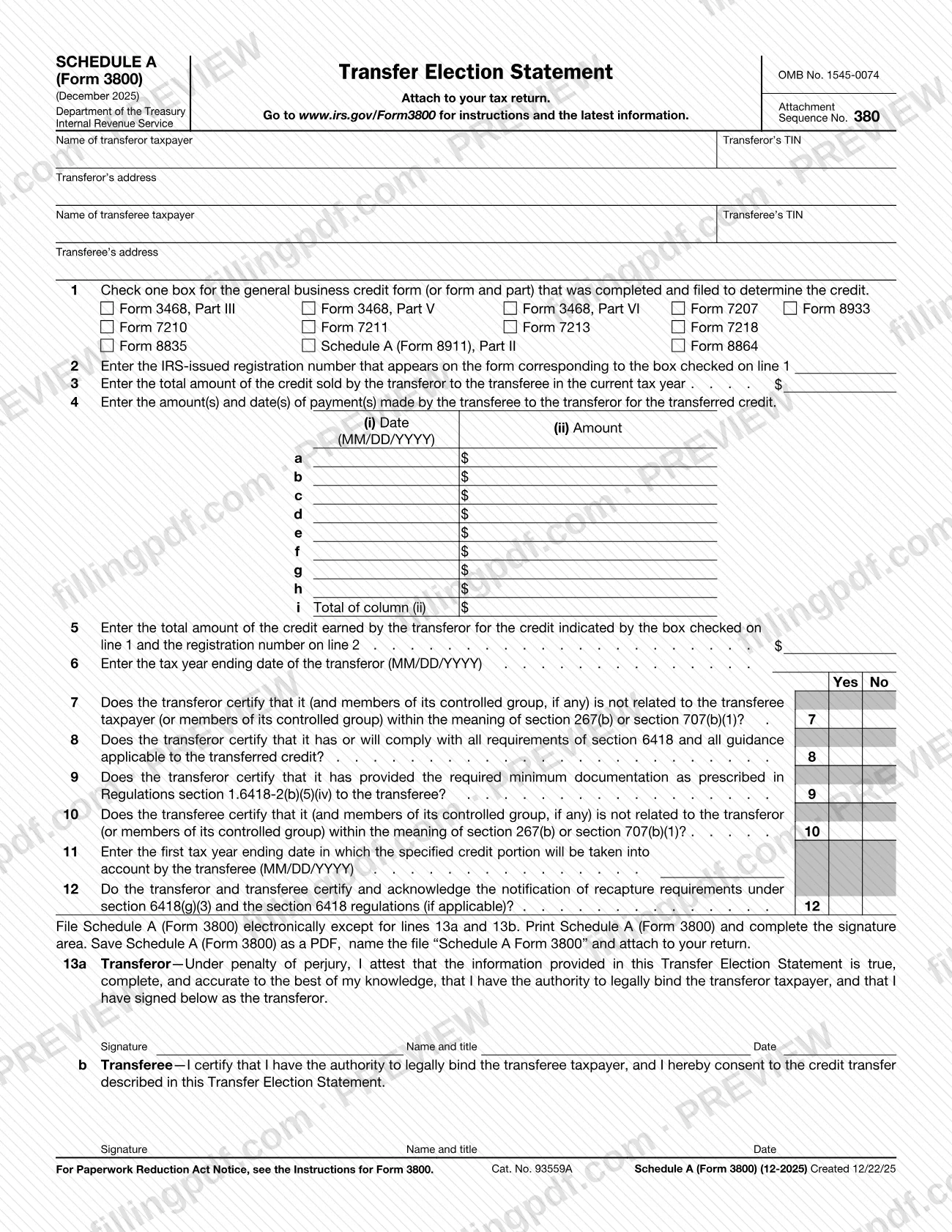
Schedule A (Form 3800), Transfer Election Statement, is an Internal Revenue Service (IRS) schedule that you attach to your tax return when a general business credit has been sold by one taxpayer, the transferor, to another, the transferee. It names both parties, identifies the credit and the form that determined it, records the payments made for it and carries certifications and signatures from each side. On this page you can fill out Schedule A (Form 3800) online on FillingPDF and download or print the completed PDF; the IRS publishes the form and its instructions at www.irs.gov/Form3800.
Last updated
What is Schedule A (Form 3800)?
Schedule A (Form 3800), Transfer Election Statement, is the IRS schedule attached to a tax return that identifies a transferred general business credit, the transferor and transferee taxpayers, the payments made for the credit, and the certifications both parties make about the transfer.
The form is issued by the Internal Revenue Service (IRS), Department of the Treasury, under OMB No. 1545-0074, Attachment Sequence No. 380. The revision printed on it is December 2025. It belongs to the Form 3800 family: the form tells you to go to www.irs.gov/Form3800 for instructions and the latest information, and its Paperwork Reduction Act notice refers to the Instructions for Form 3800.
On the form you identify the credit by checking one box on line 1 for the credit form (or form and part) that was completed and filed to determine it, such as Form 3468, Part III, Form 8835 or Schedule A (Form 8911), Part II. You then give the IRS-issued registration number from that form, the amount of credit sold, the dates and amounts of the transferee's payments, the credit the transferor earned, and the tax year ending dates. Lines 7 through 10 and line 12 are yes/no certifications that refer to section 6418, section 267(b), section 707(b)(1) and Regulations section 1.6418-2(b)(5)(iv). Lines 13a and 13b are signed by the transferor and the transferee.
The schedule is not a stand-alone filing: it is attached to your tax return.
Who needs to file Schedule A (Form 3800)?
The two taxpayers to a credit transfer use this schedule: the transferor taxpayer, which sold the credit, and the transferee taxpayer, to which it was sold in the current tax year. The form asks for each party's name, TIN and address at the top.
Both sides take part in completing it:
- Transferor: certifies on lines 7, 8 and 9 that it is not related to the transferee within the meaning of section 267(b) or section 707(b)(1), that it has or will comply with section 6418 and applicable guidance, and that it provided the required minimum documentation to the transferee. It signs line 13a under penalty of perjury and attests that it has authority to legally bind the transferor taxpayer.
- Transferee: certifies on line 10 that it is not related to the transferor, and signs line 13b, certifying that it has authority to legally bind the transferee taxpayer and consenting to the credit transfer described in the statement.
Both parties together answer line 12 on the recapture notification requirements.
The form does not describe any other person who may sign, so refer to the Instructions for Form 3800 for questions about who may act for a taxpayer.
When to file Schedule A (Form 3800)
Schedule A (Form 3800) is filed with the tax return it is attached to: the form's heading says "Attach to your tax return," and no separate due date is printed on it. The schedule therefore travels with your return whenever that return is filed.
Several entries depend on dates you should have ready: the transferor's tax year ending date on line 6, the first tax year ending date in which the specified credit portion will be taken into account by the transferee on line 11, and the date of each payment from the transferee on line 4, entered in MM/DD/YYYY format. Line 3 reports the credit sold in the current tax year. For any deadline that applies to the return itself, check the Instructions for Form 3800 at www.irs.gov/Form3800.
Documents you need
- Your tax return: Schedule A (Form 3800) is attached to it.
- The credit form (or form and part) you check on line 1, completed and filed to determine the credit, which carries the IRS-issued registration number you enter on line 2.
How to fill out Schedule A (Form 3800)
Enter the transferor's details
At the top, enter the name of the transferor taxpayer, the transferor's TIN and the transferor's address.
Enter the transferee's details
Enter the name of the transferee taxpayer, the transferee's TIN and the transferee's address in the next block.
Check the credit form on line 1
Check one box for the general business credit form (or form and part) that was completed and filed to determine the credit, for example Form 3468, Part III, Form 8835 or Form 8864.
Enter the registration number
Line 2: enter the IRS-issued registration number that appears on the form corresponding to the box you checked on line 1.
Enter the credit sold on line 3
Line 3: enter the total amount of the credit sold by the transferor to the transferee in the current tax year.
List the transferee's payments
Line 4: on rows a through h, enter each payment date in MM/DD/YYYY format in column (i) and the amount in column (ii). Enter the total of column (ii) on line 4i.
Report the credit earned
Line 5: enter the total amount of the credit earned by the transferor for the credit shown by the box on line 1 and the registration number on line 2.
Enter the transferor's year end
Line 6: enter the tax year ending date of the transferor in MM/DD/YYYY format.
Answer the certifications
Lines 7, 8 and 9 are the transferor's yes/no certifications and line 10 is the transferee's. Check Yes or No on each.
Enter the first year taken into account
Line 11: enter, in MM/DD/YYYY format, the first tax year ending date in which the specified credit portion will be taken into account by the transferee.
Answer the recapture question
Line 12: check Yes or No for whether the transferor and transferee certify and acknowledge the notification of recapture requirements under section 6418(g)(3) and the section 6418 regulations, if applicable.
Review, print, sign and download
Check each line, then download or print the completed PDF from FillingPDF. Print it so the transferor can sign line 13a and the transferee line 13b with name, title and date, and attach it to your return.
How to submit Schedule A (Form 3800)
Schedule A (Form 3800) is submitted as an attachment to your tax return; the form prints no separate mailing address, portal or appointment rule.
- With the return: attach the completed schedule to your tax return and send the return by the channel that applies to it.
- Electronic filing instructions printed on the form: file Schedule A (Form 3800) electronically except for lines 13a and 13b. Print the schedule and complete the signature area, then save it as a PDF, name the file "Schedule A Form 3800" and attach it to your return.
- Signatures: the transferor signs line 13a and the transferee signs line 13b, each with name and title and date.
Instructions and the latest information are at www.irs.gov/Form3800. FillingPDF lets you fill out and download the PDF; submission follows the channels above.
Common mistakes to avoid
- Checking more than one box on line 1; the form asks you to check one box for the credit form (or form and part) that was filed to determine the credit.
- Entering on line 2 a number that does not come from the form matching the box checked on line 1; it must be the IRS-issued registration number on that form.
- Writing payment dates in a format other than MM/DD/YYYY in line 4 column (i), or leaving the line 4i total out of line with the column (ii) amounts.
- Confusing line 3 (credit sold in the current tax year) with line 5 (total credit earned by the transferor for the credit and registration number identified on lines 1 and 2).
- Leaving any of the yes/no certifications on lines 7 through 10 and 12 unanswered.
- Filing the schedule without the transferee's signature on line 13b, or without the transferor's on line 13a; each party signs its own line.
- Not printing the schedule to sign lines 13a and 13b after completing it electronically, as the form directs.
- Attaching a file under another name; the form says to name the PDF "Schedule A Form 3800".
Frequently asked questions
What is Schedule A (Form 3800)?
Schedule A (Form 3800) is the IRS Transfer Election Statement. It is attached to a tax return to identify a transferred general business credit, the transferor and transferee, the payments made and the certifications and signatures of both parties.
Is Schedule A (Form 3800) the same as Schedule A on other IRS forms?
No. This page covers only Schedule A of Form 3800, the Transfer Election Statement. Its heading reads "Schedule A (Form 3800)" and it refers to the Instructions for Form 3800. Searches for just "Schedule A" may bring up other IRS schedules.
Who signs Schedule A (Form 3800)?
Both parties sign. The transferor signs line 13a under penalty of perjury, and the transferee signs line 13b, consenting to the credit transfer. Each signer gives a name and title and a date and attests to the authority to legally bind the taxpayer.
Where do I attach Schedule A (Form 3800)?
Attach it to your tax return; the form says so in its heading. The form prints no separate mailing address or portal. Instructions and the latest information are at www.irs.gov/Form3800.
How do I file Schedule A (Form 3800) electronically?
The form says to complete it electronically except for lines 13a and 13b. Print it and complete the signature area, then save it as a PDF named "Schedule A Form 3800" and attach it to your return.
What goes on line 2 of Schedule A (Form 3800)?
Enter the IRS-issued registration number that appears on the form matching the box you checked on line 1. For example, if you checked Form 8835, use the registration number shown on that form.
Which credit forms can I check on line 1?
Line 1 lists Form 3468, Part III, V or VI; Form 7207; Form 8933; Form 7210; Form 7211; Form 7213; Form 7218; Form 8835; Schedule A (Form 8911), Part II; and Form 8864. Check only one box.
Can I fill out Schedule A (Form 3800) online on FillingPDF?
Yes. You can fill out the PDF online on FillingPDF and download or print it. FillingPDF is an independent service and does not file the schedule with the IRS; you attach it to your return and submit that through the IRS channels.
Ready to fill out Schedule A (Form 3800)?
Fill out Schedule A (Form 3800) now