
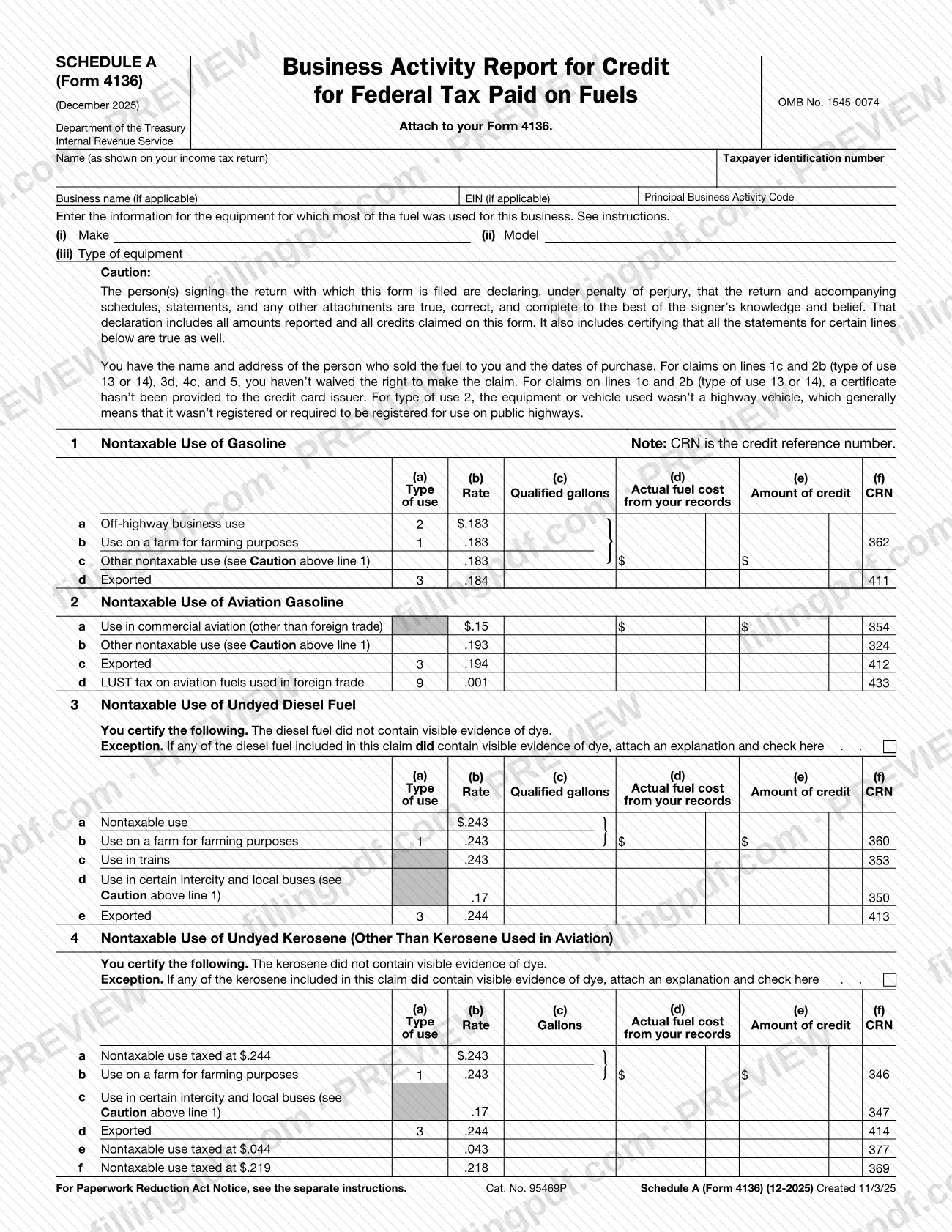
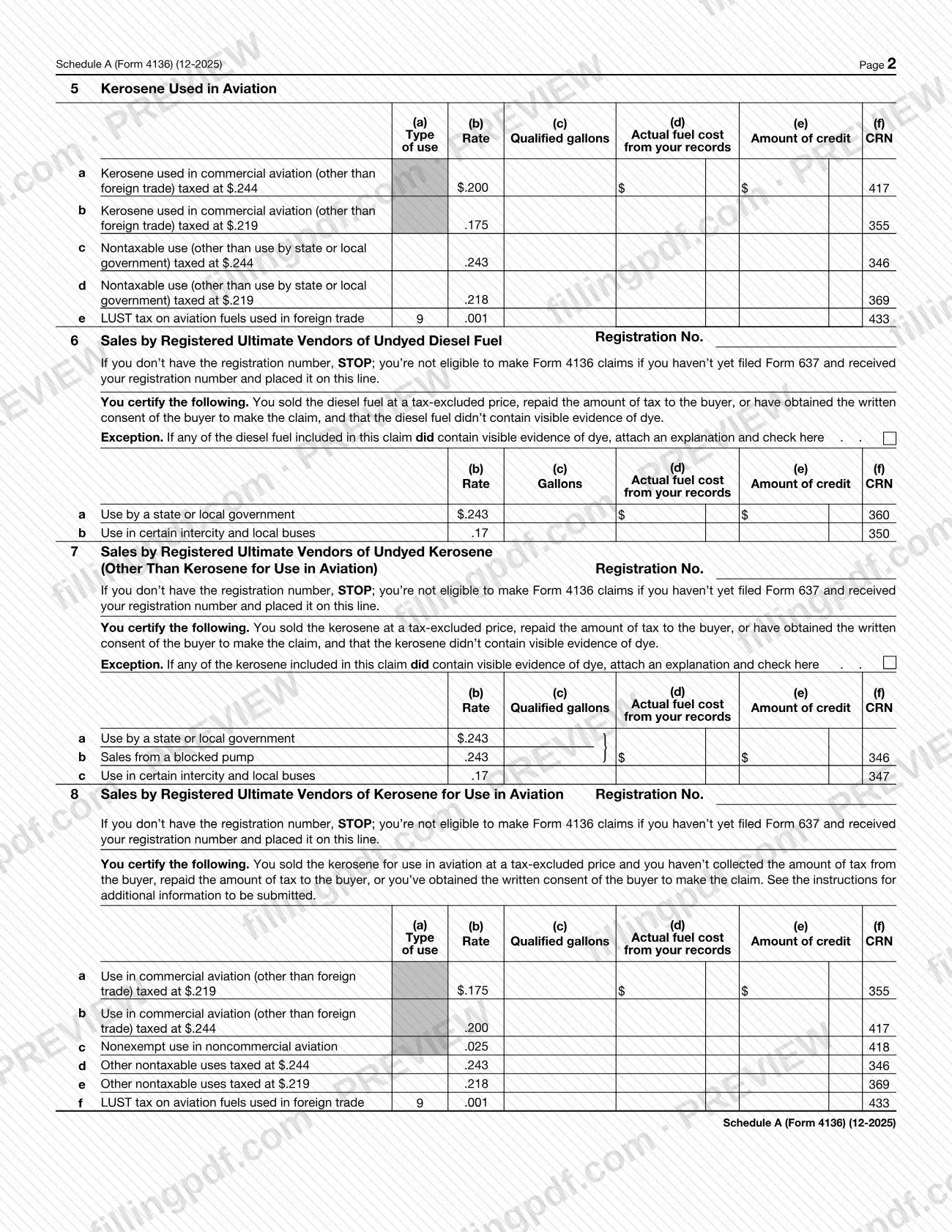
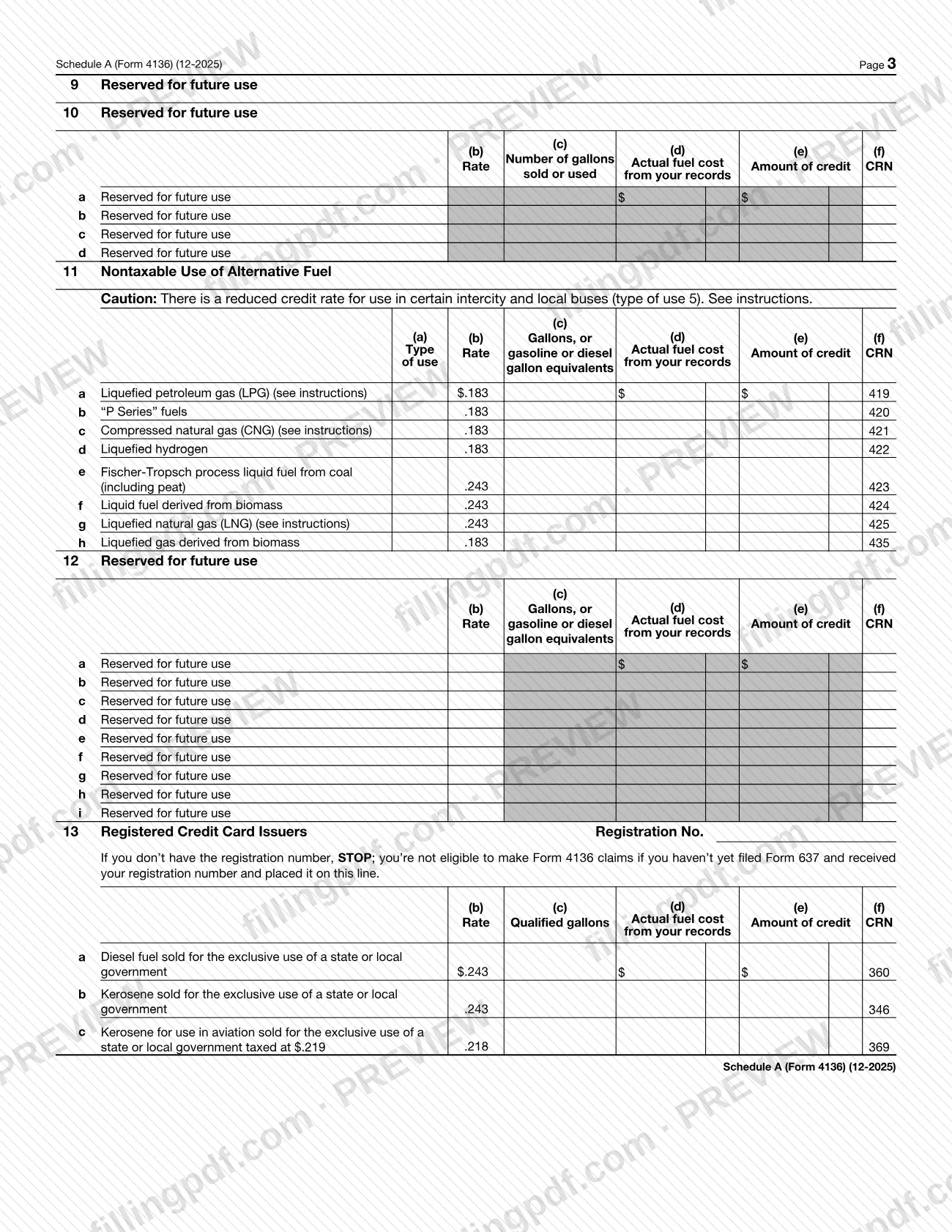
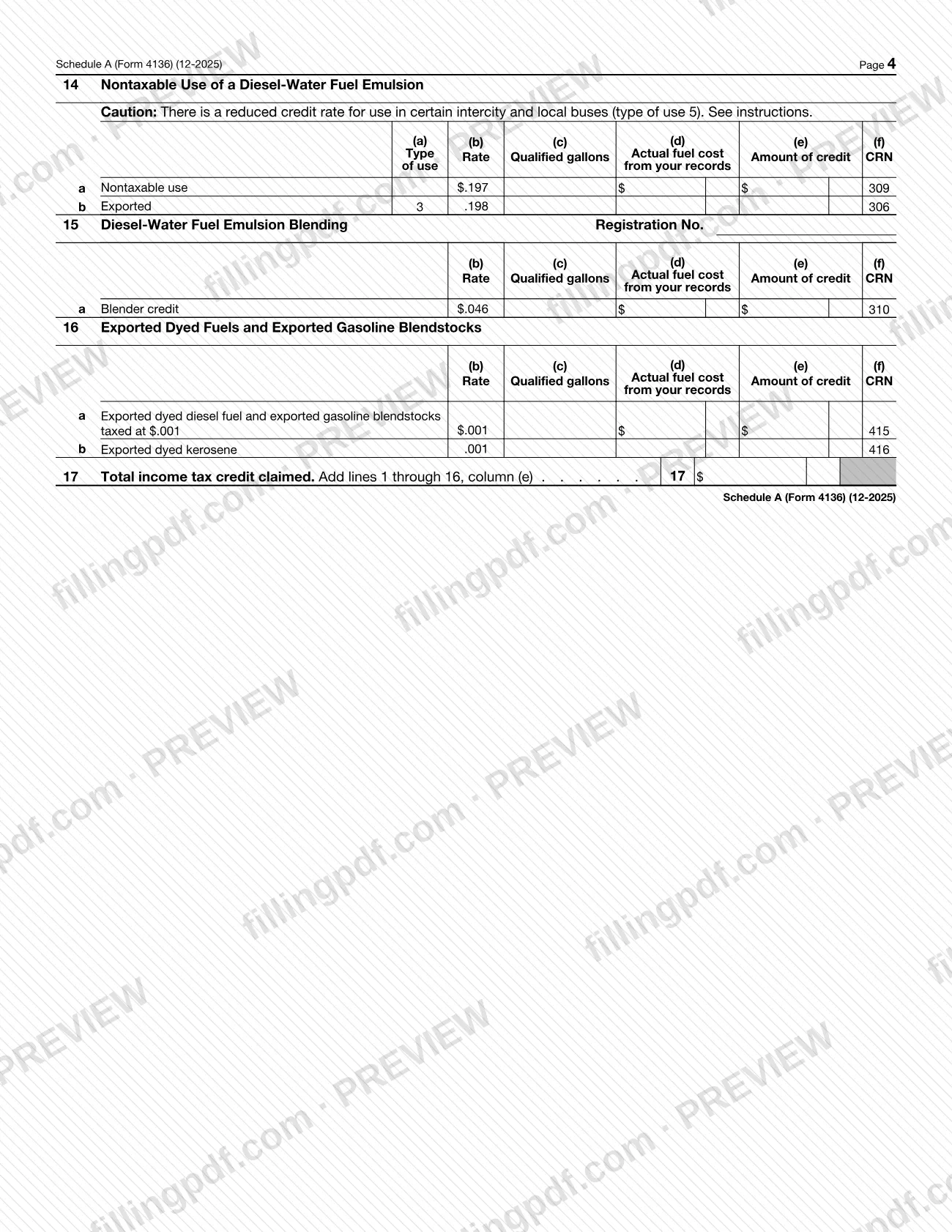
Schedule A (Form 4136), Business Activity Report for Credit for Federal Tax Paid on Fuels, is an Internal Revenue Service (IRS) schedule that you attach to your Form 4136. It reports the fuel behind your credit claim, by fuel type and type of use, and totals the income tax credit on line 17. It is one of several "Schedule A" documents the IRS publishes, so look for the Form 4136 label. On FillingPDF you can fill out the schedule online and download or print the completed PDF; the form and its separate instructions are published by the IRS.
Last updated
What is Schedule A (Form 4136)?
Schedule A (Form 4136), Business Activity Report for Credit for Federal Tax Paid on Fuels, is the IRS schedule attached to Form 4136 that lists the fuel used or sold in a business, by fuel type and type of use, and adds up the credit claimed.
The form is printed under OMB No. 1545-0074. At the top it asks for the name as shown on your income tax return, your taxpayer identification number, the business name and EIN if applicable, and the Principal Business Activity Code. It also asks for the make, model and type of equipment for which most of the fuel was used in the business.
Each fuel section has columns for type of use, rate, gallons, actual fuel cost from your records, amount of credit and CRN (credit reference number). The sections cover:
- nontaxable use of gasoline, aviation gasoline, undyed diesel fuel and undyed kerosene, and kerosene used in aviation (lines 1 to 5);
- sales by registered ultimate vendors (lines 6 to 8) and registered credit card issuers (line 13);
- nontaxable use of alternative fuel (line 11) and of diesel-water fuel emulsion (lines 14 and 15);
- exported dyed fuels and exported gasoline blendstocks (line 16).
Line 17 totals the income tax credit claimed. Lines 9, 10 and 12 are marked "Reserved for future use". This schedule is not a standalone return: it supports Form 4136.
Who needs to file Schedule A (Form 4136)?
Taxpayers who are completing Form 4136 and need to report the business activity behind a fuel credit attach this schedule to it. The form says to attach it to your Form 4136.
Some sections are limited to particular filers:
- Lines 6, 7 and 8: registered ultimate vendors of undyed diesel fuel, undyed kerosene and kerosene for use in aviation.
- Line 13: registered credit card issuers.
- Line 15: diesel-water fuel emulsion blending, which also carries a registration number line.
For lines 6, 7, 8 and 13 the form says to STOP if you do not have a registration number: you are not eligible to make Form 4136 claims if you have not yet filed Form 637 and received your registration number and placed it on the line.
The person or persons signing the return with which the form is filed declare, under penalty of perjury, that the amounts and credits on this form are true, correct and complete. Use the IRS instructions for Form 4136 to confirm which lines apply to you.
When to file Schedule A (Form 4136)
Complete Schedule A (Form 4136) whenever you file Form 4136, because the form says to attach it to your Form 4136. It has no due date of its own printed on it; it travels with the Form 4136 and the return with which that form is filed.
Before you start, gather your fuel purchase records. The certification above line 1 says you have the name and address of the person who sold you the fuel and the dates of purchase, and the columns ask for qualified gallons and actual fuel cost from your records. For any filing deadline that applies to Form 4136, check the IRS instructions for that form.
Documents you need
- Form 4136, to which this schedule is attached; the schedule is not filed without it.
- An explanation, only if any diesel fuel or kerosene included in a claim on line 3, 4, 6 or 7 contained visible evidence of dye; check the box on that line as well.
- Additional information named in the IRS instructions, for sales by registered ultimate vendors of kerosene for use in aviation on line 8.
- Your registration number from Form 637, entered on the registration line, for lines 6, 7, 8 and 13 and any registration line on line 15.
How to fill out Schedule A (Form 4136)
Enter your name and tax IDs
At the top, enter your name as shown on your income tax return, your taxpayer identification number, your business name and EIN if applicable, and your Principal Business Activity Code.
Describe your main equipment
Enter the (i) make, (ii) model and (iii) type of equipment for which most of the fuel was used for this business. The form refers you to the instructions.
Complete line 1, gasoline
On lines 1a to 1d, enter qualified gallons in column (c), actual fuel cost from your records in column (d) and the credit in column (e) for each type of use. The rate and CRN are printed on the form.
Complete lines 2 and 3
Report aviation gasoline on line 2 and undyed diesel fuel on line 3. On line 3, check the dye box and attach an explanation if any of the diesel fuel had visible evidence of dye.
Complete lines 4 and 5
Report undyed kerosene, other than kerosene used in aviation, on line 4 and kerosene used in aviation on line 5. On line 4, check the dye box and attach an explanation if the kerosene had visible evidence of dye.
Complete lines 6 to 8 if you are a vendor
Registered ultimate vendors enter their Form 637 registration number on line 6, 7 or 8 first, then report the sales. Do not complete these lines without the number.
Complete line 11, alternative fuel
On lines 11a to 11h, enter gallons, or gasoline or diesel gallon equivalents, for each alternative fuel, with the actual fuel cost and the credit amount.
Complete lines 13 to 16 if they apply
Registered credit card issuers use line 13 with their registration number. Use lines 14 and 15 for diesel-water fuel emulsion and line 16 for exported dyed fuels and gasoline blendstocks.
Skip the reserved lines
Lines 9, 10 and 12 are marked Reserved for future use. Leave them blank.
Total your credit on line 17
Add lines 1 through 16, column (e), and enter the total income tax credit claimed on line 17.
Review and download the completed PDF
Check each certification against your records, then download or print the completed PDF from FillingPDF and attach it to your Form 4136.
How to submit Schedule A (Form 4136)
Schedule A (Form 4136) is not sent on its own: you attach it to Form 4136 and submit the package through the channels that apply to Form 4136 and the return it accompanies. The schedule prints no mailing address, portal or appointment rule of its own.
- Attach: put the completed schedule with your Form 4136.
- Explanations: if any diesel fuel or kerosene in a claim on lines 3, 4, 6 or 7 contained visible evidence of dye, check the box on that line and attach an explanation. For line 8, see the instructions for additional information to be submitted.
- Instructions: the separate IRS instructions for Form 4136 give filing details.
FillingPDF lets you fill out and download the PDF; submission follows the IRS channels that apply to Form 4136.
Common mistakes to avoid
- Submitting the schedule without attaching it to Form 4136; the form says to attach it to your Form 4136.
- Completing line 6, 7, 8 or 13 without a registration number; the form says STOP if you have not filed Form 637 and received and entered your number.
- Leaving the dye box unchecked and the explanation off when any diesel fuel or kerosene in a claim on lines 3, 4, 6 or 7 showed visible evidence of dye.
- Claiming type of use 2 on line 1 for equipment that was a highway vehicle, generally one registered or required to be registered for use on public highways.
- Claiming on lines 1c, 2b, 3d, 4c or 5 after waiving the right to make the claim, or on lines 1c and 2b (type of use 13 or 14) after giving a certificate to the credit card issuer.
- Entering amounts on lines 9, 10 or 12, which are marked as reserved for future use.
- Leaving out the make, model and type of equipment for which most of the fuel was used in the business.
- Totaling line 17 from the wrong column; it adds lines 1 through 16, column (e), the amount of credit.
Frequently asked questions
What is Schedule A (Form 4136)?
Schedule A (Form 4136) is the IRS Business Activity Report for Credit for Federal Tax Paid on Fuels. You attach it to Form 4136 to report the fuel used or sold, by type of use, with gallons, fuel cost and credit, and the total on line 17.
Is this the same as the other IRS Schedule A?
No. This schedule belongs to Form 4136, as the label "Schedule A (Form 4136)" shows, and reports fuel credits. The IRS publishes other schedules with the same letter for other forms, so check the form name before you use it.
Can I file Schedule A (Form 4136) by itself?
No. The form says to attach it to your Form 4136, so it is submitted with that form and the return that accompanies it. It prints no separate address, portal or due date.
What do I need before I fill out Schedule A (Form 4136)?
Have your fuel records: the seller's name and address, the purchase dates, qualified gallons and actual fuel cost. Vendors and credit card issuers also need the registration number received after filing Form 637 for lines 6, 7, 8 and 13.
What if the fuel had dye in it?
On lines 3, 4, 6 and 7 you certify that the fuel had no visible evidence of dye. If any of the fuel in the claim did, check the box on that line and attach an explanation.
What goes on line 17?
Line 17 is the total income tax credit claimed. Add lines 1 through 16, column (e), the amount of credit, and enter the result.
Who signs Schedule A (Form 4136)?
The schedule has no signature line of its own. The person or persons signing the return with which it is filed declare under penalty of perjury that the return, schedules and credits claimed, including this form, are true, correct and complete.
Can I fill out Schedule A (Form 4136) online?
Yes. You can fill out the PDF online on FillingPDF and download or print it. FillingPDF is an independent service and does not file the form with the IRS; you submit it with Form 4136 through IRS channels.
Ready to fill out Schedule A (Form 4136)?
Fill out Schedule A (Form 4136) now