
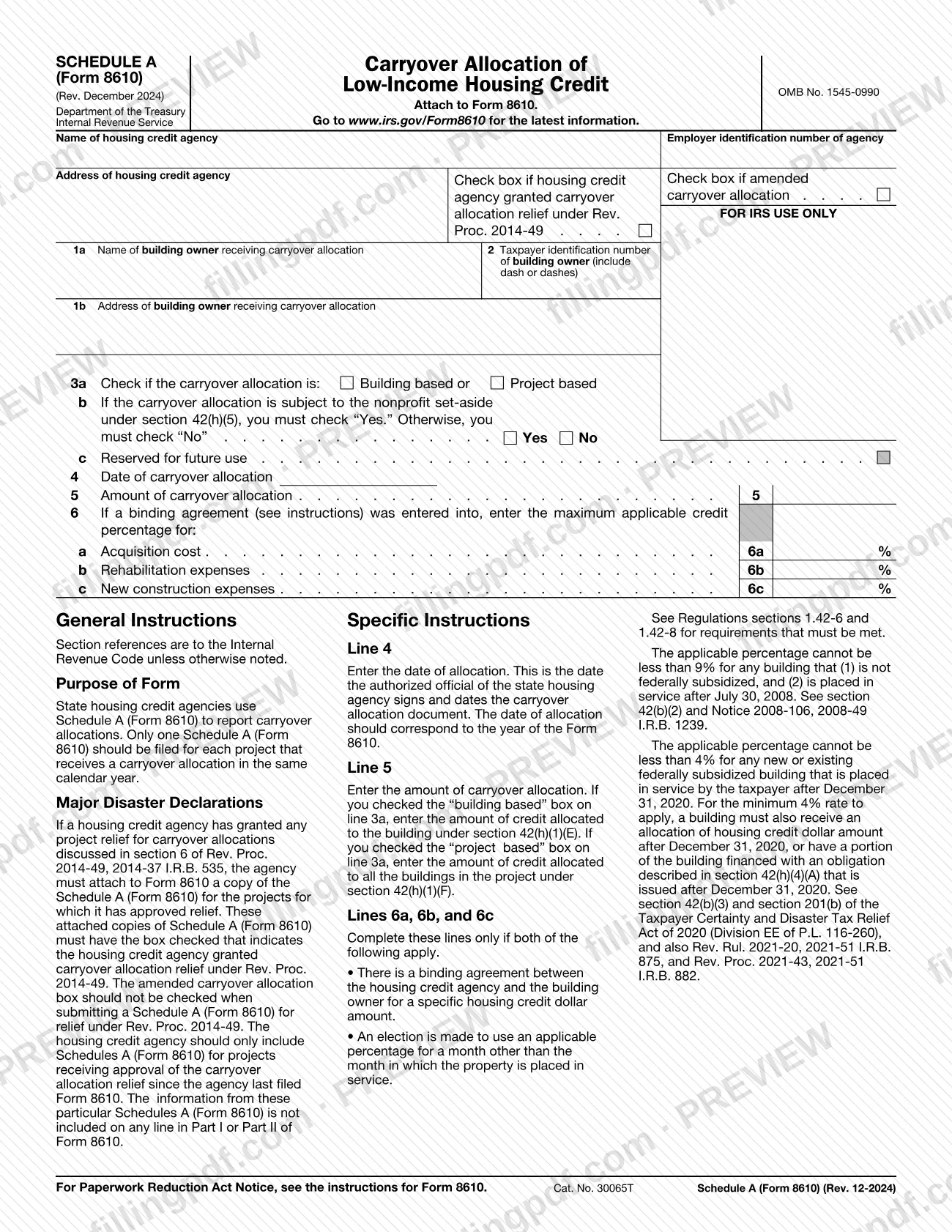
Schedule A (Form 8610), Carryover Allocation of Low-Income Housing Credit, is the Internal Revenue Service (IRS) schedule that state housing credit agencies use to report a carryover allocation to a building owner. It is attached to Form 8610, and only one is filed for each project that receives a carryover allocation in the same calendar year. On FillingPDF you can fill out the form online and download or print the completed PDF; the IRS publishes the form and the latest information at www.irs.gov/Form8610.
Last updated
What is Schedule A (Form 8610)?
Schedule A (Form 8610), Carryover Allocation of Low-Income Housing Credit, is the Internal Revenue Service (IRS) schedule on which a state housing credit agency reports a carryover allocation of the low-income housing credit to a building owner; it is attached to Form 8610.
Each schedule identifies the housing credit agency (name, employer identification number and address), the building owner receiving the allocation and the owner's taxpayer identification number, whether the allocation is building based or project based, whether it is subject to the nonprofit set-aside under section 42(h)(5), the date of the allocation and its amount. Where a binding agreement exists, it also records the maximum applicable credit percentages for acquisition cost, rehabilitation expenses and new construction expenses.
The form carries OMB No. 1545-0990 and the revision Rev. December 2024. It refers to Regulations sections 1.42-6 and 1.42-8 for the requirements that must be met. It is not filed on its own: it is a schedule of Form 8610.
Schedule A also documents disaster-related relief. When an agency has granted project relief for carryover allocations under section 6 of Rev. Proc. 2014-49, 2014-37 I.R.B. 535, it attaches a copy of the schedule for each such project to Form 8610, with the relief box checked. The information on those copies is not included on any line in Part I or Part II of Form 8610.
Who needs to file Schedule A (Form 8610)?
State housing credit agencies file Schedule A (Form 8610). The IRS describes it as the form those agencies use to report carryover allocations, and the agency's own name, employer identification number and address are the first entries on it.
- Agencies reporting a carryover allocation: one schedule for each project that receives a carryover allocation in the same calendar year.
- Agencies that granted relief under Rev. Proc. 2014-49: a copy of the schedule for each project for which the agency approved relief, attached to Form 8610 with the relief box checked. Include only projects approved since the agency last filed Form 8610.
- Agencies amending an earlier report: check the amended carryover allocation box. Do not check it on a schedule submitted for relief under Rev. Proc. 2014-49.
Building owners appear on the schedule as the recipients of the allocation (lines 1a, 1b and 2); the form does not ask them to complete it. Lines 6a, 6b and 6c are completed only when a binding agreement exists and an applicable-percentage election has been made, as explained in the steps below.
When to file Schedule A (Form 8610)
Schedule A (Form 8610) is filed whenever Form 8610 is filed, because it must be attached to that form. The schedule prints no separate due date. The date entered on line 4 should correspond to the year of the Form 8610 it accompanies.
Only one Schedule A is filed for each project that receives a carryover allocation in the same calendar year.
For projects where the agency approved carryover allocation relief under Rev. Proc. 2014-49, attach the schedules to Form 8610 for the projects approved since the agency last filed Form 8610. For the due date of Form 8610 itself, check the IRS information at www.irs.gov/Form8610.
Documents you need
- A copy of Schedule A (Form 8610) for each project granted carryover allocation relief under Rev. Proc. 2014-49, attached to Form 8610 with the relief box checked; include only projects approved since the agency last filed Form 8610.
How to fill out Schedule A (Form 8610)
Enter the housing credit agency details
At the top, enter the name of the housing credit agency, the agency's employer identification number and the agency's address.
Check the amended or relief box
Check the box for an amended carryover allocation if this schedule amends an earlier one. If the agency granted carryover allocation relief under Rev. Proc. 2014-49, check the relief box instead and leave the amended box unchecked.
Identify the building owner
Line 1a: enter the name of the building owner receiving the carryover allocation. Line 1b: enter the owner's address.
Enter the owner's taxpayer ID
Line 2: enter the building owner's taxpayer identification number, including the dash or dashes.
Choose building based or project based
Line 3a: check whether the carryover allocation is building based or project based. This choice decides what you report on line 5.
Answer the nonprofit set-aside question
Line 3b: check Yes if the allocation is subject to the nonprofit set-aside under section 42(h)(5); otherwise check No. Line 3c is reserved for future use, so leave it alone.
Enter the date of allocation
Line 4: enter the date the authorized official of the state housing agency signs and dates the carryover allocation document. The date should correspond to the year of Form 8610.
Enter the allocation amount
Line 5: if you checked building based, enter the credit allocated to the building under section 42(h)(1)(E). If you checked project based, enter the credit allocated to all buildings in the project under section 42(h)(1)(F).
Complete the percentages if required
Lines 6a, 6b and 6c: complete them only if a binding agreement exists for a specific housing credit dollar amount and an election is made to use an applicable percentage for a month other than the month the property is placed in service. Enter the maximum percentage for acquisition cost, rehabilitation expenses and new construction expenses.
Review and download the completed PDF
Check each line against the instructions, then download or print the completed PDF from FillingPDF and attach it to Form 8610 as described under How to submit.
How to submit Schedule A (Form 8610)
Schedule A (Form 8610) is submitted as an attachment to Form 8610; the schedule prints no mailing address, portal or appointment rule of its own.
- With Form 8610: attach each completed schedule to Form 8610 and send the package by the filing method that applies to Form 8610.
- Relief copies: attach a copy of the schedule for every project granted relief under Rev. Proc. 2014-49, with the relief box checked and the amended box left unchecked.
- Latest information: the form directs you to www.irs.gov/Form8610; the Paperwork Reduction Act notice appears in the instructions for Form 8610.
FillingPDF lets you fill out and download the PDF; submission follows the IRS channels that apply to Form 8610.
Common mistakes to avoid
- Filing more than one Schedule A for a project that receives a carryover allocation in the same calendar year; the instructions call for only one.
- Checking the amended carryover allocation box on a schedule submitted for relief under Rev. Proc. 2014-49; the instructions say it should not be checked.
- Leaving line 3b blank; if the allocation is subject to the nonprofit set-aside under section 42(h)(5) you must check Yes, and otherwise you must check No.
- Completing lines 6a, 6b and 6c without both a binding agreement for a specific housing credit dollar amount and an election to use an applicable percentage for a different month.
- Entering on line 5 the wrong amount for the box checked on line 3a: building based uses the section 42(h)(1)(E) amount, project based the section 42(h)(1)(F) amount for all buildings in the project.
- Entering a line 4 date that does not correspond to the year of the Form 8610 the schedule accompanies.
- Including relief-schedule information on any line in Part I or Part II of Form 8610; the instructions say it is not included there.
- Submitting the schedule without attaching it to Form 8610.
- Omitting the dash or dashes in the building owner's taxpayer identification number on line 2.
Frequently asked questions
What is Schedule A (Form 8610)?
Schedule A (Form 8610) is the IRS schedule, titled Carryover Allocation of Low-Income Housing Credit, that state housing credit agencies use to report carryover allocations. It is attached to Form 8610 and lists the building owner, the allocation type, date and amount.
Who files Schedule A (Form 8610)?
State housing credit agencies file it. The IRS instructions describe it as the form those agencies use to report carryover allocations, and the agency's name and employer identification number are the first entries. The building owner is listed on lines 1a through 2 as the recipient.
Can I file Schedule A (Form 8610) by itself?
No. The form says to attach it to Form 8610. Only one schedule should be filed for each project that receives a carryover allocation in the same calendar year, and the line 4 date should correspond to the year of that Form 8610.
What do I enter on line 5 of Schedule A (Form 8610)?
It depends on line 3a. If you checked building based, enter the credit allocated to the building under section 42(h)(1)(E). If you checked project based, enter the credit allocated to all buildings in the project under section 42(h)(1)(F).
When do I complete lines 6a, 6b and 6c?
Only if both conditions apply: there is a binding agreement between the housing credit agency and the building owner for a specific housing credit dollar amount, and an election is made to use an applicable percentage for a month other than the month the property is placed in service.
How do I report carryover allocation relief under Rev. Proc. 2014-49?
Attach a copy of Schedule A to Form 8610 for each project where the agency approved relief, with the relief box checked. Do not check the amended box, and include only projects approved since the agency last filed Form 8610.
What do I check on line 3b?
You must check Yes if the carryover allocation is subject to the nonprofit set-aside under section 42(h)(5). Otherwise you must check No. The line cannot be left blank, and line 3c next to it is reserved for future use.
Can I fill out Schedule A (Form 8610) online?
Yes. You can fill out the PDF online on FillingPDF and download or print it. FillingPDF is an independent service and does not file the schedule with the IRS; you submit it with Form 8610 through the IRS channels.
Ready to fill out Schedule A (Form 8610)?
Fill out Schedule A (Form 8610) now