
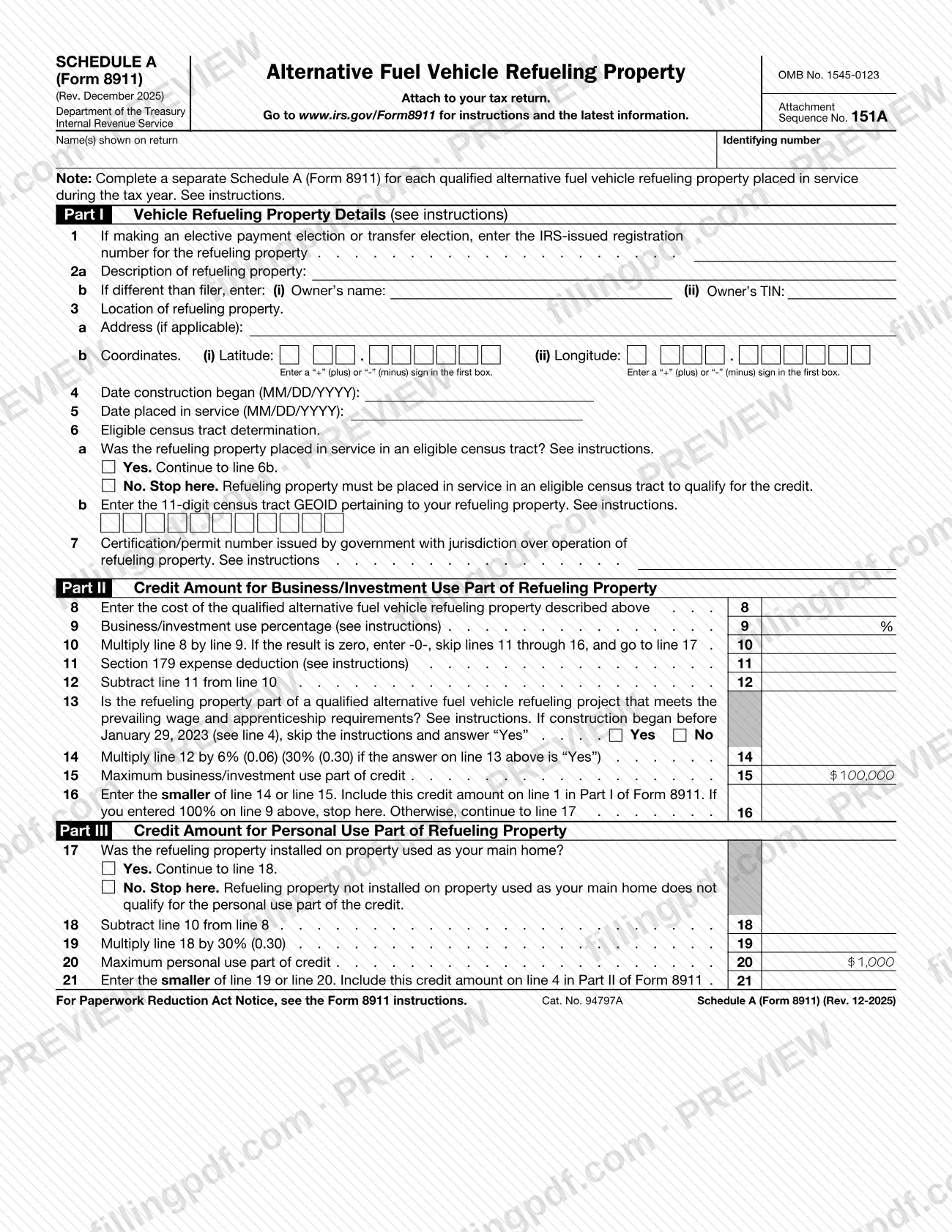
Schedule A (Form 8911), Alternative Fuel Vehicle Refueling Property, is an Internal Revenue Service (IRS) schedule that you attach to your tax return. It describes one qualified refueling property and works out the credit for its business/investment use and for its personal use, with the results carried to Form 8911. On this page you can fill out the form online on FillingPDF and download or print the completed PDF; the IRS publishes the form and its instructions at www.irs.gov/Form8911.
Last updated
What is Schedule A (Form 8911)?
Schedule A (Form 8911), Alternative Fuel Vehicle Refueling Property, is the Internal Revenue Service (IRS) schedule, attached to your tax return, on which you describe one qualified alternative fuel vehicle refueling property and figure the credit for its business/investment use and its personal use.
The schedule has three parts. Part I (lines 1 to 7) records the property: the IRS-issued registration number if you make an elective payment election or transfer election, a description, the owner when different from the filer, the location by address and by latitude and longitude, the dates construction began and the property was placed in service, the eligible census tract determination with its 11-digit census tract GEOID, and the certification or permit number issued by the government with jurisdiction over its operation. Part II (lines 8 to 16) computes the credit for the business/investment use part. Part III (lines 17 to 21) computes the credit for the personal use part.
The schedule is a companion to Form 8911: the line 16 result goes on line 1 in Part I of Form 8911, and the line 21 result goes on line 4 in Part II of Form 8911. The form is identified as OMB No. 1545-0123, Attachment Sequence No. 151A, and the revision printed on it is Rev. December 2025. The IRS instructions are at www.irs.gov/Form8911.
Who needs to file Schedule A (Form 8911)?
Taxpayers who placed a qualified alternative fuel vehicle refueling property in service during the tax year and claim the credit on Form 8911 complete this schedule and attach it to their tax return. The form says to complete a separate Schedule A (Form 8911) for each qualified refueling property placed in service during the tax year.
Conditions built into the schedule:
- Eligible census tract. On line 6a, if the property was not placed in service in an eligible census tract, you stop: the form states the property must be in one to qualify for the credit.
- Owner different from the filer. Line 2b asks for the owner's name and TIN when the owner is not the filer.
- Elective payment or transfer election. Line 1 applies only if you make one of these elections; enter the IRS-issued registration number for the property.
- Personal use part. Part III applies only if the property was installed on property used as your main home (line 17). If not, you stop, because the property does not qualify for the personal use part of the credit. If you entered 100% on line 9, you also stop after line 16.
The schedule does not describe who may sign for someone else; see the IRS instructions for Form 8911.
When to file Schedule A (Form 8911)
Complete a Schedule A (Form 8911) for each qualified refueling property placed in service during the tax year, and attach it to your tax return for that year. The schedule has no due date of its own: it travels with the tax return it is attached to.
Two dates matter on the form itself. Line 4 asks for the date construction began and line 5 for the date placed in service, both in MM/DD/YYYY format. On line 13, if construction began before January 29, 2023, the form tells you to skip the instructions and answer "Yes." For any filing deadline or extension rules that apply to your return, check the IRS instructions at www.irs.gov/Form8911.
How to fill out Schedule A (Form 8911)
Enter your name and identifying number
At the top, write the name(s) shown on your return and your identifying number. Complete a separate schedule for each qualified refueling property placed in service during the tax year.
Enter the registration number if electing
On line 1, enter the IRS-issued registration number for the refueling property only if you are making an elective payment election or transfer election.
Describe the property and its owner
On line 2a, describe the refueling property. On line 2b, enter the owner's name (i) and TIN (ii) only if the owner differs from the filer.
Enter the property location
On line 3a, enter the address if applicable. On line 3b, enter the latitude (i) and longitude (ii), putting a "+" or "-" sign in the first box of each.
Enter the construction and service dates
On line 4, enter the date construction began, and on line 5 the date placed in service, both as MM/DD/YYYY.
Answer the census tract question
On line 6a, check Yes or No. If No, stop: the property must be in an eligible census tract to qualify. If Yes, enter the 11-digit census tract GEOID on line 6b.
Enter the certification or permit number
On line 7, enter the certification or permit number issued by the government with jurisdiction over operation of the refueling property, following the IRS instructions.
Enter cost and business use percentage
On line 8, enter the cost of the refueling property. On line 9, enter the business/investment use percentage, then multiply line 8 by line 9 on line 10, entering -0- and skipping to line 17 if the result is zero.
Subtract Section 179 expense
On line 11, enter any Section 179 expense deduction, then subtract line 11 from line 10 on line 12.
Answer the wage and apprenticeship question
On line 13, check Yes or No on whether the property is part of a project meeting the prevailing wage and apprenticeship requirements. If construction began before January 29, 2023 (line 4), answer Yes.
Figure the business use credit
On line 14, multiply line 12 by the percentage printed on the line (a higher one if line 13 is Yes). Enter the smaller of line 14 or the maximum on line 15 on line 16, and carry it to line 1 in Part I of Form 8911; stop here if line 9 is 100%.
Complete the personal use part
On line 17, check Yes only if the property was installed on your main home; if No, stop. Then complete lines 18 to 21 and carry the line 21 amount to line 4 in Part II of Form 8911.
Review and download the completed PDF
Check each line against the IRS instructions at www.irs.gov/Form8911, then download or print the completed PDF from FillingPDF and attach it to your tax return.
How to submit Schedule A (Form 8911)
Schedule A (Form 8911) is not filed on its own: you attach it to your tax return, and the credit amounts it produces are carried to Form 8911.
- With your tax return: attach each completed Schedule A (Form 8911) to the return, using the same filing method you use for the return. The schedule prints no mailing address, portal or appointment rule of its own.
- Carry the results to Form 8911: include the line 16 amount on line 1 in Part I of Form 8911, and the line 21 amount on line 4 in Part II of Form 8911.
- Instructions: the form directs you to www.irs.gov/Form8911 for instructions and the latest information.
If you have more than one qualified refueling property, attach a separate completed schedule for each. FillingPDF lets you fill out and download the PDF; submission follows the IRS channels that apply to your tax return.
Common mistakes to avoid
- Continuing past line 6a after answering No; the form says to stop, because the property must be placed in service in an eligible census tract to qualify for the credit.
- Using one Schedule A (Form 8911) for several refueling properties; the form calls for a separate schedule for each qualified property placed in service during the tax year.
- Entering a census tract GEOID that is not 11 digits on line 6b.
- Leaving out the "+" or "-" sign in the first box of the latitude and longitude on line 3b.
- Entering the IRS registration number on line 1 when you are not making an elective payment election or transfer election.
- Answering line 13 "No" when construction began before January 29, 2023; the form says to answer "Yes" in that case.
- Continuing to Part III when the property was not installed on your main home; the form says to stop at line 17.
- Going on to line 17 after entering 100% on line 9; the form says to stop at line 16 in that case.
- Forgetting to carry the line 16 amount to line 1 in Part I of Form 8911 and the line 21 amount to line 4 in Part II of Form 8911.
Frequently asked questions
What is Schedule A (Form 8911) used for?
Schedule A (Form 8911) is the IRS schedule where you describe one qualified alternative fuel vehicle refueling property and compute the credit for its business/investment use and its personal use. The results are carried to Form 8911, and the schedule is attached to your tax return.
Do I need a separate Schedule A (Form 8911) for each refueling property?
Yes. The form says to complete a separate Schedule A (Form 8911) for each qualified alternative fuel vehicle refueling property placed in service during the tax year. Each schedule carries its own location, dates, census tract and credit figures.
What happens if my property is not in an eligible census tract?
You stop at line 6a. The form states that the refueling property must be placed in service in an eligible census tract to qualify for the credit, so lines 6b through 21 are not completed. See the IRS instructions for how to determine eligibility.
Where do the line 16 and line 21 amounts go?
Include the line 16 amount on line 1 in Part I of Form 8911, and the line 21 amount on line 4 in Part II of Form 8911. The schedule is attached to your tax return and feeds those two lines.
When do I answer Yes on line 13 of Schedule A (Form 8911)?
Answer Yes if the property is part of a project that meets the prevailing wage and apprenticeship requirements, as explained in the instructions. If construction began before January 29, 2023 (line 4), skip the instructions and answer Yes.
Do I fill out Part III if I entered 100% on line 9?
No. The form says that if you entered 100% on line 9, you stop at line 16. Part III, the personal use part, applies only when the business/investment use is less than 100% and the property was installed on your main home.
Can I fill out Schedule A (Form 8911) online?
Yes. You can fill out the PDF online on FillingPDF and download or print it. FillingPDF is an independent service and does not file the schedule with the IRS; you attach it to your tax return and file through the IRS channels that apply to that return.
Where can I find the instructions for Schedule A (Form 8911)?
The IRS publishes the instructions and latest information at www.irs.gov/Form8911, the address printed on the form. Lines 1, 6, 7, 9, 11 and 13 each refer to those instructions.
Ready to fill out Schedule A (Form 8911)?
Fill out Schedule A (Form 8911) now