
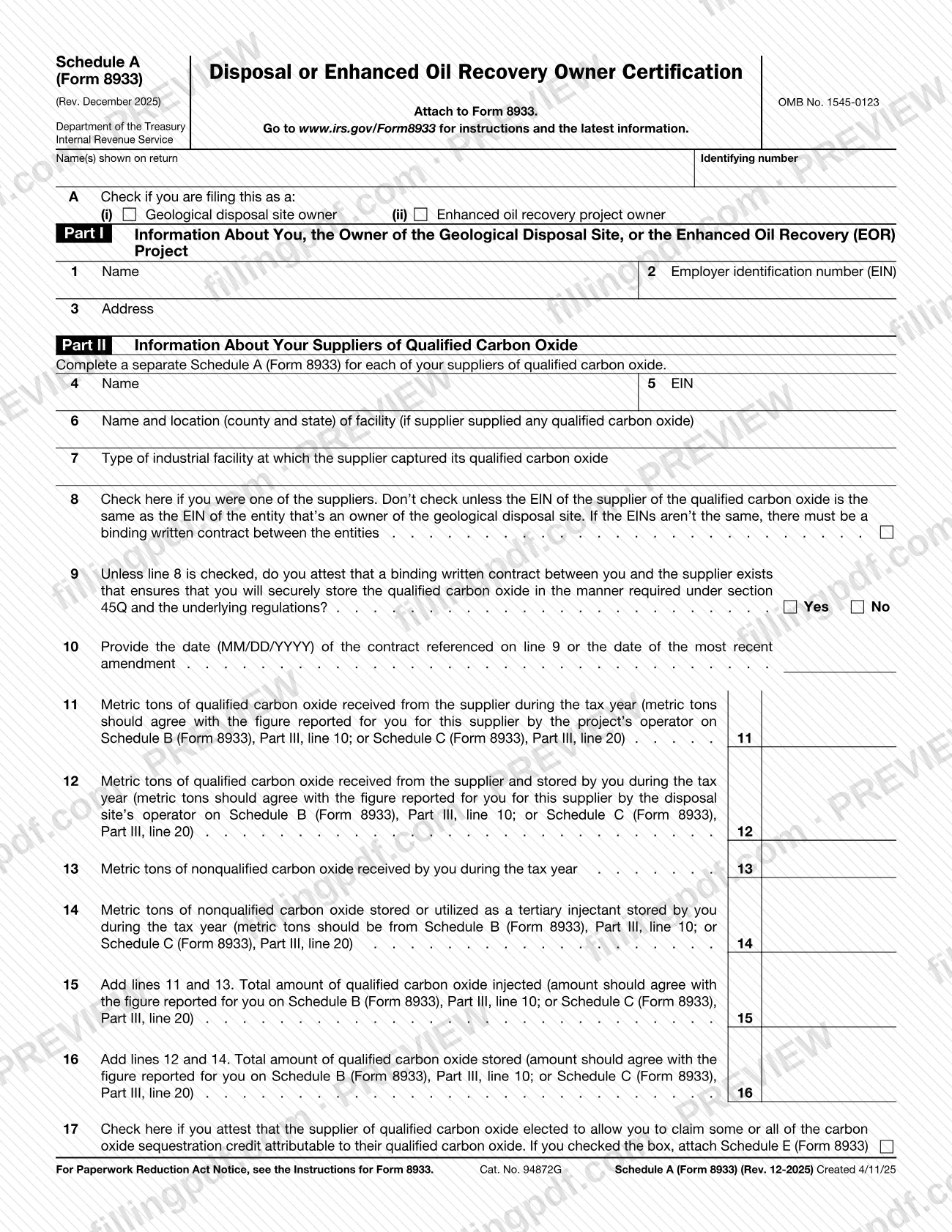
Schedule A (Form 8933), Disposal or Enhanced Oil Recovery Owner Certification, is an Internal Revenue Service (IRS) schedule that you attach to Form 8933. The owner of a geological disposal site or of an enhanced oil recovery (EOR) project uses it to identify itself, identify a supplier of qualified carbon oxide, and report the metric tons received, injected and stored. On this page you can fill out the form online on FillingPDF and download or print the completed PDF; the form and its instructions are published by the IRS at www.irs.gov/Form8933.
Last updated
What is Schedule A (Form 8933)?
Schedule A (Form 8933), Disposal or Enhanced Oil Recovery Owner Certification, is the IRS schedule attached to Form 8933 in which the owner of a geological disposal site or enhanced oil recovery (EOR) project identifies itself and reports on a supplier's qualified carbon oxide.
The form has two parts. Part I (lines 1 to 3) gives the owner's name, employer identification number (EIN) and address. Part II (lines 4 to 17) covers one supplier: its name, EIN, facility and type of industrial facility, the contract questions, and the metric tons of qualified and nonqualified carbon oxide received, injected and stored during the tax year.
Line 9 asks you to attest that a binding written contract with the supplier ensures the qualified carbon oxide will be securely stored in the manner required under section 45Q and the underlying regulations. Line 17 records whether the supplier elected to let you claim some or all of the carbon oxide sequestration credit attributable to its qualified carbon oxide.
The metric-ton figures are meant to agree with the figures reported for you on Schedule B (Form 8933), Part III, line 10, or Schedule C (Form 8933), Part III, line 20. The form carries OMB No. 1545-0123 and is not filed on its own: it says to attach it to Form 8933.
Who needs to file Schedule A (Form 8933)?
The owner of a geological disposal site or of an enhanced oil recovery (EOR) project completes Schedule A (Form 8933). Box A at the top asks you to check which of the two you are: Geological disposal site owner or Enhanced oil recovery project owner.
- You complete a separate Schedule A (Form 8933) for each of your suppliers of qualified carbon oxide, as Part II states.
- If you were also one of the suppliers, you check line 8, but only when the EIN of the supplier is the same as the EIN of the entity that is an owner of the geological disposal site.
- If the EINs are not the same, the form says there must be a binding written contract between the entities, and you answer line 9.
- If the supplier elected to let you claim some or all of the carbon oxide sequestration credit attributable to its qualified carbon oxide, you check line 17 and attach Schedule E (Form 8933).
The form does not describe who may sign for the owner or act as a representative. See the IRS instructions for Form 8933 at www.irs.gov/Form8933 for eligibility questions.
When to file Schedule A (Form 8933)
You complete Schedule A (Form 8933) when you complete Form 8933, because the schedule says to attach it to that form. No separate due date is printed on it, so it travels with Form 8933 whenever that form is filed. For the deadline that applies to Form 8933, check the IRS instructions at www.irs.gov/Form8933.
The amounts on lines 11 to 16 are for the tax year, so the receipt, injection and storage figures for that year must be known before you start. If you have more than one supplier of qualified carbon oxide, prepare one schedule per supplier at the same time. Line 10 asks for the date of the contract with the supplier, or of its most recent amendment, so have that date at hand.
Documents you need
- Schedule E (Form 8933): attach it only if you check the box on line 17, attesting that the supplier elected to let you claim some or all of the carbon oxide sequestration credit attributable to its qualified carbon oxide.
How to fill out Schedule A (Form 8933)
Enter your name and identifying number
At the top, write the name(s) shown on your return and your identifying number.
Check your owner type in box A
Check Geological disposal site owner (i) or Enhanced oil recovery project owner (ii), whichever describes you.
Complete Part I owner information
Line 1: your name. Line 2: your employer identification number (EIN). Line 3: your address.
Identify the supplier
Part II is completed once per supplier, so use a separate schedule for each. Line 4: the supplier's name. Line 5: the supplier's EIN.
Describe the supplier's facility
Line 6: the name and location (county and state) of the facility, if the supplier supplied any qualified carbon oxide. Line 7: the type of industrial facility at which the supplier captured its qualified carbon oxide.
Answer the contract questions
Check line 8 only if you were one of the suppliers and the supplier's EIN is the same as the EIN of an owner of the geological disposal site. Unless line 8 is checked, answer Yes or No on line 9 and enter the contract date, or the date of the most recent amendment, on line 10 as MM/DD/YYYY.
Report qualified carbon oxide received and stored
Line 11: metric tons of qualified carbon oxide received from the supplier during the tax year. Line 12: metric tons received from the supplier and stored by you. Both should agree with the operator's figure on Schedule B (Form 8933), Part III, line 10, or Schedule C (Form 8933), Part III, line 20.
Report nonqualified carbon oxide
Line 13: metric tons of nonqualified carbon oxide received by you during the tax year. Line 14: metric tons of nonqualified carbon oxide stored, or utilized as a tertiary injectant stored, by you, taken from Schedule B, Part III, line 10, or Schedule C, Part III, line 20.
Total the amounts injected and stored
Line 15: add lines 11 and 13 for the total qualified carbon oxide injected. Line 16: add lines 12 and 14 for the total qualified carbon oxide stored. Each total should agree with the figure reported for you on Schedule B or Schedule C.
Decide whether to check line 17
Check the box on line 17 only if you attest that the supplier elected to allow you to claim some or all of the carbon oxide sequestration credit attributable to its qualified carbon oxide, and then attach Schedule E (Form 8933).
Review, download and attach
Check each line against Schedule B or C, then download or print the completed PDF from FillingPDF and attach it to Form 8933 as described under How to submit.
How to submit Schedule A (Form 8933)
Schedule A (Form 8933) is submitted as an attachment to Form 8933. It has no filing channel, mailing address or portal of its own printed on it.
- Attach to Form 8933: include each completed schedule, one per supplier of qualified carbon oxide, with Form 8933.
- Attach Schedule E (Form 8933) when required: if you check the box on line 17, attach Schedule E (Form 8933).
- Send it the way you send Form 8933: the schedule follows the filing method of the form it accompanies. The IRS publishes the form, instructions and latest information at www.irs.gov/Form8933, the address printed on the schedule.
Before sending, check that the name(s) shown on your return and your identifying number appear at the top of each schedule. FillingPDF lets you fill out and download the PDF; submission follows the IRS channels that apply to Form 8933.
Common mistakes to avoid
- Using one Schedule A (Form 8933) for several suppliers; Part II says to complete a separate schedule for each supplier of qualified carbon oxide.
- Checking line 8 when the supplier's EIN is not the same as the EIN of the entity that is an owner of the geological disposal site.
- Answering line 9 without a binding written contract with the supplier when line 8 is not checked.
- Entering metric tons on lines 11, 12 or 14 that do not agree with the figures on Schedule B (Form 8933), Part III, line 10, or Schedule C (Form 8933), Part III, line 20.
- Computing line 15 or line 16 from the wrong lines; line 15 adds lines 11 and 13, and line 16 adds lines 12 and 14.
- Checking the box on line 17 without attaching Schedule E (Form 8933).
- Leaving box A unchecked, so the form does not show whether you are a geological disposal site owner or an enhanced oil recovery project owner.
- Entering the contract date on line 10 in a format other than MM/DD/YYYY.
Frequently asked questions
What is Schedule A (Form 8933)?
Schedule A (Form 8933), Disposal or Enhanced Oil Recovery Owner Certification, is the IRS schedule attached to Form 8933. The owner of a geological disposal site or enhanced oil recovery project uses it to identify itself and report on one supplier of qualified carbon oxide.
Do I file one Schedule A (Form 8933) for all my suppliers?
No. Part II says to complete a separate Schedule A (Form 8933) for each of your suppliers of qualified carbon oxide. Part I, with your own name, EIN and address, is the same on each, while lines 4 to 17 are specific to the supplier.
When do I check line 8 on Schedule A (Form 8933)?
Check it only if you were one of the suppliers and the supplier's EIN is the same as the EIN of the entity that is an owner of the geological disposal site. If the EINs are not the same, the form requires a binding written contract between the entities, and you answer line 9.
What do I attach if I check line 17?
Attach Schedule E (Form 8933). Line 17 is for attesting that the supplier of qualified carbon oxide elected to allow you to claim some or all of the carbon oxide sequestration credit attributable to that carbon oxide.
Which figures must the metric tons on lines 11 and 12 match?
They should agree with the figure reported for you for this supplier by the operator on Schedule B (Form 8933), Part III, line 10, or Schedule C (Form 8933), Part III, line 20. Which schedule applies depends on how the project's operator reports.
How do I figure lines 15 and 16?
Line 15, total qualified carbon oxide injected, is lines 11 and 13 added together. Line 16, total qualified carbon oxide stored, is lines 12 and 14 added together. Each should agree with the figure reported for you on Schedule B or Schedule C.
Where do I find the instructions for Schedule A (Form 8933)?
The IRS publishes the Instructions for Form 8933 and the latest information at www.irs.gov/Form8933, the address printed on the schedule. The schedule refers to those instructions for the Paperwork Reduction Act Notice.
Can I fill out Schedule A (Form 8933) online on FillingPDF?
Yes. You can fill out the PDF online on FillingPDF and download or print it. FillingPDF is an independent service and does not file the schedule with the IRS; you submit it with Form 8933 through the IRS channels.
Ready to fill out Schedule A (Form 8933)?
Fill out Schedule A (Form 8933) now