
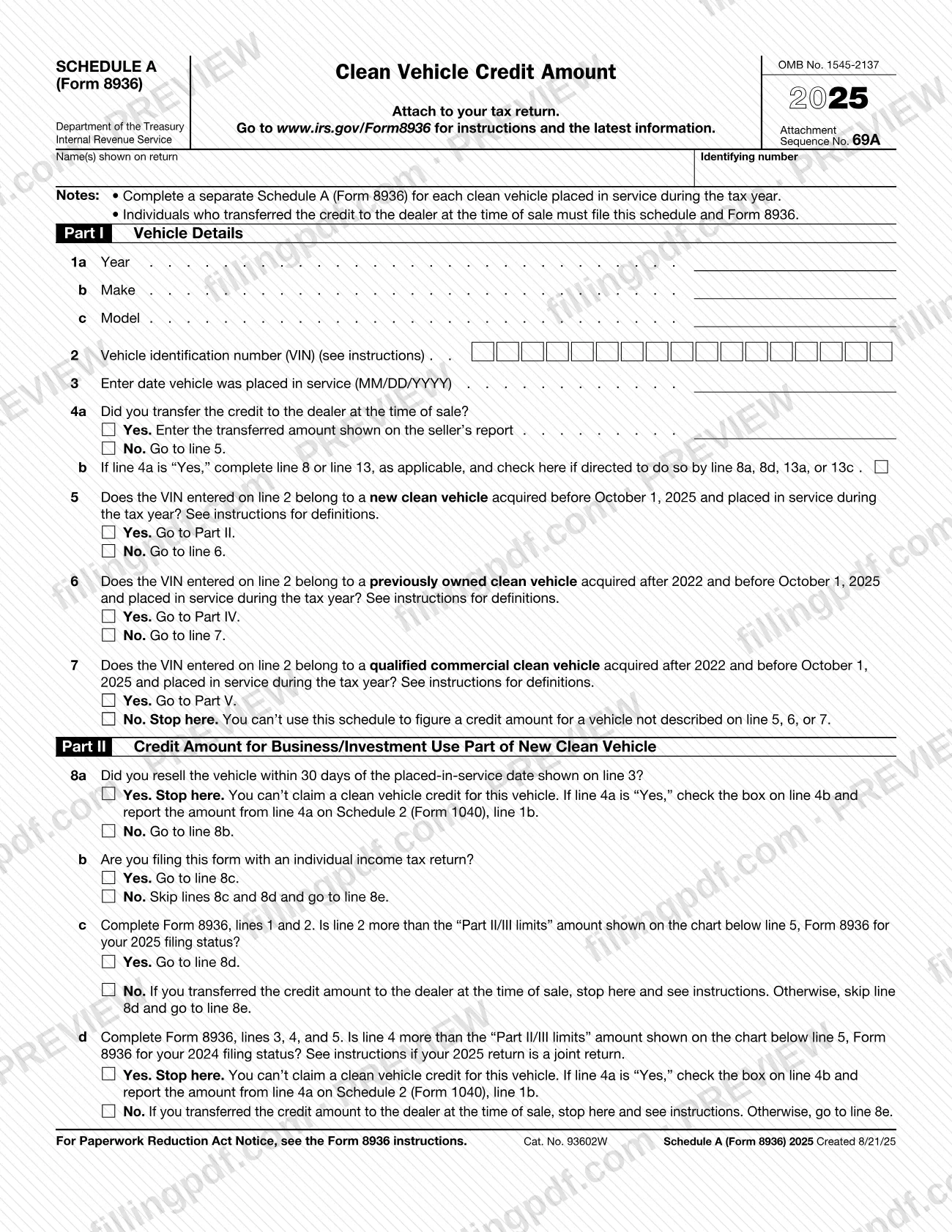
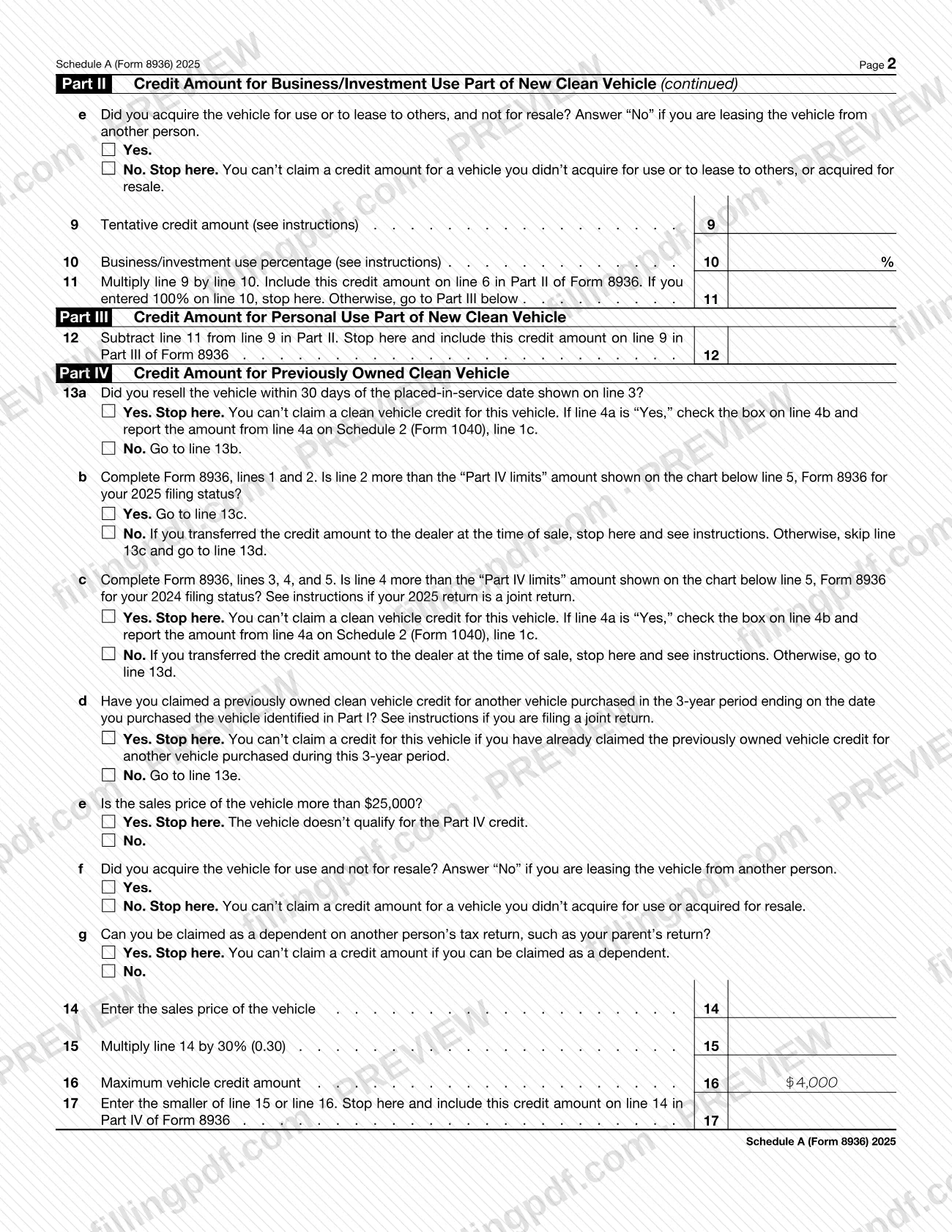
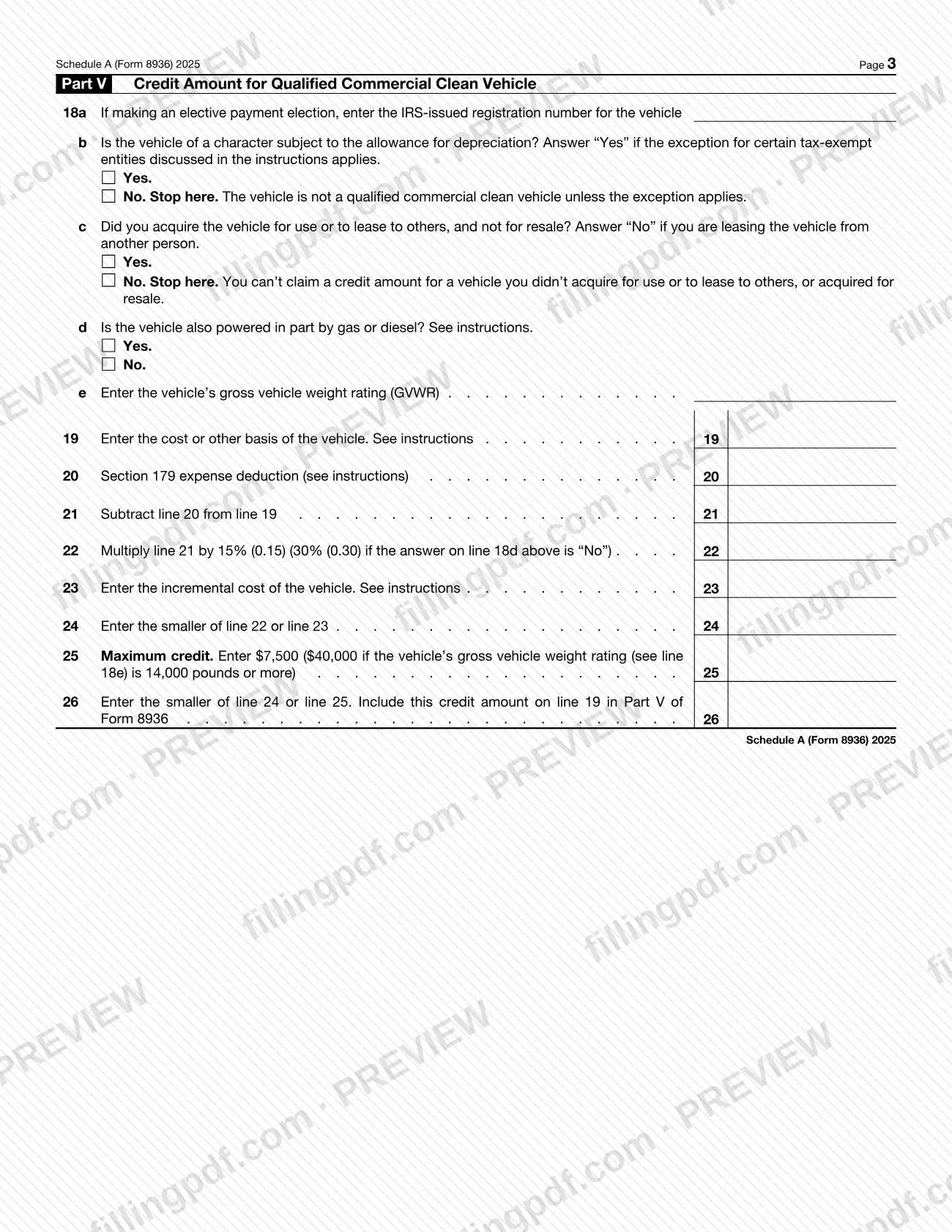
Schedule A (Form 8936), Clean Vehicle Credit Amount, is the Internal Revenue Service (IRS) schedule that you attach to your tax return to figure the credit for one clean vehicle. You complete a separate schedule for each vehicle placed in service during the tax year, and anyone who transferred the credit to the dealer at the time of sale must file it together with Form 8936. On this page you can fill out the 2025 schedule online on FillingPDF and download or print the completed PDF; the form and its instructions are published by the IRS at www.irs.gov/Form8936.
Last updated
What is Schedule A (Form 8936)?
Schedule A (Form 8936), Clean Vehicle Credit Amount, is the Internal Revenue Service (IRS) schedule on which you work out the amount of the clean vehicle credit for a single vehicle before carrying it to Form 8936.
The schedule is not a stand-alone form. It says to attach it to your tax return, and each result is carried to a specific line of Form 8936. It carries OMB No. 1545-2137 and Attachment Sequence No. 69A, and the version described here is the 2025 edition.
Part I identifies the vehicle (year, make, model, VIN, placed-in-service date), records whether you transferred the credit to the dealer at the time of sale, and routes you to the right part through lines 5, 6 and 7:
- Parts II and III: a new clean vehicle acquired before October 1, 2025 and placed in service during the tax year. Part II covers the business/investment use part and Part III the personal use part.
- Part IV: a previously owned clean vehicle acquired after 2022 and before October 1, 2025.
- Part V: a qualified commercial clean vehicle acquired after 2022 and before October 1, 2025.
If the VIN does not belong to a vehicle described on line 5, 6 or 7, the form says to stop: you cannot use this schedule to figure a credit for it. The IRS publishes the definitions and line-by-line instructions at www.irs.gov/Form8936.
Who needs to file Schedule A (Form 8936)?
Taxpayers who claim the clean vehicle credit for a vehicle placed in service during the tax year complete this schedule, using a separate Schedule A (Form 8936) for each vehicle.
- Individuals who transferred the credit to the dealer at the time of sale must file this schedule and Form 8936, even though the credit was applied at the sale.
- Buyers of a new clean vehicle acquired before October 1, 2025 complete Part II, and Part III when the business/investment use percentage on line 10 is less than 100%.
- Buyers of a previously owned clean vehicle acquired after 2022 and before October 1, 2025 complete Part IV.
- Owners of a qualified commercial clean vehicle acquired after 2022 and before October 1, 2025 complete Part V.
The form lists situations in which you cannot claim the credit for the vehicle: you resold it within 30 days of the placed-in-service date (lines 8a and 13a); you did not acquire it for use or to lease to others, or you acquired it for resale (lines 8e, 13f and 18c); your income exceeds the limits in the chart on Form 8936 (lines 8c, 8d, 13b and 13c); you have already claimed the previously owned clean vehicle credit for another vehicle in the 3-year period (line 13d); the sales price is above the Part IV limit (line 13e); or you can be claimed as a dependent on another person's return (line 13g).
When to file Schedule A (Form 8936)
You complete Schedule A (Form 8936) when you prepare the tax return for the year in which the vehicle was placed in service; the date goes on line 3 in MM/DD/YYYY format. The form says to attach it to your tax return, so it has no separate due date and travels with that return and Form 8936.
The 2025 schedule applies to new, previously owned and qualified commercial clean vehicles acquired before October 1, 2025 and placed in service during the tax year, as lines 5, 6 and 7 state. If you resold the vehicle within 30 days of the placed-in-service date, you cannot claim the credit, but you still report any credit you transferred to the dealer on Schedule 2 (Form 1040), line 1b for a new vehicle or line 1c for a previously owned vehicle, and check the box on line 4b. For deadlines that apply to the return itself, see the IRS instructions at www.irs.gov/Form8936.
Documents you need
- The seller's report, when you transferred the credit to the dealer at the time of sale: line 4a asks you to enter the transferred amount shown on that report.
- The IRS-issued registration number for the vehicle, only if you are making an elective payment election: enter it on line 18a in Part V.
How to fill out Schedule A (Form 8936)
Enter your name and identifying number
At the top, write the name(s) shown on your return and your identifying number. Complete a separate schedule for each clean vehicle placed in service during the tax year.
Describe the vehicle in Part I
Enter the year (line 1a), make (1b) and model (1c), the vehicle identification number (VIN) on line 2, and the date the vehicle was placed in service on line 3 in MM/DD/YYYY format.
Report any dealer transfer
On line 4a, answer whether you transferred the credit to the dealer at the time of sale; if Yes, enter the transferred amount shown on the seller's report. Check line 4b only if line 8a, 8d, 13a or 13c directs you to.
Identify the type of vehicle
Answer lines 5, 6 and 7 in order. Yes on line 5 sends you to Part II, Yes on line 6 to Part IV and Yes on line 7 to Part V; if all three are No, stop.
Answer the Part II questions
On lines 8a to 8e, answer the resale, filing and income-limit questions, completing Form 8936 lines 1 and 2 (and 3, 4 and 5 when line 8d tells you to). Line 8e asks whether you acquired the vehicle for use or to lease to others.
Figure the business/investment credit
Enter the tentative credit amount on line 9 and the business/investment use percentage on line 10. Multiply line 9 by line 10 on line 11 and include it on line 6 of Form 8936; stop there if you entered 100%.
Figure the personal use credit
In Part III, subtract line 11 from line 9 and enter the result on line 12. Include that amount on line 9 in Part III of Form 8936.
Answer the Part IV questions
On lines 13a to 13g, answer the resale, income-limit, 3-year, sales price, acquisition and dependent questions. Any stop instruction means no Part IV credit for this vehicle.
Figure the previously owned credit
Enter the sales price on line 14, the amount from the percentage printed on line 15, and the maximum printed on line 16. Enter the smaller of line 15 or 16 on line 17 and include it on line 14 of Form 8936.
Answer the Part V questions
On line 18a enter the IRS-issued registration number if you are making an elective payment election. Answer lines 18b to 18d about depreciation, acquisition and gas or diesel power, and enter the gross vehicle weight rating on line 18e.
Figure the commercial vehicle credit
Enter cost or other basis (line 19), Section 179 expense deduction (line 20) and their difference (line 21). Complete lines 22 to 25, then enter the smaller of line 24 or 25 on line 26 and include it on line 19 of Form 8936.
Review, download and attach
Check that only the Parts that apply to your vehicle are completed and that each result is carried to Form 8936. Download or print the completed PDF from FillingPDF and attach it to your tax return as described under How to submit.
How to submit Schedule A (Form 8936)
Schedule A (Form 8936) is not filed on its own: you attach it to your tax return, together with Form 8936, and submit the return through whatever channel you use for it.
- With the tax return: attach one completed schedule for each clean vehicle placed in service during the tax year.
- With Form 8936: carry the result to the line named on the schedule: line 6 in Part II, line 9 in Part III, line 14 in Part IV or line 19 in Part V of Form 8936.
- If you transferred the credit to the dealer: also check the box on line 4b when line 8a, 8d, 13a or 13c directs you to, and report the amount from line 4a on Schedule 2 (Form 1040), line 1b or line 1c as the form indicates.
The schedule prints no mailing address, portal or appointment rule of its own. Find the instructions and the latest information at www.irs.gov/Form8936. FillingPDF lets you fill out and download the PDF; submission follows the IRS channels that apply to your tax return.
Common mistakes to avoid
- Using one Schedule A (Form 8936) for several vehicles; the form says to complete a separate schedule for each clean vehicle placed in service during the tax year.
- Skipping the schedule because the credit was transferred to the dealer at the time of sale; the form says those individuals must file this schedule and Form 8936.
- Continuing past line 7 for a vehicle that is not described on line 5, 6 or 7; the form says to stop, because you cannot use this schedule for it.
- Claiming a credit after reselling the vehicle within 30 days of the placed-in-service date on line 3 (lines 8a and 13a); no credit is allowed for that vehicle.
- Forgetting to check line 4b and report the line 4a amount on Schedule 2 (Form 1040), line 1b or 1c, when the form directs you to after a stop.
- Answering "Yes" on line 8e, 13f or 18c for a vehicle you lease from another person; the form says to answer "No" in that case.
- Skipping Part III after entering less than 100% on line 10; line 11 says to go on to Part III unless the business/investment use is 100%.
- Entering the line 22 percentage without checking line 18d; the percentage on line 22 changes depending on whether the vehicle is also powered in part by gas or diesel.
- Entering the standard maximum on line 25 for a vehicle whose gross vehicle weight rating on line 18e is 14,000 pounds or more; the form prints a different maximum for that weight.
Frequently asked questions
What is Schedule A (Form 8936)?
Schedule A (Form 8936), Clean Vehicle Credit Amount, is the IRS schedule used to figure the clean vehicle credit for one vehicle. You attach it to your tax return, and each result is carried to a numbered line of Form 8936.
Do I need a separate Schedule A (Form 8936) for each vehicle?
Yes. The form's first note says to complete a separate schedule for each clean vehicle placed in service during the tax year. Each vehicle gets its own VIN on line 2 and its own route through Parts II to V.
I transferred the credit to the dealer. Do I still file this schedule?
Yes. The form states that individuals who transferred the credit to the dealer at the time of sale must file this schedule and Form 8936. Enter the transferred amount from the seller's report on line 4a.
Which part of Schedule A (Form 8936) do I complete?
Lines 5, 6 and 7 decide it. A new clean vehicle acquired before October 1, 2025 goes to Part II (and Part III if business use is under 100%), a previously owned one to Part IV, and a qualified commercial clean vehicle to Part V.
Can I claim the credit if I resold the vehicle?
Not if you resold it within 30 days of the placed-in-service date on line 3. Lines 8a and 13a say to stop and that you cannot claim a credit. If you transferred the credit to the dealer, check line 4b and report that amount on Schedule 2 (Form 1040).
Where do I send Schedule A (Form 8936)?
You do not send it separately. Attach it to your tax return along with Form 8936 and submit the return through the channel you normally use. The schedule prints no address of its own; instructions are at www.irs.gov/Form8936.
Can I fill out Schedule A (Form 8936) online?
Yes. You can fill out the PDF online on FillingPDF and download or print it. FillingPDF is an independent service and does not file anything with the IRS; you submit the schedule with your tax return through the IRS channels.
What do I enter on line 18a?
Line 18a applies only if you are making an elective payment election: enter the IRS-issued registration number for the vehicle. If you are not making that election, the form gives no other instruction for the line.
Ready to fill out Schedule A (Form 8936)?
Fill out Schedule A (Form 8936) now