
Schedule A (Form 8971), Beneficiary Information Regarding Property Acquired From a Decedent, is the Internal Revenue Service (IRS) schedule that reports the estate tax value of property a beneficiary received from a decedent. It is attached to Form 8971, and the beneficiary keeps it for tax reporting, including where IRC section 1014(f) applies. On FillingPDF you can fill out the form online and download or print the completed PDF; the IRS publishes the form and its instructions at www.irs.gov/Form8971.
Last updated
What is Schedule A (Form 8971)?
Schedule A (Form 8971), Beneficiary Information Regarding Property Acquired From a Decedent, is the IRS schedule attached to Form 8971 that lists property a beneficiary acquired from a decedent, with each item's estate tax value as reported on Form 706 or Form 706-NA.
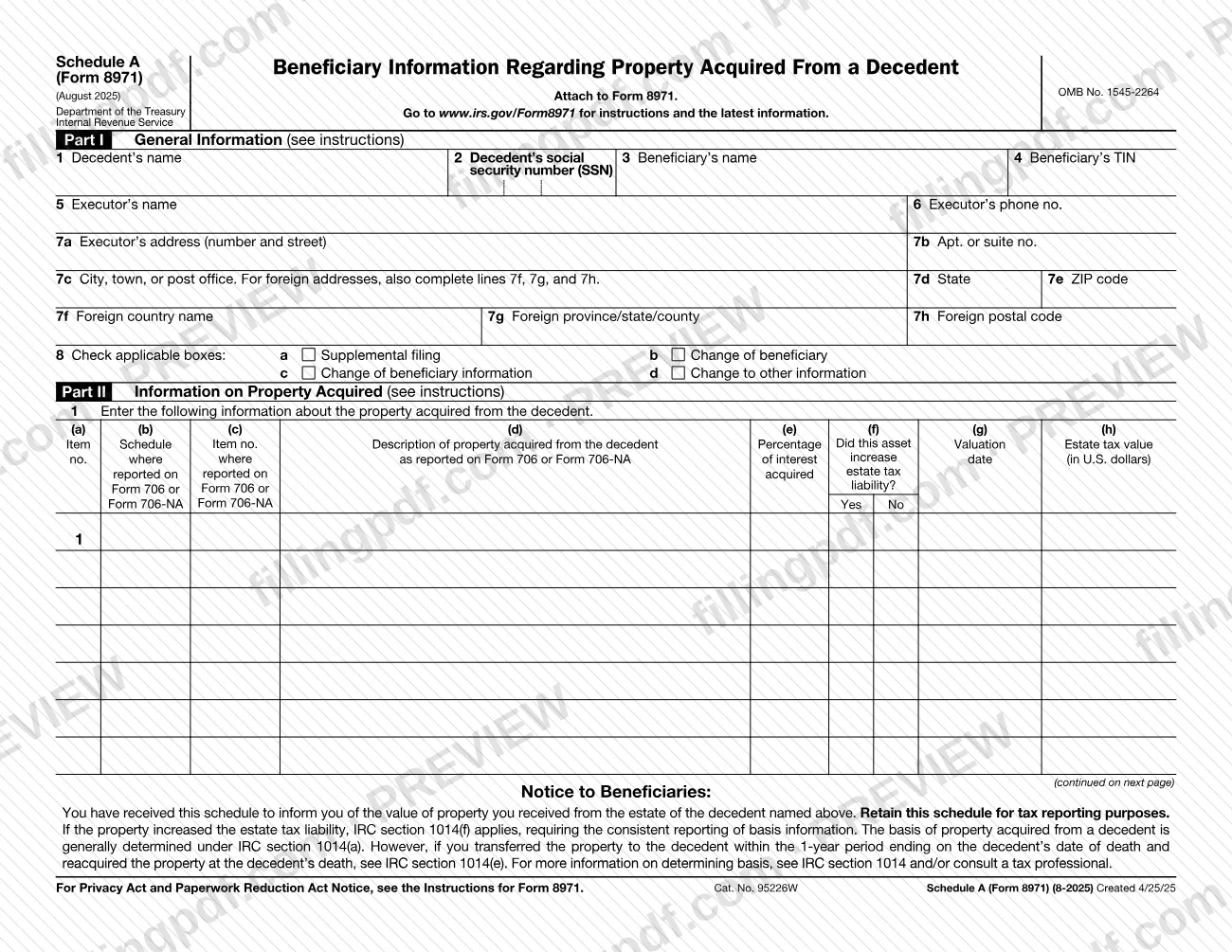
The schedule has two parts. Part I, General Information, identifies the decedent (name and Social Security number, SSN), the beneficiary (name and taxpayer identification number, TIN) and the executor (name, phone number and address, with separate lines for a foreign address). Line 8 has four boxes for filings that change an earlier one: Supplemental filing, Change of beneficiary, Change of beneficiary information and Change to other information.
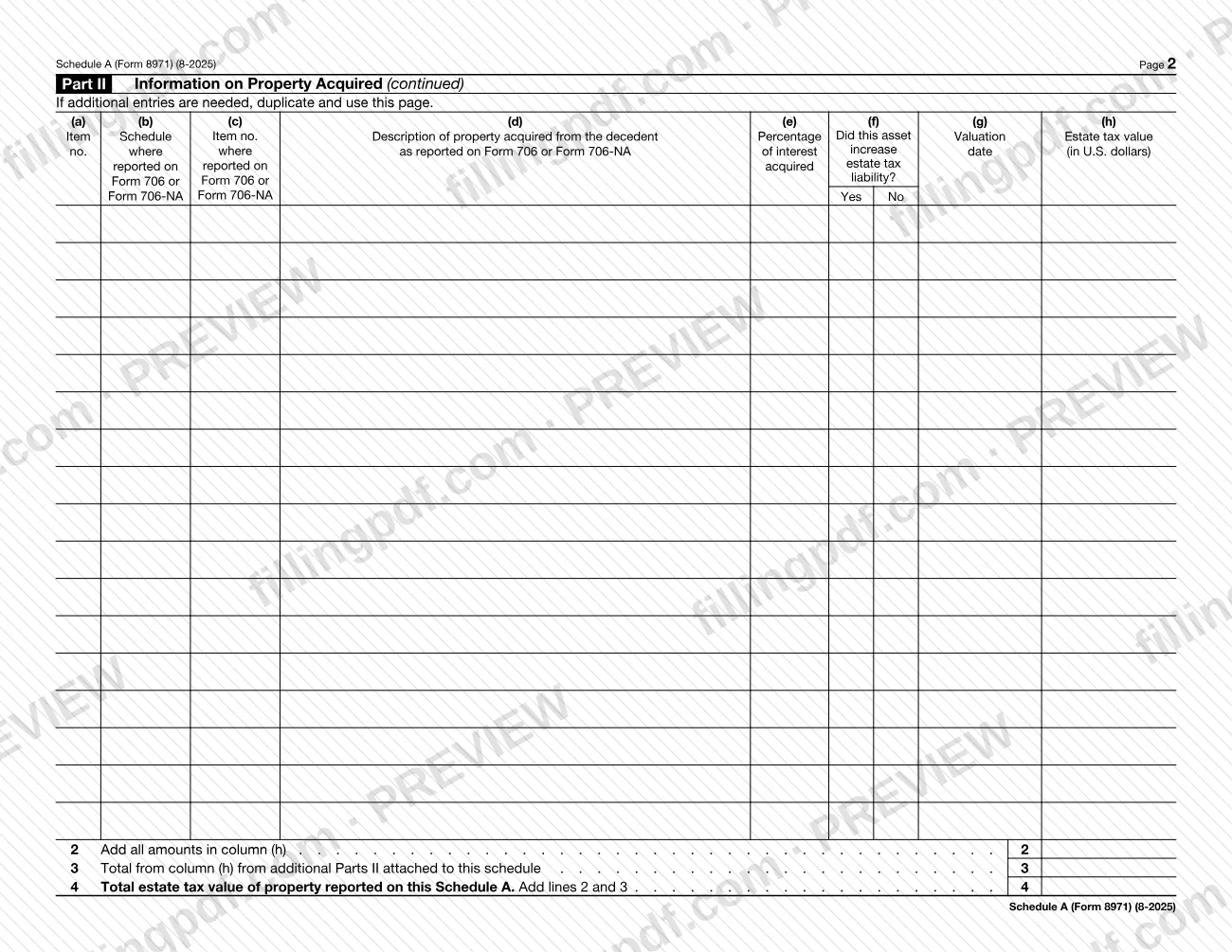
Part II, Information on Property Acquired, is a table with one row per item. Columns (a) to (h) record the item number, where the item appears on Form 706 or Form 706-NA, a description, the percentage of interest acquired, whether the asset increased estate tax liability, the valuation date and the estate tax value in U.S. dollars. Lines 2 to 4 total column (h) and add in any additional Parts II.
A Notice to Beneficiaries printed on the form tells the beneficiary to retain the schedule for tax reporting. It adds that if the property increased the estate tax liability, IRC section 1014(f) requires consistent reporting of basis information. The printed revision is August 2025, OMB No. 1545-2264.
Who needs to file Schedule A (Form 8971)?
The schedule is used with Form 8971, and it names three people: the decedent, one beneficiary and the executor. Part I asks for the decedent's name and SSN, the beneficiary's name and TIN, and the executor's name, phone number and address.
- Beneficiaries: the Notice to Beneficiaries says a beneficiary who receives the schedule has been informed of the value of property received from the decedent's estate, and should retain it for tax reporting.
- Executors: the schedule carries the executor's contact details and the estate tax values taken from Form 706 or Form 706-NA.
- Anyone correcting an earlier filing: line 8 offers boxes for a supplemental filing, a change of beneficiary, a change of beneficiary information or a change to other information.
A beneficiary who transferred property to the decedent within the 1-year period ending on the decedent's date of death and reacquired it at death is pointed to IRC section 1014(e) on the form. The schedule itself does not say who must file it; the IRS instructions at www.irs.gov/Form8971 cover that.
When to file Schedule A (Form 8971)
Schedule A (Form 8971) is completed when Form 8971 is completed, because the form says to attach it to Form 8971. It has no separate due date printed on it, so it travels with Form 8971.
Use the line 8 boxes when the schedule changes something already reported: Supplemental filing, Change of beneficiary, Change of beneficiary information or Change to other information. Each property row also asks for a valuation date in column (g), so have the estate tax values and dates from Form 706 or Form 706-NA at hand before you start. For any deadline that applies to Form 8971, check the IRS instructions at www.irs.gov/Form8971.
How to fill out Schedule A (Form 8971)
Enter the decedent's details
In Part I, line 1, write the decedent's name. On line 2, enter the decedent's Social Security number (SSN).
Enter the beneficiary's details
On line 3, write the beneficiary's name. On line 4, enter the beneficiary's taxpayer identification number (TIN).
Enter the executor's name and phone
On line 5, write the executor's name, and on line 6 the executor's phone number.
Enter the executor's address
On line 7a enter the number and street, and on line 7b any apartment or suite number. Then fill in line 7c (city, town or post office), 7d (state) and 7e (ZIP code).
Add a foreign address if needed
If the executor's address is foreign, also complete line 7f (foreign country name), 7g (foreign province/state/county) and 7h (foreign postal code).
Check the line 8 boxes
Check any that apply: a Supplemental filing, b Change of beneficiary, c Change of beneficiary information or d Change to other information.
Identify each property item
In Part II, line 1, enter an item number in column (a). In columns (b) and (c), give the schedule and item number where the property was reported on Form 706 or Form 706-NA.
Describe the property and interest
In column (d), describe the property acquired from the decedent as reported on Form 706 or Form 706-NA. In column (e), enter the percentage of interest acquired.
Answer the estate tax and date columns
In column (f), check Yes or No for whether the asset increased estate tax liability. In column (g), enter the valuation date.
Enter the estate tax value
In column (h), enter each item's estate tax value in U.S. dollars. If you need more rows, duplicate page 2 and continue Part II.
Total the column (h) amounts
On line 2, add all amounts in column (h). On line 3, enter the column (h) total from any additional Parts II attached, and on line 4 add lines 2 and 3.
Review and download the completed PDF
Check names, TINs, item numbers and totals, then download or print the completed PDF from FillingPDF and attach it to Form 8971 as described under How to submit.
How to submit Schedule A (Form 8971)
Schedule A (Form 8971) has no submission channel of its own: the form says to attach it to Form 8971, so it goes through whatever channel applies to Form 8971.
- With Form 8971: attach the completed schedule, plus any duplicated copies of page 2 needed for additional entries, to Form 8971.
- Addresses and methods: none are printed on the schedule. The form directs you to www.irs.gov/Form8971 for instructions and the latest information.
- Beneficiary copy: the Notice to Beneficiaries says the beneficiary receives the schedule and retains it for tax reporting; the form does not say how it is delivered.
FillingPDF lets you fill out and download the PDF; submission follows the channels that apply to Form 8971.
Common mistakes to avoid
- Filing Schedule A (Form 8971) on its own; the form states it is to be attached to Form 8971.
- Skipping lines 7f, 7g and 7h when the executor's address is foreign; line 7c says to complete them for foreign addresses.
- Leaving the line 8 boxes unchecked when the schedule changes an earlier filing (supplemental filing, change of beneficiary, beneficiary information or other information).
- Running out of rows and not duplicating page 2; the form says to duplicate and use that page if additional entries are needed.
- Not entering totals from additional Parts II on line 3, which makes the line 4 total incomplete.
- Entering column (h) estate tax values in another currency; the column asks for U.S. dollars.
- Describing property in column (d) differently from how it was reported on Form 706 or Form 706-NA.
- Leaving the Yes or No box in column (f) blank for an asset, when the form asks whether it increased estate tax liability.
- Throwing the schedule away; the Notice to Beneficiaries says to retain it for tax reporting.
Frequently asked questions
What is Schedule A (Form 8971)?
Schedule A (Form 8971), Beneficiary Information Regarding Property Acquired From a Decedent, is an IRS schedule attached to Form 8971. It lists property a beneficiary acquired from a decedent and each item's estate tax value as reported on Form 706 or Form 706-NA.
Where do I send Schedule A (Form 8971)?
Attach it to Form 8971; the schedule says so and prints no address or filing method of its own. It goes through the channel that applies to Form 8971, and the IRS instructions and latest information are at www.irs.gov/Form8971.
What should a beneficiary do with the schedule?
Retain it for tax reporting. The Notice to Beneficiaries on the form says it informs you of the value of property you received from the decedent's estate, and that you should keep it.
What does IRC section 1014(f) mean on this form?
The notice says that if the property increased the estate tax liability, IRC section 1014(f) applies and requires consistent reporting of basis information. Basis is generally determined under IRC section 1014(a); see IRC section 1014 or a tax professional for details.
What do I enter in column (h) of Part II?
Enter the estate tax value of each item in U.S. dollars, as reported on Form 706 or Form 706-NA. Line 2 then adds all column (h) amounts, line 3 adds totals from any additional Parts II, and line 4 gives the schedule's total.
What if I have more property than fits on the page?
Duplicate page 2 and use the copies for additional entries. Enter the column (h) total from those extra pages on line 3, so line 4 reflects all property reported on the schedule.
When do I check a box on line 8?
Check the box that matches what you are changing: supplemental filing, change of beneficiary, change of beneficiary information or change to other information. The form does not define the boxes further, so use the IRS instructions at www.irs.gov/Form8971.
Can I fill out Schedule A (Form 8971) online?
Yes. You can fill out the PDF online on FillingPDF and download or print it. FillingPDF is an independent service and does not file the schedule with the IRS; you attach it to Form 8971 and submit it through the IRS channels.
Ready to fill out Schedule A (Form 8971)?
Fill out Schedule A (Form 8971) now