
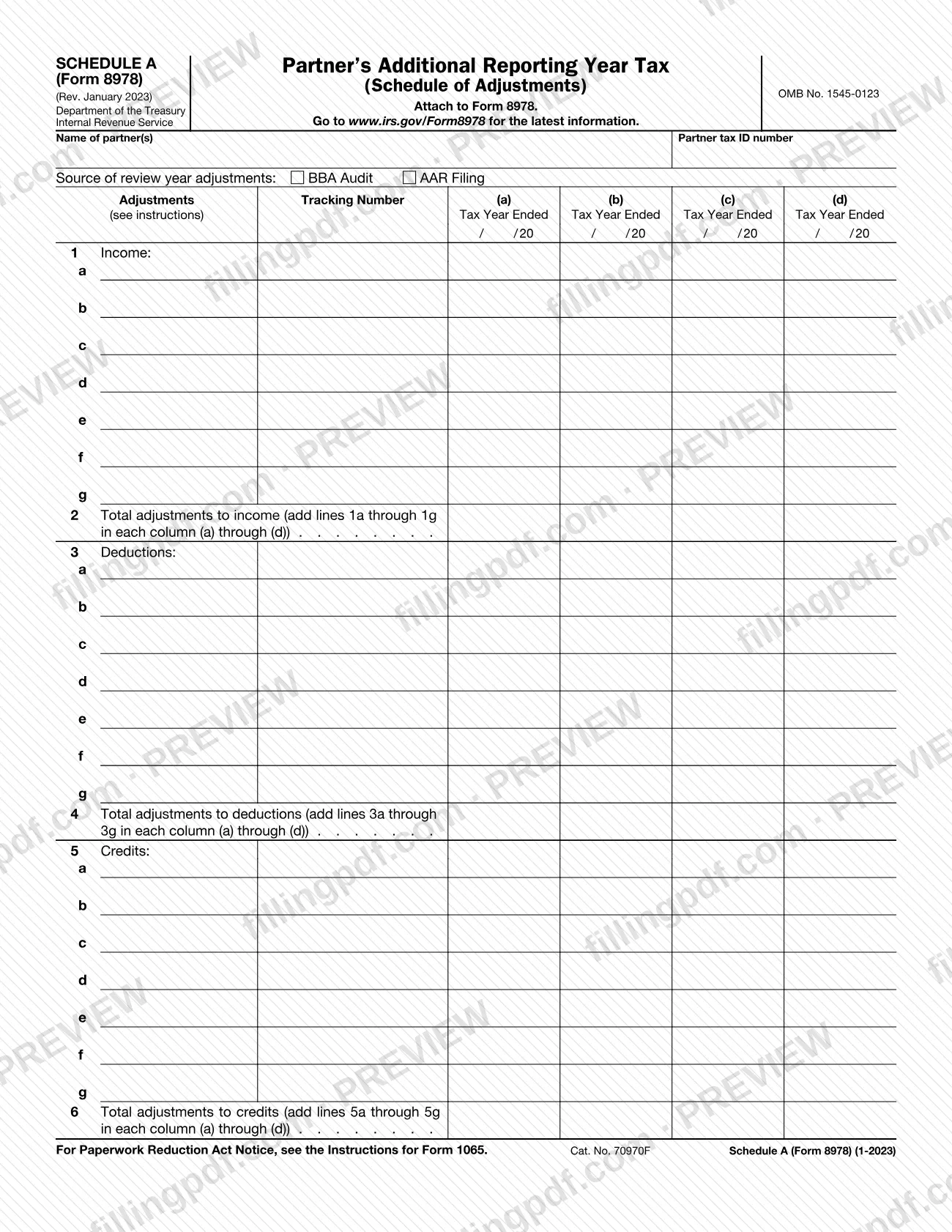
Schedule A (Form 8978), Partner's Additional Reporting Year Tax (Schedule of Adjustments), is an Internal Revenue Service (IRS) schedule that you attach to Form 8978. It lists a partner's adjustments to income, deductions and credits for up to four tax years in columns (a) through (d), and it asks you to mark whether the adjustments come from a BBA Audit or an AAR Filing. On this page you can fill out Schedule A (Form 8978) online on FillingPDF and download or print the completed PDF; the form and the latest information are published by the IRS at www.irs.gov/Form8978.
Last updated
What is Schedule A (Form 8978)?
Schedule A (Form 8978), Partner's Additional Reporting Year Tax (Schedule of Adjustments), is the IRS schedule attached to Form 8978 on which a partner lists adjustments to income, deductions and credits, tax year by tax year, together with the totals for each category.
The form opens with the name of the partner(s) and the partner tax ID number. It then asks for the source of the review year adjustments, with two boxes to mark: BBA Audit and AAR Filing. Below that, a column for the Adjustments Tracking Number (the form refers you to the instructions for it) sits beside four columns, (a) to (d), each headed by a Tax Year Ended date.
The body has three blocks of seven rows each. Line 1 (rows a through g) is for income adjustments, and line 2 totals them. Line 3 is for deductions, with the total on line 4. Line 5 is for credits, with the total on line 6. Each total is the sum of the seven rows above it, figured separately in each of columns (a) through (d).
The schedule is identified as OMB No. 1545-0123, Cat. No. 70970F, and the revision printed on it is Rev. January 2023. It is a schedule of Form 8978 and is not filed on its own: the form says to attach it to Form 8978.
Who needs to file Schedule A (Form 8978)?
Partners who are completing Form 8978 and need to report adjustments to income, deductions or credits for the tax years covered by their review attach this schedule to that form. The schedule asks for the name of the partner(s) and the partner tax ID number, and for whether the adjustments come from a BBA Audit or an AAR Filing.
The schedule has four tax-year columns, (a) through (d), and seven rows in each of the income, deduction and credit blocks. It points to the instructions for the Adjustments Tracking Number that goes beside each row of adjustments.
The form does not stand alone: it says to attach it to Form 8978. It does not describe who may sign or file for someone else, and it has no signature block of its own. For eligibility questions and for how to complete the Adjustments Tracking Number, use the IRS instructions at www.irs.gov/Form8978.
When to file Schedule A (Form 8978)
You complete Schedule A (Form 8978) when you complete Form 8978, because the schedule says to attach it to that form. No separate due date is printed on it, so it travels with Form 8978 whenever that form is submitted. For any deadline that applies to Form 8978, check the IRS page at www.irs.gov/Form8978.
Have the adjustments for each tax year ready before you start: each of columns (a) through (d) needs the date the tax year ended, and each row needs its Adjustments Tracking Number.
How to fill out Schedule A (Form 8978)
Enter the partner name and tax ID
At the top, write the name of the partner(s) and the partner tax ID number.
Mark the source of adjustments
Next to Source of review year adjustments, check BBA Audit or AAR Filing, depending on where the adjustments come from.
Enter tracking numbers and tax year dates
For each row of adjustments, enter the Adjustments Tracking Number as the instructions describe. In each of columns (a) through (d) that you use, enter the Tax Year Ended date in the printed / / 20 layout.
List income adjustments on line 1
On rows 1a through 1g, enter each income adjustment in the column for its tax year, (a) through (d).
Total income adjustments on line 2
Add lines 1a through 1g in each column (a) through (d) and enter each sum on line 2 for that column.
List deduction adjustments on line 3
On rows 3a through 3g, enter each deduction adjustment in the column for its tax year.
Total deduction adjustments on line 4
Add lines 3a through 3g in each column (a) through (d) and enter each sum on line 4.
List credit adjustments on line 5
On rows 5a through 5g, enter each credit adjustment in the column for its tax year.
Total credit adjustments on line 6
Add lines 5a through 5g in each column (a) through (d) and enter each sum on line 6.
Review, download and attach
Check the names, dates and totals, then download or print the completed PDF from FillingPDF and attach it to Form 8978.
How to submit Schedule A (Form 8978)
Schedule A (Form 8978) is submitted as an attachment to Form 8978; it has no filing channel, address or portal of its own printed on it.
- With Form 8978: attach the completed schedule to Form 8978 and send the package the way you submit that form.
- Latest information: the form directs you to www.irs.gov/Form8978 for the latest information and instructions.
Before you send it, check that the partner name(s) and partner tax ID number are filled in at the top. FillingPDF lets you fill out and download the PDF; submission follows the IRS channels that apply to Form 8978.
Common mistakes to avoid
- Submitting Schedule A (Form 8978) without attaching it to Form 8978; the schedule states that it is to be attached to that form.
- Leaving the source of review year adjustments unmarked instead of checking BBA Audit or AAR Filing.
- Omitting the Adjustments Tracking Number for a row of adjustments; the form refers you to the instructions for it.
- Leaving the Tax Year Ended date blank in a column that carries adjustments, or entering it outside the printed / / 20 layout.
- Not entering the partner name(s) or the partner tax ID number at the top of the form.
- Totaling line 2, 4 or 6 across the columns instead of adding rows 1a through 1g, 3a through 3g or 5a through 5g separately in each column (a) through (d).
- Entering an income adjustment on a deduction row or a credit row; income belongs on line 1, deductions on line 3 and credits on line 5.
Frequently asked questions
What is Schedule A (Form 8978)?
Schedule A (Form 8978) is the IRS schedule titled Partner's Additional Reporting Year Tax (Schedule of Adjustments). You attach it to Form 8978 to list adjustments to income, deductions and credits by tax year, with totals on lines 2, 4 and 6.
Can I file Schedule A (Form 8978) by itself?
No. The form says to attach it to Form 8978, so it is submitted with that form. It has no separate address, portal or due date printed on it.
What do I check for the source of review year adjustments?
The form offers two boxes: BBA Audit and AAR Filing. Check the one that matches where your adjustments come from. The IRS instructions at www.irs.gov/Form8978 give the latest information on these two sources.
What do lines 2, 4 and 6 total?
Line 2 adds lines 1a through 1g (income), line 4 adds lines 3a through 3g (deductions), and line 6 adds lines 5a through 5g (credits). Each total is figured separately in each of columns (a) through (d).
What goes in the Adjustments Tracking Number column?
The form places an Adjustments Tracking Number beside the rows of adjustments and says to see the instructions for it. Follow the IRS instructions at www.irs.gov/Form8978 for how to determine it.
How many tax years fit on one Schedule A (Form 8978)?
The form has four columns, (a) through (d), and each column is headed by a Tax Year Ended date, so one schedule covers up to four tax years. The form itself does not say what to do for more years.
Can I fill out Schedule A (Form 8978) online?
Yes. You can fill out the PDF online on FillingPDF and download or print it. FillingPDF is an independent service and does not file the form with the IRS; you submit it with Form 8978.
Ready to fill out Schedule A (Form 8978)?
Fill out Schedule A (Form 8978) now