
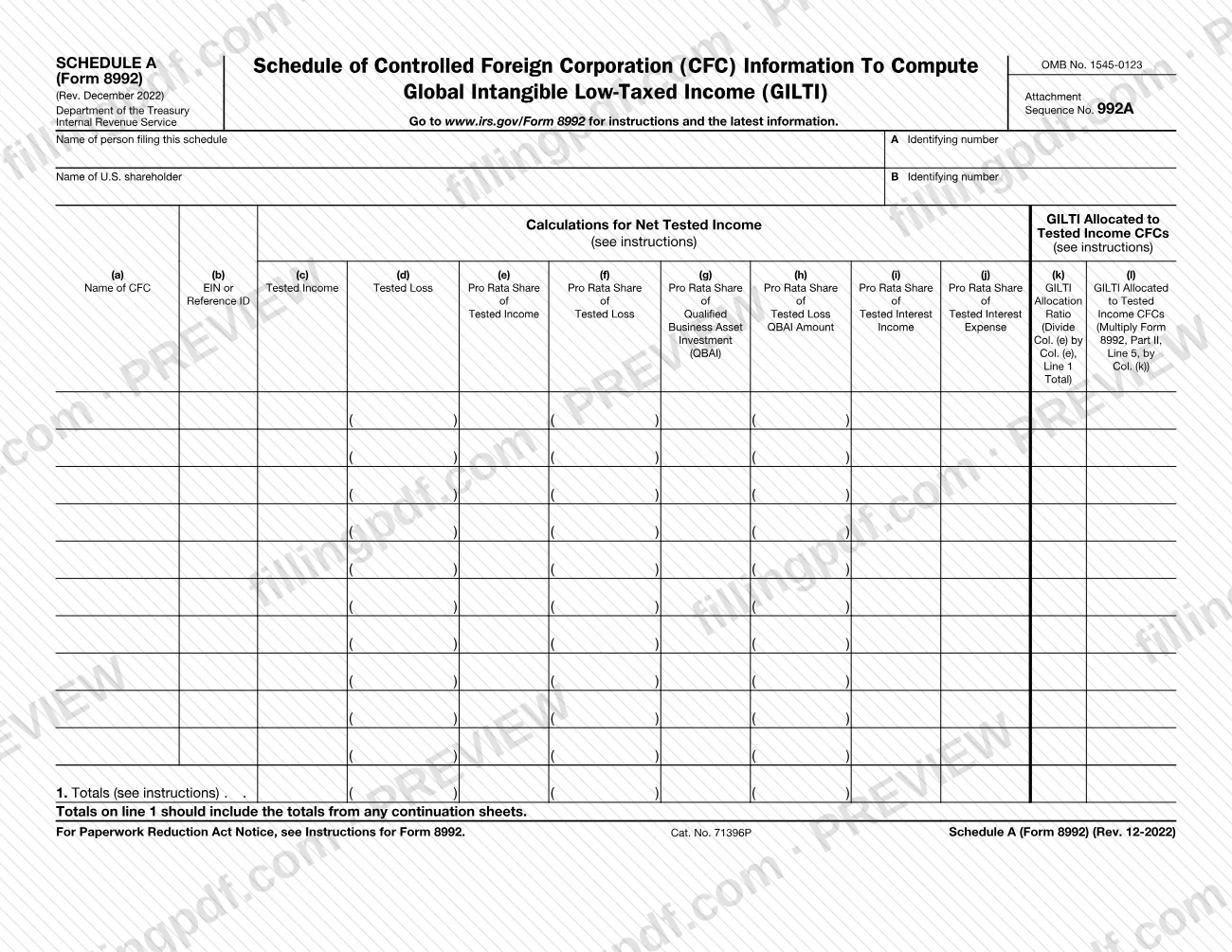
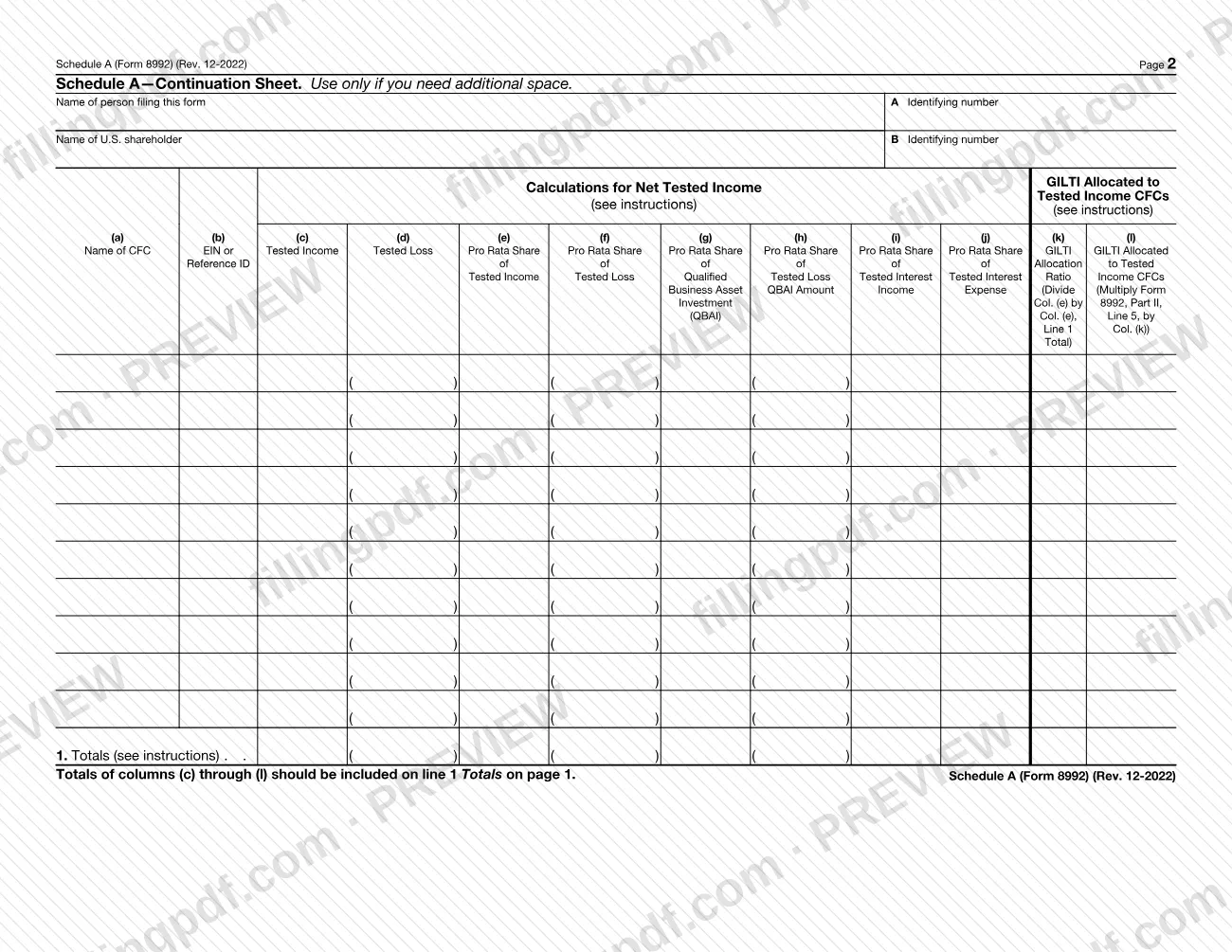
Schedule A (Form 8992) is the Internal Revenue Service (IRS) attachment on which a filer lists each controlled foreign corporation (CFC) and the figures used to compute global intangible low-taxed income (GILTI). It is built as a table with columns (a) through (l), a line 1 totals row and an optional continuation sheet on page 2. On FillingPDF you can fill out the schedule online and download or print the completed PDF. The IRS publishes the form, and its instructions and latest information are at www.irs.gov/Form8992.
Last updated
What is Schedule A (Form 8992)?
Schedule A (Form 8992) is the IRS attachment to Form 8992 that lists each controlled foreign corporation (CFC) with its tested income, tested loss and pro rata amounts, and allocates global intangible low-taxed income (GILTI) to tested income CFCs.
The form is printed as OMB No. 1545-0123, Attachment Sequence No. 992A, and the revision shown is Rev. December 2022. It is not filed alone: it supports Form 8992, and the GILTI allocation in column (l) is figured with an amount from Form 8992, Part II, Line 5.
Page 1 starts with two identification blocks: A, the name and identifying number of the person filing the schedule, and B, the name and identifying number of the U.S. shareholder. Below them, each row of the table is one CFC. Columns (a) and (b) give the CFC's name and its EIN or Reference ID. Columns (c) and (d) report tested income and tested loss. Columns (e) through (j) report the pro rata share of tested income, tested loss, qualified business asset investment (QBAI), the tested loss QBAI amount, tested interest income and tested interest expense. Column (k) is the GILTI allocation ratio, and column (l) is the GILTI allocated to tested income CFCs.
The table has ten rows. Page 2 is a continuation sheet, to be used only if you need additional space. Line 1, Totals, sits at the bottom of each page.
Who needs to file Schedule A (Form 8992)?
Schedule A (Form 8992) is used by the person who completes Form 8992 and needs to report CFC-level information to compute GILTI. The form asks for two parties: the person filing the schedule (item A) and the U.S. shareholder (item B), each with an identifying number. Those entries may be the same person or different ones; the form does not say which situations call for which.
The schedule is also for anyone with more CFCs than fit on page 1. The form provides a continuation sheet for that case and says its totals must be carried to line 1 on page 1.
The printed form does not describe who is required to file it, who is exempt or who may sign for someone else. It points to the Instructions for Form 8992 and to www.irs.gov/Form8992 for those questions. Read the instructions for Form 8992 before deciding whether this schedule applies to you.
When to file Schedule A (Form 8992)
You complete Schedule A (Form 8992) when you complete Form 8992, because it is an attachment to that form. It has no separate due date printed on it, so it travels with Form 8992 whenever that form is submitted.
Have each CFC's figures ready before you start, since every row needs the amounts in columns (c) through (j) before you can figure the ratio in column (k). Column (l) also depends on an amount from Form 8992, Part II, Line 5, so complete that part of Form 8992 first. For any deadline that applies to Form 8992, check the IRS instructions at www.irs.gov/Form8992.
How to fill out Schedule A (Form 8992)
Identify the person filing the schedule
In item A, enter the name of the person filing this schedule and, beside it, that person's identifying number.
Identify the U.S. shareholder
In item B, enter the name of the U.S. shareholder and its identifying number.
List each CFC
In column (a), enter the name of each controlled foreign corporation, one per row. In column (b), enter its EIN or Reference ID.
Enter tested income and tested loss
In columns (c) and (d), enter each CFC's tested income and tested loss. See the Instructions for Form 8992 for how each amount is determined.
Enter the pro rata shares
In columns (e) through (j), enter the pro rata share of tested income, tested loss, QBAI, tested loss QBAI amount, tested interest income and tested interest expense for each CFC.
Total the columns on line 1
On line 1, Totals, enter the totals for the columns as the instructions direct. Include the totals from any continuation sheets.
Figure the GILTI allocation ratio
In column (k), divide each CFC's column (e) amount by the column (e) total on line 1.
Allocate GILTI to tested income CFCs
In column (l), multiply the amount from Form 8992, Part II, Line 5, by the column (k) ratio for each CFC.
Use the continuation sheet if needed
If you have more CFCs than rows, complete page 2, repeating items A and B. Carry its totals of columns (c) through (l) to line 1 on page 1.
Review and download the completed PDF
Check the identifying numbers, the row amounts and the line 1 totals, then download or print the completed PDF from FillingPDF and attach it to Form 8992.
How to submit Schedule A (Form 8992)
Schedule A (Form 8992) has no filing channel of its own: it is an attachment that goes with Form 8992, and it prints no mailing address, portal or appointment rule.
- With Form 8992: attach the completed schedule to Form 8992 and send both through the channel that applies to the return or filing the Form 8992 supports.
- Continuation sheet: if you used page 2, keep it with page 1. The totals of columns (c) through (l) on the continuation sheet are included on line 1, Totals, on page 1.
- Instructions: the form directs you to www.irs.gov/Form8992 for instructions and the latest information.
FillingPDF lets you fill out and download the PDF; submission follows the IRS channels that apply to Form 8992.
Common mistakes to avoid
- Leaving out the totals from any continuation sheet: the form says line 1 on page 1 should include them, specifically the totals of columns (c) through (l).
- Using the page 2 continuation sheet when page 1 has enough rows; the form says to use it only if you need additional space.
- Leaving blank the identifying number for the person filing the schedule (A) or for the U.S. shareholder (B).
- Entering a CFC without its EIN or Reference ID in column (b).
- Computing the column (k) ratio from the wrong figures: the form says to divide column (e) by the column (e) total on line 1.
- Figuring column (l) without the Form 8992, Part II, Line 5 amount; the form says to multiply that amount by column (k).
- Filing Schedule A (Form 8992) without Form 8992, which the form identifies as the document it attaches to.
Frequently asked questions
What is Schedule A (Form 8992)?
Schedule A (Form 8992) is an IRS attachment to Form 8992 that lists each controlled foreign corporation with its tested income, tested loss and pro rata amounts, and allocates GILTI to tested income CFCs. It is titled Schedule of Controlled Foreign Corporation (CFC) Information to Compute Global Intangible Low-Taxed Income (GILTI).
Is Schedule A (Form 8992) filed on its own?
No. The form is labeled as an attachment, and its column (l) uses an amount from Form 8992, Part II, Line 5. It is submitted with Form 8992 and has no separate address or due date printed on it.
What do I do if I have more CFCs than the table has rows?
Use the continuation sheet on page 2, which the form says to use only if you need additional space. Repeat items A and B, then include the totals of columns (c) through (l) on line 1, Totals, on page 1.
How is the GILTI allocation ratio in column (k) figured?
Divide the CFC's column (e) amount by the column (e) total on line 1. Column (l) then multiplies the Form 8992, Part II, Line 5 amount by that ratio to show the GILTI allocated to each tested income CFC.
What goes in column (b) of Schedule A (Form 8992)?
Column (b) asks for the CFC's EIN or Reference ID, next to the CFC's name in column (a). The form does not explain when to use a Reference ID, so check the Instructions for Form 8992 at www.irs.gov/Form8992.
Where do I find the instructions for this schedule?
The form directs you to www.irs.gov/Form8992 for instructions and the latest information, and refers to the Instructions for Form 8992 for the Paperwork Reduction Act Notice and for columns (c) through (l).
Can I fill out Schedule A (Form 8992) online?
Yes. You can fill out the PDF online on FillingPDF and download or print it. FillingPDF is an independent service and does not file the schedule with the IRS; you submit it with Form 8992 through the IRS channels.
Ready to fill out Schedule A (Form 8992)?
Fill out Schedule A (Form 8992) now