
Schedule A (Form 940) (sp), Multi-State Employer and Credit Reduction Information (Spanish Version), is the Internal Revenue Service (IRS) schedule, printed in Spanish, that employers attach to Form 940 for 2025 to mark the states where they paid state unemployment tax and to figure the FUTA credit reduction. It applies to employers that paid wages in more than one state or in a state with a credit reduction. On FillingPDF you can fill out the form online and download or print the completed PDF; the IRS publishes the original PDF at irs.gov.
Last updated
What is Schedule A (Form 940) (sp)?
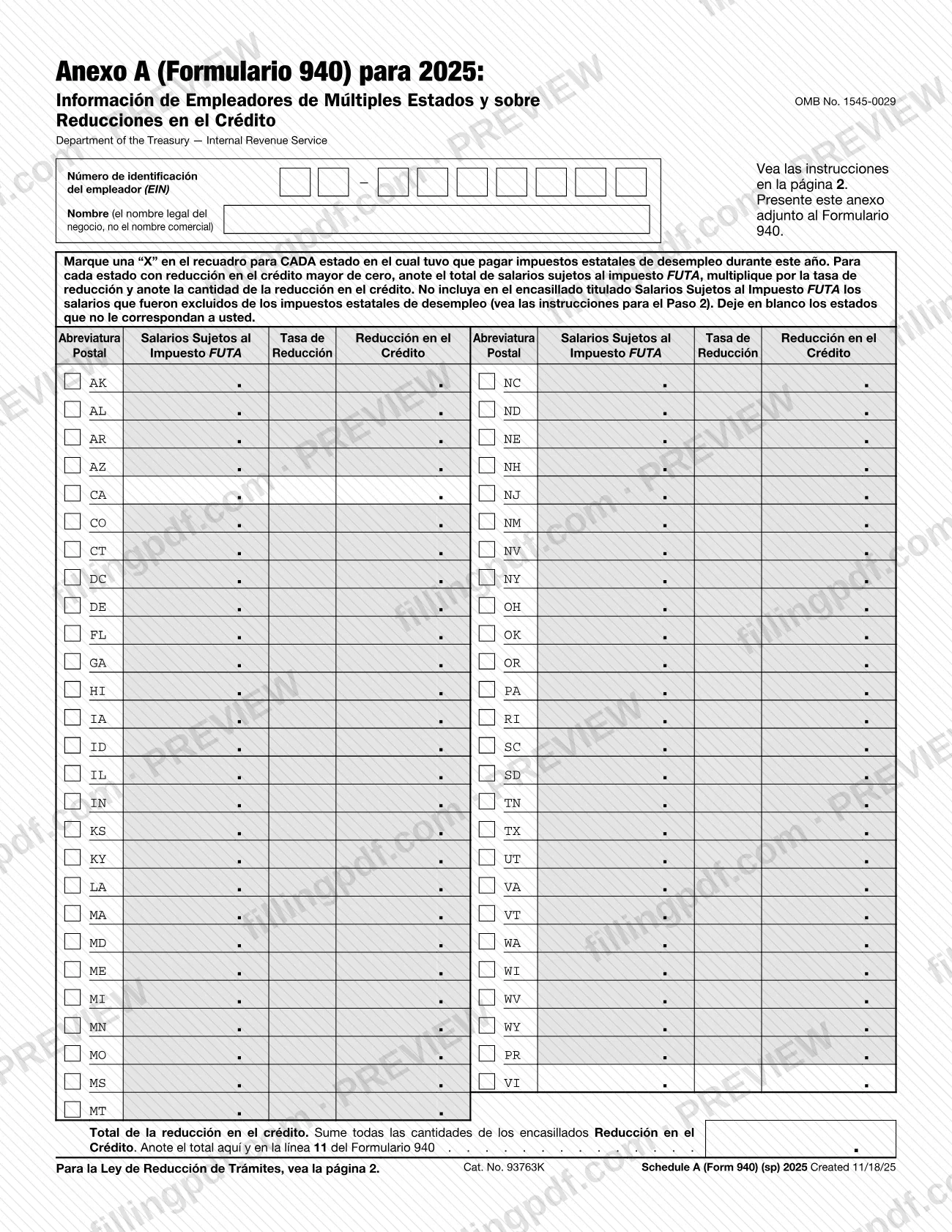
Schedule A (Form 940) (sp), Multi-State Employer and Credit Reduction Information (Spanish Version) is the Spanish-language schedule that an employer attaches to Form 940 to report the states where it paid state unemployment tax and to figure any FUTA credit reduction for 2025.
The IRS prints the schedule under the title "Anexo A (Formulario 940) para 2025: Información de Empleadores de Múltiples Estados y sobre Reducciones en el Crédito" (OMB No. 1545-0029, Cat. No. 93763K). Its instructions are on page 2 of the same PDF.
The form is a table of two-letter postal abbreviations, one row per state, including the District of Columbia, Puerto Rico (PR) and the U.S. Virgin Islands (VI). Each row has a box to mark with an "X" and three columns: Salarios Sujetos al Impuesto FUTA (FUTA taxable wages), Tasa de Reducción (reduction rate) and Reducción en el Crédito (credit reduction). At the bottom, Total de la reducción en el crédito adds the credit reduction amounts.
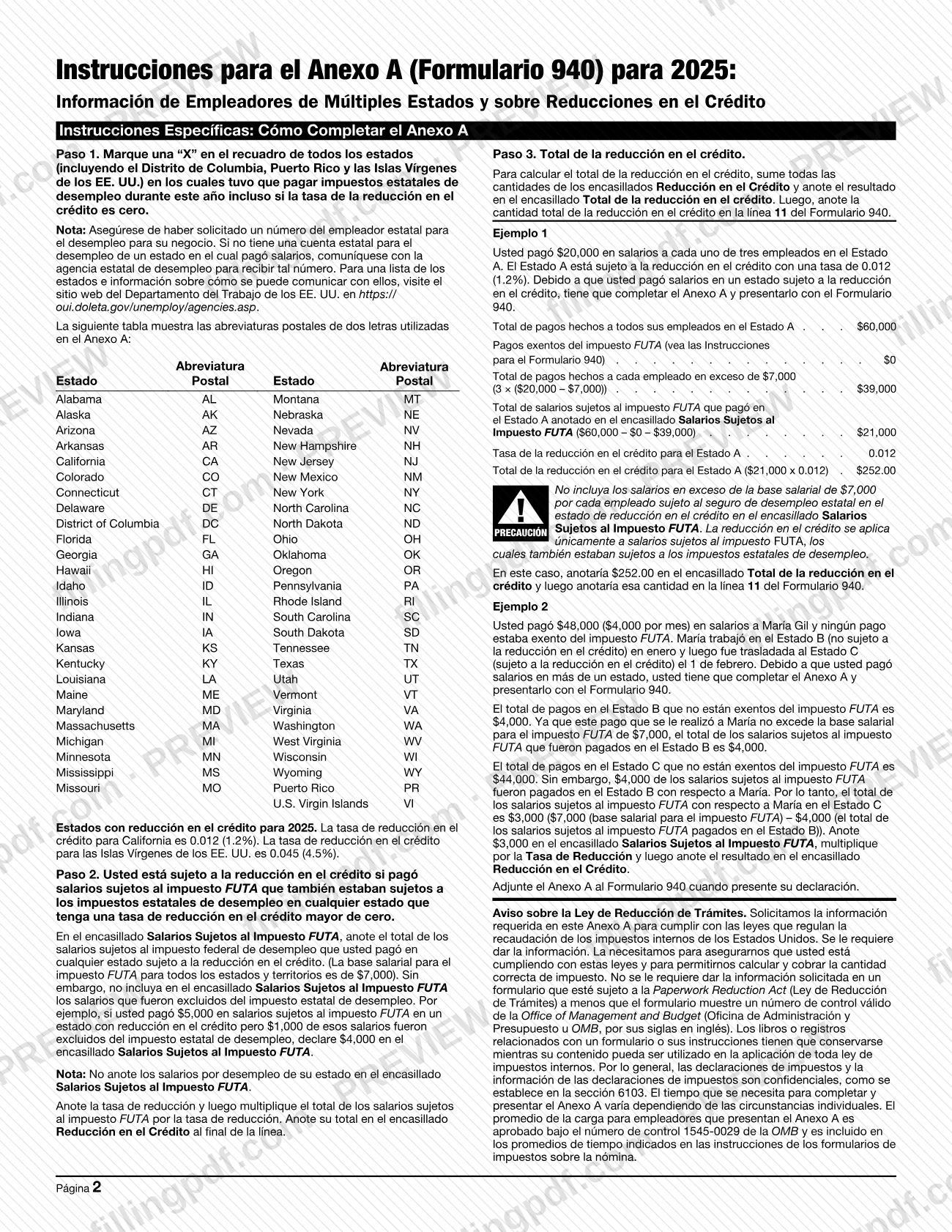
The credit reduction applies to wages subject to FUTA tax that were also subject to state unemployment tax in a state whose reduction rate is greater than zero. The 2025 instructions name California and the U.S. Virgin Islands as the states with a credit reduction and give their rates.
The schedule is not filed on its own. It is attached to Form 940, and its total is copied to line 11 of that form.
Who needs to file Schedule A (Form 940) (sp)?
Employers that file Form 940 and paid wages in a state subject to the credit reduction, or paid wages in more than one state, complete Schedule A (Form 940) (sp) and file it with Form 940. The IRS instructions give an example of each case: an employer that paid wages to employees in a credit reduction state, and an employer whose employee worked in one state and was then transferred to another.
You are subject to the credit reduction if you paid wages subject to FUTA tax that were also subject to state unemployment tax in any state with a reduction rate greater than zero. You still mark an "X" for every state, including the District of Columbia, Puerto Rico and the U.S. Virgin Islands, where you had to pay state unemployment tax during the year, even if that state's reduction rate is zero.
Make sure you have a state unemployment employer number for each state where you paid wages. If you do not have a state account, contact that state's unemployment agency; the instructions point to https://oui.doleta.gov/unemploy/agencies.asp for a list.
Leave blank the states that do not apply to you. Wages that were excluded from state unemployment tax do not go in the FUTA wages box.
When to file Schedule A (Form 940) (sp)
Complete Schedule A (Form 940) (sp) when you file Form 940, because the instructions say to attach it to that form when you submit your return. The schedule prints no due date of its own, so it travels with Form 940.
The form is for 2025. The state boxes cover states where you had to pay state unemployment tax during that year, and the reduction rates named in the instructions (for California and the U.S. Virgin Islands) are the 2025 rates.
If you paid wages in a credit reduction state or in more than one state, prepare the schedule at the same time as Form 940, because its total goes on line 11 of that form.
How to fill out Schedule A (Form 940) (sp)
Enter your EIN and legal name
At the top, enter your employer identification number (EIN) and your business's legal name in the Nombre box. The form asks for the legal name, not a trade name.
Confirm your state unemployment accounts
Check that you have a state unemployment employer number for every state where you paid wages. If you do not have one, contact that state's unemployment agency before completing the schedule.
Mark every state where you paid
Put an "X" in the box for each state, including DC, PR and VI, where you had to pay state unemployment tax this year. Mark it even if the state's reduction rate is zero.
Identify credit reduction states
You are subject to the credit reduction in any state with a rate above zero where your FUTA wages were also subject to state unemployment tax. The 2025 instructions name California and the U.S. Virgin Islands.
Enter FUTA taxable wages
In Salarios Sujetos al Impuesto FUTA, enter the total FUTA taxable wages you paid in each credit reduction state, leaving out wages excluded from state unemployment tax and wages above each employee's FUTA wage base.
Adjust for employees in several states
If an employee worked in more than one state, enter in the later state only the FUTA wages remaining after subtracting the FUTA wages already counted in the earlier state, as in the instructions' Example 2.
Enter the rate and multiply
In Tasa de Reducción, enter the reduction rate for the state. Multiply the FUTA taxable wages by that rate and enter the result in Reducción en el Crédito.
Leave other states blank
Do not enter figures in states that do not apply to you. A state with a zero rate gets only the "X" mark.
Add up the credit reduction
Add every amount in the Reducción en el Crédito boxes and enter the sum in Total de la reducción en el crédito.
Copy the total to Form 940
Enter the same total on line 11 of Form 940, which the schedule attaches to.
Review and download the PDF
Check the EIN, the marked states, the wages and the total. Download or print the completed PDF from FillingPDF and attach it to Form 940.
How to submit Schedule A (Form 940) (sp)
Schedule A (Form 940) (sp) has no filing channel of its own: you attach it to Form 940 and submit both together.
- Attached to Form 940: the form says to file the schedule attached to Form 940, and the instructions repeat that you attach it when you file your return.
- Line 11 of Form 940: enter the amount from Total de la reducción en el crédito on this line of Form 940.
The schedule prints no mailing address, portal or appointment rule, so follow the channels that apply to Form 940 itself. Keep the books and records tied to the schedule for as long as their contents may be used under the internal revenue laws, as the paperwork notice on page 2 states. FillingPDF lets you fill out and download the PDF; submission follows the channels above.
Common mistakes to avoid
- Marking an "X" only for credit reduction states. The instructions say to mark every state, including DC, Puerto Rico and the U.S. Virgin Islands, where you had to pay state unemployment tax, even if its reduction rate is zero.
- Including wages that were excluded from state unemployment tax in the Salarios Sujetos al Impuesto FUTA box; the instructions say to leave them out.
- Entering state unemployment wages in the Salarios Sujetos al Impuesto FUTA box instead of wages subject to FUTA tax.
- Including wages above the FUTA wage base for each employee in the credit reduction state's FUTA wages box; the instructions warn against it.
- Counting an employee's FUTA wages in full in each state when the employee worked in more than one state; wages already counted in an earlier state reduce what is entered for the later one.
- Writing figures in rows for states that do not apply to you; the form says to leave those states blank.
- Entering the total reduction on the schedule but not copying it to line 11 of Form 940.
- Filing the schedule without Form 940; it is meant to be attached to that form when you file.
Frequently asked questions
What is Schedule A (Form 940) (sp)?
Schedule A (Form 940) (sp) is the Spanish-language schedule that employers attach to Form 940. It lists the states where you paid state unemployment tax and figures the FUTA credit reduction for 2025, and its total goes to line 11 of Form 940.
Do I have to file Schedule A with Form 940?
Yes, if you paid wages in a state subject to the credit reduction or in more than one state. The IRS instructions give an example of each and say that in those cases you must complete Schedule A and file it with Form 940.
Which states have a credit reduction for 2025?
The 2025 instructions name California and the U.S. Virgin Islands as the states with a credit reduction. Their reduction rates are printed in the instructions, and you multiply your FUTA taxable wages in each state by the rate.
Do I mark a state if its credit reduction rate is zero?
Yes. Mark an "X" for every state where you had to pay state unemployment tax during the year, even if the reduction rate is zero. Enter wages, rate and reduction only for states with a rate greater than zero.
Which wages go in the Salarios Sujetos al Impuesto FUTA box?
Enter wages subject to FUTA tax that were also subject to state unemployment tax in a credit reduction state. Leave out wages excluded from state unemployment tax and wages above each employee's FUTA wage base.
Where do I enter the total credit reduction?
Enter it in Total de la reducción en el crédito at the bottom of the schedule, then copy the same amount to line 11 of Form 940. Add all the Reducción en el Crédito boxes to get the total.
Does Schedule A (Form 940) have its own due date?
No due date is printed on it. The schedule is attached to Form 940 when you file that return, so it is submitted with Form 940 and follows that form's filing timing and channels.
Can I fill out Schedule A (Form 940) (sp) online on FillingPDF?
Yes. You can fill out the PDF online on FillingPDF and download or print it. FillingPDF is an independent service and does not file anything with the IRS; you attach the schedule to Form 940 and submit it through the IRS channels.
Ready to fill out Schedule A (Form 940) (sp)?
Fill out Schedule A (Form 940) (sp) now