
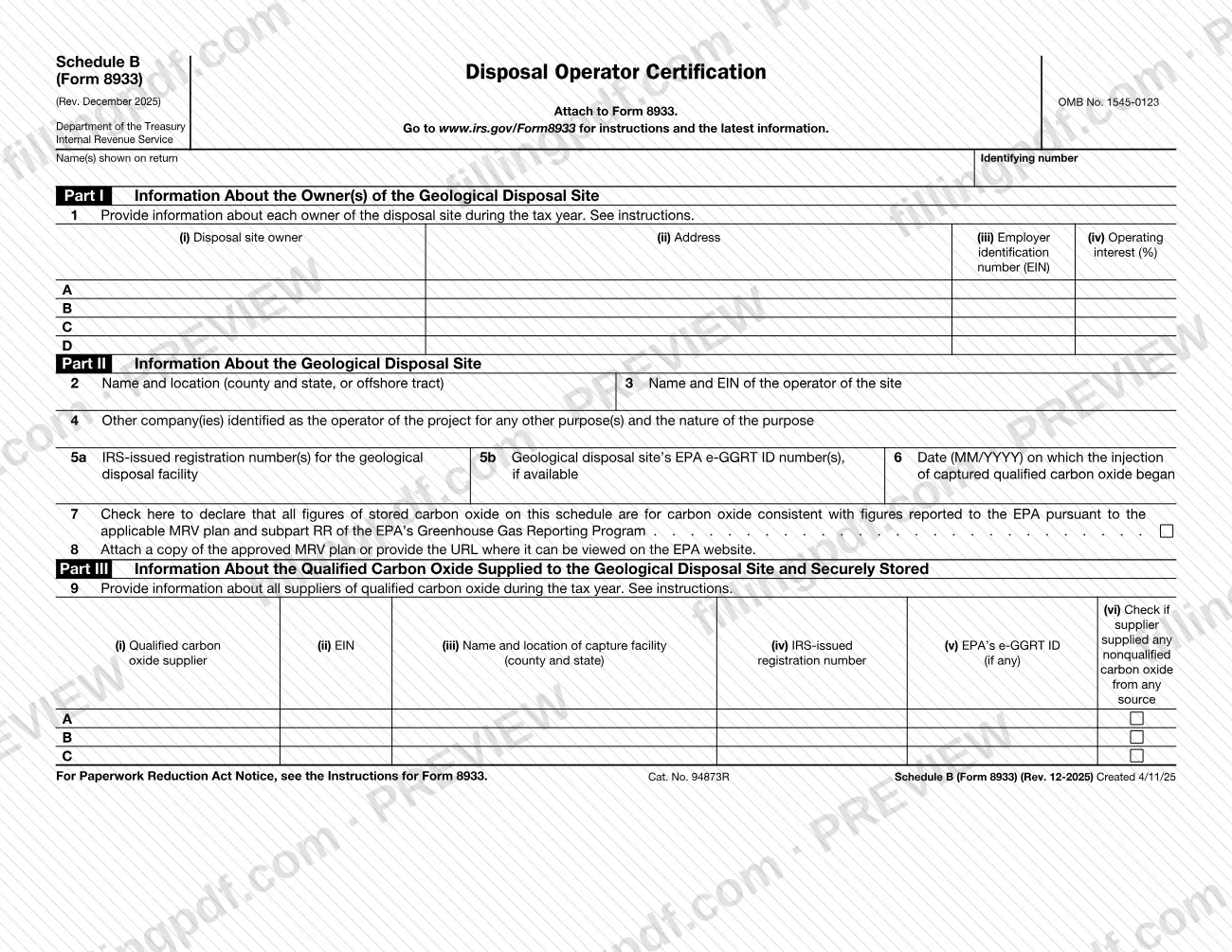
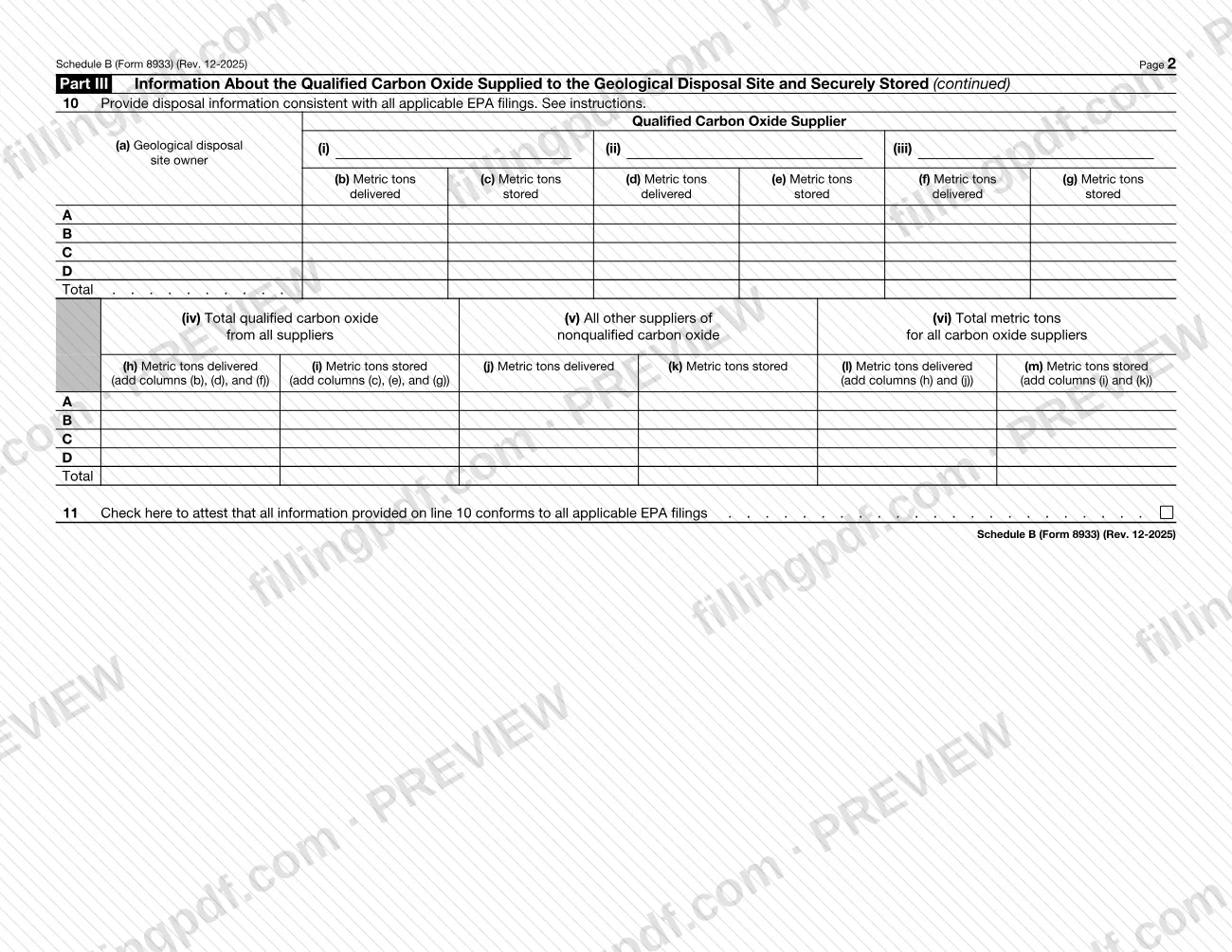
Schedule B (Form 8933), Disposal Operator Certification, is an Internal Revenue Service (IRS) schedule that you attach to Form 8933. It identifies the owners of a geological disposal site, describes the site and its operator, and lists the suppliers of qualified carbon oxide with the metric tons delivered and stored. On this page you can fill out Schedule B (Form 8933) online on FillingPDF and download or print the completed PDF; the form and its instructions are published by the IRS at www.irs.gov/Form8933.
Last updated
What is Schedule B (Form 8933)?
Schedule B (Form 8933), Disposal Operator Certification, is the IRS schedule attached to Form 8933 that reports who owns a geological disposal site, where it is and who operates it, and how much qualified carbon oxide each supplier delivered and the site stored.
The schedule has three parts:
- Part I lists each owner of the disposal site during the tax year, with address, Employer Identification Number (EIN) and operating interest (%), in rows A to D (line 1).
- Part II describes the site: name and location (line 2), the operator's name and EIN (line 3), other companies identified as operator for any other purpose (line 4), IRS-issued registration numbers and EPA e-GGRT ID numbers (lines 5a and 5b), and the date injection began (line 6, MM/YYYY). Line 7 is a declaration that the figures match what was reported to the EPA under the applicable MRV plan and subpart RR of the EPA's Greenhouse Gas Reporting Program, and line 8 asks for the approved MRV plan or its URL.
- Part III lists the suppliers of qualified carbon oxide (line 9) and reports metric tons delivered and stored by owner and supplier (line 10), ending with an attestation on line 11 that line 10 conforms to all applicable EPA filings.
The form is identified as OMB No. 1545-0123, and the revision printed on it is Rev. December 2025. It is a schedule of Form 8933 and is not filed on its own. The IRS publishes the instructions at www.irs.gov/Form8933; lines 1, 9 and 10 refer to them.
Who needs to file Schedule B (Form 8933)?
Taxpayers completing Form 8933 attach this schedule to it. The schedule is titled Disposal Operator Certification, and it is built around the geological disposal site: it names the site's owners (Part I), the site and its operator (Part II) and the qualified carbon oxide supplied to and stored at the site (Part III).
The form itself sets these limits and conditions:
- It says to attach it to Form 8933, so it is not used without that form.
- Part I has room for four owners (rows A to D), and line 9 has room for three suppliers (rows A to C).
- The checkbox declarations on lines 7 and 11 tie the figures to filings made with the EPA.
The schedule prints no rule about who may sign for someone else or who is excluded. For questions about who must complete Form 8933 and this schedule, see the IRS instructions at www.irs.gov/Form8933.
When to file Schedule B (Form 8933)
You complete Schedule B (Form 8933) whenever you complete Form 8933, because the form says to attach it to Form 8933. No separate due date is printed on the schedule, so it travels with Form 8933 and follows that form's timing.
Part I asks about each owner of the disposal site during the tax year, and line 9 asks for all suppliers of qualified carbon oxide during the tax year, so the schedule covers a tax year. Line 6 asks for the date, in MM/YYYY format, on which injection of captured qualified carbon oxide began, so have that date ready. For any deadline that applies to Form 8933, check the IRS instructions at www.irs.gov/Form8933.
Documents you need
- A copy of the approved MRV plan, or the URL where it can be viewed on the EPA website: line 8 asks for one or the other.
How to fill out Schedule B (Form 8933)
Enter your name and identifying number
At the top of page 1, write the name(s) shown on your return and your identifying number.
List the disposal site owners
On line 1, Part I, enter each owner of the disposal site during the tax year in rows A to D: owner, address, EIN and operating interest (%). See the instructions for line 1.
Describe the site and its operator
On line 2, enter the name and location of the site (county and state, or offshore tract). On line 3, enter the name and EIN of the site's operator.
Name other operator companies
On line 4, list any other company identified as the operator of the project for any other purpose and the nature of that purpose.
Enter registration and EPA ID numbers
On line 5a, enter the IRS-issued registration number(s) for the geological disposal facility. On line 5b, enter the site's EPA e-GGRT ID number(s), if available.
Enter the injection start date
On line 6, enter the date, in MM/YYYY format, on which injection of captured qualified carbon oxide began.
Make the EPA declaration and MRV plan entry
Check the box on line 7 to declare that all stored carbon oxide figures are consistent with those reported to the EPA under the applicable MRV plan and subpart RR. On line 8, attach the approved MRV plan or provide its URL on the EPA website.
List the carbon oxide suppliers
On line 9, Part III, enter for each supplier (rows A to C) its name, EIN, capture facility name and location (county and state), IRS-issued registration number and EPA e-GGRT ID, if any. Check column (vi) if the supplier supplied any nonqualified carbon oxide from any source.
Report metric tons by supplier on line 10
On page 2, enter the geological disposal site owner in column (a) and, for each qualified carbon oxide supplier (i) to (iii), the metric tons delivered and stored in columns (b) to (g). Figures must be consistent with your EPA filings.
Complete the totals on line 10
In columns (h) and (i), add (b), (d) and (f) and add (c), (e) and (g). Enter nonqualified carbon oxide from all other suppliers in (j) and (k), then add (h) and (j) for column (l) and (i) and (k) for column (m). Fill in the Total row.
Attest, review and download the PDF
Check the box on line 11 to attest that line 10 conforms to all applicable EPA filings. Review every entry, then download or print the completed PDF from FillingPDF and attach it to Form 8933.
How to submit Schedule B (Form 8933)
Schedule B (Form 8933) is submitted as an attachment to Form 8933. It lists no mailing address, portal or appointment rule of its own, so it goes through whatever channel you use for Form 8933.
- Attach it to Form 8933. Include the completed schedule, with your name(s) shown on the return and your identifying number at the top, in the same package as Form 8933.
- Include the MRV plan if you attach it. Line 8 asks you to attach a copy of the approved MRV plan or to provide the URL where it can be viewed on the EPA website; if you choose the copy, it travels with the schedule.
- Check the IRS instructions. The form directs you to www.irs.gov/Form8933 for instructions and the latest information, including where and how Form 8933 is filed.
FillingPDF lets you fill out and download the PDF; submission follows the IRS channels that apply to Form 8933.
Common mistakes to avoid
- Submitting Schedule B without Form 8933; the form states it is to be attached to Form 8933.
- Skipping line 8: the form asks you to attach the approved MRV plan or provide the URL where it can be viewed on the EPA website.
- Entering figures on line 10 that differ from what was reported to the EPA; line 7 and line 11 both declare consistency with EPA filings.
- Leaving the line 7 or line 11 box unchecked when you are making that declaration or attestation.
- Not adding across on line 10: columns (h) and (i) are the sums of (b), (d), (f) and of (c), (e), (g), and columns (l) and (m) add (h) and (j), and (i) and (k).
- Forgetting the column (vi) box on line 9 when a supplier supplied any nonqualified carbon oxide from any source.
- Entering the injection start date on line 6 in a format other than MM/YYYY.
- Leaving out the name(s) shown on the return or the identifying number at the top of page 1.
Frequently asked questions
What is Schedule B (Form 8933)?
Schedule B (Form 8933), Disposal Operator Certification, is an IRS schedule attached to Form 8933. It reports the owners of a geological disposal site, the site and its operator, and the qualified carbon oxide delivered by each supplier and stored at the site.
Is Schedule B (Form 8933) filed on its own?
No. The form says to attach it to Form 8933, so it is submitted with that form. It has no separate address, portal or due date printed on it; check the IRS instructions at www.irs.gov/Form8933 for the rules that apply to Form 8933.
Do I have to attach the MRV plan to Schedule B?
Line 8 gives you a choice: attach a copy of the approved MRV plan, or provide the URL where it can be viewed on the EPA website. Line 7 separately declares that your stored carbon oxide figures match those reported to the EPA.
What do I enter in the column (vi) box on line 9?
Check the box in column (vi) for any supplier that supplied any nonqualified carbon oxide from any source. Line 9 covers all suppliers of qualified carbon oxide during the tax year, and the instructions at www.irs.gov/Form8933 give further detail.
How are the totals on line 10 figured?
Columns (h) and (i) add the three suppliers' delivered columns (b), (d), (f) and stored columns (c), (e), (g). Columns (l) and (m) then add (h) and (j), and (i) and (k). A Total row sums each column, and line 11 attests the figures match your EPA filings.
How many owners and suppliers can I list on Schedule B?
Part I, line 1 has rows A to D for four disposal site owners, and line 9 has rows A to C for three suppliers. The form refers to the instructions at www.irs.gov/Form8933 for lines 1, 9 and 10.
Can I fill out Schedule B (Form 8933) online?
Yes, you can fill out the PDF online on FillingPDF and download or print it. FillingPDF is an independent service and does not file the form with the IRS; you submit it with Form 8933 through the IRS channels that apply.
Ready to fill out Schedule B (Form 8933)?
Fill out Schedule B (Form 8933) now