
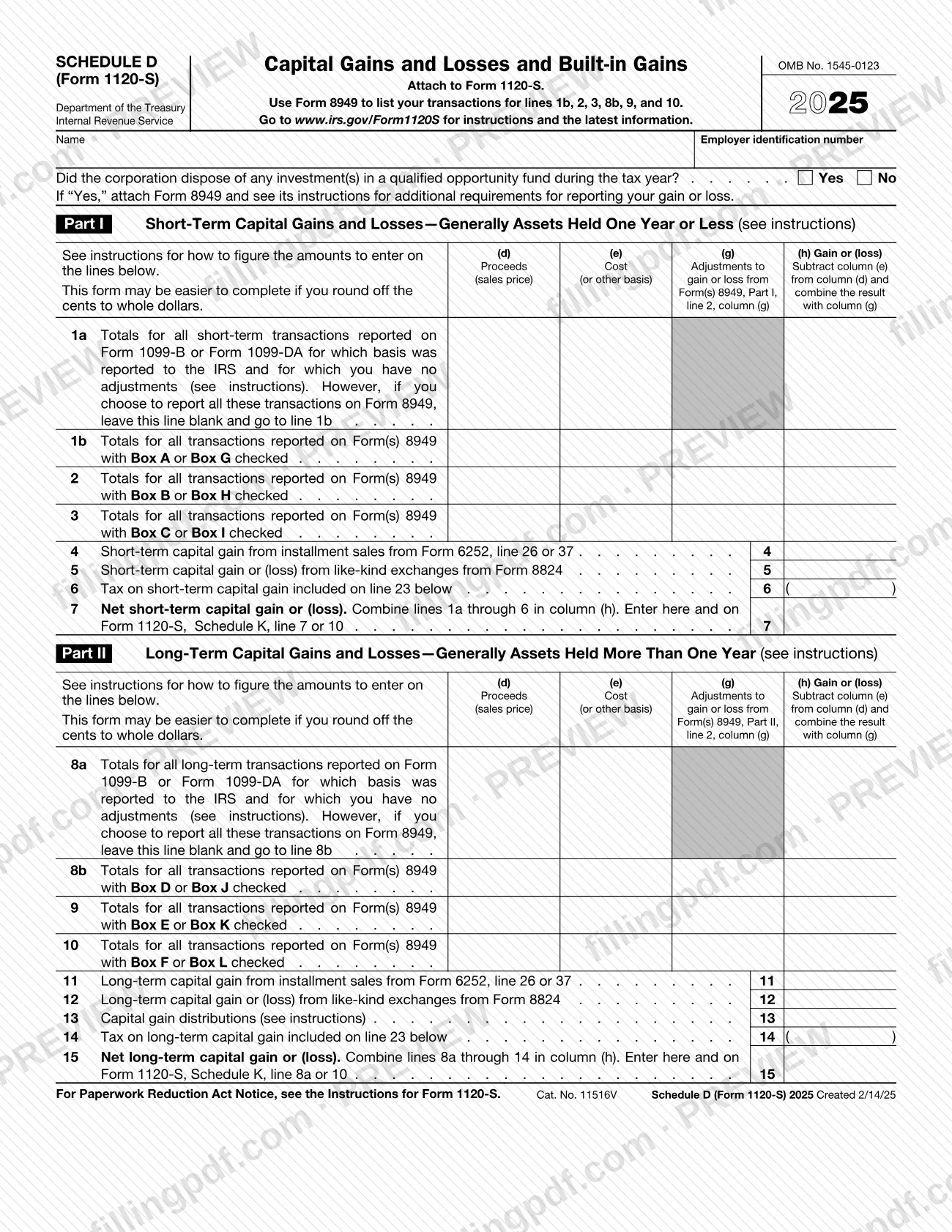
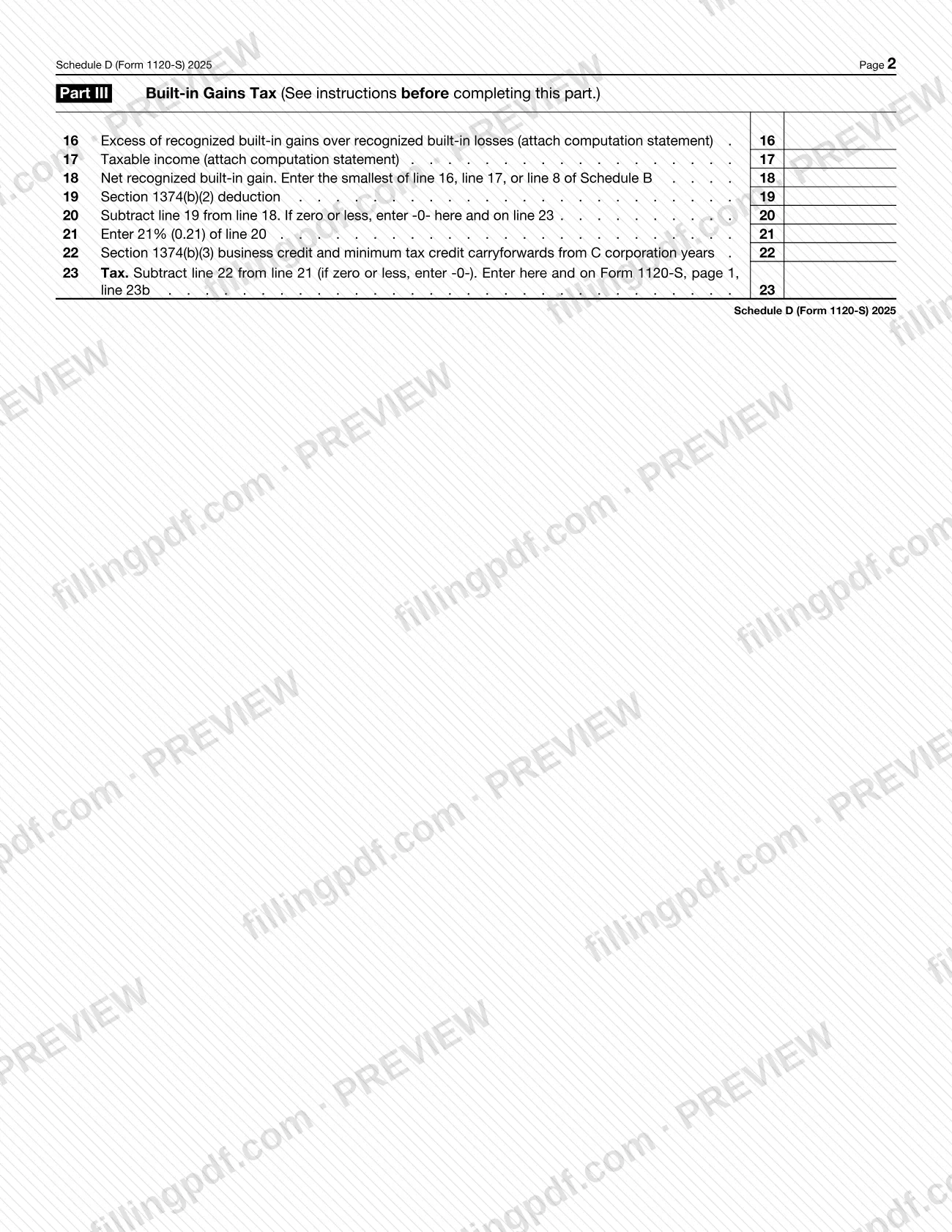
Schedule D (Form 1120-S), Capital Gains and Losses and Built-In Gains, is the Internal Revenue Service (IRS) schedule an S corporation attaches to Form 1120-S. It totals the corporation's short-term and long-term capital gains and losses, carries them to Schedule K, and figures the built-in gains tax in Part III. On this page you can fill out the 2025 form online on FillingPDF and download or print the completed PDF; the original form and its instructions are published by the IRS at www.irs.gov/Form1120S.
Last updated
What is Schedule D (Form 1120-S)?
Schedule D (Form 1120-S), Capital Gains and Losses and Built-In Gains, is the Internal Revenue Service (IRS) schedule that an S corporation attaches to Form 1120-S to report its capital gains and losses and the tax on built-in gains.
The IRS instructions say the schedule reports the overall gains and losses from transactions listed on Form 8949, Sales and Other Dispositions of Capital Assets, plus certain transactions the corporation does not have to list on Form 8949. It also picks up capital gains from Form 6252 (installment sales) and Form 8824 (like-kind exchanges), gains on distributions of appreciated capital assets to shareholders, and capital gain distributions.
The form has three parts. Part I covers short-term gains and losses (lines 1a to 7), generally assets held one year or less. Part II covers long-term gains and losses (lines 8a to 15), generally assets held more than one year. Part III (lines 16 to 23) figures the built-in gains tax under section 1374. Net results flow to Form 1120-S, Schedule K, and the Part III tax goes to Form 1120-S, page 1, line 23b.
This page covers only the schedule that is attached to Form 1120-S. Sales of business property, casualty and theft losses, and section 1256 contracts are reported on other forms (4797, 4684 and 6781), not here.
Who needs to file Schedule D (Form 1120-S)?
S corporations that file Form 1120-S and have capital gains or losses, or built-in gains tax, to report attach this schedule to that return. The form is marked "Attach to Form 1120-S" and asks for the corporation's name and employer identification number.
Part III applies only to certain S corporations. The IRS instructions say the built-in gains tax may apply to:
- an S corporation that was a C corporation before it elected S status; and
- an S corporation that acquired an asset with a basis determined in whole or in part by reference to its basis in the hands of a C corporation (a transferred-basis acquisition).
A corporation in both situations figures the tax separately for each group of assets.
Do not report these items on Schedule D, according to the instructions: sales or distributions of real property or depreciable property used in a trade or business, and other business-property dispositions, go on Form 4797; casualty and theft conversions go on Form 4684; section 1256 contracts and straddles go on Form 6781.
When to file Schedule D (Form 1120-S)
Complete Schedule D (Form 1120-S) whenever the corporation has capital transactions, installment or like-kind gains, capital gain distributions, or built-in gains tax to report for the tax year, and attach it to Form 1120-S. The form prints no separate due date: it is filed with the Form 1120-S it supports.
Complete all necessary pages of Form 8949 before you fill in lines 1b, 2, 3, 8b, 9 and 10.
For Part III, the IRS instructions tie the tax to the applicable recognition period, a 5-year period. For an asset held when the corporation was a C corporation, it begins on the first day of the first tax year for which the corporation is an S corporation. For a transferred-basis acquisition, it begins on the date the asset was acquired.
Documents you need
- Form 8949, Sales and Other Dispositions of Capital Assets: complete it before lines 1b, 2, 3, 8b, 9 and 10; attach it if you answer Yes to the qualified opportunity fund question.
- Form 6252, Installment Sale Income: needed for the gain entered on line 4 (short-term) or line 11 (long-term) from installment sales.
- Form 8824, Like-Kind Exchanges: needed for the gain or loss entered on line 5 (short-term) or line 12 (long-term).
- Computation statement for line 16 (excess of recognized built-in gains over recognized built-in losses), as the form directs, when completing Part III.
- Form 1120 computation or other worksheet used to figure taxable income for line 17, attached to Schedule D, when completing Part III.
- An attachment showing the total net recognized built-in gain, listing separately any capital gain or loss and ordinary gain or loss, for Part III.
- Form 8997, Initial and Annual Statement of Qualified Opportunity Fund (QOF) Investments: attach each year to the return until the QOF investment is disposed of, if the corporation deferred gain invested in a QOF.
How to fill out Schedule D (Form 1120-S)
Enter name and EIN
At the top, enter the corporation's name and employer identification number.
Answer the QOF question
Check Yes or No for whether the corporation disposed of any investment in a qualified opportunity fund during the tax year. If Yes, attach Form 8949 and see its instructions for additional reporting requirements.
Finish Form 8949 first
List your transactions on Form 8949 and complete all necessary pages before filling in lines 1b, 2, 3, 8b, 9 and 10.
Complete lines 1a and 8a
If you choose to report qualifying transactions without adjustments directly, enter aggregate totals for short-term transactions on line 1a and long-term transactions on line 8a, in columns (d), (e) and (h). If you report them all on Form 8949, leave the line blank.
Enter Form 8949 totals
On lines 1b, 2 and 3 (short-term) and 8b, 9 and 10 (long-term), enter totals from Form 8949 by box checked. Subtract column (e) from column (d), combine with column (g), and enter the result in column (h), with losses in parentheses.
Add installment, like-kind and distributions
Enter installment sale gain from Form 6252 on line 4 or 11 and like-kind exchange gain or loss from Form 8824 on line 5 or 12. On line 13, enter the total capital gain distributions paid to the corporation.
Enter built-in gains tax deductions
On line 6 and line 14, enter in parentheses the tax on short-term and long-term capital gain included on line 23, if any.
Total Parts I and II
Line 7: combine lines 1a through 6 in column (h), then enter the result on Form 1120-S, Schedule K, line 7 or 10. Line 15: combine lines 8a through 14 in column (h), then enter it on Schedule K, line 8a or 10.
Figure net recognized built-in gain
In Part III, enter the excess of recognized built-in gains over losses on line 16 and taxable income on line 17, attaching computation statements. Line 18 is the smallest of line 16, line 17 or line 8 of Schedule B.
Compute the built-in gains tax
Enter the section 1374(b)(2) deduction on line 19 and subtract it from line 18 on line 20 (enter -0- if zero or less). Line 21 is 21% (0.21) of line 20; subtract the line 22 credit carryforwards to get the tax on line 23.
Review and download the completed PDF
Check every line, carry line 23 to Form 1120-S, page 1, line 23b, then download or print the completed PDF from FillingPDF and attach it to Form 1120-S as described under How to submit.
How to submit Schedule D (Form 1120-S)
Schedule D (Form 1120-S) is not filed on its own. It is submitted as an attachment to Form 1120-S, and the schedule prints no separate address, portal or appointment rule.
- With Form 1120-S: attach the completed schedule to the return and send it through whatever channel you use for Form 1120-S. Check the Instructions for Form 1120-S for where to send the return.
- Other attachments: attach Form 8949 if you answer Yes to the qualified opportunity fund question, and attach the computation statements requested for lines 16 and 17 when you complete Part III.
- Latest information: the form directs you to www.irs.gov/Form1120S for instructions and updates.
FillingPDF lets you fill out and download the PDF; submission follows the IRS channels that apply to Form 1120-S.
Common mistakes to avoid
- Reporting a 1099-B or 1099-DA transaction on line 1a or 8a when basis was not reported to the IRS; the instructions say such a transaction goes on Form 8949.
- Completing lines 1b, 2, 3, 8b, 9 or 10 before finishing all necessary pages of Form 8949, whose totals feed those lines.
- Reporting sales of business property or depreciable property on Schedule D instead of Form 4797.
- Rounding only some amounts to whole dollars; if you round, all amounts must be rounded, and sums are added with cents before the total is rounded.
- Leaving the qualified opportunity fund question unanswered, or answering Yes without attaching Form 8949.
- Skipping the computation statements for lines 16 and 17 in Part III, or the attachment listing capital and ordinary built-in gain or loss separately.
- Using Schedule B, line 8 on line 18 when figuring the tax for separate groups of assets; the instructions say to figure net unrealized built-in gain separately for each group.
- Entering collectibles (28% rate) gain or loss only here; the instructions say to report it on Form 1120-S, Schedule K, line 8b, and in box 8b of each Schedule K-1.
- Forgetting to deduct the line 23 tax on line 6 or line 14 as short-term or long-term capital loss, or as a tax deduction on Form 1120-S, line 12, for ordinary income.
Frequently asked questions
What is Schedule D (Form 1120-S)?
Schedule D (Form 1120-S) is the IRS schedule where an S corporation reports capital gains and losses and figures the built-in gains tax. It is attached to Form 1120-S, and its net results are carried to Schedule K and to page 1 of Form 1120-S.
Who has to file Schedule D with Form 1120-S?
S corporations with capital gains or losses, or built-in gains tax, to report attach it to Form 1120-S. Part III applies only to S corporations that were C corporations before electing S status or that acquired assets with a transferred basis from a C corporation.
What is the difference between line 1a and line 1b?
Line 1a totals short-term transactions with basis reported to the IRS and no adjustments, which you may enter without Form 8949. Line 1b totals Form 8949 transactions with Box A or Box G checked. Line 8a and line 8b work the same way for long-term.
Where do I send Schedule D (Form 1120-S)?
You do not send it separately. The form says to attach it to Form 1120-S, so it travels with that return through the same channel. The schedule prints no address of its own; see the Instructions for Form 1120-S.
Do I need Form 8949 with Schedule D?
Yes, for lines 1b, 2, 3, 8b, 9 and 10, which total transactions listed on Form 8949. Complete Form 8949 first. You must also attach it if you answer Yes to the qualified opportunity fund question.
Where does the line 23 built-in gains tax go?
Enter line 23 on Form 1120-S, page 1, line 23b. The instructions treat the tax as a loss sustained in the same year and deduct it on line 6, line 14 or Form 1120-S, line 12, depending on the type of gain.
Can I round cents to whole dollars on Schedule D?
Yes, but if you round, all amounts must be rounded. Drop amounts under 50 cents and raise 50 to 99 cents to the next dollar. When adding several amounts for one line, include cents and round only the total.
Can I fill out Schedule D (Form 1120-S) online on FillingPDF?
Yes. You can fill out the fillable PDF on FillingPDF and download or print it. FillingPDF is an independent service and does not file the schedule with the IRS; you attach it to Form 1120-S and submit that return through IRS channels.
Ready to fill out Schedule D (Form 1120-S)?
Fill out Schedule D (Form 1120-S) now