
Schedule D (Form 941), Report of Discrepancies Caused by Acquisitions, Statutory Mergers, or Consolidations, is the Internal Revenue Service (IRS) schedule that explains why an employer's Forms 941 and Forms W-2 (Copy A) show different totals when the only cause is a statutory merger, consolidation or acquisition. Each party to an applicable transaction files its own schedule. On FillingPDF you can fill out the form online and download or print the completed PDF; the IRS publishes the form and its separate instructions at irs.gov.
Last updated
What is Schedule D (Form 941)?
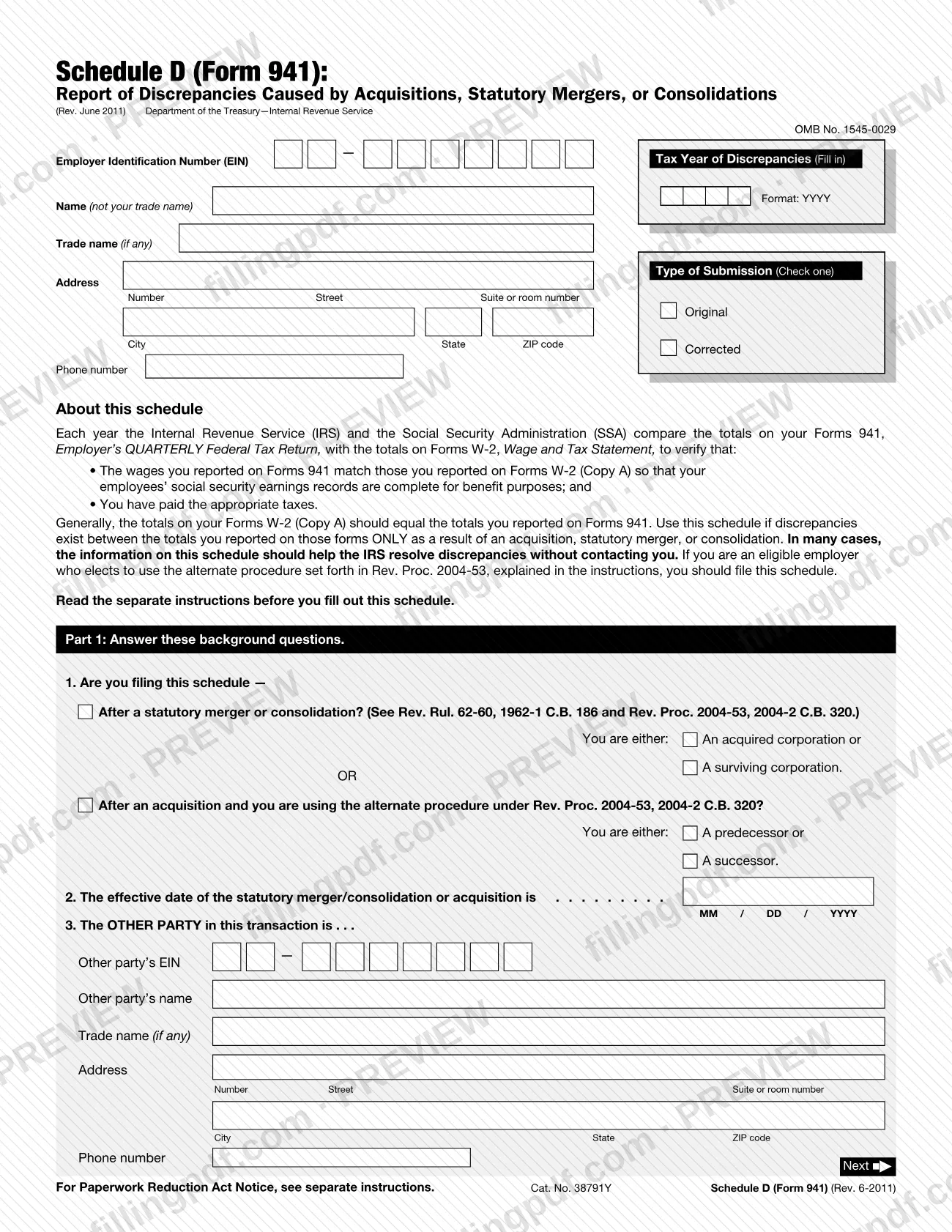
Schedule D (Form 941), Report of Discrepancies Caused by Acquisitions, Statutory Mergers, or Consolidations, is the IRS schedule employers use to explain differences between the totals on their Forms 941 and their Forms W-2 (Copy A) that arise only because of a merger, consolidation or acquisition.
Each year the IRS and the Social Security Administration (SSA) compare the totals on Form 941, Employer's QUARTERLY Federal Tax Return, with the totals on Form W-2, Wage and Tax Statement (Copy A). The comparison checks that wages match, so employees' social security earnings records are complete, and that the right taxes were paid. The schedule lists, for social security wages, Medicare wages and tips, social security tips, federal income tax withheld and advance earned income credit (EIC) payments (for tax years ending before January 1, 2011), the amount reported to the IRS, the amount reported to the SSA and the difference. The IRS says the information often lets it resolve discrepancies without contacting you.
The form is printed as OMB No. 1545-0029 and is a schedule of Form 941, not a stand-alone return. It applies to three kinds of transactions: statutory mergers and consolidations, and acquisitions handled under the alternate procedure in Rev. Proc. 2004-53. For a surviving corporation, filing it also gives notice of the merger or consolidation under Rev. Rul. 62-60.
Who needs to file Schedule D (Form 941)?
Employers whose Forms 941 and Forms W-2 (Copy A) differ in the totals of social security wages, Medicare wages and tips, social security tips, federal income tax withheld or advance EIC payments only because of a transaction file this schedule. Each party to the transaction files its own.
You file after either of these:
- A statutory merger or consolidation: check whether you are the acquired corporation or the surviving corporation. An acquired corporation files it with its final Form 941.
- An acquisition under the alternate procedure of Rev. Proc. 2004-53: check whether you are the predecessor or the successor.
Do not file Schedule D (Form 941) for an acquisition for which you use the standard procedure under Rev. Proc. 2004-53, or for an acquisition that is not a statutory merger or consolidation and does not qualify under the predecessor-successor rules. You do not need one for every merger, acquisition or reorganization, only those that create the discrepancies described above.
When to file Schedule D (Form 941)
If your business continues to operate, file Schedule D (Form 941) with your Form 941 no later than the due date of Form 941 for the first quarter of the year after the calendar year of the transaction. If your business is not continuing to operate, file it with your final Form 941.
The instructions give an example: for a transaction in the third quarter of 2010, a continuing business files by the due date of the first-quarter 2011 Form 941. A business that stopped operating during 2010 files with its final Form 941, no later than the due date for the third quarter of 2010.
When you have more than one transaction in a calendar year, file a separate schedule for each one.
Documents you need
- Forms 941, as corrected by any Forms 941-X: not attached, but you total them to fill in Column A, the amount reported to the IRS.
- Forms W-2 (Copy A), as corrected by any Forms W-2c (Copy A): not attached, but you total them to fill in Column B, the amount reported to the SSA.
How to fill out Schedule D (Form 941)
Enter the tax year of discrepancies
In the box at the top, write the tax year (not the quarter) in which the discrepancies occurred, in the YYYY format. It must match the year you enter on line 2 of Part 1.
Fill in your business information
Enter your EIN, your name (not your trade name), your trade name if any, your address and your phone number. The EIN must exactly match the one the IRS assigned to your business.
Choose the type of submission
Check Original for the first Schedule D (Form 941) for a transaction, or Corrected if it corrects one you submitted earlier.
Answer line 1 about the transaction
Check the statutory merger or consolidation box and mark whether you are an acquired or a surviving corporation. Otherwise check the acquisition box under the alternate procedure of Rev. Proc. 2004-53 and mark predecessor or successor.
Enter the effective date on line 2
Write the effective date of the merger, consolidation or acquisition as MM/DD/YYYY. The year must equal the tax year at the top of the schedule.
Describe the other party on line 3
Enter the other party's EIN, name, trade name if any, address and phone number. Verify the EIN.
Complete Part 2, Columns A and B
On lines 4 to 8, enter in Column A the totals from your Forms 941 as corrected by any Forms 941-X, and in Column B the totals from your Forms W-2 (Copy A) as corrected by any Forms W-2c. Show an amount on every line, write -0- in Column B if you filed no W-2 (Copy A), and you may round to the nearest dollar.
Calculate Column C differences
Subtract Column B from Column A on each of lines 4 to 8. Put a negative result in parentheses. If you file for one transaction only, stop after Part 2.
Fill in page 2 header and line 9
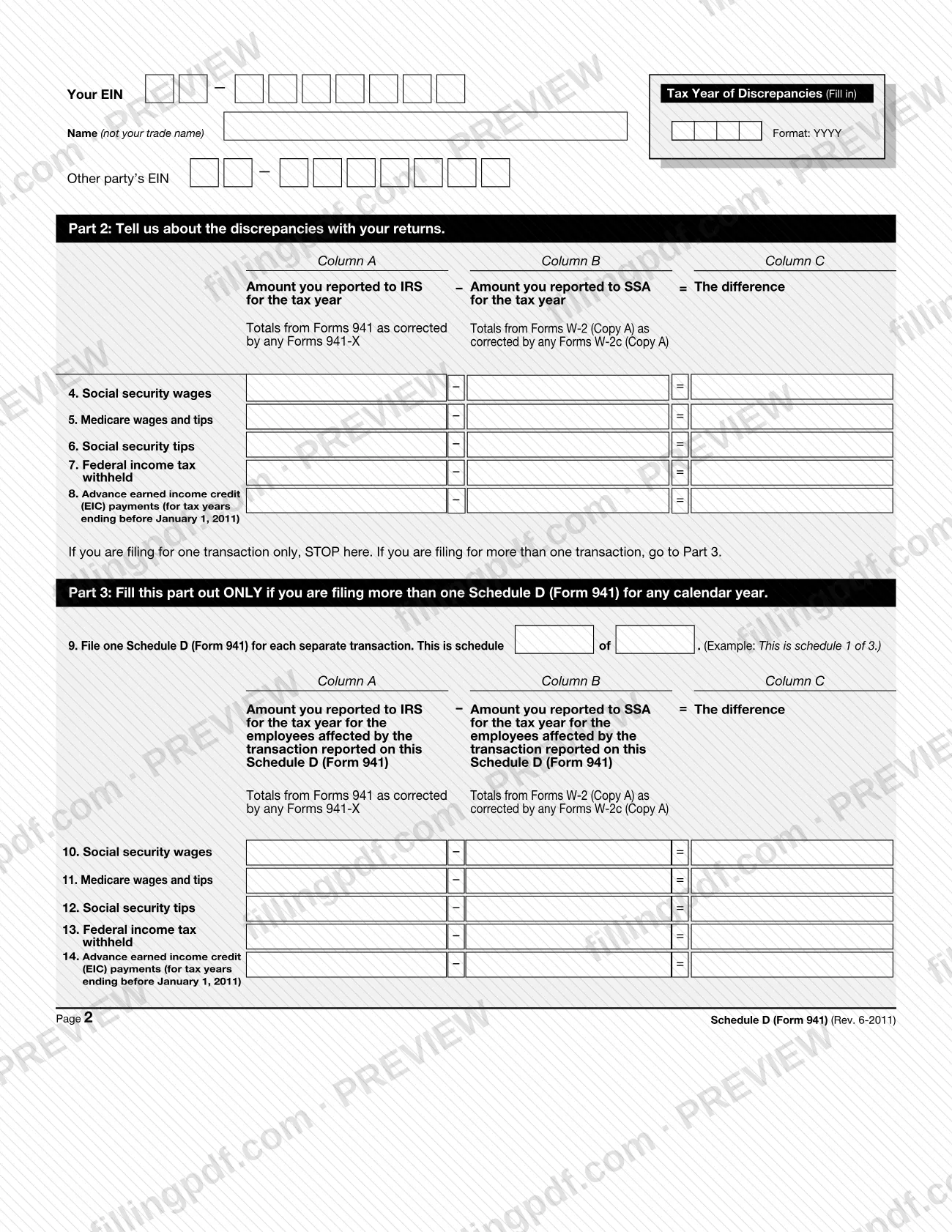
If you file more than one schedule for the calendar year, repeat your EIN, name, tax year and the other party's EIN at the top of page 2. On line 9 write which schedule this is, for example "2" of "3".
Complete Part 3, lines 10 to 14
Use the same columns as Part 2, but report only the employees affected by the transaction on this schedule: those whose wages appeared on one employer's Forms 941 and another employer's Forms W-2 (Copy A). Part 2, Column C should equal the total of the Part 3 entries for all your schedules.
Review and download the completed PDF
Check the EIN, tax year, dates and each column, then download or print the completed PDF from FillingPDF and file it as described under How to submit.
How to submit Schedule D (Form 941)
Schedule D (Form 941) can be filed electronically with your electronic submission of Form 941, or on paper if necessary.
- Electronically: the schedule was designed to be filed with your electronic Form 941 submission. The IRS says this lets it process the information more efficiently and accurately.
- On paper: do not attach it to your Form 941. File it separately with the IRS Philadelphia Campus, Mail Stop 4-G08 151, 2970 Market Street, Philadelphia, PA 19104.
Do not use that address to file Form 941; the Instructions for Form 941 give its filing address. Do not send the schedule to the Tax Products Coordinating Committee address, which is only for comments on the form. FillingPDF lets you fill out and download the PDF; submission follows the IRS channels above.
Common mistakes to avoid
- Attaching a paper Schedule D (Form 941) to Form 941 instead of filing it separately with the IRS Philadelphia Campus.
- Mailing the schedule to the Form 941 filing address; the instructions say not to use the Philadelphia address for Form 941, and the reverse also applies.
- Writing the quarter, or fewer than four digits, in the Tax Year of Discrepancies box. Enter the tax year as YYYY, such as 2011.
- Entering a line 2 effective date whose year differs from the tax year in the box at the top of the schedule.
- Leaving Column B blank when you filed no Forms W-2 (Copy A); the instructions say to write "-0-".
- Omitting an amount that is zero. Show an amount in every column of every line, even if it is zero.
- Showing a negative difference in Column C without parentheses, for example writing 6,000 instead of (6,000).
- Combining several transactions on one schedule. File one Schedule D (Form 941) for each separate transaction.
- Using an EIN that does not exactly match the EIN the IRS assigned, or skipping the EIN, name and tax year at the top of page 2.
- Filing the schedule for an acquisition handled under the standard procedure of Rev. Proc. 2004-53.
Frequently asked questions
What is Schedule D (Form 941) used for?
Schedule D (Form 941) explains differences between your Forms 941 and Forms W-2 (Copy A) in social security wages, Medicare wages and tips, social security tips, federal income tax withheld and advance EIC payments when a statutory merger, consolidation or acquisition caused them. It often lets the IRS resolve the discrepancy without contacting you.
Who has to file Schedule D (Form 941)?
Each party to a statutory merger, consolidation or an acquisition handled under the alternate procedure in Rev. Proc. 2004-53 files its own schedule, but only when the transaction creates discrepancies between Forms W-2 (Copy A) and Forms 941. You do not file it for every merger or acquisition.
When is the 941 Schedule D due?
If your business keeps operating, file it with your Form 941 no later than the due date of the first-quarter Form 941 for the year after the transaction year. If your business is not continuing, file it with your final Form 941.
Where do I mail Schedule D (Form 941)?
File it separately, not attached to Form 941, with the IRS Philadelphia Campus, Mail Stop 4-G08 151, 2970 Market Street, Philadelphia, PA 19104. That address is not for Form 941. The schedule can also be filed electronically with your electronic Form 941 submission.
Can I file Schedule D (Form 941) electronically?
Yes. The IRS instructions say the schedule was designed to be filed electronically with your electronic submission of Form 941, which lets the IRS process it more efficiently and accurately. Paper filing is allowed if necessary, using the separate Philadelphia address.
What do I enter in Column B if I filed no Forms W-2 (Copy A)?
Write "-0-" in Column B, Amount you reported to SSA for the tax year. The instructions repeat this warning for Part 2 and Part 3. Then figure Column C as Column A minus Column B, putting negative results in parentheses.
What if I have more than one merger or acquisition in a year?
File a separate Schedule D (Form 941) for each transaction and complete Part 3 on each one. Line 9 states which schedule it is, such as "2 of 3". Part 2 stays the same on each schedule, and its Column C should equal the total of the Part 3 entries.
Can I fill out Schedule D (Form 941) online on FillingPDF?
You can fill out the PDF online on FillingPDF and download or print it. FillingPDF is an independent service and does not file the schedule with the IRS; you file it electronically with Form 941 or on paper at the IRS Philadelphia Campus address.
Ready to fill out Schedule D (Form 941)?
Fill out Schedule D (Form 941) now