
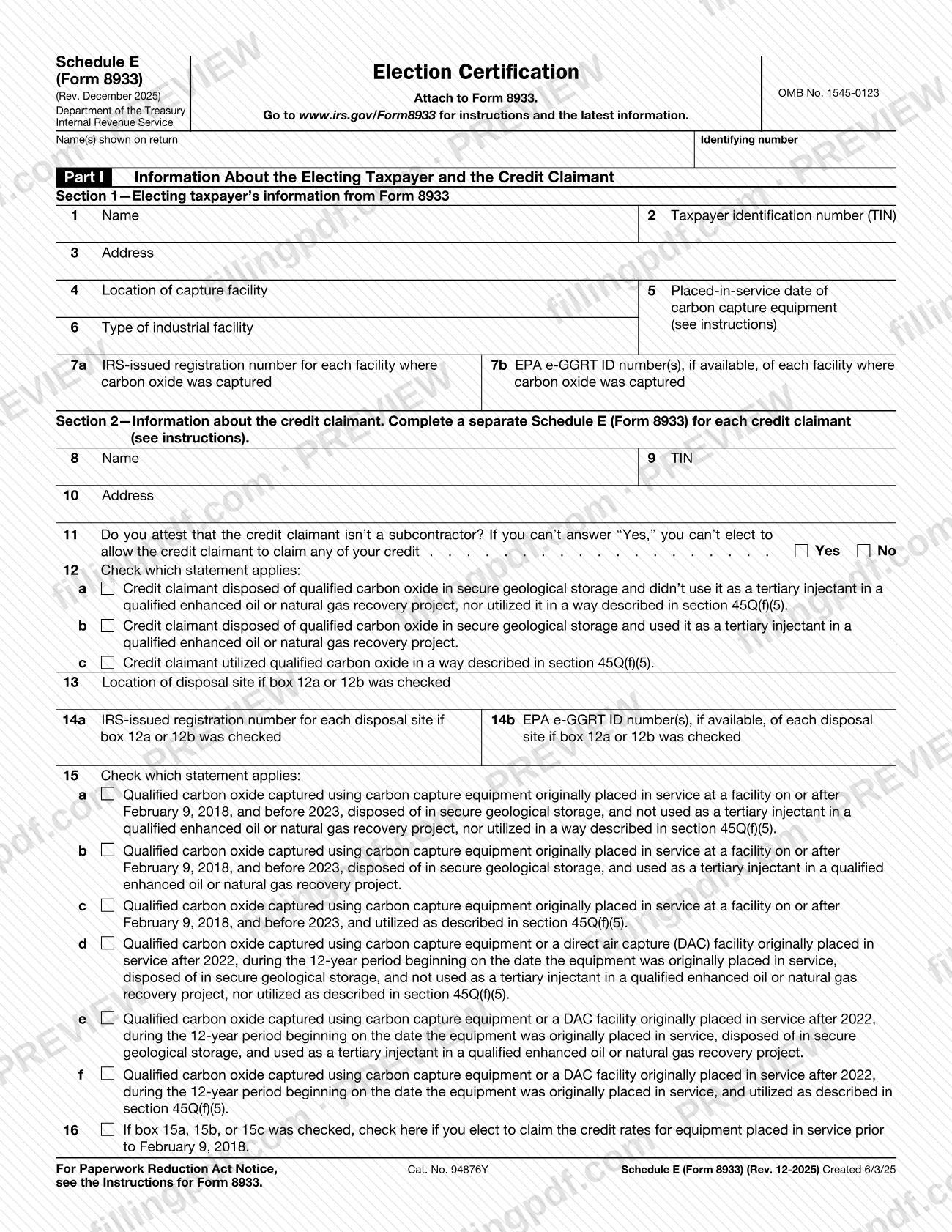
Schedule E (Form 8933), Election Certification, is an Internal Revenue Service (IRS) schedule that you attach to Form 8933. The electing taxpayer uses it to identify a credit claimant, state how the claimant handled the qualified carbon oxide, and figure how many metric tons and how much credit the claimant is allowed to claim. On this page you can fill out Schedule E (Form 8933) online on FillingPDF and download or print the completed PDF; the form and its instructions are published by the IRS at www.irs.gov/Form8933.
Last updated
What is Schedule E (Form 8933)?
Schedule E (Form 8933), Election Certification, is the IRS schedule attached to Form 8933 on which an electing taxpayer identifies a credit claimant and certifies how much qualified carbon oxide that claimant may claim the credit for.
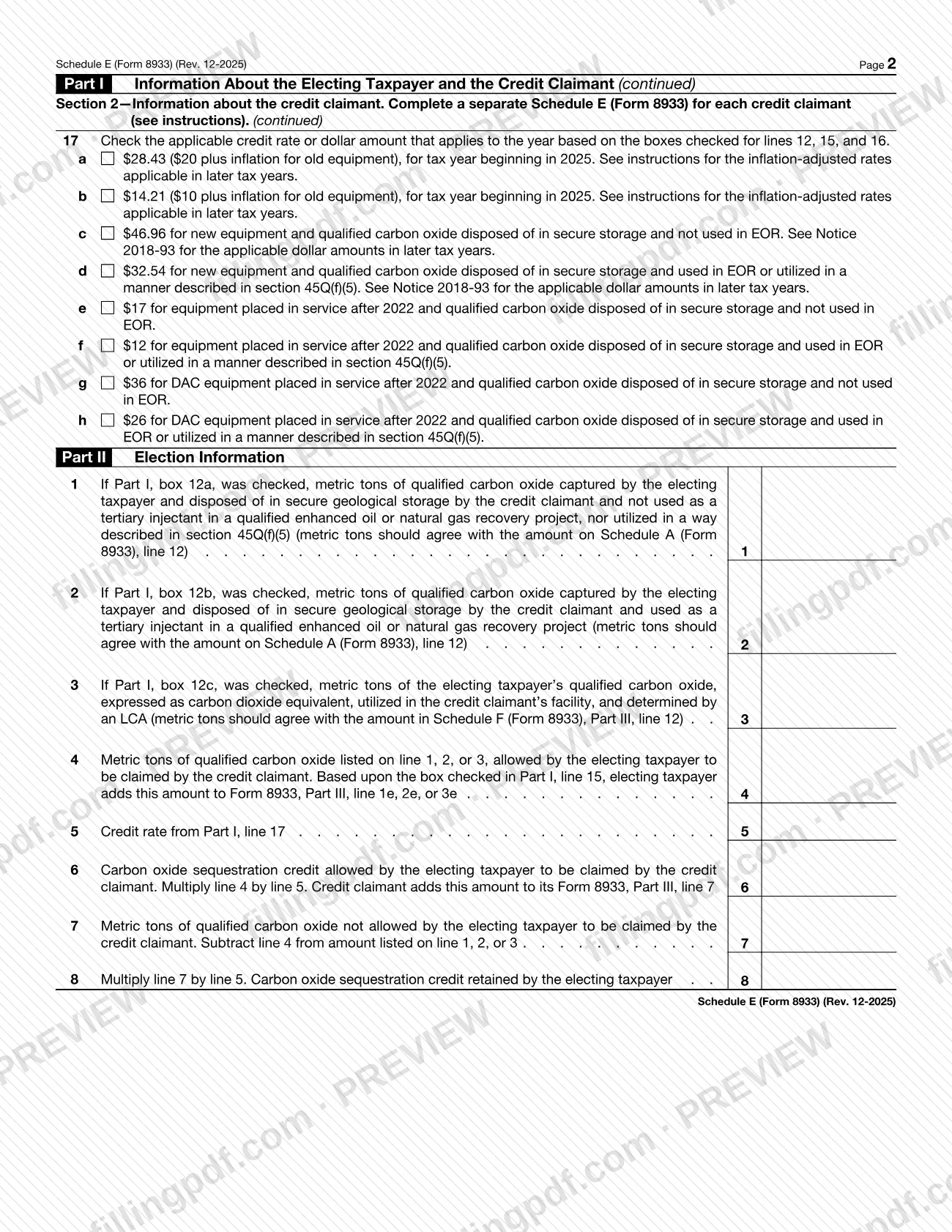
The form has two parts. Part I collects information about the electing taxpayer, taken from Form 8933 (lines 1 through 7b), and about the credit claimant (lines 8 through 17): name, taxpayer identification number (TIN), address, a subcontractor attestation, how the carbon oxide was disposed of or utilized, the disposal site, the statement that describes the equipment and its placed-in-service date, and the applicable credit rate. Part II, Election Information, turns that into numbers: metric tons captured, metric tons the claimant is allowed to claim, the resulting carbon oxide sequestration credit, and the tons and credit the electing taxpayer keeps.
The metric tons on Part II must agree with other schedules of Form 8933: lines 1 and 2 with Schedule A (Form 8933), line 12, and line 3 with Schedule F (Form 8933), Part III, line 12. The form is identified as OMB No. 1545-0123, and the IRS publishes the instructions at www.irs.gov/Form8933. Complete a separate Schedule E for each credit claimant.
Who needs to file Schedule E (Form 8933)?
The electing taxpayer completing Form 8933 uses Schedule E when it elects to allow another party, the credit claimant, to claim all or part of the credit. Part I, Section 1 repeats the electing taxpayer's information from Form 8933, and the schedule's header asks for the name(s) shown on the return and an identifying number.
The credit claimant is the party described in Section 2 (lines 8 through 17). The electing taxpayer completes a separate Schedule E for each credit claimant; the form refers you to the instructions for details.
Exclusion: line 11 asks you to attest that the credit claimant is not a subcontractor. If you cannot answer Yes, the form says you cannot elect to allow that credit claimant to claim any of your credit.
The credit claimant also uses the result: line 6 says the credit claimant adds the credit allowed to its own Form 8933, Part III, line 7. The form does not describe who may sign for someone else; see the IRS instructions at www.irs.gov/Form8933.
When to file Schedule E (Form 8933)
Complete Schedule E (Form 8933) whenever you file Form 8933 and elect to allow a credit claimant to claim part or all of your credit. The form says to attach it to Form 8933, and no separate due date is printed on it, so it travels with Form 8933 whenever that form is submitted.
Prepare one schedule for each credit claimant at the same time. Have the related amounts ready before you start: the metric tons on Part II must agree with Schedule A (Form 8933), line 12, or Schedule F (Form 8933), Part III, line 12, depending on the box checked on line 12. The credit rate on line 17 depends on the tax year; for later years the form refers you to the instructions and to Notice 2018-93. For any deadline that applies to Form 8933, check the IRS instructions at www.irs.gov/Form8933.
How to fill out Schedule E (Form 8933)
Enter your name and identifying number
At the top, write the name(s) shown on your return and your identifying number. Check that the form is the Rev. December 2025 edition and that it will be attached to Form 8933.
Copy the electing taxpayer details
In Part I, Section 1, enter the name (line 1), taxpayer identification number (line 2) and address (line 3) from Form 8933.
Describe the capture facility
Line 4: location of the capture facility. Line 5: placed-in-service date of the carbon capture equipment. Line 6: type of industrial facility; see the instructions.
Enter facility registration numbers
Line 7a: IRS-issued registration number for each facility where carbon oxide was captured. Line 7b: EPA e-GGRT ID number(s) of each such facility, if available.
Identify the credit claimant
In Section 2, enter the credit claimant's name (line 8), TIN (line 9) and address (line 10). Use a separate Schedule E for each credit claimant.
Attest on the subcontractor question
Line 11: check Yes or No on whether you attest that the credit claimant is not a subcontractor. If you cannot answer Yes, you cannot elect to allow the claimant to claim any of your credit.
Check how the carbon oxide was used
Line 12: check box 12a, 12b or 12c, depending on whether the claimant disposed of the carbon oxide in secure geological storage, used it as a tertiary injectant in enhanced recovery, or utilized it as described in section 45Q(f)(5).
Enter the disposal site details
Only if box 12a or 12b was checked: line 13 for the location of the disposal site, line 14a for the IRS-issued registration number and line 14b for the EPA e-GGRT ID number(s), if available.
Select the equipment statement on line 15
Check the box from 15a to 15f that matches the placed-in-service period of the equipment or direct air capture (DAC) facility and how the carbon oxide was disposed of or utilized.
Decide on the line 16 election
If box 15a, 15b or 15c was checked, check line 16 only if you elect to claim the credit rates for equipment placed in service before February 9, 2018.
Select the credit rate on line 17
Check the one rate or dollar amount, 17a through 17h, that applies to the year based on the boxes checked on lines 12, 15 and 16. For later tax years, follow the instructions or Notice 2018-93 as the form directs.
Enter the metric tons in Part II
Complete only the line that matches the box checked on line 12: line 1 for 12a, line 2 for 12b, line 3 for 12c. Make the amount agree with Schedule A (Form 8933), line 12, or Schedule F (Form 8933), Part III, line 12.
Figure the claimant's tons and credit
Line 4: metric tons from line 1, 2 or 3 that you allow the credit claimant to claim. Line 5: the credit rate from Part I, line 17. Line 6: multiply line 4 by line 5.
Figure the amounts you retain
Line 7: subtract line 4 from the amount on line 1, 2 or 3. Line 8: multiply line 7 by line 5; this is the credit retained by the electing taxpayer.
Review, download and attach
Check each line and that the metric tons agree with the other schedules. Download or print the completed PDF from FillingPDF and attach it to Form 8933.
How to submit Schedule E (Form 8933)
Schedule E (Form 8933) is submitted as an attachment to Form 8933; the form prints no separate address, portal or appointment rule of its own.
- Attach to Form 8933: include each completed Schedule E, one per credit claimant, with Form 8933 and send the package by the same channel you use for Form 8933.
- Instructions and latest information: the form directs you to www.irs.gov/Form8933.
- Use of the amounts: the electing taxpayer adds the line 4 amount to Form 8933, Part III, line 1e, 2e or 3e, depending on the box checked on line 15, and the credit claimant adds the line 6 amount to its Form 8933, Part III, line 7.
FillingPDF lets you fill out and download the PDF; submission follows the IRS channels that apply to Form 8933.
Common mistakes to avoid
- Using one Schedule E (Form 8933) for several credit claimants; the form says to complete a separate schedule for each credit claimant.
- Answering Yes on line 11 when the credit claimant is a subcontractor; if you cannot answer Yes, you cannot elect to allow that claimant to claim any of your credit.
- Entering metric tons on Part II, lines 1 or 2 that do not agree with Schedule A (Form 8933), line 12.
- Entering metric tons on Part II, line 3 that do not agree with Schedule F (Form 8933), Part III, line 12.
- Completing lines 13, 14a and 14b when box 12c was checked; they apply only if box 12a or 12b was checked.
- Checking line 16 when box 15d, 15e or 15f applies; line 16 is for boxes 15a, 15b or 15c only.
- Not adding the line 4 amount to Form 8933, Part III, line 1e, 2e or 3e based on the box checked on line 15.
- Computing line 7 from the wrong line; it subtracts line 4 from the amount on line 1, 2 or 3, whichever applies.
Frequently asked questions
What is Schedule E (Form 8933)?
Schedule E (Form 8933), Election Certification, is the IRS schedule attached to Form 8933. The electing taxpayer uses it to identify a credit claimant and to figure the metric tons and carbon oxide sequestration credit the claimant is allowed to claim, and the amounts the electing taxpayer keeps.
Do I need a separate Schedule E for each credit claimant?
Yes. Section 2 of the form says to complete a separate Schedule E (Form 8933) for each credit claimant. Section 1, the electing taxpayer's information from Form 8933, is repeated on each schedule.
Can a subcontractor be the credit claimant on Schedule E?
No. Line 11 asks whether you attest that the credit claimant is not a subcontractor, and the form states that if you cannot answer Yes, you cannot elect to allow that credit claimant to claim any of your credit.
Is Schedule E (Form 8933) filed on its own?
No. The form says to attach it to Form 8933, so it is submitted with that form. It prints no separate address, portal or due date, and the instructions are at www.irs.gov/Form8933.
What goes on line 16 of Schedule E (Form 8933)?
Line 16 applies only if box 15a, 15b or 15c was checked. Check it if you elect to claim the credit rates for equipment placed in service before February 9, 2018. Leave it blank if box 15d, 15e or 15f applies.
Which metric tons do I enter in Part II?
Use only the line matching the box checked on Part I, line 12: line 1 for 12a, line 2 for 12b, line 3 for 12c. Lines 1 and 2 must agree with Schedule A (Form 8933), line 12; line 3 with Schedule F (Form 8933), Part III, line 12.
Where do the line 4 and line 6 amounts go?
The electing taxpayer adds line 4 to Form 8933, Part III, line 1e, 2e or 3e, based on the box checked on Part I, line 15. The credit claimant adds the line 6 amount to its own Form 8933, Part III, line 7.
Can I fill out Schedule E (Form 8933) online?
Yes. You can fill out the PDF online on FillingPDF and download or print it. FillingPDF is an independent service and does not file the schedule with the IRS; you submit it with Form 8933 through the IRS channels.
Ready to fill out Schedule E (Form 8933)?
Fill out Schedule E (Form 8933) now