
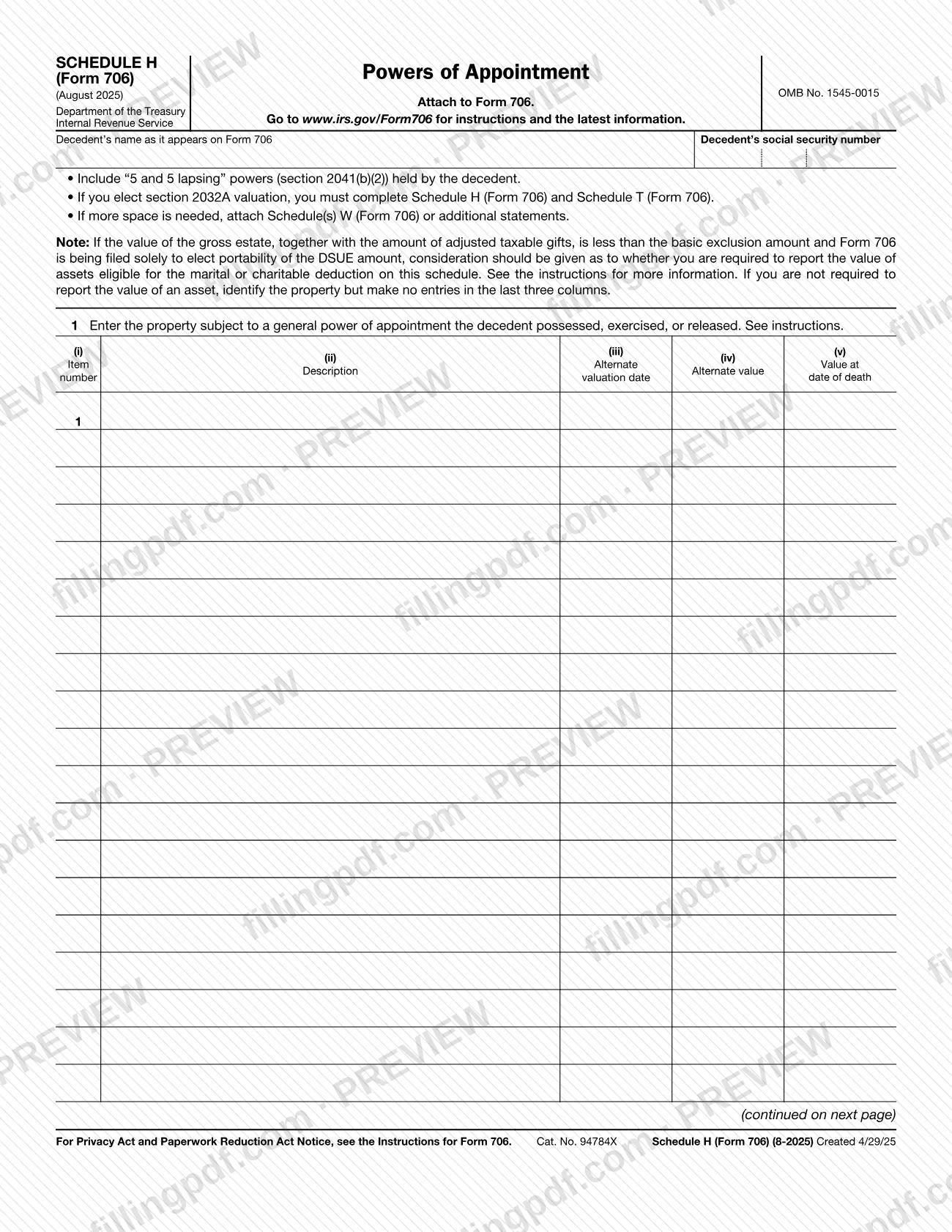
Schedule H (Form 706), Powers of Appointment, is an Internal Revenue Service (IRS) schedule that you attach to Form 706. It lists property subject to a general power of appointment that the decedent possessed, exercised, or released, and it totals the values for Form 706, Part V, item 8. On FillingPDF you can fill out Schedule H (Form 706) online and download or print the completed PDF; the form and its instructions are published by the IRS at www.irs.gov/Form706.
Last updated
What is Schedule H (Form 706)?
Schedule H (Form 706), Powers of Appointment, is the IRS schedule attached to Form 706 on which you list property subject to a general power of appointment that the decedent possessed, exercised, or released, and total its value.
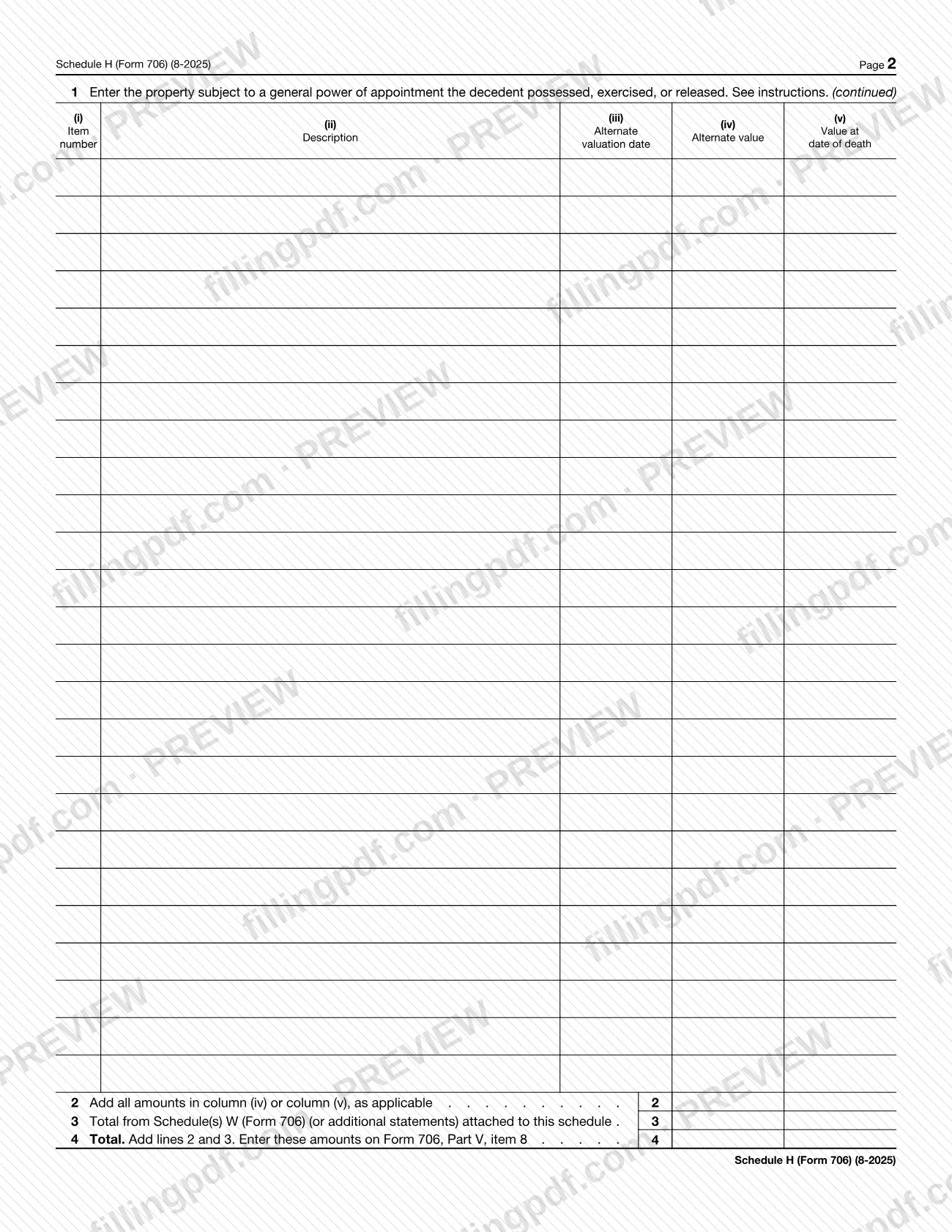
The schedule has a header with the decedent's name as it appears on Form 706 and the decedent's social security number. On line 1 each item gets an item number, a description, an alternate valuation date, an alternate value and the value at date of death. Line 2 adds the amounts in column (iv) or column (v), as applicable. Line 3 brings in the total from any Schedule(s) W (Form 706) or additional statements attached for extra space. Line 4 adds lines 2 and 3, and the form tells you to enter that total on Form 706, Part V, item 8.
The form states that "5 and 5 lapsing" powers (section 2041(b)(2)) held by the decedent are included. It is identified as OMB No. 1545-0015, and the revision printed on it is August 2025. Schedule H is not filed on its own: it is attached to Form 706. The IRS publishes the instructions and the latest information at www.irs.gov/Form706.
Who needs to file Schedule H (Form 706)?
Anyone preparing Form 706 for a decedent whose estate includes property subject to a general power of appointment that the decedent possessed, exercised, or released attaches this schedule to that form. The form also says to include "5 and 5 lapsing" powers (section 2041(b)(2)) held by the decedent.
Two further situations are named on the form:
- Section 2032A valuation. If you elect section 2032A valuation, you must complete both Schedule H (Form 706) and Schedule T (Form 706).
- Portability only. If the value of the gross estate, together with adjusted taxable gifts, is less than the basic exclusion amount and Form 706 is filed solely to elect portability of the DSUE amount, consider whether you must report the value of assets eligible for the marital or charitable deduction. If you are not required to report an asset's value, identify the property but make no entries in the last three columns. The Instructions for Form 706 explain this in more detail.
The form does not say who may sign for the estate; refer to the Instructions for Form 706 for that.
When to file Schedule H (Form 706)
You complete Schedule H (Form 706) when you prepare Form 706, because the form says to attach it to Form 706. It has no separate due date printed on it, so it travels with Form 706 whenever that form is filed. If you elect section 2032A valuation, Schedule H must be completed together with Schedule T (Form 706). For any deadline that applies to Form 706 itself, check the Instructions for Form 706 at www.irs.gov/Form706.
Documents you need
- Form 706, to which Schedule H is attached; the schedule is not filed on its own.
- Schedule(s) W (Form 706) or additional statements, only if you need more space than the schedule provides; their total goes on line 3.
- Schedule T (Form 706), only if you elect section 2032A valuation; the form says you must complete both Schedule H and Schedule T in that case.
How to fill out Schedule H (Form 706)
Enter the decedent's name and SSN
At the top, write the decedent's name exactly as it appears on Form 706 and the decedent's social security number.
Check what the schedule covers
Include "5 and 5 lapsing" powers (section 2041(b)(2)) held by the decedent. If you elect section 2032A valuation, you must also complete Schedule T (Form 706).
Describe each item on line 1
On line 1, enter the property subject to a general power of appointment the decedent possessed, exercised, or released. Give each property an item number in column (i) and a description in column (ii).
Enter the valuation columns
Complete column (iii) alternate valuation date, column (iv) alternate value and column (v) value at date of death, as the instructions for line 1 require.
Apply the portability note if relevant
If Form 706 is filed solely to elect portability of the DSUE amount and you are not required to report an asset's value, identify the property but make no entries in the last three columns.
Continue on page 2 or attach more
Use the continued line 1 table on page 2 for more items. If you need more space, attach Schedule(s) W (Form 706) or additional statements.
Total the values on line 2
Add all amounts in column (iv) or column (v), as applicable, and enter the sum on line 2.
Enter attached totals on line 3
On line 3, enter the total from Schedule(s) W (Form 706) or additional statements attached to this schedule.
Add lines 2 and 3 on line 4
Add lines 2 and 3 and enter the result on line 4. Enter this amount on Form 706, Part V, item 8.
Review and download the PDF
Check the decedent's name, the item values and the totals, then download or print the completed PDF from FillingPDF and attach it to Form 706.
How to submit Schedule H (Form 706)
Schedule H (Form 706) is submitted as an attachment to Form 706; it has no filing channel, address or portal of its own printed on it.
- With Form 706: attach the completed schedule to Form 706 and send the package through the channel and to the address given in the Instructions for Form 706.
- Extra space: if you need more room, attach Schedule(s) W (Form 706) or additional statements, and enter their total on line 3.
- Where to look: the form directs you to www.irs.gov/Form706 for instructions and the latest information. The Privacy Act and Paperwork Reduction Act Notice is in the Instructions for Form 706.
FillingPDF lets you fill out and download the PDF; submission follows the IRS channels that apply to Form 706.
Common mistakes to avoid
- Filing Schedule H (Form 706) without attaching it to Form 706; the form states it is to be attached to Form 706.
- Leaving out "5 and 5 lapsing" powers (section 2041(b)(2)) held by the decedent, which the form says to include.
- Electing section 2032A valuation and completing Schedule H without also completing Schedule T (Form 706).
- Adding extra items on a separate sheet but not entering that total on line 3 from Schedule(s) W (Form 706) or additional statements.
- Filling in the last three columns for an asset you are not required to report in a portability-only filing; the form says to identify the property and make no entries there.
- Adding both column (iv) and column (v) on line 2 instead of the amounts in column (iv) or column (v), as applicable.
- Not carrying the line 4 total to Form 706, Part V, item 8.
- Writing a decedent's name that differs from the name as it appears on Form 706.
Frequently asked questions
What is Schedule H (Form 706)?
Schedule H (Form 706), Powers of Appointment, is the IRS schedule you attach to Form 706 to list property subject to a general power of appointment that the decedent possessed, exercised, or released, and to total its value for Form 706, Part V, item 8.
Is Schedule H (Form 706) the same as the Schedule H on Form 1040?
No. This page covers Schedule H (Form 706), which is attached to Form 706 and reports powers of appointment. It is identified by its title, Powers of Appointment, and by the instruction at the top to attach it to Form 706.
Are "5 and 5 lapsing" powers reported on Schedule H?
Yes. The form says to include "5 and 5 lapsing" powers (section 2041(b)(2)) held by the decedent. Enter them as property on line 1 like any other power covered by the schedule.
Where does the line 4 total go?
Line 4 adds line 2 and line 3, and the form tells you to enter that total on Form 706, Part V, item 8. Line 3 is the total from any Schedule(s) W (Form 706) or additional statements attached for extra space.
Do I need Schedule T if I complete Schedule H?
Only if you elect section 2032A valuation. The form says that in that case you must complete both Schedule H (Form 706) and Schedule T (Form 706).
What do I enter if Form 706 is filed only to elect portability?
If you are not required to report the value of an asset, identify the property on line 1 but make no entries in the last three columns. The note on the form points to the Instructions for Form 706 for when reporting is required.
Can I fill out Schedule H (Form 706) online?
Yes. You can fill out the PDF online on FillingPDF and download or print it. FillingPDF is an independent service and does not file the schedule with the IRS; you submit it with Form 706 through the IRS channels.
Where can I find the instructions for this schedule?
The IRS publishes the Instructions for Form 706 and the latest information at www.irs.gov/Form706, the address printed on the schedule. The instructions also contain the Privacy Act and Paperwork Reduction Act Notice.
Ready to fill out Schedule H (Form 706)?
Fill out Schedule H (Form 706) now