
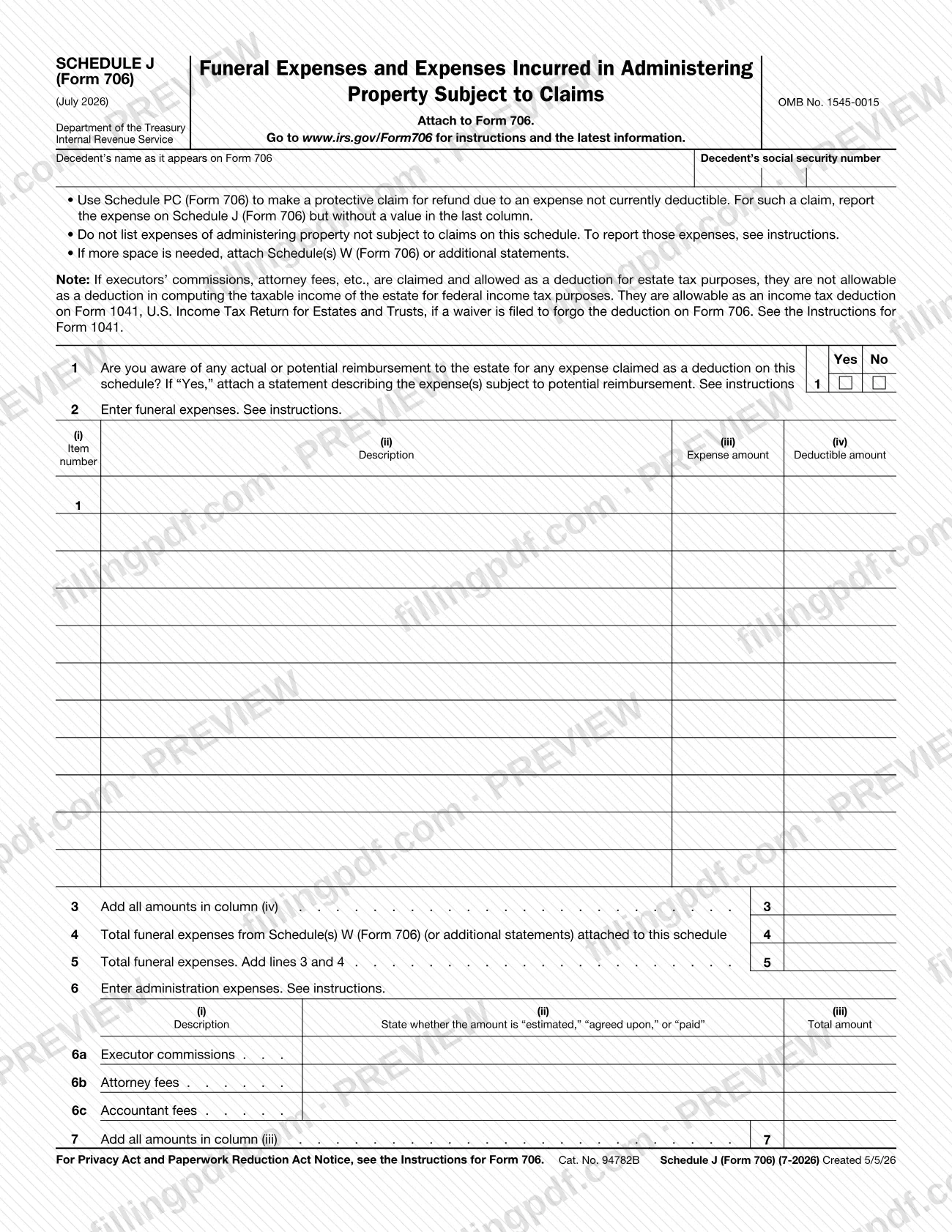
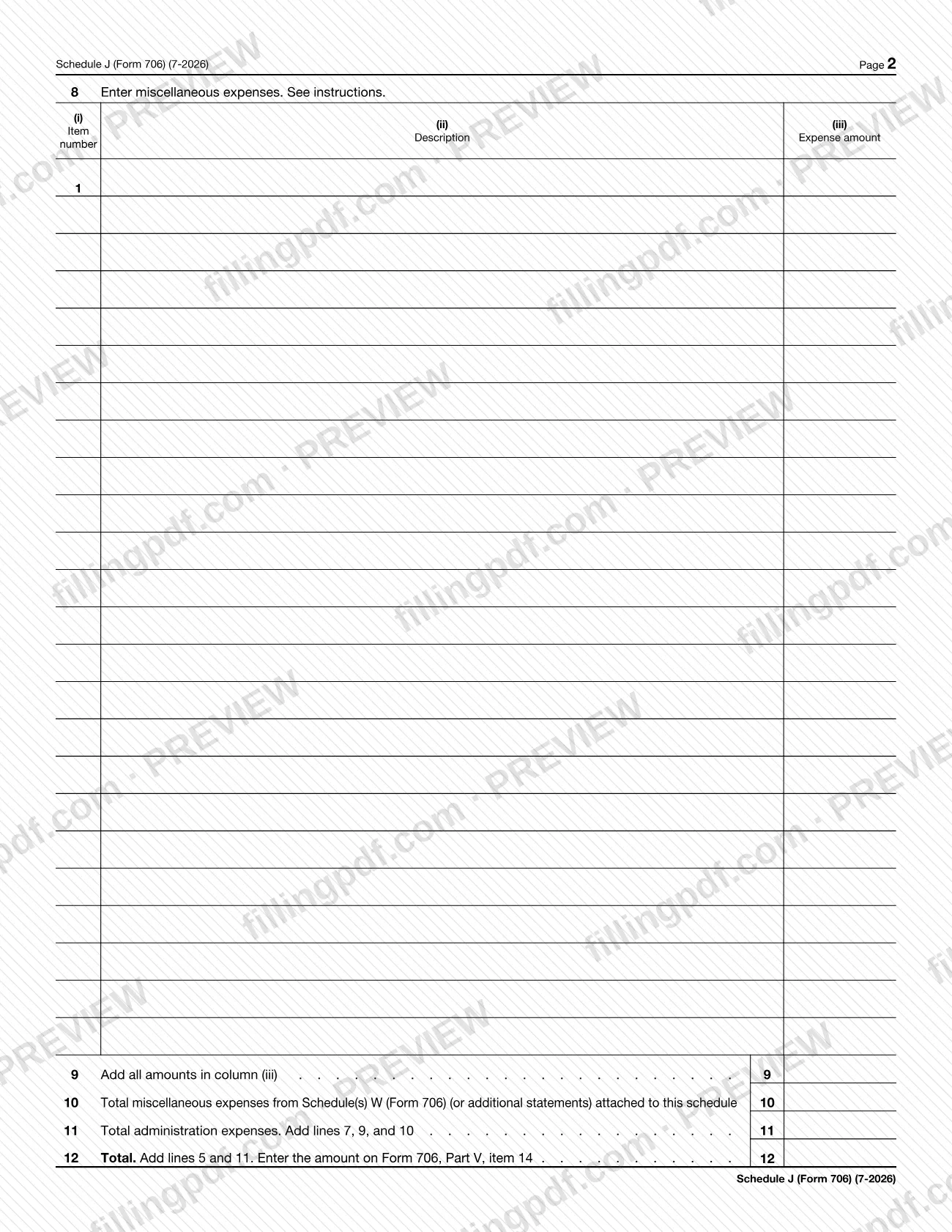
Schedule J (Form 706), Funeral Expenses and Expenses Incurred In Administering Property Subject to Claims, is the Internal Revenue Service (IRS) schedule on which funeral expenses and administration expenses are listed and totaled for Form 706. It is attached to Form 706, and its bottom line (line 12) is carried to Form 706, Part V, item 14. On this page you can fill out the schedule online on FillingPDF and download or print the completed PDF; the IRS publishes the form and its instructions at www.irs.gov/Form706.
Last updated
What is Schedule J (Form 706)?
Schedule J (Form 706), Funeral Expenses and Expenses Incurred In Administering Property Subject to Claims, is the IRS schedule attached to Form 706 on which funeral expenses and the expenses of administering property subject to claims are itemized, totaled and carried to the return.
The schedule is issued by the Internal Revenue Service under OMB No. 1545-0015, and the revision printed on it is July 2026. It is not filed alone: the form says to attach it to Form 706, and it asks for the decedent's name as it appears on Form 706 and the decedent's Social Security number.
It has three expense groups:
- Funeral expenses (lines 2 to 5), listed by item with a description, the expense amount and the deductible amount.
- Administration expenses (lines 6 and 7), with separate rows for executor commissions, attorney fees and accountant fees, each marked "estimated," "agreed upon," or "paid."
- Miscellaneous expenses (lines 8 to 10), listed by item with a description and the expense amount.
Line 11 totals the administration expenses and line 12 adds funeral and administration expenses; line 12 is entered on Form 706, Part V, item 14. Line 1 asks whether any actual or potential reimbursement to the estate exists for an expense claimed here.
The schedule is limited to expenses of administering property subject to claims. The form tells you not to list expenses of administering property not subject to claims on it, and refers you to the instructions for reporting those. A protective claim for refund for an expense that is not currently deductible is made with Schedule PC (Form 706).
Who needs to file Schedule J (Form 706)?
Schedule J (Form 706) is for whoever prepares Form 706 for a decedent and claims a deduction for funeral expenses or for expenses of administering property subject to claims. The form is attached to Form 706 and takes the decedent's name and Social Security number from that return.
Points the form itself makes about who should use it, and how:
- Do not list expenses of administering property not subject to claims on this schedule. The form refers you to the instructions for reporting those.
- If an expense is not currently deductible and you want to make a protective claim for refund, use Schedule PC (Form 706); report the expense on Schedule J but leave the last column without a value.
- If executors' commissions, attorney fees and similar costs are claimed and allowed as a deduction for estate tax purposes, they cannot also be deducted in computing the estate's taxable income for federal income tax purposes. They can be deducted on Form 1041, U.S. Income Tax Return for Estates and Trusts, only if a waiver is filed to forgo the deduction on Form 706.
The schedule has no signature block and does not say who may act for the estate; see the Instructions for Form 706.
When to file Schedule J (Form 706)
Schedule J (Form 706) has no due date of its own: the form says to attach it to Form 706, so it is completed and submitted whenever Form 706 is. Any deadline for the return is found in the Instructions for Form 706 at www.irs.gov/Form706.
Line 4 and line 10 pick up totals from Schedule(s) W (Form 706) or additional statements, so prepare those attachments before you total the schedule. If an expense is not currently deductible and you want to protect a refund claim, report it on this schedule without a value in the last column and use Schedule PC (Form 706) to make the protective claim.
Documents you need
- A statement describing the expense(s) subject to potential reimbursement, attached only if you answer "Yes" on line 1.
- Schedule(s) W (Form 706) or additional statements, attached only if you need more space; their funeral expense total goes on line 4 and their miscellaneous expense total on line 10.
- Schedule PC (Form 706), used only to make a protective claim for refund for an expense that is not currently deductible.
How to fill out Schedule J (Form 706)
Enter the decedent's name and SSN
At the top, enter the decedent's name as it appears on Form 706 and the decedent's Social Security number.
Answer the reimbursement question
On line 1, check Yes or No: are you aware of any actual or potential reimbursement to the estate for an expense claimed on this schedule? If Yes, attach a statement describing the expense(s) and see the instructions.
List funeral expenses on line 2
For each expense, enter the item number in column (i), a description in (ii), the expense amount in (iii) and the deductible amount in (iv).
Total funeral expenses on lines 3 to 5
On line 3, add all amounts in column (iv). On line 4, enter the funeral expense total from attached Schedule(s) W (Form 706) or statements, then add lines 3 and 4 on line 5.
Enter administration expenses on line 6
Use lines 6a (Executor commissions), 6b (Attorney fees) and 6c (Accountant fees). In column (ii) state whether each amount is "estimated," "agreed upon," or "paid," and enter the total amount in column (iii).
Add administration expenses on line 7
Add all amounts in column (iii) of line 6 and enter the result on line 7.
List miscellaneous expenses on line 8
For each expense, enter the item number in column (i), a description in (ii) and the expense amount in (iii).
Total miscellaneous expenses
On line 9, add all amounts in column (iii). On line 10, enter the miscellaneous expense total from attached Schedule(s) W (Form 706) or statements.
Figure total administration expenses
On line 11, add lines 7, 9 and 10.
Compute the total on line 12
Add lines 5 and 11 and enter the result on line 12, then carry it to Form 706, Part V, item 14.
Review and download the completed PDF
Check that every total adds correctly and that any statement or Schedule W is attached, then download or print the completed PDF from FillingPDF and attach it to Form 706 as described under How to submit.
How to submit Schedule J (Form 706)
Schedule J (Form 706) has no filing channel of its own: it is attached to Form 706 and is submitted with that return. The schedule prints no mailing address, portal or appointment rule.
- With Form 706: attach the completed schedule to the return and send it by the method that applies to Form 706. Mailing details and other filing information are in the Instructions for Form 706 at www.irs.gov/Form706, the address printed on the form.
- Extra space: if you need more room, attach Schedule(s) W (Form 706) or additional statements to the schedule.
- Reimbursement statement: if you answer "Yes" on line 1, attach a statement describing the expense(s) subject to potential reimbursement.
- Protective claim: a protective claim for refund is made on Schedule PC (Form 706), not on this schedule.
FillingPDF lets you fill out and download the PDF; submission follows the IRS channels that apply to Form 706.
Common mistakes to avoid
- Listing expenses of administering property not subject to claims on this schedule; the form says to see the instructions for reporting those.
- Filing Schedule J (Form 706) on its own instead of attaching it to Form 706.
- Answering line 1 "Yes" without attaching a statement describing the expenses subject to potential reimbursement.
- Leaving the "estimated," "agreed upon," or "paid" status out of column (ii) for executor commissions, attorney fees or accountant fees on lines 6a to 6c.
- Entering a value in the last column for an expense that is not currently deductible when a protective claim is intended; the form says to report it without a value there.
- Forgetting to add the Schedule W (Form 706) or additional-statement totals on lines 4 and 10 when extra pages are attached.
- Deducting executor commissions or attorney fees on both Form 706 and Form 1041 without a waiver filed to forgo the deduction on Form 706.
- Carrying a total other than line 12 to Form 706, Part V, item 14.
Frequently asked questions
What is Schedule J (Form 706)?
Schedule J (Form 706) is the IRS schedule attached to Form 706 that lists funeral expenses, administration expenses and miscellaneous expenses for property subject to claims. Its line 12 total goes on Form 706, Part V, item 14.
Where does the Schedule J total go on Form 706?
Line 12 of Schedule J (Form 706) adds total funeral expenses (line 5) and total administration expenses (line 11). The form says to enter that amount on Form 706, Part V, item 14.
Should I list expenses of administering property not subject to claims on Schedule J?
No. The form says not to list expenses of administering property not subject to claims on this schedule. It refers you to the Instructions for Form 706 at www.irs.gov/Form706 for how to report those expenses.
What do I do if I need more space on Schedule J?
Attach Schedule(s) W (Form 706) or additional statements. The funeral expense total from those attachments goes on line 4, and the miscellaneous expense total goes on line 10 of Schedule J (Form 706).
Can executor and attorney fees be deducted on both Form 706 and Form 1041?
Not both. If executors' commissions, attorney fees and similar costs are claimed and allowed for estate tax purposes, they are not deductible in computing the estate's taxable income, unless a waiver is filed on Form 706 to forgo that deduction and they are taken on Form 1041.
How do I make a protective claim for an expense that is not deductible yet?
Use Schedule PC (Form 706) to make the protective claim. On Schedule J (Form 706), report the expense but leave the last column without a value, as the form directs.
Do I send Schedule J separately to the IRS?
No. Schedule J (Form 706) is attached to Form 706 and travels with it. It prints no address or due date of its own; filing details are in the Instructions for Form 706.
Can I fill out Schedule J (Form 706) online on FillingPDF?
Yes. You can fill out the PDF online on FillingPDF and download or print it. FillingPDF is an independent service and does not file the schedule with the IRS; you submit it with Form 706 through the IRS channels.
Ready to fill out Schedule J (Form 706)?
Fill out Schedule J (Form 706) now