
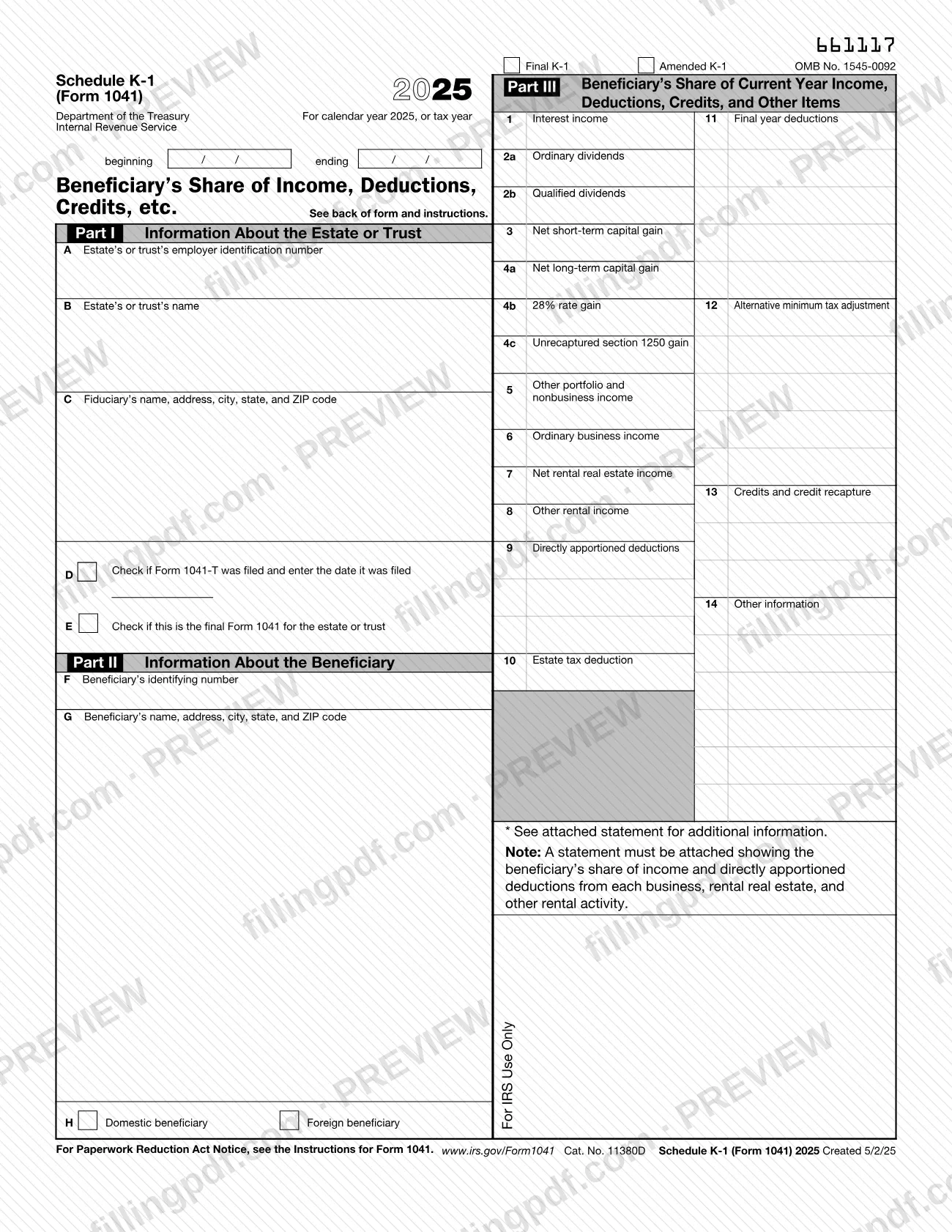
Schedule K-1 (Form 1041), Beneficiary's Share of Income, Deductions, Credits, etc., is the Internal Revenue Service (IRS) schedule an estate or trust uses to tell each beneficiary their share of the year's income, deductions, credits and other items. The fiduciary completes it; the beneficiary uses it to report those items on Form 1040 or 1040-SR and keeps it for their records. On this page you can fill out the 2025 form online on FillingPDF and download or print the completed PDF; the IRS publishes the form and its instructions at irs.gov/Form1041.
Last updated
What is Schedule K-1 (Form 1041)?
Schedule K-1 (Form 1041), Beneficiary's Share of Income, Deductions, Credits, etc., is the IRS schedule an estate or trust gives each beneficiary to report that beneficiary's share of its income, deductions, credits and other items for the tax year.
The form carries OMB No. 1545-0092 and has three parts. Part I identifies the estate or trust: its employer identification number, name, the fiduciary's name and address, whether Form 1041-T was filed, and whether this is the final Form 1041. Part II identifies the beneficiary: identifying number, name and address, and whether the beneficiary is domestic or foreign. Part III lists the beneficiary's share in boxes 1 through 14, including interest, dividends, capital gains, business and rental income, directly apportioned deductions, the estate tax deduction, final year deductions, alternative minimum tax items, credits and other information.
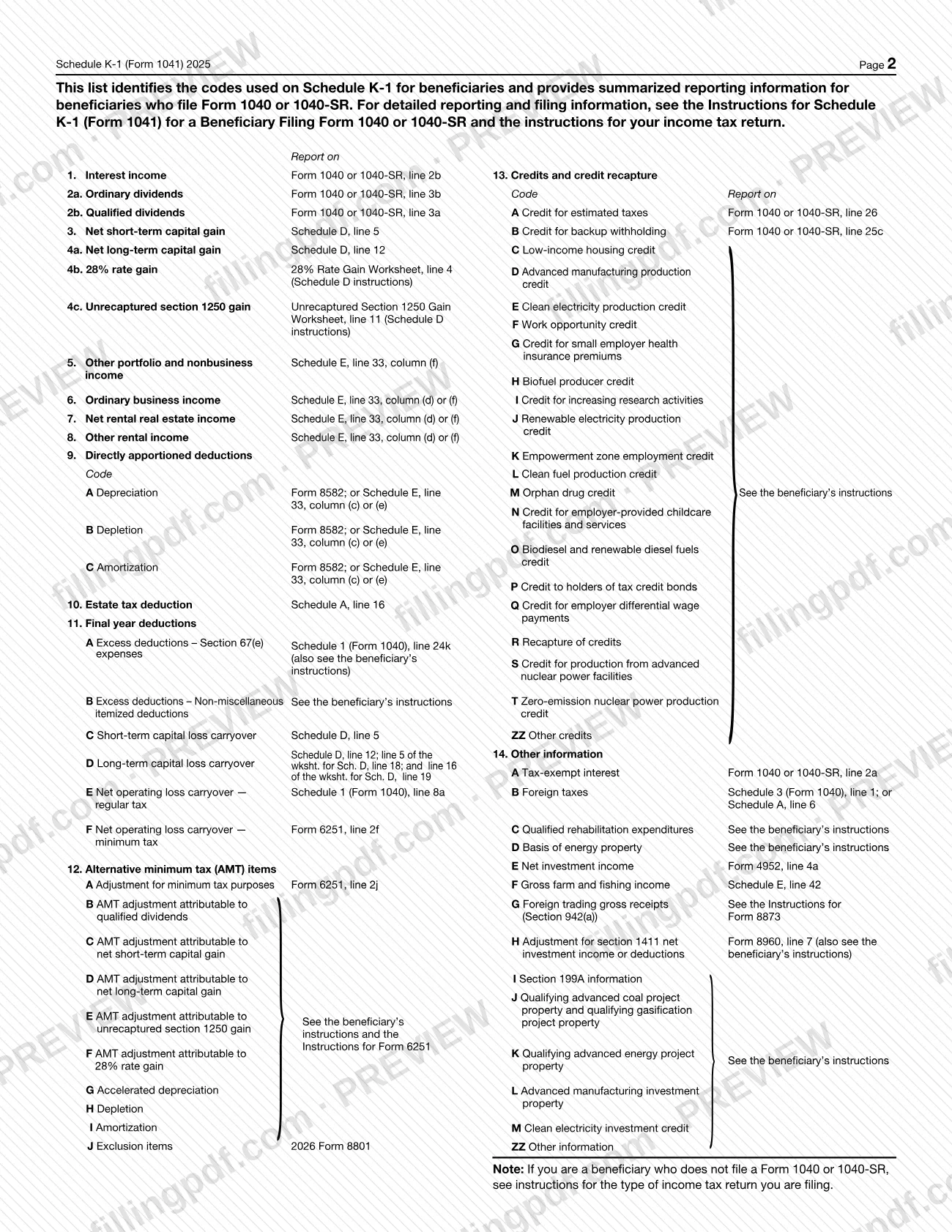
At the top, the fiduciary can check Final K-1 or Amended K-1. In box 9 and boxes 11 through 14 each item is identified by a code, and page 2 lists the codes with a summary of where a beneficiary filing Form 1040 or 1040-SR reports each item. An asterisk (*) after a code means a statement with more detail is attached.
The IRS publishes separate Instructions for Schedule K-1 (Form 1041) for a Beneficiary Filing Form 1040 or 1040-SR. The fiduciary's own instructions for completing the schedule are in the Instructions for Form 1041.
Who needs to file Schedule K-1 (Form 1041)?
The fiduciary of an estate or trust completes Schedule K-1 (Form 1041) for each beneficiary; the fiduciary's instructions are in the Instructions for Form 1041.
Beneficiaries receive the schedule and use it as follows:
- A beneficiary who files Form 1040 or 1040-SR uses the amounts in boxes 1 through 14 and the summary on page 2 of the form to complete that return.
- A beneficiary who does not file Form 1040 or 1040-SR follows the instructions for the type of income tax return being filed. A beneficiary who is not an individual reports the amounts in each box as that return instructs.
- An executor who received a decedent's Schedule K-1 for a prior year in which the decedent had a beneficial interest should ask the fiduciary for a corrected Schedule K-1 reflecting the proper allocation of tax items under the will or the trust's governing instrument.
- A beneficiary who received Form 706-GS(D-1) and paid generation-skipping transfer tax on Form 706-GS(D) can deduct that tax on Schedule A (Form 1040), line 6.
Excess deductions on termination (box 11, codes A and B) can be deducted only by the beneficiary of an estate or trust who succeeds to its property.
A beneficiary does not file this schedule with their tax return unless it reports backup withholding in box 13, code B.
When to file Schedule K-1 (Form 1041)
Schedule K-1 (Form 1041) covers one tax year of the estate or trust: calendar year 2025, or the fiscal year whose beginning and ending dates are entered at the top of the form. The form prints no separate due date.
Some timing rules in the IRS instructions attach to specific items:
- Form 1041-T, Allocation of Estimated Tax Payments to Beneficiaries, must be timely filed by the fiduciary for the beneficiary to get credit for an estimated tax payment. The beneficiary treats the amount in box 13, code A, as an estimated payment made on January 15, 2026 when figuring any underpayment penalty on Form 2210.
- If the Final K-1 box is checked, this is the beneficiary's final return; if item E in Part I is checked, this is the final year of the estate or trust.
- Excess deductions on termination arise only in the last tax year of the trust or decedent's estate. A beneficiary who cannot absorb the whole deduction that year cannot carry the balance to a later year.
- A beneficiary whose treatment of an item is inconsistent with the estate's or trust's treatment files Form 8082 with the original or amended return.
Documents you need
- A statement showing the beneficiary's share of income and directly apportioned deductions from each business, rental real estate and other rental activity: the form says one must be attached.
- A statement of depreciation, depletion and amortization directly apportioned to the beneficiary for each activity reported in boxes 5 through 8, when box 9 is used.
- Any other statement the fiduciary refers to with an asterisk (*) after a code, or with "STMT" in the amount space, for items that cannot be shown as one dollar amount.
- A copy of Schedule K-1 attached to the beneficiary's Form 1040 or 1040-SR, only if box 13, code B (credit for backup withholding) shows an amount.
- Form 8082 filed with the beneficiary's return, only if the beneficiary's treatment of an item is inconsistent with the estate's or trust's treatment, or the estate or trust has not filed a return.
How to fill out Schedule K-1 (Form 1041)
Mark the tax year and K-1 type
At the top, enter the calendar year 2025 or the tax year beginning and ending dates. Check Final K-1 or Amended K-1 if either applies.
Enter the estate or trust details
In Part I, enter the estate's or trust's employer identification number (item A), its name (item B) and the fiduciary's name, address, city, state and ZIP code (item C).
Complete the Form 1041-T and final-year items
Item D: check the box if Form 1041-T was filed and enter the date filed. Item E: check the box if this is the final Form 1041 for the estate or trust.
Identify the beneficiary
In Part II, enter the beneficiary's identifying number (item F) and name, address, city, state and ZIP code (item G). Check Domestic beneficiary or Foreign beneficiary in item H.
Enter interest, dividends and capital gains
In Part III, enter the beneficiary's share in box 1 (interest income), 2a (ordinary dividends), 2b (qualified dividends), 3 (net short-term capital gain), 4a (net long-term capital gain), and 4b and 4c for 28% rate gain and unrecaptured section 1250 gain.
Enter other, business and rental income
Box 5 holds other portfolio and nonbusiness income. Boxes 6, 7 and 8 hold ordinary business income, net rental real estate income and other rental income, and a statement for each activity must be attached.
Enter deductions in boxes 9 and 10
Box 9 lists directly apportioned deductions by code (A depreciation, B depletion, C amortization). Box 10 is the estate tax deduction.
Enter final year deductions in box 11
Use the codes A through F for excess deductions on termination, capital loss carryovers and net operating loss carryovers. Use box 11 only when the estate or trust is ending.
Complete box 12 AMT items
Enter alternative minimum tax items by code, from A (adjustment for minimum tax purposes) through J (exclusion items).
Enter credits in box 13
Enter each credit by its code, such as A for credit for estimated taxes, B for credit for backup withholding, C through T for specific credits, R for recapture or ZZ for other credits.
Enter other information in box 14
Enter each item by code, such as A tax-exempt interest, B foreign taxes, E net investment income or I section 199A information. Add an asterisk (*) after a code, and "STMT" in the amount space, when a statement is attached.
Review and download the completed PDF
Check each part and attach the required statements. Download or print the completed PDF from FillingPDF and give each beneficiary their copy.
How to submit Schedule K-1 (Form 1041)
Schedule K-1 (Form 1041) prints no filing address or portal of its own; what happens to the copy depends on who holds it.
- Beneficiary: keep the schedule for your records and do not file it with your tax return. The one exception is box 13, code B, credit for backup withholding: enter the amount on line 25c of Form 1040 or 1040-SR and attach a copy of Schedule K-1 to your return.
- Fiduciary: the form refers to the Instructions for Form 1041 (www.irs.gov/Form1041) for completing and handling the schedule.
- Errors: if you think the fiduciary made an error, notify the fiduciary and ask for an amended or corrected Schedule K-1. Do not change any items on your copy. Make sure the fiduciary sends a copy of the amended schedule to the IRS. If you cannot reach agreement with the fiduciary, file Form 8082 with your return.
FillingPDF lets you fill out and download the PDF; submission follows the channels above.
Common mistakes to avoid
- Filing Schedule K-1 with your Form 1040 or 1040-SR when box 13, code B shows no backup withholding; the instructions say to keep it for your records instead.
- Changing amounts on your own copy because you think the fiduciary made an error; the instructions say to ask the fiduciary for an amended or corrected Schedule K-1.
- Reporting an item differently from the estate's or trust's return without filing Form 8082, which can lead to an accuracy-related penalty.
- Leaving out the attached statement of income and directly apportioned deductions from each business, rental real estate and other rental activity.
- Omitting the asterisk (*) after a code, or "STMT" in the amount space, when an item is explained on an attached statement.
- Claiming box 13, code A as an estimated tax credit when the fiduciary did not timely file Form 1041-T.
- Deducting miscellaneous itemized deductions as excess deductions on termination; the instructions say section 67(g) makes them not deductible for 2018 through 2025.
- Carrying excess deductions on termination to a later year; any balance the beneficiary cannot absorb that year cannot be carried over.
- Mixing up boxes 2a and 2b when reporting: ordinary dividends go to Form 1040 line 3b, qualified dividends to line 3a.
Frequently asked questions
What is Schedule K-1 (Form 1041)?
Schedule K-1 (Form 1041) is the IRS schedule an estate or trust gives each beneficiary to show the beneficiary's share of its income, deductions, credits and other items for the tax year. The beneficiary uses it to report those items on Form 1040 or 1040-SR.
Do I file Schedule K-1 (Form 1041) with my tax return?
Usually not. The instructions say to keep it for your records and not file it with your return. The exception is box 13, code B: if it shows backup withholding, enter the amount on line 25c of Form 1040 or 1040-SR and attach a copy of the schedule.
Who fills out Schedule K-1 (Form 1041), the trust or the beneficiary?
The fiduciary of the estate or trust completes it and gives a copy to each beneficiary. The fiduciary's instructions are in the Instructions for Form 1041; beneficiaries filing Form 1040 or 1040-SR use the separate beneficiary instructions.
What do I do if my Schedule K-1 (Form 1041) has an error?
Notify the fiduciary and ask for an amended or corrected Schedule K-1; do not change items on your copy. Make sure the fiduciary sends the amended schedule to the IRS. If you cannot reach agreement, you must file Form 8082 with your return.
What is Form 8082 and when does a beneficiary need it?
Form 8082 is the Notice of Inconsistent Treatment or Administrative Adjustment Request (AAR). You file it with your original or amended return when you treat an item differently from the estate or trust, or when it was required to file a return and has not. Failing to file can bring an accuracy-related penalty.
Can I deduct excess deductions on termination from box 11?
Only if you are the beneficiary who succeeds to the property in the final year of the estate or trust. Code A is reported on Schedule 1 (Form 1040), line 24k. Miscellaneous itemized deductions are not deductible this way for 2018 through 2025, and unused amounts cannot be carried forward.
What does the Final K-1 box mean?
If the Final K-1 box at the top is checked, the instructions say this is the final return for the beneficiary. Separately, item E in Part I, when checked, means this is the final year of the estate or trust.
Can I fill out Schedule K-1 (Form 1041) online?
Yes. You can fill out the PDF online on FillingPDF and download or print it. FillingPDF is an independent service and does not file or deliver the schedule; the fiduciary and beneficiary handle it through the IRS channels and instructions.
Ready to fill out Schedule K-1 (Form 1041)?
Fill out Schedule K-1 (Form 1041) now