
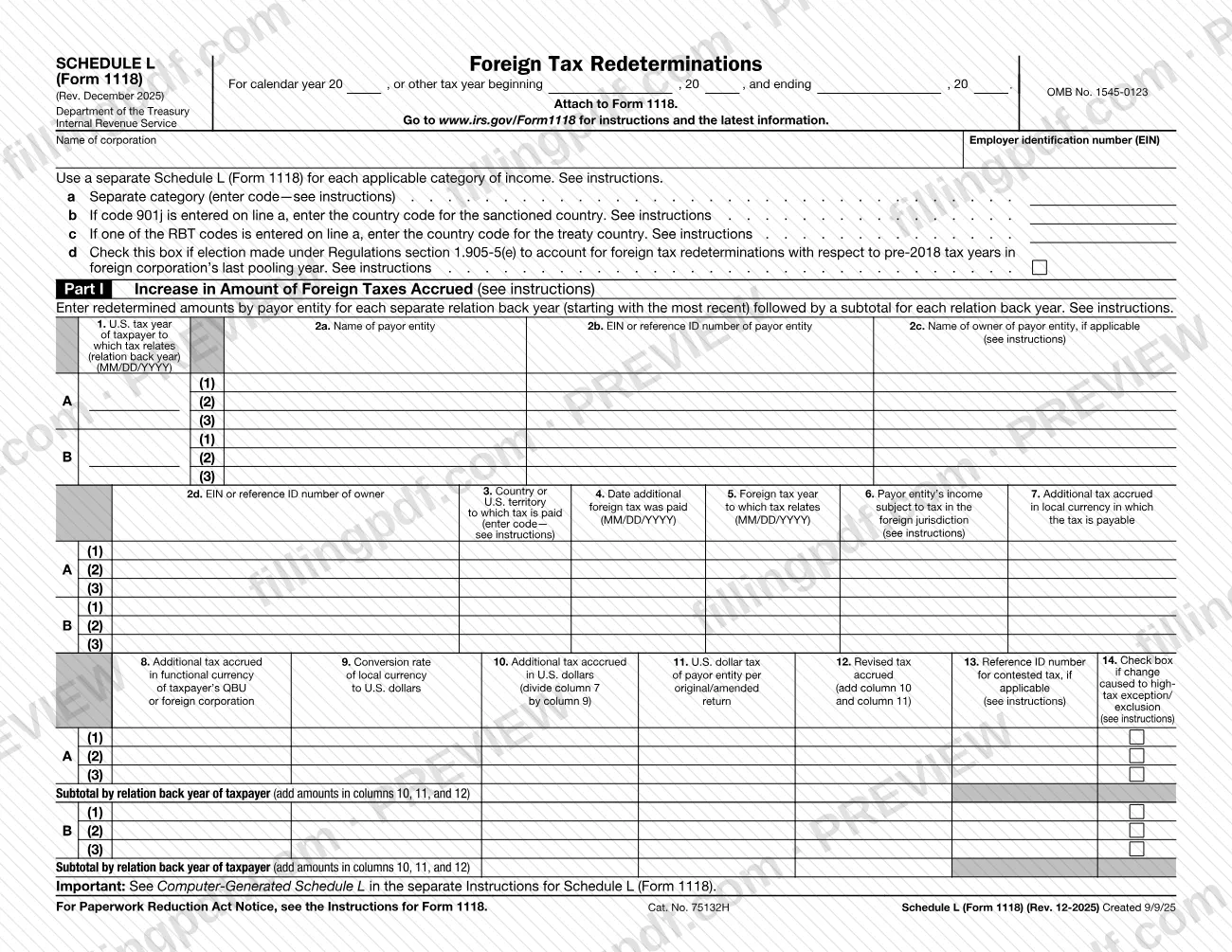
Schedule L (Form 1118), Foreign Tax Redeterminations, is the Internal Revenue Service (IRS) schedule that you attach to Form 1118 to report changes in foreign income taxes that relate to earlier years. Any taxpayer with a foreign tax redetermination under section 905(c) completes it, one schedule for each separate category of income. On this page you can fill out the form online on FillingPDF and download or print the completed PDF; the form and its instructions are published by the IRS at www.irs.gov/Form1118.
Last updated
What is Schedule L (Form 1118)?
Schedule L (Form 1118), Foreign Tax Redeterminations, is the Internal Revenue Service (IRS) schedule, attached to Form 1118, that identifies the foreign tax redeterminations of the current tax year by separate category of income and the years they relate to.
The IRS instructions say the schedule also carries the information that satisfies the taxpayer's obligation to notify the IRS of foreign tax redeterminations related to prior years. The form is OMB No. 1545-0123, revision Rev. December 2025, and has four pages with five parts:
- Part I: increases in the amount of foreign taxes accrued.
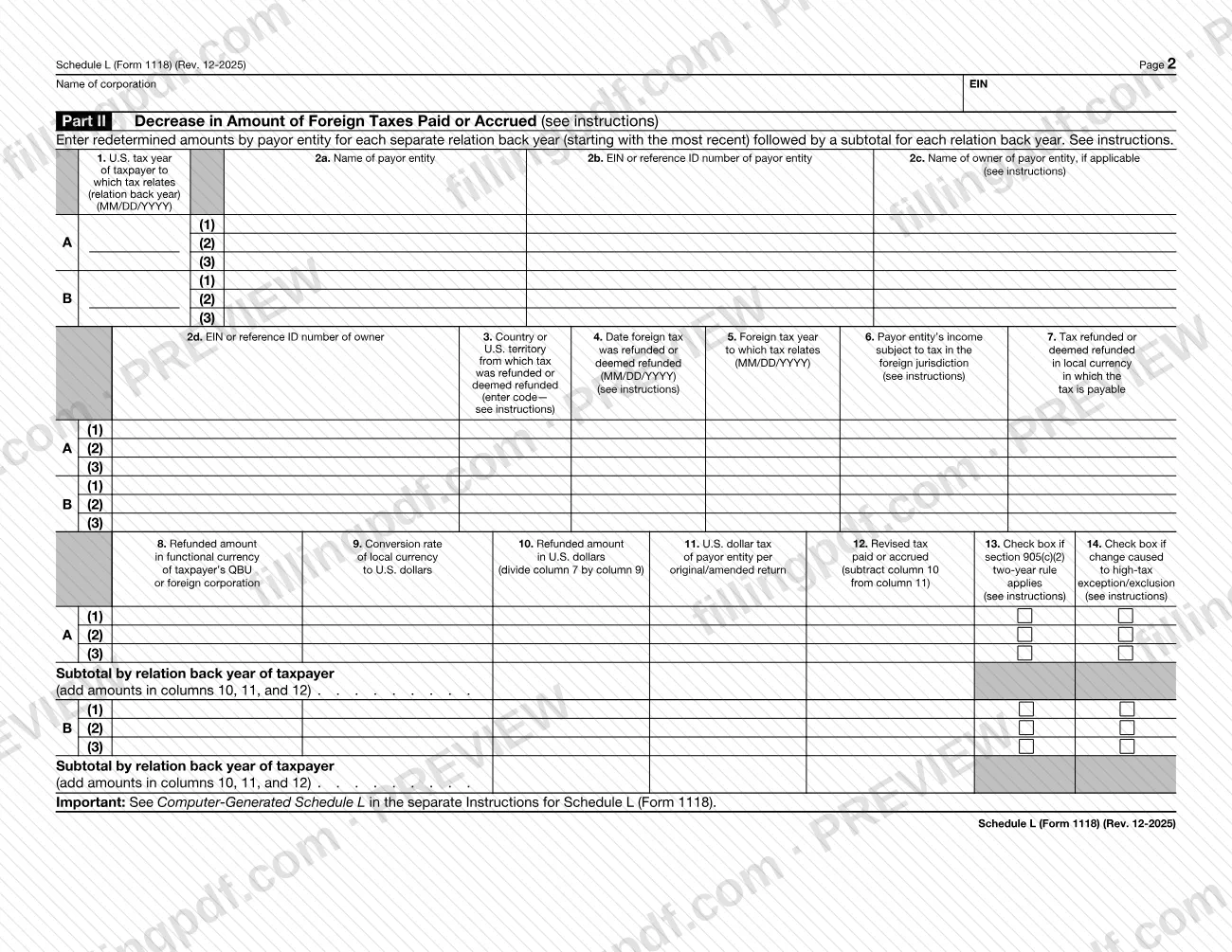
- Part II: decreases in the amount of foreign taxes paid or accrued, such as refunds.
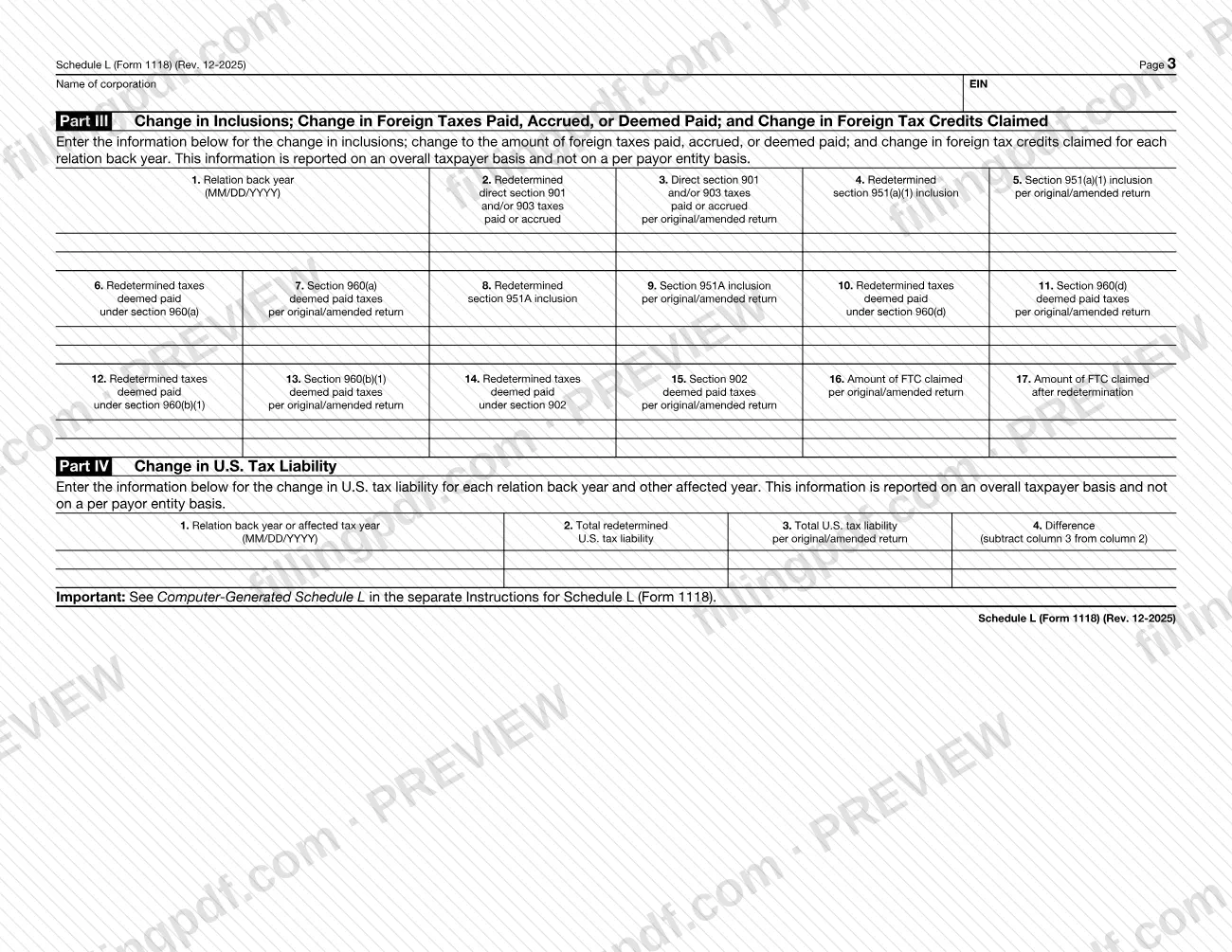
- Part III: changes in inclusions, in foreign taxes paid, accrued or deemed paid, and in foreign tax credits claimed, reported on an overall taxpayer basis.
- Part IV: the change in U.S. tax liability for each relation back year and other affected year.
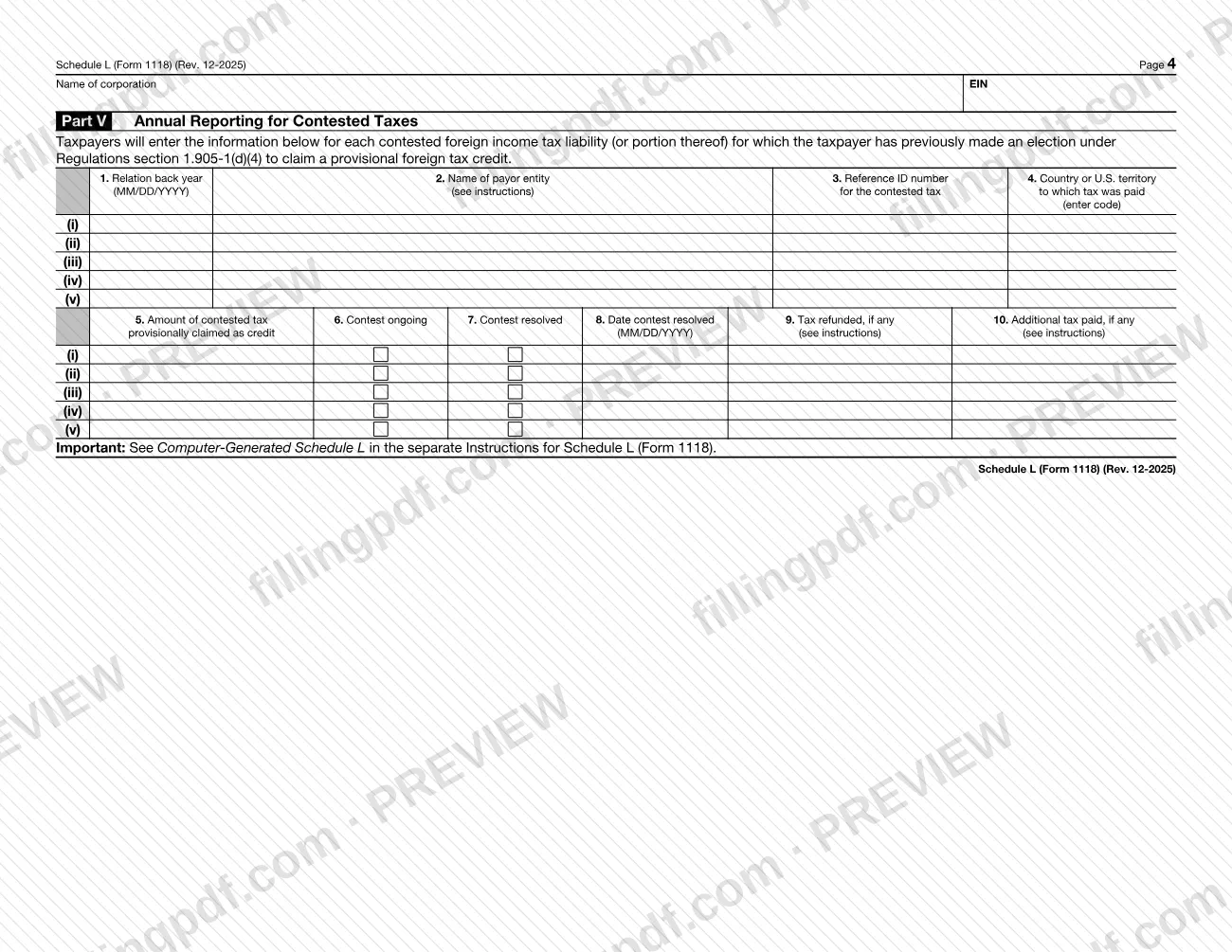
- Part V: annual reporting for contested taxes for which a provisional foreign tax credit was claimed under Regulations section 1.905-1(d)(4).
The instructions define a foreign tax redetermination as a change in the liability for foreign income taxes, for example when accrued taxes differ from the amounts claimed as credits, when accrued taxes are not paid within 24 months after the close of the tax year to which they relate, or when foreign tax paid is refunded in whole or in part. Schedule L is a schedule of Form 1118 and is not filed on its own.
Who needs to file Schedule L (Form 1118)?
Any taxpayer that has a foreign tax redetermination under section 905(c) must complete Schedule L (Form 1118) and attach it to the income tax return for the tax year in which the redetermination occurs. The instructions say it must be submitted whether or not the redetermination changed the taxpayer's U.S. tax liability.
Other conditions in the instructions:
- Use a separate schedule for each applicable separate category of income, plus a "TOTAL" Schedule L that aggregates the categories, even if you have only one category.
- Complete Part V only if you previously made an election under Regulations section 1.905-1(d)(4) to claim a provisional foreign tax credit for a contested foreign income tax.
- Check the box on line d only if an election under Regulations section 1.905-5(e) has been made, or is being made in the current year, for pre-2018 tax years in a foreign corporation's last pooling year.
- If the U.S. tax liability for any year changes because of the redetermination, you must also file an amended return for that year.
The form asks for the name of the corporation and its employer identification number (EIN).
When to file Schedule L (Form 1118)
File Schedule L (Form 1118) with the income tax return for the tax year in which the foreign tax redetermination occurs. The schedule has no separate due date printed on it, so it travels with that return and its Form 1118.
The IRS instructions say that if the redetermination changes the U.S. tax liability for any year, you must also file an amended return for the tax year with respect to which the liability is adjusted, in addition to the Schedule L for the year of the redetermination. If the redetermination does not change the U.S. tax due for any year, no amended return is needed: filing Schedule L with the return for the year of the redetermination meets the reporting requirement under Regulations section 1.905-4(b)(1)(v).
Under the 2-year rule of section 905(c)(2), accrued foreign taxes not paid within 24 months after the close of the tax year to which they relate are treated as refunded on that date, which is itself a redetermination to report in Part II.
Documents you need
- Form 1118, to which Schedule L (Form 1118) is attached; the schedule is not filed on its own.
- An amended return for each tax year whose U.S. tax liability changes because of the foreign tax redetermination, filed in addition to Schedule L; not needed when no year's U.S. tax due changes.
- The reference ID number from the Form 7204 filed for a contested foreign income tax, needed for Part I, column 13 and Part V, column 3 when a contested tax applies.
- Additional Schedules L in the same format when you report more than three payor entities for a relation back year or more than two relation back years.
- The "TOTAL" Schedule L aggregating all separate category Schedules L for Parts I, II, III and V, with Part IV completed once.
How to fill out Schedule L (Form 1118)
Enter corporation name, EIN and tax year
At the top of page 1, enter the calendar year or the tax year beginning and ending dates, the name of the corporation and its employer identification number (EIN). Repeat the name and EIN at the top of pages 2 to 4.
Complete lines a through d
Line a: the same separate category code as on the Form 1118 this schedule relates to. Line b: the sanctioned country code if you entered 901j. Line c: the treaty country code if you entered an RBT code. Line d: check the box only if an election under Regulations section 1.905-5(e) has been or is being made.
Identify years and payor entities in Part I
In column 1 enter the ending date of each relation back year in MM/DD/YYYY format, then the payor entity's name and EIN or reference ID number in columns 2a and 2b. If the payor is not a corporation, use columns 2c and 2d for the owner.
Enter additional foreign tax accrued
In Part I, column 3 enter the country or U.S. territory code from IRS.gov/CountryCodes. Columns 4 and 5 are the payment date and the ending date of the foreign tax year; column 6 is income subject to foreign tax; columns 7 and 8 are the additional tax in local and functional currency.
Convert to U.S. dollars in Part I
Column 9 is the exchange rate originally used, stated as units of foreign currency per one U.S. dollar, rounded to at least four places. Column 10 is column 7 divided by column 9, column 11 is the U.S. dollar tax on the original or amended return, and column 12 adds columns 10 and 11.
Add contested tax and high-tax boxes
Part I, column 13: enter the Form 7204 reference ID number if the tax is contested. Column 14: check the box if the redetermination changes whether a grouping of income qualifies for the high-tax exception or exclusion. Then enter the subtotal for each relation back year.
Report refunds in Part II
Complete columns 1 to 2d as in Part I. Column 3 is the country the tax was refunded from, column 4 the date refunded or deemed refunded, column 7 the refund in local currency, and column 10 the U.S. dollar refund. Check column 13 if the section 905(c)(2) 2-year rule applies, and column 14 for the high-tax change.
Complete Part III overall taxpayer figures
For each relation back year, enter the redetermined amount and the amount per the original or amended return for direct section 901 and/or 903 taxes, the section 951(a)(1) and 951A inclusions and the section 960 and 902 deemed paid taxes. Columns 16 and 17 show the foreign tax credit claimed before and after redetermination.
Report the U.S. tax change in Part IV
For each relation back year or affected tax year, enter the ending date in column 1, the total redetermined U.S. tax liability in column 2 and the liability per the original or amended return in column 3. Column 4 is column 3 subtracted from column 2.
Complete Part V for contested taxes
Only if you previously elected to claim a provisional credit, enter the relation back year, payor entity, reference ID number, country code and amount provisionally claimed. Check column 6 or 7, then enter the resolution date, tax refunded and additional tax paid in columns 8 to 10.
Add the TOTAL schedule, review and download
Prepare the "TOTAL" Schedule L and any expansion pages, check that amounts are in U.S. dollars unless a column says otherwise and that entries are in English. Download or print the completed PDF from FillingPDF and attach it to Form 1118.
How to submit Schedule L (Form 1118)
Schedule L (Form 1118) has no filing channel of its own: you attach it to Form 1118 and submit it with the income tax return for the year in which the foreign tax redetermination occurs.
- With the return and Form 1118: attach one Schedule L for each separate category of income, plus the "TOTAL" Schedule L. File the "TOTAL" schedule with the same category of income that completes Schedule B, Part III of Form 1118.
- Category with no Form 1118 this year: if a redetermination falls in a category for which you do not file a Form 1118 in the current year, file that Schedule L with the category that completes Schedule B, Part III.
- With an amended return, when required: if the redetermination changes U.S. tax liability for another year, the amended return for that year is filed in addition to the Schedule L.
- Extra pages: if you report more than three payor entities for a relation back year, or more than two relation back years, expand Schedule L following its format.
The form prints no mailing address, portal or fee. For where to send the return, see the Instructions for Form 1118 and www.irs.gov/Form1118. FillingPDF lets you fill out and download the PDF; submission follows the channels above.
Common mistakes to avoid
- Using one Schedule L for several separate categories of income; the form says to use a separate Schedule L for each applicable category.
- Leaving out the "TOTAL" Schedule L, which the instructions require even when you have only one separate category of income.
- Completing Part IV on every category schedule; because it is based on overall U.S. tax liability, Part IV is completed only once, in the "TOTAL" version.
- Reporting the exchange rate as U.S. dollars per unit of foreign currency; the instructions require units of foreign currency per one U.S. dollar, rounded to at least four places.
- Entering "FOREIGNUS" or "APPLIED FOR" in column 2b or 2d; use a reference ID number that uniquely identifies the entity when it has no EIN.
- Assuming no Schedule L is needed because U.S. tax liability did not change; it must be submitted whether or not the redetermination changed it.
- Skipping the amended return when U.S. tax liability for a year changes because of the redetermination.
- Entering a separate category code on line a that differs from the one on the Form 1118 to which the schedule relates.
- Entering the actual payment date in Part II, column 4 for a 2-year rule refund instead of the date 24 months after the close of the tax year.
Frequently asked questions
What is Schedule L (Form 1118) used for?
Schedule L (Form 1118) identifies foreign tax redeterminations that occur in the current tax year, by separate category of income and by the years they relate to. It also satisfies the taxpayer's duty to notify the IRS of redeterminations tied to prior years.
Do I have to file Schedule L if my U.S. tax did not change?
Yes. The IRS instructions say the schedule must be submitted whether or not the foreign tax redetermination changed your U.S. tax liability. If no year's tax due changes, no amended return is required; the schedule alone satisfies the reporting requirement.
Do I need to file an amended return with Schedule L?
Only if the redetermination changes your U.S. tax liability for a year. Then you file an amended return for the year whose liability is adjusted, in addition to Schedule L with the return for the year the redetermination occurs.
What is a relation back year on Schedule L?
It is the U.S. tax year in which the foreign taxes being redetermined were originally taken into account. Enter its ending date in MM/DD/YYYY format in column 1 of Parts I, II and III, and list each relation back year separately, starting with the most recent.
How do I report the exchange rate on Schedule L?
Use the divide-by convention: report the units of foreign currency that equal one U.S. dollar, rounded to at least four places. Do not report the number of U.S. dollars per unit of foreign currency. Round further if four places would materially distort the result.
What is the computer-generated "TOTAL" Schedule L?
It is a separate Schedule L, coded "TOTAL", that aggregates every line and column of the category Schedules L for Parts I, II, III and V. File it even if you have only one category. Part IV is completed only once, in this TOTAL version.
What changed in Part V in the December 2025 revision?
The former column 9 of Part V was split into two columns: column 9 for tax refunded, if any, and column 10 for additional tax paid, if any. The instructions add a new explanation for Part V, columns 8, 9 and 10.
Can I fill out Schedule L (Form 1118) online on FillingPDF?
Yes. You can fill out the PDF online on FillingPDF and download or print it. FillingPDF is an independent service and does not file the schedule with the IRS; you attach it to Form 1118 and submit it with your return.
Ready to fill out Schedule L (Form 1118)?
Fill out Schedule L (Form 1118) now