
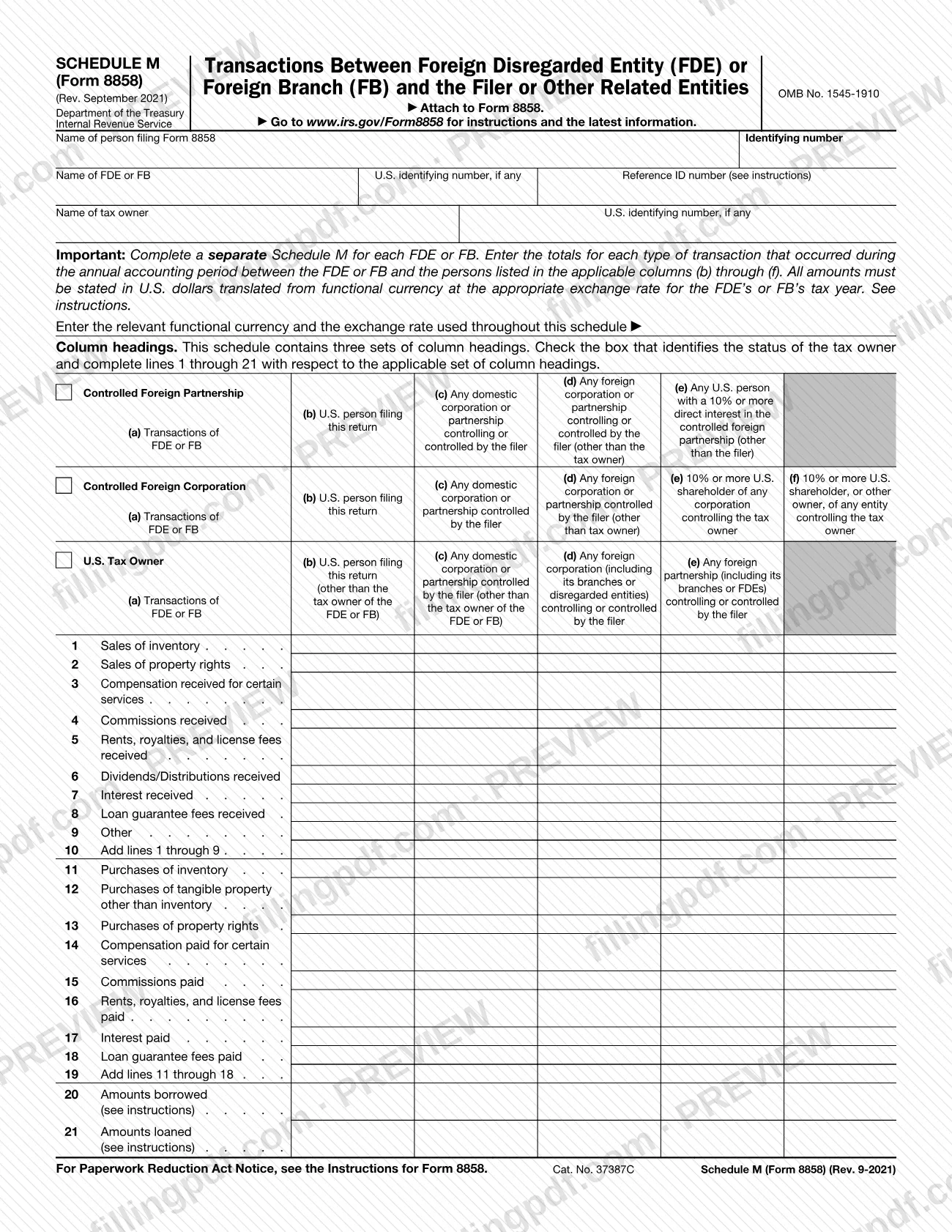
Schedule M (Form 8858), Transactions Between Foreign Disregarded Entity (FDE) or Foreign Branch (FB) and the Filer or Other Related Entities, is an Internal Revenue Service (IRS) schedule that you attach to Form 8858. It lists, by type, the totals of sales, purchases, payments, loans and other transactions between a foreign disregarded entity (FDE) or foreign branch (FB) and the filer or other related persons. On this page you can fill out the form online on FillingPDF and download or print the completed PDF; the IRS publishes the form and its instructions at www.irs.gov/Form8858.
Last updated
What is Schedule M (Form 8858)?
Schedule M (Form 8858), Transactions Between Foreign Disregarded Entity (FDE) or Foreign Branch (FB) and the Filer or Other Related Entities, is the IRS schedule attached to Form 8858 that totals the transactions of an FDE or FB with the filer and with other related persons during the annual accounting period.
The schedule is issued by the Internal Revenue Service under OMB No. 1545-1910, and the revision printed on it is Rev. September 2021. Its lines are grouped in two blocks. Lines 1 through 10 cover amounts received: sales of inventory, sales of property rights, compensation received for certain services, commissions, rents, royalties and license fees, dividends and distributions, interest, loan guarantee fees and other items, with line 10 adding lines 1 through 9. Lines 11 through 19 cover amounts paid: purchases of inventory, tangible property other than inventory and property rights, compensation, commissions, rents, royalties and license fees, interest and loan guarantee fees, with line 19 adding lines 11 through 18. Lines 20 and 21 report amounts borrowed and amounts loaned.
The columns split each total by counterparty, in columns (b) through (f). The form has three sets of column headings, and you complete only the set that matches the status of the tax owner. Every amount is stated in U.S. dollars, translated from the functional currency at the appropriate exchange rate for the tax year of the FDE or FB.
The bare name "Schedule M" is also used for other IRS schedules; this page covers only Schedule M of Form 8858, and the schedule is not filed on its own.
Who needs to file Schedule M (Form 8858)?
The person who files Form 8858 attaches this schedule to it. The form asks for the name and identifying number of the person filing Form 8858, followed by the FDE or FB and its tax owner.
- A separate Schedule M is completed for each FDE or FB. If your Form 8858 covers more than one, prepare one schedule per entity or branch.
- Which set of column headings you use depends on the status of the tax owner. The form offers three sets, labeled for a U.S. tax owner, a controlled foreign corporation and a controlled foreign partnership, and you check the box that identifies the tax owner's status.
The schedule itself does not say who must file Form 8858. For that question, and for any exception, see the Instructions for Form 8858 at www.irs.gov/Form8858. The form names no representative or signer of its own, because it is a schedule that accompanies Form 8858.
When to file Schedule M (Form 8858)
Schedule M (Form 8858) has no due date of its own: the form says to attach it to Form 8858, so it is completed and submitted whenever Form 8858 is. The transactions you report are those that occurred during the annual accounting period, and the exchange rate used is the one for the tax year of the FDE or FB. For the deadline that applies to Form 8858 and to the return it accompanies, check the Instructions for Form 8858 at www.irs.gov/Form8858.
How to fill out Schedule M (Form 8858)
Identify the filer and the entity
Enter the name and identifying number of the person filing Form 8858, then the name of the FDE or FB, its U.S. identifying number if any, and the Reference ID number (see instructions).
Identify the tax owner
Enter the name of the tax owner and its U.S. identifying number, if any. Complete a separate Schedule M for each FDE or FB.
Enter currency and exchange rate
On the line provided, enter the functional currency and the exchange rate used throughout the schedule. All amounts must be in U.S. dollars, translated at the appropriate rate for the tax year of the FDE or FB.
Check the tax owner's status
Check the box that identifies the status of the tax owner. Then complete lines 1 through 21 using only the set of column headings that applies.
Report amounts received on lines 1-9
For each type of transaction (lines 1 through 9, such as sales of inventory, commissions received or interest received), enter the totals for the annual accounting period in column (a) and in the applicable columns (b) through (f).
Add lines 1 through 9
On line 10, add lines 1 through 9 for each column that you completed.
Report amounts paid on lines 11-18
Enter totals for purchases of inventory, tangible property, property rights, compensation, commissions, rents, royalties and license fees, interest, and loan guarantee fees paid.
Add lines 11 through 18
On line 19, add lines 11 through 18 for each column that you completed.
Enter amounts borrowed and loaned
On line 20 enter amounts borrowed and on line 21 amounts loaned, following the instructions for those lines.
Review and download the completed PDF
Check that each total is in U.S. dollars and that the correct column set is used. Then download or print the completed PDF from FillingPDF and attach it to Form 8858.
How to submit Schedule M (Form 8858)
Schedule M (Form 8858) is submitted as an attachment to Form 8858; the form prints no mailing address, portal or appointment rule of its own.
- With Form 8858: attach each completed schedule, one for every FDE or FB, to Form 8858.
- Through the Form 8858 channel: send the package the way you submit Form 8858 and the return it accompanies. The instructions and latest information are at www.irs.gov/Form8858, as the form directs.
FillingPDF lets you fill out and download the PDF; submission follows the IRS channels that apply to Form 8858.
Common mistakes to avoid
- Filing a single Schedule M for several FDEs or FBs; the form says to complete a separate Schedule M for each FDE or FB.
- Leaving out the functional currency and the exchange rate on the line that asks for them.
- Reporting amounts in the functional currency; all amounts must be in U.S. dollars translated at the appropriate exchange rate for the FDE's or FB's tax year.
- Completing a set of column headings that does not match the tax owner's status instead of checking the box for the correct one.
- Reporting transactions with persons who are not listed in the applicable columns (b) through (f).
- Entering a total on line 10 or line 19 that does not equal the sum of lines 1 through 9 or lines 11 through 18.
- Submitting the schedule without Form 8858; the form says to attach it to Form 8858.
- Leaving out the reference ID number or the U.S. identifying number of the FDE or FB and the tax owner without checking the instructions for when they are required.
Frequently asked questions
What is Schedule M (Form 8858)?
Schedule M (Form 8858) is the IRS schedule that reports transactions between a foreign disregarded entity (FDE) or foreign branch (FB) and the filer or other related entities. You attach it to Form 8858, and it totals each transaction type by counterparty.
Is Schedule M (Form 8858) filed on its own?
No. The form says to attach it to Form 8858, so it is submitted with that form. It has no separate due date, address or portal printed on it.
Do I need a separate Schedule M for each FDE or FB?
Yes. The form states that you must complete a separate Schedule M for each FDE or FB. Each schedule reports the totals for one entity or branch and its own tax owner.
What currency do I use on Schedule M (Form 8858)?
U.S. dollars. Amounts are translated from the functional currency at the appropriate exchange rate for the FDE's or FB's tax year, and you enter the functional currency and exchange rate on the line near the top of the form.
Which column headings do I complete?
The schedule has three sets of column headings. Check the box that identifies the status of the tax owner, then complete lines 1 through 21 using only the set of headings that applies to that status.
Where can I find the instructions for Schedule M (Form 8858)?
The IRS publishes the Instructions for Form 8858 and the latest information at www.irs.gov/Form8858, the address printed on the schedule. The form refers to them for the Reference ID number and for lines 20 and 21.
Can I fill out Schedule M (Form 8858) online?
Yes. You can fill out the PDF online on FillingPDF and download or print it. FillingPDF is an independent service and does not file the schedule with the IRS; you submit it with Form 8858 through the IRS channels.
Ready to fill out Schedule M (Form 8858)?
Fill out Schedule M (Form 8858) now