
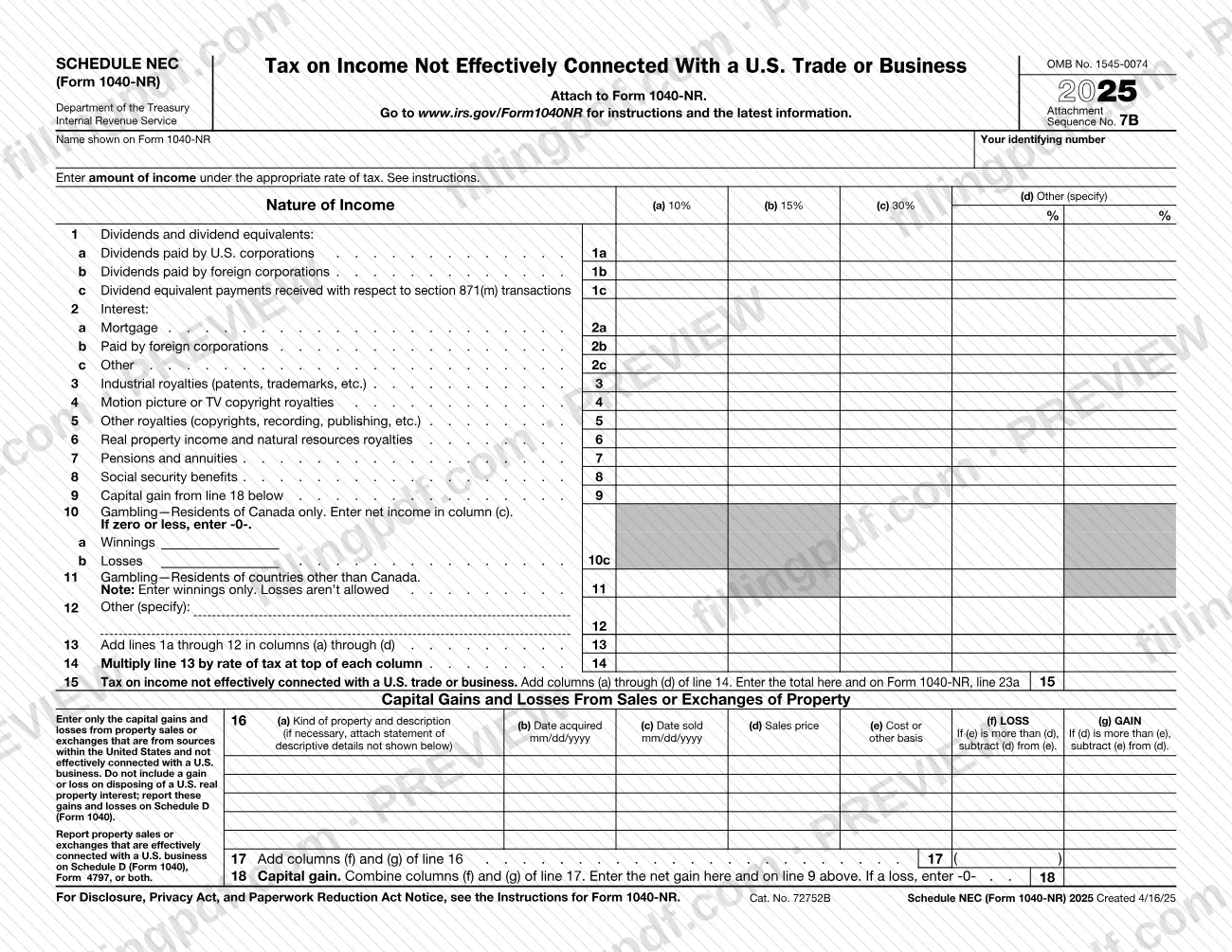
Schedule NEC (Form 1040-NR) is the Internal Revenue Service (IRS) schedule on which you list income that is not effectively connected with a U.S. trade or business, sorted by type of income and rate of tax, and figure the tax on it. It is attached to Form 1040-NR, and its line 15 total is carried to Form 1040-NR, line 23a. On this page you can fill out the form online on FillingPDF and download or print the completed PDF; the form and its instructions are published by the IRS at www.irs.gov/Form1040NR.
Last updated
What is Schedule NEC (Form 1040-NR)?
Schedule NEC (Form 1040-NR), Tax on Income Not Effectively Connected With a U.S. Trade or Business, is the Internal Revenue Service (IRS) schedule attached to Form 1040-NR that lists such income by type and rate and figures the tax on it.
The schedule has two parts. The top part, lines 1 through 15, sorts the income by nature: dividends and dividend equivalents (line 1), interest (line 2), industrial, motion picture or TV, and other royalties (lines 3 to 5), real property income and natural resources royalties (line 6), pensions and annuities (line 7), social security benefits (line 8), capital gain (line 9), gambling (lines 10 and 11) and other income (line 12). Each amount goes in the column for its rate of tax: columns (a) through (c) are printed rate columns, and column (d) is for another rate that you specify. Line 13 adds the columns, line 14 multiplies by the rate at the top of each column, and line 15 gives the tax, which is entered on Form 1040-NR, line 23a.
The lower part, Capital Gains and Losses From Sales or Exchanges of Property (lines 16 to 18), lists each sale of property and nets the result into the capital gain carried up to line 9.
The printed revision is 2025, with OMB No. 1545-0074 and Attachment Sequence No. 7B. The schedule is not a return on its own. Gain or loss on disposing of a U.S. real property interest is not reported here but on Schedule D (Form 1040), and property sales that are effectively connected with a U.S. business are reported on Schedule D (Form 1040), Form 4797, or both.
Who needs to file Schedule NEC (Form 1040-NR)?
Filers of Form 1040-NR who have income that is not effectively connected with a U.S. trade or business use this schedule to report it and to figure the tax on it. The form itself says to attach it to Form 1040-NR and asks for the name shown on that return and your identifying number.
Which lines apply to you depends on the kind of income you received:
- Dividends, interest, royalties, real property income, pensions and annuities, and social security benefits go on lines 1 to 8.
- Residents of Canada report gambling on line 10, netting winnings and losses in column (c).
- Residents of countries other than Canada report gambling winnings only on line 11; losses are not allowed.
- Anyone selling property from sources within the United States, not effectively connected with a U.S. business, lists the sales on line 16.
Do not use line 16 for a gain or loss on disposing of a U.S. real property interest; report it on Schedule D (Form 1040). Do not list property sales that are effectively connected with a U.S. business here either; they belong on Schedule D (Form 1040), Form 4797, or both. For questions about eligibility or the rate that applies to a type of income, see the instructions at www.irs.gov/Form1040NR.
When to file Schedule NEC (Form 1040-NR)
You complete Schedule NEC (Form 1040-NR) when you prepare Form 1040-NR, because the form says to attach it to that return. No separate due date is printed on the schedule, so it is submitted whenever Form 1040-NR is submitted.
Work the schedule in a useful order: if you sold property, fill out lines 16 to 18 first, because the net gain on line 18 is entered on line 9 above. The total tax on line 15 then goes to Form 1040-NR, line 23a. For any deadline or extension rule that applies to Form 1040-NR, check the IRS instructions at www.irs.gov/Form1040NR.
Documents you need
- A statement with descriptive details of the property, attached to Form 1040-NR only if the space on line 16, column (a) is not enough to describe the kind of property sold.
How to fill out Schedule NEC (Form 1040-NR)
Enter your name and identifying number
At the top, enter the name shown on Form 1040-NR and your identifying number.
Pick the rate column for each amount
Enter each amount of income in the column for its rate of tax: (a), (b) or (c) are printed rate columns, and column (d), Other (specify), is for a different rate that you write in. See the instructions for the appropriate rate.
Report dividends on lines 1a to 1c
Use line 1a for dividends paid by U.S. corporations, 1b for dividends paid by foreign corporations, and 1c for dividend equivalent payments received with respect to section 871(m) transactions.
Report interest on lines 2a to 2c
Enter mortgage interest on line 2a, interest paid by foreign corporations on line 2b, and any other interest on line 2c.
Report royalties on lines 3 to 5
Line 3 is industrial royalties (patents, trademarks, etc.), line 4 is motion picture or TV copyright royalties, and line 5 is other royalties (copyrights, recording, publishing, etc.).
Report real property, pension and social security income
Enter real property income and natural resources royalties on line 6, pensions and annuities on line 7, and social security benefits on line 8.
List property sales on line 16
For each sale or exchange of property from U.S. sources not effectively connected with a U.S. business, enter the description, date acquired, date sold (mm/dd/yyyy), sales price and cost or other basis. Enter a loss in column (f) or a gain in column (g), and leave out any U.S. real property interest.
Total the sales on lines 17 and 18
On line 17, add columns (f) and (g) of line 16. On line 18, combine them and enter the net gain here and on line 9; if it is a loss, enter -0-.
Complete the gambling lines
Residents of Canada: enter winnings and losses on line 10 and the net income in column (c) on line 10c, or -0- if zero or less. Residents of other countries: enter winnings only on line 11.
Add any other income on line 12
On line 12, specify the type of any other income not covered above and enter it under the appropriate rate.
Total the columns and figure the tax
On line 13, add lines 1a through 12 in columns (a) through (d). On line 14, multiply line 13 by the rate of tax at the top of each column.
Enter the tax and download the PDF
On line 15, add columns (a) through (d) of line 14 and enter the total here and on Form 1040-NR, line 23a. Review every line, then download or print the completed PDF from FillingPDF and attach it to Form 1040-NR.
How to submit Schedule NEC (Form 1040-NR)
Schedule NEC (Form 1040-NR) has no filing channel of its own: the form says to attach it to Form 1040-NR, so it is submitted wherever and however your Form 1040-NR is submitted.
- With Form 1040-NR: attach the completed schedule to your return. Check that the name shown on Form 1040-NR and your identifying number are entered at the top, and that the line 15 total is also entered on Form 1040-NR, line 23a.
- Statement for line 16: if you need more room for descriptive details of a property sale, attach a statement, as line 16 allows.
- Addresses and e-filing: the schedule prints no mailing address, portal or appointment rule. Find the latest information and instructions at www.irs.gov/Form1040NR, the address printed on the form.
FillingPDF lets you fill out and download the PDF; submission follows the IRS channels that apply to Form 1040-NR.
Common mistakes to avoid
- Listing a gain or loss on disposing of a U.S. real property interest on line 16; the form says to report it on Schedule D (Form 1040).
- Reporting property sales that are effectively connected with a U.S. business on line 16 instead of Schedule D (Form 1040), Form 4797, or both.
- Entering a net loss on line 18; the form says to enter -0- if the combined result is a loss.
- Deducting gambling losses on line 11 as a resident of a country other than Canada; enter winnings only, because losses are not allowed.
- Entering a negative result on line 10c as a resident of Canada; net income goes in column (c), and if it is zero or less you enter -0-.
- Leaving out the dates acquired and sold in mm/dd/yyyy format, or the cost or other basis, on a line 16 sale.
- Not carrying the line 15 total to Form 1040-NR, line 23a.
- Putting an amount in a rate column that does not match its income type instead of following the instructions for the appropriate rate.
- Submitting the schedule alone; it is meant to be attached to Form 1040-NR.
Frequently asked questions
What is Schedule NEC (Form 1040-NR)?
It is the IRS schedule titled Tax on Income Not Effectively Connected With a U.S. Trade or Business. You attach it to Form 1040-NR to list that income by type and rate of tax and to figure the tax, which is entered on Form 1040-NR, line 23a.
Is Schedule NEC filed on its own?
No. The form says to attach it to Form 1040-NR, so it is submitted with that return. It prints no separate address or due date; check www.irs.gov/Form1040NR for the instructions and latest information.
Where does the line 15 total go?
Line 15 is the tax on income not effectively connected with a U.S. trade or business. Enter the total on line 15 and also on Form 1040-NR, line 23a. It is the sum of columns (a) through (d) of line 14.
How do I report gambling winnings on Schedule NEC?
It depends on where you reside. Residents of Canada use line 10, netting winnings and losses and entering the net in column (c), or -0- if zero or less. Residents of other countries enter winnings only on line 11; losses are not allowed.
Do I report the sale of U.S. real property on Schedule NEC?
No. Line 16 excludes any gain or loss on disposing of a U.S. real property interest; the form says to report it on Schedule D (Form 1040). Sales effectively connected with a U.S. business go on Schedule D (Form 1040), Form 4797, or both.
What do I enter on line 18 if I have a capital loss?
Enter -0-. Line 18 combines columns (f) and (g) of line 17, and the form says to enter the net gain on line 18 and on line 9, or -0- if the result is a loss.
Can I fill out Schedule NEC (Form 1040-NR) online?
Yes. You can fill out the PDF online on FillingPDF and download or print it. FillingPDF is an independent service and does not file the schedule with the IRS; you submit it with Form 1040-NR through the IRS channels.
What are the columns for rates on the schedule?
Columns (a), (b) and (c) are printed rate columns, and column (d), Other (specify), is for a rate you write in. You enter each amount of income under the appropriate rate; see the instructions at www.irs.gov/Form1040NR to find it.
Ready to fill out Schedule NEC (Form 1040-NR)?
Fill out Schedule NEC (Form 1040-NR) now