
Schedule PC (Form 706), Protective Claim for Refund, is the Internal Revenue Service (IRS) schedule that an estate uses to preserve its right to a refund when a claim or expense may not become deductible under section 2053 until later. This schedule PC is filed with Form 706 for a decedent dying after December 31, 2011, and each separate claim or expense needs its own copy. On FillingPDF you can fill out the form online and download or print the completed PDF; the IRS publishes the form and its instructions at www.irs.gov/Form706.
Last updated
What is Schedule PC (Form 706)?
Schedule PC (Form 706), Protective Claim for Refund, is the IRS schedule that lets an estate preserve its right to a refund based on an unresolved claim or expense that may not become deductible under section 2053 until after the limitation period ends.
The form works in two stages. First, timely filing it with Form 706 protects the estate's right to claim a refund for the amount in contest. Later, once the claim or expense becomes deductible, the same schedule can be used to notify the IRS that a refund is being claimed, either in part or in full and final amount.
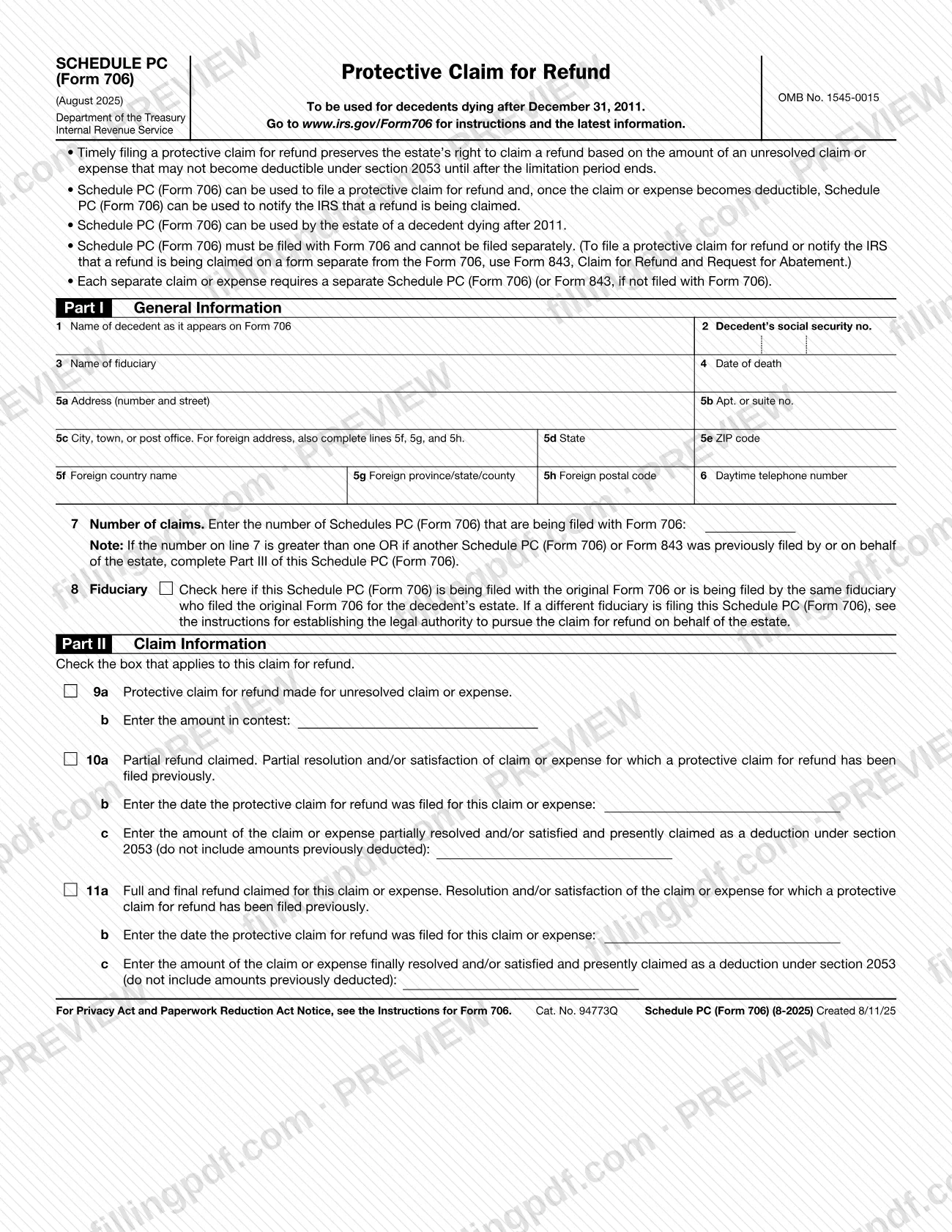
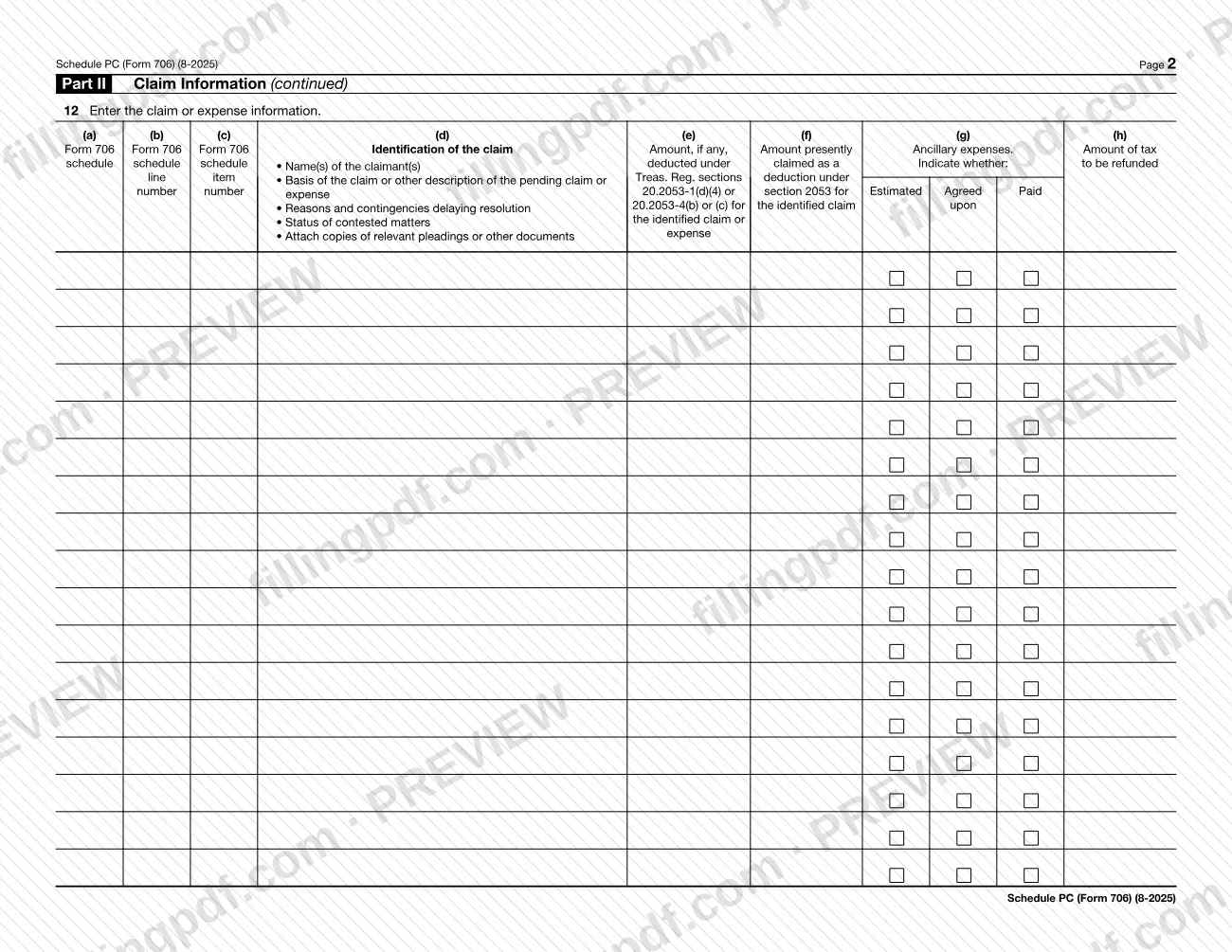
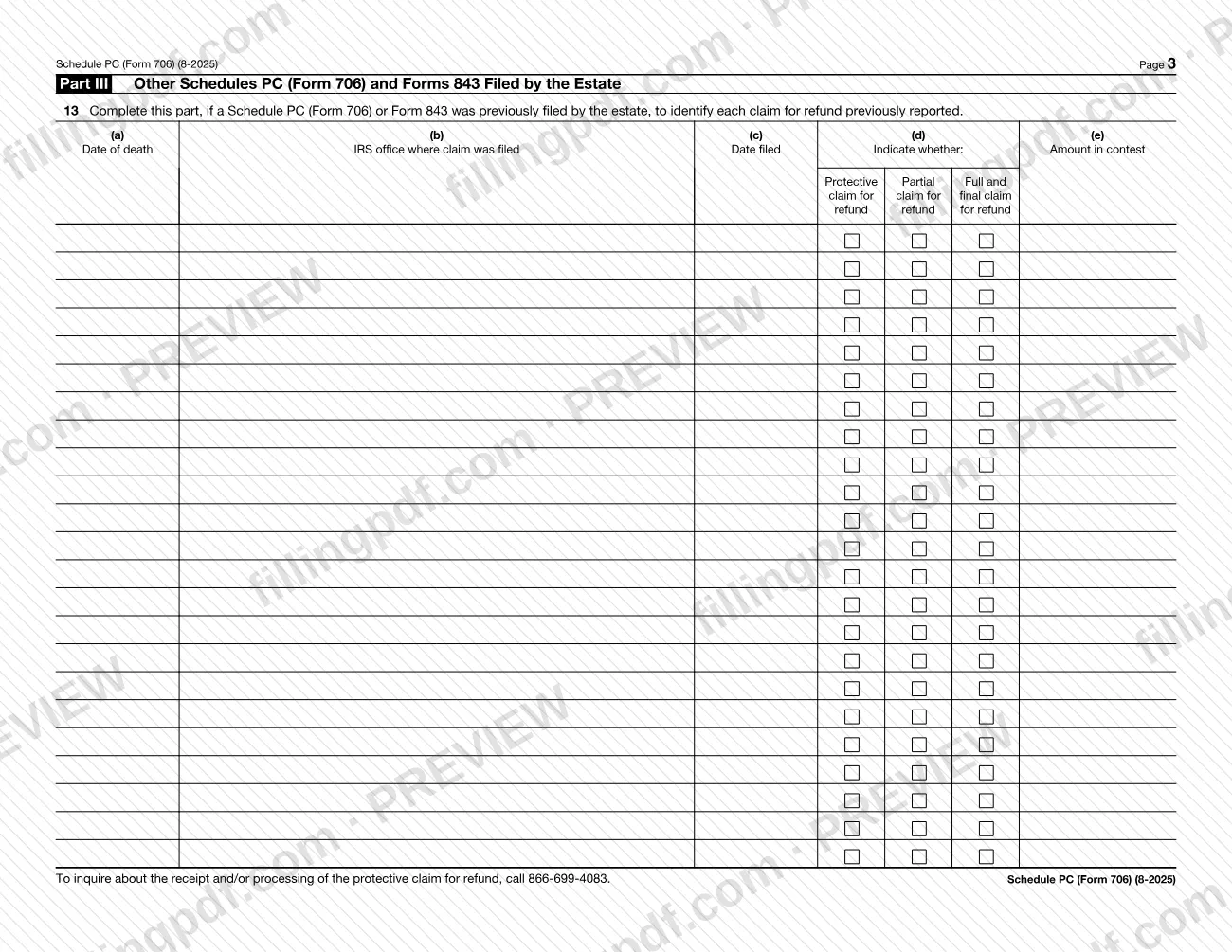
The form is built in three parts. Part I (lines 1 to 8) collects general information: the decedent, the fiduciary, the address, the number of claims and whether the fiduciary is the one who filed the original Form 706. Part II (lines 9 to 12) identifies the claim and says whether it is a protective claim, a partial refund claim or a full and final refund claim, then describes the claim or expense in a table. Part III (line 13) lists any other Schedule PC (Form 706) or Form 843 the estate has already filed.
Schedule PC (Form 706) is not a stand-alone claim form. It must be filed with Form 706 and cannot be filed separately. To file a protective claim for refund, or to notify the IRS that a refund is being claimed, on a form separate from Form 706, the schedule directs you to Form 843, Claim for Refund and Request for Abatement. The form carries OMB No. 1545-0015 and is marked August 2025.
Who needs to file Schedule PC (Form 706)?
The estate of a decedent dying after December 31, 2011 uses Schedule PC (Form 706), through its fiduciary, when it files Form 706 and has a claim or expense that may not become deductible under section 2053 until after the limitation period ends.
- One schedule per claim or expense. Each separate claim or expense needs a separate Schedule PC (Form 706), or a Form 843 if it is not filed with Form 706.
- The original fiduciary. Line 8 is checked when the schedule is filed with the original Form 706 or by the same fiduciary who filed it.
- A different fiduciary. If someone other than the original fiduciary files the schedule, the Instructions for Form 706 explain how to establish the legal authority to pursue the refund claim on behalf of the estate.
- Estates with earlier claims. If you file more than one schedule, or a Schedule PC (Form 706) or Form 843 was filed earlier by or for the estate, you also complete Part III.
Do not use Schedule PC (Form 706) if you are not filing Form 706 with it. A protective claim or a notice of refund made on a separate form uses Form 843, Claim for Refund and Request for Abatement.
When to file Schedule PC (Form 706)
File Schedule PC (Form 706) at the same time as Form 706, because it cannot be filed separately. The schedule says that timely filing a protective claim for refund preserves the estate's right to claim a refund for a claim or expense that may not become deductible under section 2053 until after the limitation period ends.
Once the claim or expense becomes deductible, the schedule can be used again to tell the IRS that a refund is being claimed. Check line 10a for a partial refund, where the claim or expense is partly resolved or satisfied, or line 11a for a full and final refund, where it is fully resolved or satisfied. If that notice is not filed with a Form 706, use Form 843 instead. The schedule prints no other deadline, so check the Instructions for Form 706 at www.irs.gov/Form706 for the limitation period that applies to your estate.
Documents you need
- Form 706, filed together with the schedule: Schedule PC (Form 706) must be filed with Form 706 and cannot be filed separately.
- Copies of relevant pleadings or other documents about the claim or expense, attached for each claim or expense described in the line 12 table.
- Proof of legal authority to pursue the refund claim for the estate, only if a different fiduciary than the one who filed the original Form 706 files the schedule; the Instructions for Form 706 explain what establishes it.
How to fill out Schedule PC (Form 706)
Enter the decedent's information
On line 1, enter the name of the decedent as it appears on Form 706. Enter the decedent's social security number on line 2 and the date of death on line 4.
Enter the fiduciary name and phone
Line 3 is the name of the fiduciary. Line 6 is the daytime telephone number.
Complete the address lines
Enter the street address on line 5a, the apartment or suite on 5b, and city, state and ZIP code on 5c, 5d and 5e. For a foreign address, also complete lines 5f (country), 5g (province/state/county) and 5h (postal code).
State the number of claims
On line 7, enter the number of Schedules PC (Form 706) being filed with Form 706. If it is more than one, or an earlier Schedule PC or Form 843 exists, complete Part III too.
Mark the fiduciary box
On line 8, check the box if the schedule is filed with the original Form 706 or by the same fiduciary who filed it. If a different fiduciary files, see the instructions on legal authority.
Choose the type of claim
In Part II, check only the box that applies: line 9a for a protective claim for an unresolved claim or expense, line 10a for a partial refund, or line 11a for a full and final refund.
Enter the amount in contest
For a protective claim (line 9a), enter the amount in contest on line 9b.
Complete partial refund details
For a partial refund (line 10a), enter on line 10b the date the protective claim was filed, and on line 10c the amount partially resolved or satisfied and now claimed as a section 2053 deduction, excluding amounts previously deducted.
Complete full and final refund details
For a full and final refund (line 11a), enter the date of the earlier protective claim on line 11b. On line 11c enter the amount finally resolved or satisfied and now claimed as a section 2053 deduction, excluding amounts previously deducted.
Describe the claim or expense
On line 12, use columns (a) to (h) for the Form 706 schedule and line item numbers, the identification of the claim (claimants, basis, contingencies, status), amounts deducted or claimed, ancillary expenses (Estimated, Agreed or Paid) and the tax to be refunded. Attach copies of relevant pleadings or other documents.
List other claims in Part III
On line 13, if the estate previously filed a Schedule PC (Form 706) or Form 843, list each claim: date of death, IRS office, date filed, the type of claim and the amount in contest.
Review and download the PDF
Check every line against Form 706 and your claim records, then download or print the completed PDF from FillingPDF and attach it to Form 706 as described under How to submit.
How to submit Schedule PC (Form 706)
Schedule PC (Form 706) is submitted as part of Form 706, not on its own, so it travels through whichever channel you use for Form 706.
- With Form 706. Attach the completed schedule to Form 706 and send them together as the Instructions for Form 706 direct. The schedule itself prints no mailing address, portal or appointment rule; find the current filing details at www.irs.gov/Form706.
- Multiple claims. Enter on line 7 the number of Schedules PC being filed with Form 706, and attach one schedule for each separate claim or expense.
- Separate filing. If the protective claim or the notice that a refund is being claimed is filed apart from Form 706, use Form 843, Claim for Refund and Request for Abatement, instead of this schedule.
- Questions about receipt or processing. The schedule gives 866-699-4083 for inquiries about the receipt or processing of the protective claim for refund.
No fee is mentioned on the form. FillingPDF lets you fill out and download the PDF; submission follows the channels above.
Common mistakes to avoid
- Filing Schedule PC (Form 706) on its own; the form says it must be filed with Form 706 and cannot be filed separately. Use Form 843 for a separate filing.
- Reporting several claims or expenses on one schedule when each separate claim or expense requires its own Schedule PC (Form 706).
- Skipping Part III when line 7 is greater than one or when another Schedule PC (Form 706) or Form 843 was already filed by or for the estate.
- Including amounts already deducted on line 10c or 11c; the form says not to include amounts previously deducted.
- Leaving out copies of relevant pleadings or other documents that line 12 says to attach for the claim or expense.
- Using the schedule for a decedent who died on or before December 31, 2011; it is to be used for decedents dying after that date.
- Filing as a different fiduciary without checking the Instructions for Form 706 on establishing legal authority to pursue the refund claim for the estate.
- Entering a foreign address without completing lines 5f, 5g and 5h in addition to line 5c.
Frequently asked questions
What is Schedule PC (Form 706)?
Schedule PC (Form 706) is the IRS Protective Claim for Refund. An estate files it with Form 706 to preserve its right to a refund based on a claim or expense that may not become deductible under section 2053 until after the limitation period ends.
Can I file Schedule PC (Form 706) by itself?
No. The schedule must be filed with Form 706 and cannot be filed separately. To file a protective claim for refund, or notify the IRS that a refund is being claimed, on a form separate from Form 706, use Form 843, Claim for Refund and Request for Abatement.
Do I need a separate Schedule PC for each claim or expense?
Yes. Each separate claim or expense requires its own Schedule PC (Form 706), or a Form 843 if it is not filed with Form 706. Enter the total number of schedules filed with Form 706 on line 7.
Which decedents can Schedule PC (Form 706) be used for?
It is for the estate of a decedent dying after December 31, 2011. The form says it is to be used for decedents dying after that date, and the estate's fiduciary completes it.
What is the difference between lines 9a, 10a and 11a?
Line 9a is a protective claim for an unresolved claim or expense, with the amount in contest on 9b. Line 10a is a partial refund after partial resolution of a claim already protected. Line 11a is the full and final refund once the claim or expense is resolved.
When do I have to complete Part III of Schedule PC?
Complete Part III if the number on line 7 is greater than one, or if another Schedule PC (Form 706) or Form 843 was previously filed by or for the estate. Line 13 lists each earlier claim with its date, IRS office, type and amount in contest.
What phone number do I call about a protective claim for refund?
The form lists 866-699-4083 for inquiries about the receipt or processing of the protective claim for refund.
Can I fill out Schedule PC (Form 706) online?
Yes. You can fill out the PDF online on FillingPDF and download or print it. FillingPDF is an independent service and does not file the schedule with the IRS; it is submitted with Form 706 through the IRS channels.
Ready to fill out Schedule PC (Form 706)?
Fill out Schedule PC (Form 706) now