
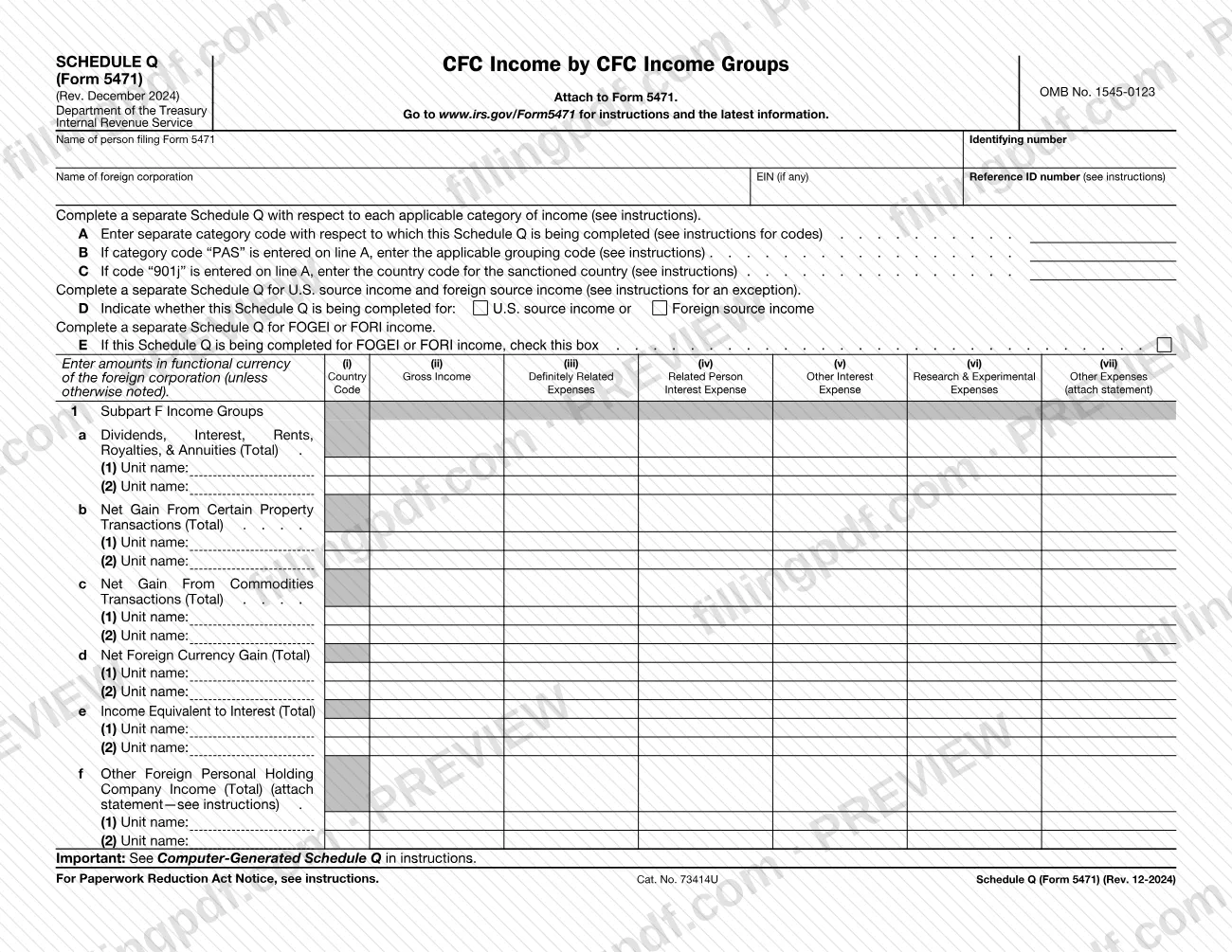
Schedule Q (Form 5471), CFC Income by CFC Income Groups, is the Internal Revenue Service (IRS) schedule that you attach to Form 5471 to report a foreign corporation's income by income group, with the expenses, taxes and net income for each group. The form says to complete a separate Schedule Q for each applicable category of income, so one Form 5471 can carry several copies. On this page you can fill out the schedule online on FillingPDF and download or print the completed PDF; the form and its instructions are published by the IRS at www.irs.gov/Form5471.
Last updated
What is Schedule Q (Form 5471)?
Schedule Q (Form 5471), CFC Income by CFC Income Groups, is the IRS schedule attached to Form 5471 on which the person filing reports a foreign corporation's income by CFC income group, together with related expenses, taxes, net income and loss allocation.
The schedule is not filed on its own: it is marked "Attach to Form 5471." It carries OMB No. 1545-0123 and Cat. No. 73414U, and the revision printed on it is Rev. December 2024. The header asks for the name of the person filing Form 5471, an identifying number, the name of the foreign corporation, its EIN (if any) and a Reference ID number.
Lines A through E at the top set up each copy: the category code (line A), the grouping code when the category is "PAS" (line B), the country code of the sanctioned country when the code is "901j" (line C), whether the copy covers U.S. source or foreign source income (line D) and a box for FOGEI or FORI income (line E).
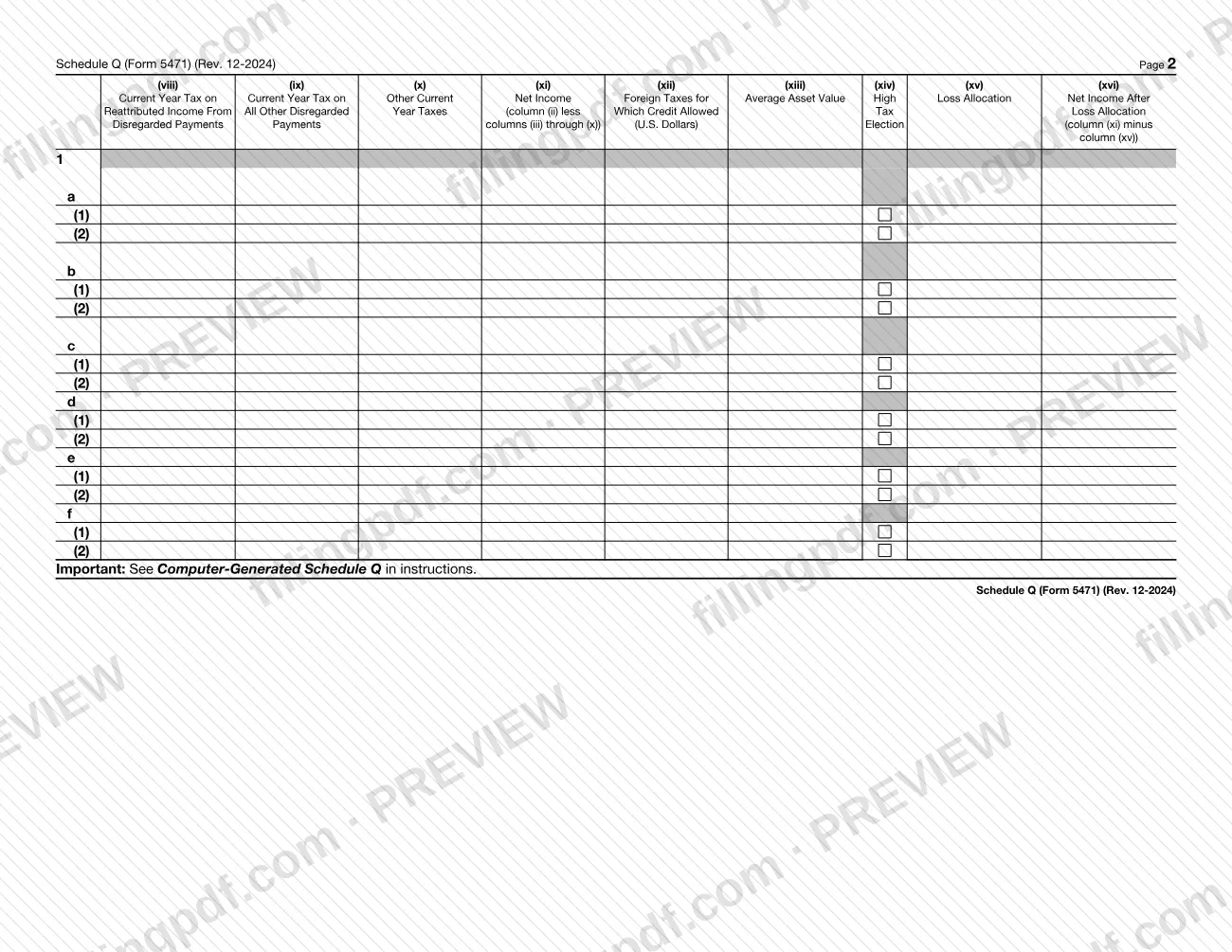
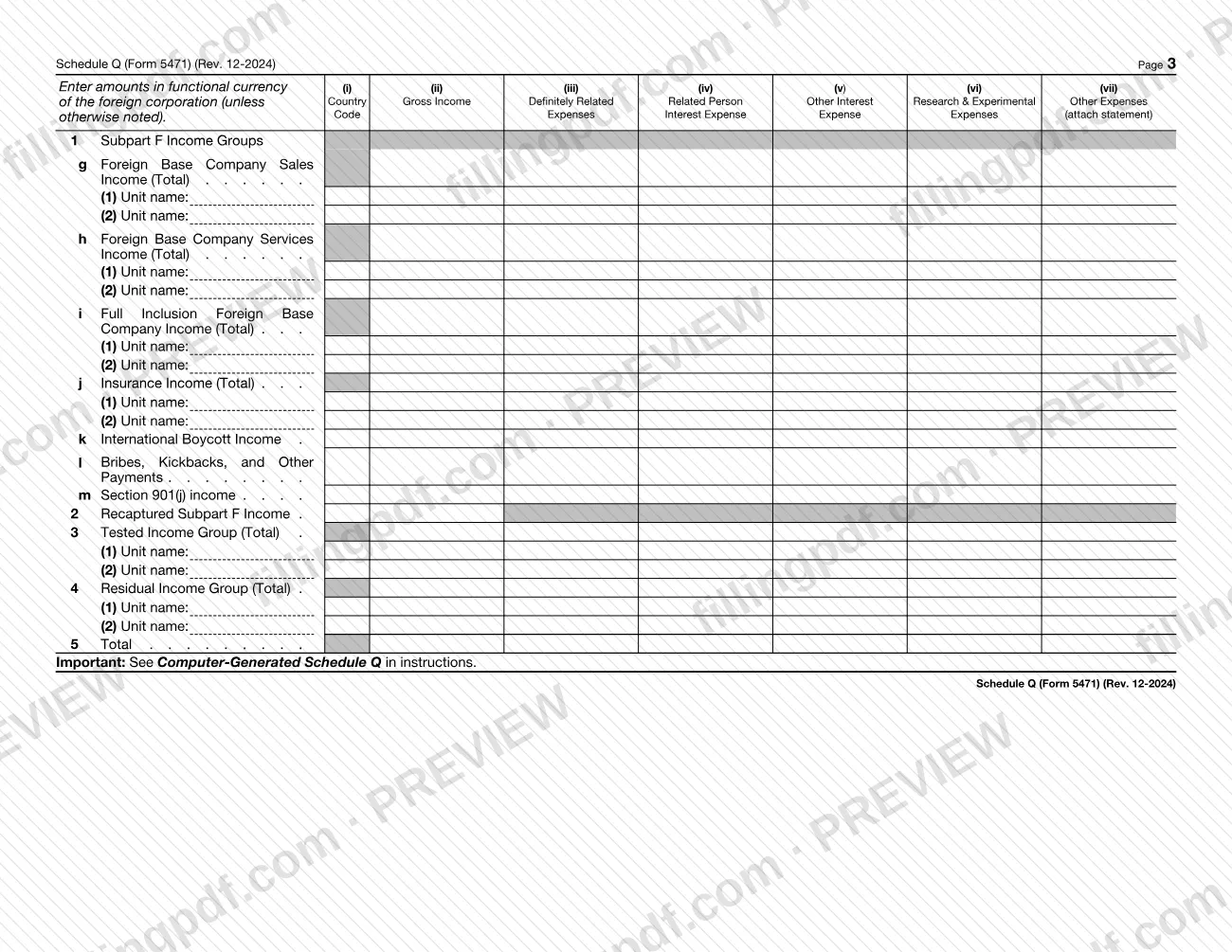
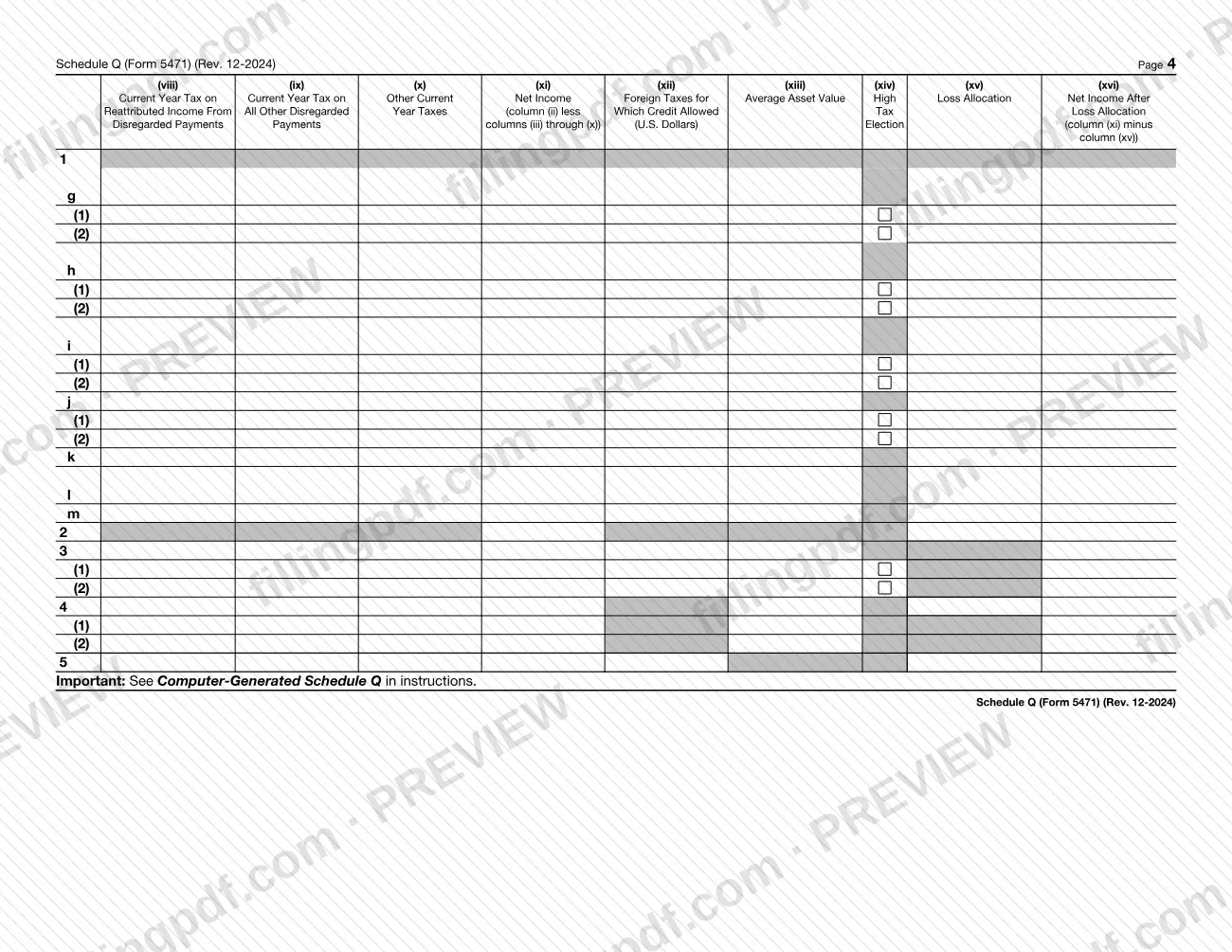
The body is a grid. Line 1 lists the Subpart F Income Groups, lines 1a through 1m, from dividends, interest, rents, royalties and annuities to Section 901(j) income. Line 2 is Recaptured Subpart F Income, line 3 the Tested Income Group, line 4 the Residual Income Group and line 5 the Total. Columns (i) through (xvi) run from country code and gross income through expenses and taxes to net income, foreign taxes for which credit is allowed, average asset value, high tax election, loss allocation and net income after loss allocation. Each page refers to the Computer-Generated Schedule Q section of the instructions.
Who needs to file Schedule Q (Form 5471)?
Schedule Q (Form 5471) is completed by the person filing Form 5471, whose name goes in the first line of the header, for the foreign corporation named on the second line. It is attached to that form and does not stand alone.
The schedule is built around separate copies. The form says to complete a separate Schedule Q:
- for each applicable category of income, identified by the category code on line A;
- for U.S. source income and for foreign source income, with an exception described in the instructions;
- for FOGEI or FORI income, marked in the box on line E.
Whether a given category or group applies to your Form 5471 is decided by the IRS instructions at www.irs.gov/Form5471, which the schedule points to for the category codes, the grouping code, the country code and the exception. The form does not say who may sign or file for someone else.
When to file Schedule Q (Form 5471)
Schedule Q (Form 5471) is completed whenever you complete Form 5471, because the form says to attach it to Form 5471. No separate due date is printed on it, so it travels with Form 5471 and follows the timing that applies to that form; the IRS instructions at www.irs.gov/Form5471 cover those dates.
If you need more than one Schedule Q, prepare every copy at the same time and attach them all. The form calls for a separate copy for each applicable category of income, for U.S. source and foreign source income, and for FOGEI or FORI income.
Documents you need
- A statement for column (vii), Other Expenses, attached to the schedule; the column heading says "attach statement."
- A statement for line 1f, Other Foreign Personal Holding Company Income (Total); the line says to attach a statement and to see the instructions.
How to fill out Schedule Q (Form 5471)
Enter the filer and corporation details
At the top, enter the name of the person filing Form 5471 and the identifying number. Then enter the name of the foreign corporation, its EIN (if any) and the Reference ID number described in the instructions.
Enter the category code on line A
Line A: enter the separate category code for which this Schedule Q is completed, using the codes in the instructions. If you enter "PAS," give the grouping code on line B; if you enter "901j," give the sanctioned country's code on line C.
Indicate the source of income
Line D: indicate whether this copy is for U.S. source income or foreign source income. Use a separate Schedule Q for each, unless the instructions' exception applies.
Check the FOGEI or FORI box
Line E: check the box if this Schedule Q is completed for FOGEI or FORI income. Use a separate copy for that income.
Enter income and expenses by group
For each group on line 1 (lines 1a through 1m), line 3 and line 4, enter the country code in column (i) and gross income in column (ii). Enter expenses in columns (iii) through (vii), using functional currency, and list each unit name where lines (1) and (2) are printed.
Enter the current year taxes
Columns (viii), (ix) and (x) take the current year tax on reattributed disregarded income, the current year tax on income from disregarded payments, and all other current year taxes.
Figure net income in column (xi)
Column (xi): enter column (ii) less columns (iii) through (x) for each line.
Complete columns (xii) through (xvi)
Enter foreign taxes for which credit is allowed in U.S. dollars in column (xii), then average asset value, high tax election and loss allocation in columns (xiii) to (xv). Column (xvi) is column (xi) minus column (xv).
Complete lines 2 through 5
Enter Recaptured Subpart F Income on line 2, the Tested Income Group on line 3 and the Residual Income Group on line 4, with unit names where shown. Line 5 is the Total.
Review, download and attach
Check each line and every column, and add the required statements for column (vii) and line 1f. Download or print the completed PDF from FillingPDF and attach it to Form 5471.
How to submit Schedule Q (Form 5471)
Schedule Q (Form 5471) is submitted as an attachment to Form 5471. It prints no mailing address, portal or appointment rule of its own.
- With Form 5471: attach every completed copy of the schedule to Form 5471 and send the package through the channel that applies to Form 5471.
- IRS instructions: the form directs you to www.irs.gov/Form5471 for instructions and the latest information, including the category codes and the Computer-Generated Schedule Q section.
- Statements: if you use column (vii), Other Expenses, or line 1f, Other Foreign Personal Holding Company Income, the form says to attach a statement; include it in the same package.
FillingPDF lets you fill out and download the PDF; submission follows the IRS channels that apply to Form 5471.
Common mistakes to avoid
- Filing Schedule Q (Form 5471) without attaching it to Form 5471; the form is marked "Attach to Form 5471."
- Combining several categories of income on one copy; the form says to complete a separate Schedule Q for each applicable category of income.
- Mixing U.S. source and foreign source income on one copy; line D asks which one the copy covers, and the instructions describe the only exception.
- Putting FOGEI or FORI income on a copy without checking the box on line E, or mixing it with other income on the same copy.
- Leaving line B blank when line A is "PAS," or line C blank when line A is "901j."
- Entering amounts in U.S. dollars in columns that call for the foreign corporation's functional currency; only columns marked U.S. Dollars, such as (xii), are in dollars.
- Figuring column (xi) incorrectly; it is column (ii) less columns (iii) through (x), and column (xvi) is column (xi) minus column (xv).
- Using column (vii) or line 1f without attaching the required statement.
Frequently asked questions
What is Schedule Q (Form 5471)?
Schedule Q (Form 5471), CFC Income by CFC Income Groups, is an IRS schedule attached to Form 5471. It reports a foreign corporation's income by income group, with expenses, taxes, net income and loss allocation in columns (i) through (xvi).
Is Schedule Q filed on its own?
No. The schedule is marked "Attach to Form 5471," so it is submitted with that form. It prints no separate mailing address or due date; the IRS instructions at www.irs.gov/Form5471 cover the filing rules for Form 5471.
How many copies of Schedule Q do I complete?
One copy for each applicable category of income. The form also calls for separate copies for U.S. source and foreign source income (the instructions describe an exception) and for FOGEI or FORI income, which you mark in the box on line E.
What do I enter on line A of Schedule Q?
Line A takes the separate category code for which that copy is completed; the instructions list the codes. If the code is "PAS," line B asks for the grouping code, and if it is "901j," line C asks for the sanctioned country's code.
How is column (xi) Net Income calculated?
Column (xi) is column (ii), gross income, less columns (iii) through (x), which are expenses and taxes. Column (xvi), Net Income After Loss Allocation, is then column (xi) minus column (xv), Loss Allocation.
Which currency do I use on Schedule Q?
Use the functional currency of the foreign corporation unless the form says otherwise. Column (xii), Foreign Taxes for Which Credit Allowed, is the column the form labels as U.S. Dollars.
Can I use a computer-generated Schedule Q?
Each page of the form says "See Computer-Generated Schedule Q in instructions." Read that section of the instructions at www.irs.gov/Form5471 before substituting a computer-generated version for the printed form.
Can I fill out Schedule Q (Form 5471) online?
Yes. You can fill out the PDF online on FillingPDF and download or print it. FillingPDF is an independent service and does not file the schedule with the IRS; you submit it with Form 5471 through the IRS channels.
Ready to fill out Schedule Q (Form 5471)?
Fill out Schedule Q (Form 5471) now