
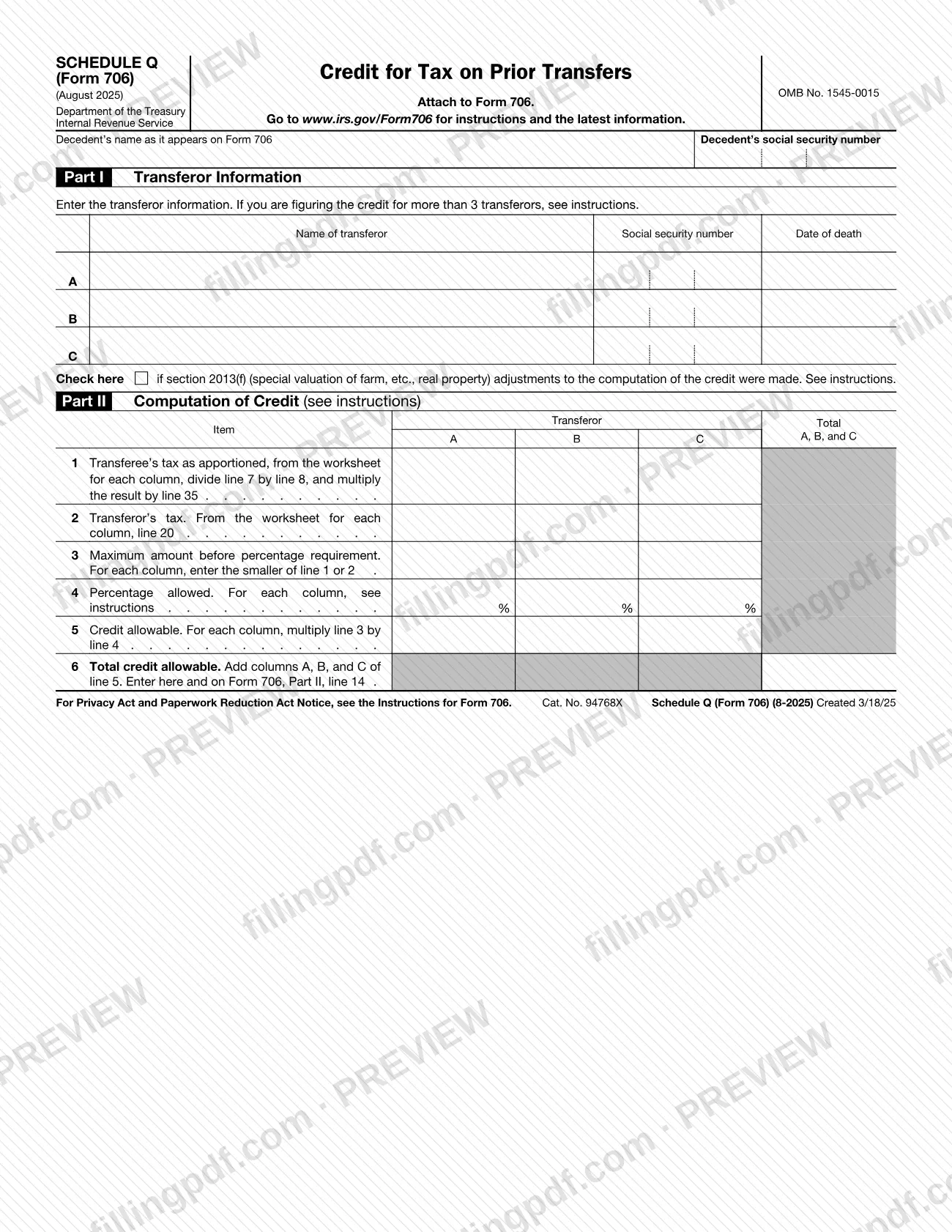
Schedule Q (Form 706), Credit for Tax on Prior Transfers, is an Internal Revenue Service (IRS) schedule that you attach to Form 706. It lists up to three transferors in Part I and, in Part II, works out the credit allowable for each one and in total. On this page you can fill out the form online on FillingPDF and download or print the completed PDF; the form and its instructions are published by the IRS at www.irs.gov/Form706.
Last updated
What is Schedule Q (Form 706)?
Schedule Q (Form 706), Credit for Tax on Prior Transfers, is the IRS schedule attached to Form 706 on which the credit is computed for up to three transferors, with the total carried to Form 706, Part II, line 14.
The schedule has two parts. Part I, Transferor Information, records the name, social security number and date of death of each transferor in rows A, B and C, under the decedent's name and social security number as they appear on Form 706. A box in Part I is checked if section 2013(f) adjustments (special valuation of farm, etc., real property) were made to the computation of the credit.
Part II, Computation of Credit, has one column for each transferor and a Total column. Line 1 is the transferee's tax as apportioned, taken from the worksheet: for each column you divide line 7 by line 8 and multiply the result by line 35. Line 2 is the transferor's tax, from line 20 of the worksheet. Line 3 is the smaller of lines 1 and 2. Line 4 is the percentage allowed, which the form refers to the instructions. Line 5 multiplies line 3 by line 4, and line 6 adds the three columns of line 5 into the total credit allowable.
The form carries OMB No. 1545-0015 and the revision date August 2025. It is not filed on its own: it says to attach it to Form 706. For more than three transferors, the form directs you to the instructions.
Who needs to file Schedule Q (Form 706)?
The schedule is used by whoever prepares Form 706 for a decedent and has a credit for tax on prior transfers to compute. The form asks for the decedent's name as it appears on Form 706 and the decedent's social security number, then for the name, social security number and date of death of each transferor.
- Up to three transferors fit on one schedule, in columns A, B and C.
- If you are figuring the credit for more than three transferors, the form tells you to see the instructions.
- If section 2013(f) adjustments (special valuation of farm, etc., real property) were made to the computation, you also check the box in Part I and follow the instructions.
The form itself does not say who is eligible for the credit or who may sign for the estate; those questions are answered in the instructions for Form 706 at www.irs.gov/Form706. Because the schedule is attached to Form 706 and its result is entered on Form 706, Part II, line 14, it is relevant only to a return that claims this credit.
When to file Schedule Q (Form 706)
Complete Schedule Q (Form 706) when you prepare Form 706, because the form says to attach it to Form 706. It has no separate due date printed on it, so it travels with Form 706 whenever that form is submitted. For any deadline that applies to Form 706, check the IRS instructions at www.irs.gov/Form706.
Gather the information the worksheet needs before you start: line 1 draws on lines 7, 8 and 35 of the worksheet, and line 2 on line 20. If you have more than three transferors, plan for the additional computation the instructions describe.
How to fill out Schedule Q (Form 706)
Enter the decedent's details
At the top, enter the decedent's name exactly as it appears on Form 706 and the decedent's social security number.
List each transferor in Part I
In rows A, B and C, enter each transferor's name, social security number and date of death. If you are figuring the credit for more than three transferors, see the instructions.
Check the section 2013(f) box if needed
Check the box in Part I only if section 2013(f) adjustments (special valuation of farm, etc., real property) were made to the computation of the credit; see the instructions.
Enter the transferee's tax on line 1
For each column, take the worksheet, divide line 7 by line 8 and multiply the result by line 35. Enter the transferee's tax as apportioned in the matching column A, B or C.
Enter the transferor's tax on line 2
For each column, copy line 20 of the worksheet to line 2.
Find the maximum amount on line 3
For each column, enter the smaller of line 1 or line 2.
Enter the percentage allowed on line 4
For each column, enter the percentage allowed as the instructions direct.
Figure the credit allowable on line 5
For each column, multiply line 3 by line 4.
Total the credit on line 6
Add columns A, B and C of line 5 and enter the total on line 6, then on Form 706, Part II, line 14.
Review and download the completed PDF
Check the names, social security numbers and each column's arithmetic, then download or print the completed PDF from FillingPDF and attach it to Form 706.
How to submit Schedule Q (Form 706)
Schedule Q (Form 706) is submitted as an attachment to Form 706; the schedule itself prints no mailing address, portal or appointment rule.
- With Form 706: attach the completed schedule to Form 706 and send the package by the method that applies to Form 706.
- Link to the return: enter the total from line 6 on Form 706, Part II, line 14.
- Instructions and updates: the form directs you to www.irs.gov/Form706 for instructions and the latest information.
FillingPDF lets you fill out and download the PDF; submission follows the IRS channels that apply to Form 706.
Common mistakes to avoid
- Filing the schedule on its own; the form says to attach it to Form 706.
- Entering a decedent's name that differs from the name as it appears on Form 706.
- Using the schedule for more than three transferors without following the instructions the form refers to.
- Skipping the Part I box when section 2013(f) (special valuation of farm, etc., real property) adjustments were made to the credit computation.
- Entering the larger of line 1 or line 2 on line 3; the form calls for the smaller of the two.
- Leaving line 4 without checking the instructions for the percentage allowed in each column.
- Computing line 1 without dividing line 7 by line 8 and multiplying the result by line 35 for each column.
- Not carrying the line 6 total to Form 706, Part II, line 14.
Frequently asked questions
What is Schedule Q (Form 706)?
Schedule Q (Form 706), Credit for Tax on Prior Transfers, is an IRS schedule attached to Form 706. It lists up to three transferors and computes the credit allowable for each, with the total entered on Form 706, Part II, line 14.
Is Schedule Q (Form 706) filed on its own?
No. The schedule says to attach it to Form 706, so it is submitted with that form. It prints no separate address, portal or due date of its own.
Where does the line 6 total go?
Line 6 is the total credit allowable, the sum of columns A, B and C of line 5. The form tells you to enter it here and on Form 706, Part II, line 14.
What if there are more than three transferors?
The form has room for three transferors, A, B and C. If you are figuring the credit for more than three, it directs you to the instructions at www.irs.gov/Form706 for how to proceed.
What goes on line 3 of the schedule?
Line 3 is the maximum amount before the percentage requirement. For each column, enter the smaller of line 1 (the transferee's tax as apportioned) or line 2 (the transferor's tax).
When do I check the section 2013(f) box?
Check the box in Part I if section 2013(f) adjustments (special valuation of farm, etc., real property) were made to the computation of the credit. The form refers you to the instructions for those adjustments.
Can I fill out Schedule Q (Form 706) online?
Yes. You can fill out the PDF online on FillingPDF and download or print it. FillingPDF is an independent service and does not file the schedule; you submit it with Form 706 through the IRS channels.
Ready to fill out Schedule Q (Form 706)?
Fill out Schedule Q (Form 706) now